
Mining Limits
No reviews yet
Adds features related to mining and ways to control it in a better way.
Fabric is a mod loader for versions 1.14+ of Minecraft, particularly popular for client side and optimization mods.
Community voices
Reviews
Click once to include, again to exclude, again to clear
No reviews yet. Be the first to review this project!
Get it on
Available Platforms
 Modrinth
Compatibility
Supported Environments
About
Project Details
For authors
Embed Badge
If you're the author of this project, you can embed a live badge anywhere that supports HTML or Markdown. It updates automatically whenever ratings change.
Use HTML for any page that supports it, or Markdown for README files and Markdown-based descriptions.
Identifiers
Platform IDs
About
Description
Overview
Mining Limits lets you have more control over the stuff you are mining, it allows you to do things like limiting your mining space to a single chunk and controlling how much time it takes for you to break blocks.
Features
-
Adds a configurable border for the highest height the player can mine
- Lets you mine only up to a certain height (ex: allows you to only mine up to layer 70, any layer higher than 70 would not be minable)
- This can be turned off in settings
-
Adds a configurable border for the lowest height the player can mine
- Lets you mine only down to a certain height (ex: allows you to only mine down to layer -10, any layer lower than -10 would not be minable)
- This can be turned off in settings
-
Adds an option to only be able to mine in one chunk
- Allows you to give only the position of a block that is inside of that chunk, so you won't need to calculate what is that chunk position in the world
- The other borders would still work, so you can limit mining to a chunk and only mine down to a certain height
-
Allows you to have a different outline color for blocks outside of limits
- You can choose any color you'd want for the outline, the color and opacity are completely customizable
- Note: This may interfere with mods that change the block's outline, so it also has an option to turn this off
-
Adds an option to turn off Instant Mining and lets you control how long it takes to break a block while you are sneaking
- Note: Having a breaking speed higher than your normal one will just use your normal speed instead
-
Mod Menu configuration support
-
Brazilian Portuguese translations
FAQ
-
Can i use this on my modpack/server?
- As long as you don't claim it as your own, i don't see a problem in using it.
-
How do i select the chunk that i can mine? / How do i turn on/off this feature?
- There is two ways of doing it, you can either do it using Mod Menu or by going to .minecraft > config > mining-limits and changing the config.toml file.
-
Do i need to have this mod installed on the server?
- As far as i know, with the way that the mod handles the configs, the mod is required in both ends. I also plan on changing to another Config API and since the rely on getting anything from the server, it probably will be able to be a client-side mod.
-
My FPS is dropping every time that i look at a block, how can i fix it?
- This is probably being caused by the red outline around blocks, this can be turned off in the mod settings.
-
My game crashed after looking at a block
- There is probably a mod conflicting with the block outline rendering of the mod, try to look for an error in your game logs. If you are stuck with the game crashing every time you enter a world, you will have to manually turn the outline rendering off in the config.toml file. If you are still having problems with this, please open a issue here.
-
Will you port this mod to X version??
- Currently i only have plans to port it down to 1.20.1 (and possibly 1.19.2), but every version after 1.21 will probably be ported to.
-
Forge/Neoforge version?
- If someone wants to port it themself there will be, but there is no plans for it.
-
Does this work with Quilt?
- Possibly, it was not tested tho.
Source code can be found on GitHub
Screenshots
Gallery
-
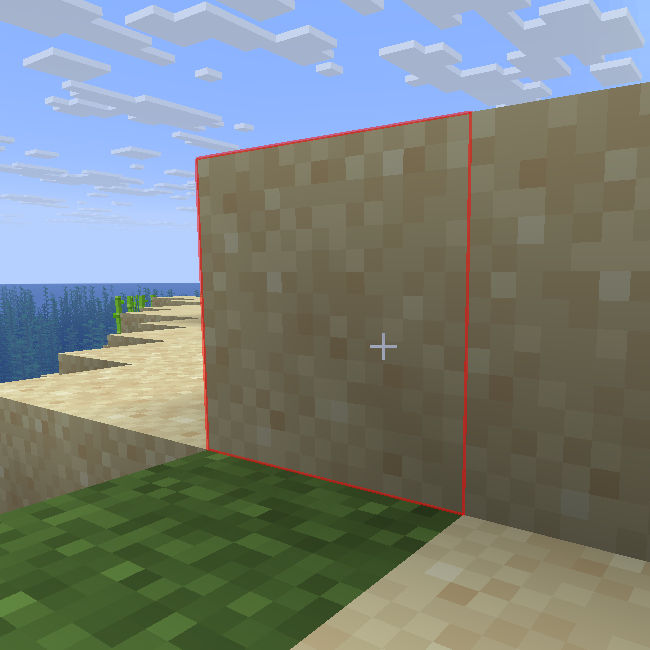 Outline of block's outside of mining limits Outline Alpha value set to 128 for better viewing (default value is 64). Taken on 1.21.10 using version 1.0.0
 -
 Under border message Message that appears when the player tries to mine under the mining border
 -
 Over border message Message that appears when the player tries to mine over the mining limits
 -
 Outside border message Message that appears when the player tries to mine outside of selected chunk limits
 -
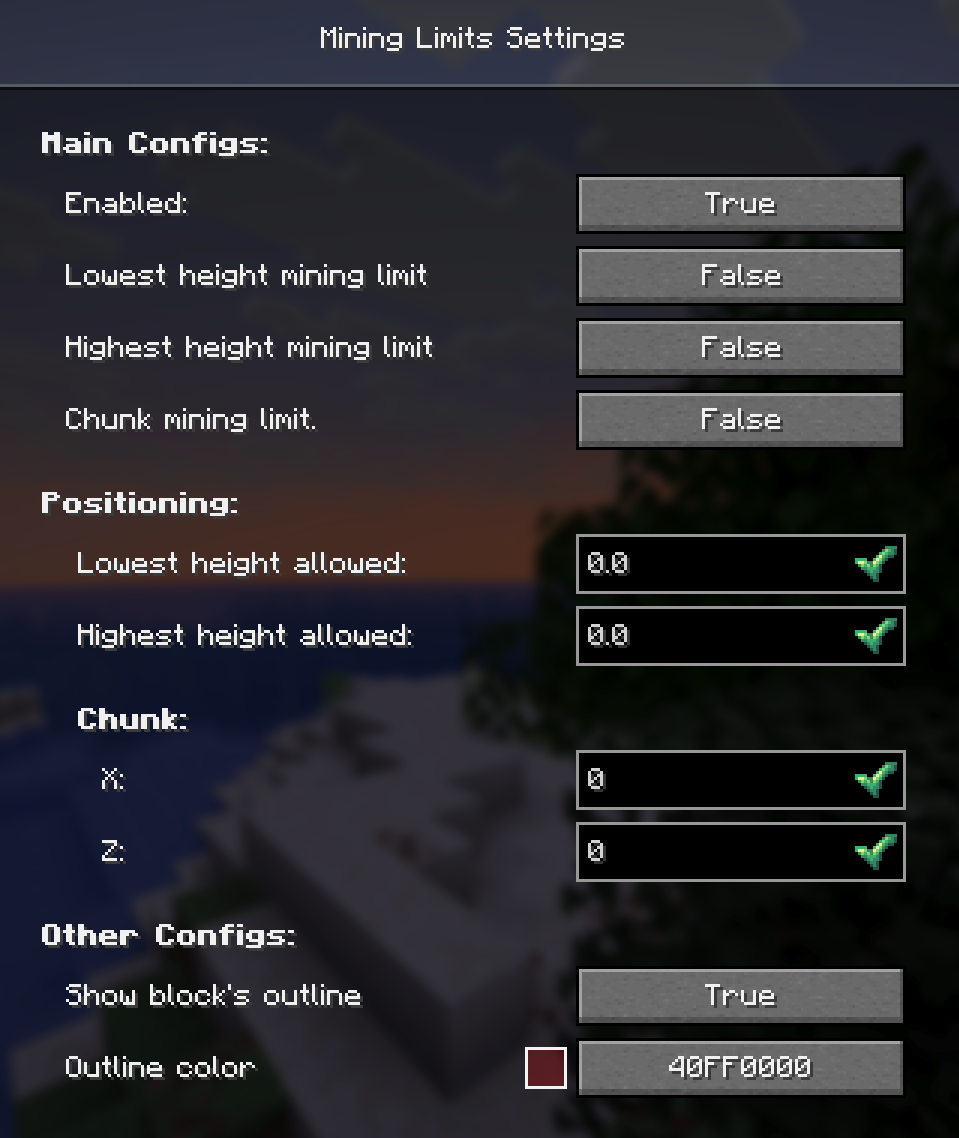 Mod's setting screen Taken on 1.21.10 using version 1.0.0
Versions
Files
Relations
Project Relations
More like this
Similar Mods
Suggestions use data such as tags, dependencies, dependents, descriptions, titles, and more to rank how much they overlap with this mod.
On ModDex
Community snapshot
By the numbers
Statistics

Want to reach Minecraft players?
We're looking for a server hosting partner to feature here and other parts of the site. Interested? Send us a message!
Get in touchGet it on
Available Platforms
On ModDex
Community snapshot
By the numbers