
Community listing page, reviews here may not be monitored by the author.
MINONWERE

No reviews yet
A powerful Fabric mod for Minecraft 1.21.11 that lets you clone, manage, and suspend child client processes directly from your main game menu or Pause screen (ESC).
Community voices
Reviews
No reviews yet. Be the first to review this project!
Get it on
Available Platforms
Compatibility
Supported Environments
Runs entirely on the client. Works on vanilla servers.
About
Project Details
For authors
Embed Badge
If you're the author of this project, you can embed a live badge anywhere that supports HTML or Markdown. It updates automatically whenever ratings change.
Use HTML for any page that supports it, or Markdown for README files and Markdown-based descriptions.
Identifiers
Platform IDs
Resources
External Links
About
Description
🚀 MINOWERE — Multi-Instance Parent-Child Manager
A powerful Fabric mod for Minecraft 1.21.11 that lets you clone, manage, and suspend child client processes directly from your main game menu or Pause screen (ESC).
[!NOTE]
Available in both English and Русский below.
🇬🇧 English Description
MINOWERE is a client-side utility mod designed for testers, developers, and multi-boxing enthusiasts. It allows your main (Parent) Minecraft client to launch independent, lightweight child clients with custom offline profiles under your control, and manage them dynamically without leaving the game.
🌟 Key Features
- Parent-Child Cloning: Launch secondary Minecraft instances with a single click from the main menu or Escape menu.
- Process Suspending (Freeze/Unfreeze): Freeze child client processes to free up 100% of their CPU usage while they are idle in the background, and instantly resume them when needed.
- Unified Control Bar: Easily add profiles, save configurations (
config/minowere.json), and launch clients from a polished, centered card UI. - Dynamic Status Indicators: Visually track instance states using native Minecraft items:
- 🟢 EMERALD — Running / Connected.
- ❄️ PACKED ICE — Process Frozen (0% CPU usage).
- ⏳ CLOCK — Launching / Connecting.
- 🛑 BARRIER — Stopped / Offline.
- Auto-Cleanup: If the parent client closes, all child processes terminate automatically to prevent memory leaks and orphan background processes.
- Window Suffix: Child windows are dynamically renamed to
Minecraft 1.21.11 - Child (<Username>)for easy window swapping.
🛠️ How it Works (Technical Details)
- Network Sync: The parent client starts a local loopback TCP server on a dynamic free port. Child clients connect to it using hidden JVM properties.
- Native Thread Suspension: Freezing uses Windows Native
NtSuspendProcessAPIs (via JNA) with a fail-safe fallback to PowerShell scripts. Threads are completely halted, dropping CPU usage to exactly 0%. - Optimized I/O: Stream pipes of child clients are redirected to the OS null discard stream to save JVM memory and context-switching overhead.
🚀 Quick Start
- Place
minowere-1.0-SNAPSHOT.jarin yourmodsfolder. - Launch Minecraft. On the Title screen or in-game Esc menu, click Minowere Manager.
- Type a username (e.g.
Helper1) in the text field at the top and click Add. - Click Launch on your new profile to spin up a child client.
- Click Freeze when you want to put them in the background, or Unfreeze to resume.
- Click Save Set to save this profile list for future launches.
🇷🇺 Описание на русском
MINOWERE — это клиентский мод-утилита для разработчиков, тестеров и любителей мультибоксинга (игры в несколько окон). Он позволяет основному (Родительскому) клиенту прямо из игры запускать дополнительные (Дочерние) клиенты с кастомными оффлайн-профилями и управлять их жизненным циклом "на лету".
🌟 Основные возможности
- Клонирование окон в клик: Создавайте дочерние окна игры одной кнопкой прямо из Главного меню или меню паузы (ESC).
- Заморозка процессов (Freeze/Unfreeze): Приостанавливайте потоки дочерних клиентов. Замороженное окно потребляет 0% процессора (CPU) в фоне. Размораживайте мгновенно одной кнопкой!
- Удобный карточный интерфейс: Добавляйте профили, сохраняйте наборы (
config/minowere.json) и управляйте клиентами в единой аккуратной таблице. - Наглядные индикаторы статуса:
- 🟢 ИЗУМРУД — Клиент работает и подключен.
- ❄️ ПЛОТНЫЙ ЛЕД — Процесс заморожен (0% CPU).
- ⏳ ЧАСЫ — Клиент запускается и подключается.
- 🛑 БАРЬЕР — Клиент остановлен.
- Умная очистка памяти: При закрытии основного (родительского) окна все дочерние клиенты закрываются автоматически, предотвращая накопление фонового мусора в системе.
- Кастомизация заголовков: Окна дочерних клиентов автоматически переименовываются в
Minecraft 1.21.11 - Child (<Имя>)для удобного переключения через Alt+Tab.
🛠️ Технические детали
- Локальная синхронизация: Родительский процесс открывает TCP-сервер на случайном свободном порту, к которому подключаются дочерние процессы.
- Нативная заморозка: Приостановка потоков происходит через системные вызовы Windows
NtSuspendProcess(с помощью JNA, входящей в состав игры) с отказоустойчивым дублированием через PowerShell скрипты. - Оптимизация ввода-вывода: Консольный вывод дочерних процессов сбрасывается напрямую в null-поток ОС, не нагружая процессор обработкой лишнего лога.
🚀 Быстрый запуск
- Поместите
minowere-1.0-SNAPSHOT.jarв папкуmods. - Запустите игру. В Главном меню или по нажатию на ESC в мире нажмите Minowere Manager.
- Введите оффлайн-никнейм в поле сверху и нажмите Add.
- Нажмите Launch на созданном профиле для запуска второго окна.
- Нажимайте Freeze для заморозки фонового окна и Unfreeze для возврата в игру.
- Нажмите Save Set, чтобы сохранить этот список игроков на будущее.
Screenshots
Gallery
-
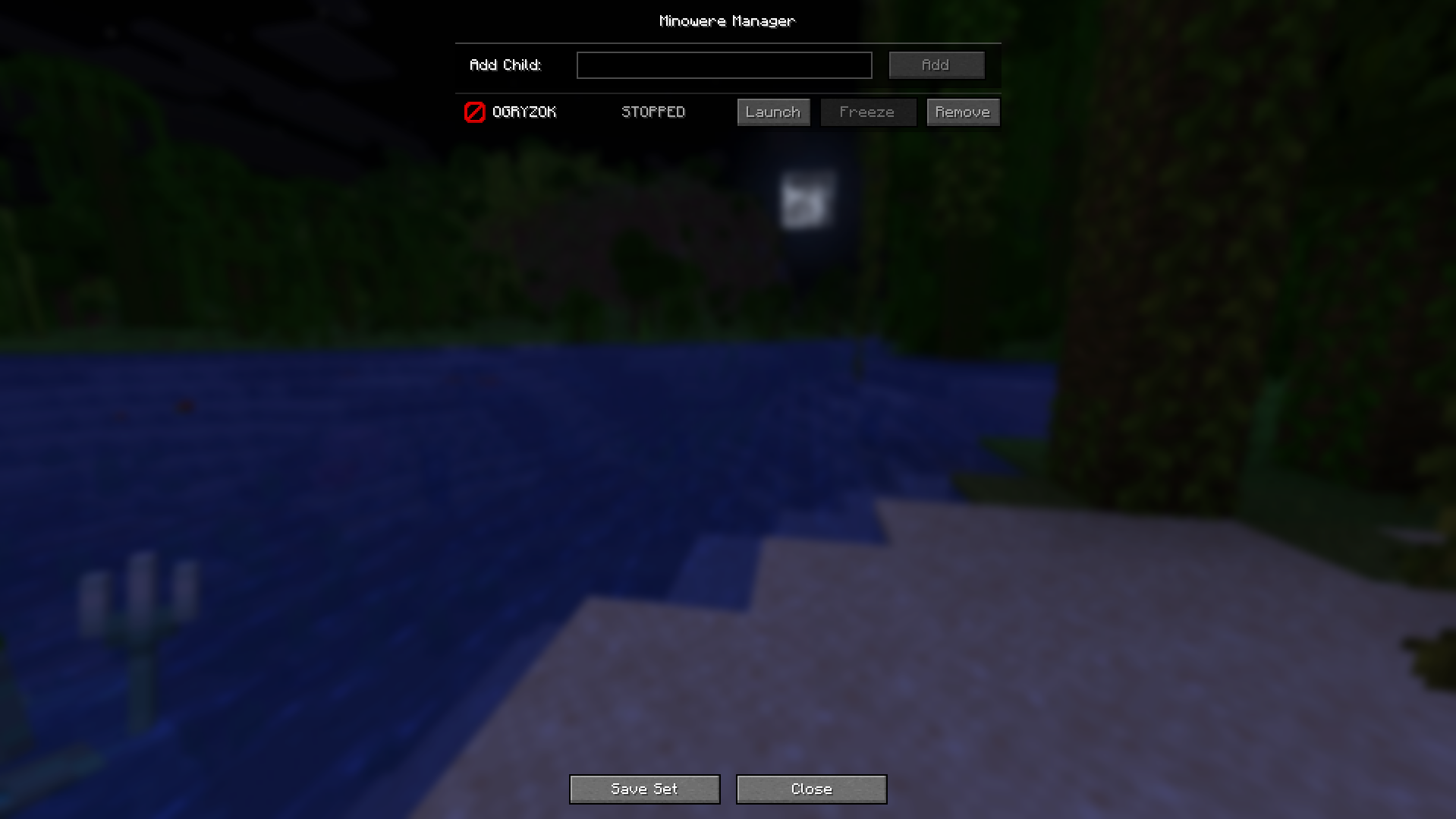 Main MENU Main menu preview
 -
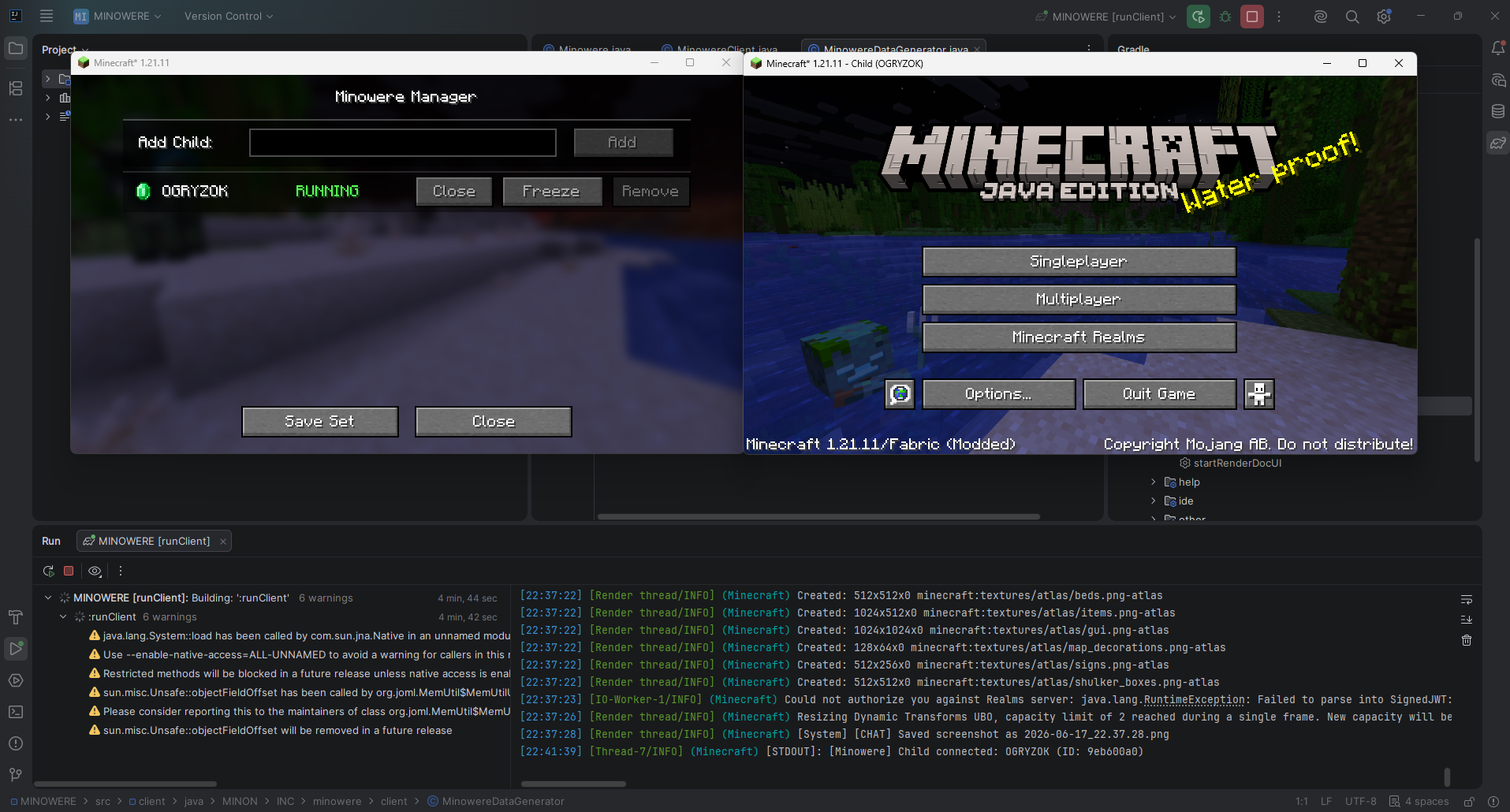 Multi Instances
Versions
Files
Relations
Project Relations
More like this
Similar Mods
Suggestions use data such as tags, dependencies, dependents, descriptions, titles, and more to rank how much they overlap with this mod.
On ModDex
Community snapshot
By the numbers
Statistics

Want to reach Minecraft players?
We're looking for a server hosting partner to feature here and other parts of the site. Interested? Send us a message!
Get in touchGet it on
Available Platforms
On ModDex
Community snapshot
By the numbers
Statistics
Resources