
Easymenu
No reviews yet
A lightweight GUI menu plugin for Paper and Spigot servers. Create menus easily with YAML configuration.
Paper is a fork of Spigot that adds its own plugin API on top of the Bukkit API. All Spigot plugins are compatible with paper, not all paper plugins are compatible with Spigot.
Spigot is a popular software for running dedicated servers that can load Plugins created with the Bukkit API.
Community voices
Reviews
Click once to include, again to exclude, again to clear
No reviews yet. Be the first to review this project!
Get it on
Available Platforms
 Modrinth
Compatibility
Supported Environments
About
Project Details
For authors
Embed Badge
If you're the author of this project, you can embed a live badge anywhere that supports HTML or Markdown. It updates automatically whenever ratings change.
Use HTML for any page that supports it, or Markdown for README files and Markdown-based descriptions.
Identifiers
Platform IDs
About
Description
EasyMenu
EasyMenu is a lightweight GUI menu plugin for Spigot and Paper servers.
Create clean, clickable Minecraft menus using simple YAML files. Build a main menu, add unlimited submenus, run commands from items, customize sounds and lore, and reload your menu setup without restarting the server.
日本語にも対応しています
Features
-
YAML-based menu creation
Create and edit menus with simple configuration files. -
Main menu and submenu support
Usemain.ymlfor the main menu and place submenu files inside thesub/folder. -
Unlimited nested menus
Open submenus from menu items and return to the main menu when needed. -
Command execution from menu items
Run player commands such as/spawn,/home,/warp, or any command provided by other plugins. -
Custom item display
Configure materials, names, lore, sounds, slot positions, and custom model data. -
Multi-language support
Built-in language files for English, Japanese, and Russian. -
Async loading and cache system
Menu loading and submenu access are optimized with asynchronous processing and configurable caching. -
No external dependencies
EasyMenu works without requiring Vault, PlaceholderAPI, or any other plugin.
Requirements
| Requirement | Version |
|---|---|
| Java | 17 or newer |
| Server software | Spigot / Paper / Purpur |
| Minecraft API version | 1.20+ |
| Verified Versions | 1.21.8 |
| Supported Versions (Not all versions have been individually tested) | 1.16.x~paper latest |
| Dependencies | None |
| Folia may load, but full compatibility is not guaranteed. |
Installation
- Download the latest EasyMenu
.jarfile. - Place it into your server's
pluginsfolder. - Restart the server.
- Edit the generated files in
plugins/EasyMenu/. - Run
/menuin-game to open the menu.
After the first startup, EasyMenu generates the following structure:
plugins/EasyMenu/
├── config.yml
├── main.yml
├── lang/
└── sub/
Basic Usage
Open the main menu
/menu
Reload the configuration
/menu reload
Open a submenu directly
/submenu <id>
Example:
/submenu shop
Permissions
| Permission | Description | Default |
|---|---|---|
easymenu.admin |
Allows reloading the EasyMenu configuration | OP |
menu.reload |
Legacy reload permission kept for compatibility | OP |
/menureload is still available for compatibility, but /menu reload is the recommended command.
Example Main Menu
Create or edit plugins/EasyMenu/main.yml.
menu-title: "&6&lEasyMenu"
menu-opensound: "ENTITY_EXPERIENCE_ORB_PICKUP"
menu-background-item: "GRAY_STAINED_GLASS_PANE"
menu-size: 54

menu-items:
  - location: "5,3"
    material: "DIAMOND"
    name: "&bTeleport Home"
    command: "/home"
    sound: "ENTITY_ENDERMAN_TELEPORT"
    close-menu: true
    lore:
      - "&7Click to teleport"
      - "&7to your home."

  - location: "5,4"
    material: "EMERALD"
    name: "&aShop"
    command: "sub_shop"
    sound: "BLOCK_NOTE_BLOCK_PLING"
    close-menu: true
    lore:
      - "&7Open the shop menu."
Example Submenu
Create plugins/EasyMenu/sub/shop.yml.
menu-title: "&a&lShop Menu"
menu-opensound: "BLOCK_CHEST_OPEN"
menu-background-item: "LIME_STAINED_GLASS_PANE"
menu-size: 27

menu-items:
  - location: "3,2"
    material: "DIAMOND"
    name: "&bBuy Diamonds"
    command: "/buy diamond 1"
    sound: "ENTITY_EXPERIENCE_ORB_PICKUP"
    close-menu: false
    lore:
      - "&7Price: $100"

  - location: "5,3"
    material: "BARRIER"
    name: "&cBack to Main Menu"
    command: "main_mainopen"
    sound: "UI_BUTTON_CLICK"
    close-menu: true
    lore:
      - "&7Return to the main menu."
To open this submenu from another menu item, use:
command: "sub_shop"
Supported Item Options
| Option | Description |
|---|---|
location |
Menu slot position in column,row format |
material |
Bukkit material name |
name |
Item display name with color codes |
command |
Command or EasyMenu special action |
sound |
Sound played when the item is clicked |
close-menu |
Whether the inventory closes after clicking |
lore |
Item lore lines |
custom-model-data |
Custom model data for resource packs |
Special Commands
| Format | Behavior |
|---|---|
/command |
Runs a command as the player |
sub_<name> |
Opens plugins/EasyMenu/sub/<name>.yml |
main_mainopen |
Returns to the main menu |
Configuration Overview
config.yml is used for plugin behavior and performance settings.
language: "en_us"
load-on-startup: true
precache-submenus: true

async:
  worker-threads: 2

cache:
  submenu-expiry-seconds: 300
  submenu-max-size: 100
  cleanup-interval-seconds: 60
  resolved-path-max-size: 200

submenu:
  search-depth: 3
  listener-failsafe-seconds: 30
main.yml is used only for the main menu layout.
This separation makes large menu setups easier to manage and reduces the risk of mixing plugin settings with menu definitions.
Language Files
EasyMenu includes language files for:
- English:
en_us.yml - Japanese:
ja_jp.yml - Russian:
ru_ru.yml
You can edit the generated language files in plugins/EasyMenu/lang/ and reload the plugin afterward.
Good For
EasyMenu is useful for:
- server navigation menus
- warp menus
- shop menus
- rule and help menus
- player utility menus
- server selector-style menus
- custom lobby menus
- resource-pack based custom GUI items
Notes for Updating from Older Versions
EasyMenu v5.0.0 uses a cleaner folder and configuration structure.
Older versions used:
plugins/EasyMenuPlugin/config.yml
Newer versions use:
plugins/EasyMenu/config.yml
plugins/EasyMenu/main.yml
Move your main menu definition into main.yml and keep plugin behavior settings in config.yml.
License
This plugin is free to use on Minecraft servers. Redistribution, resale, modified redistribution, or claiming this plugin as your own is not allowed without permission.
Screenshots
Gallery
-
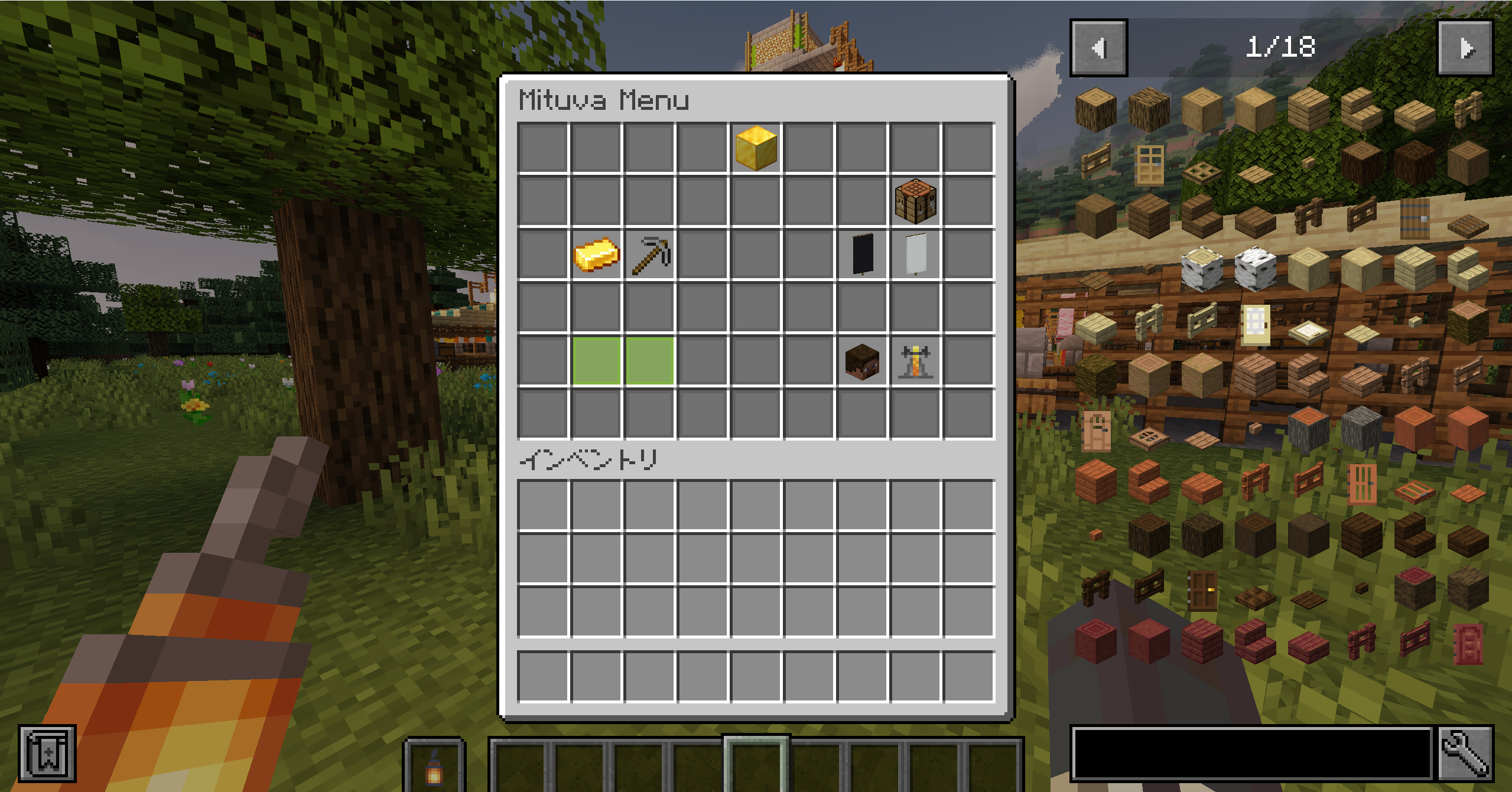 menu
menu
Versions
Files
Relations
Project Relations
More like this
Similar Mods
Suggestions use data such as tags, dependencies, dependents, descriptions, titles, and more to rank how much they overlap with this mod.
On ModDex
Community snapshot
By the numbers
Statistics

Want to reach Minecraft players?
We're looking for a server hosting partner to feature here and other parts of the site. Interested? Send us a message!
Get in touchGet it on
Available Platforms
On ModDex
Community snapshot
By the numbers