
Community listing page, reviews here may not be monitored by the author.
MmdSkin

No reviews yet
A mod that replaces Minecraft entity rendering with MMD models
Community voices
Reviews
No reviews yet. Be the first to review this project!
Get it on
Available Platforms
Compatibility
Supported Environments
Must be installed on both the client and the server.
About
Project Details
For authors
Embed Badge
If you're the author of this project, you can embed a live badge anywhere that supports HTML or Markdown. It updates automatically whenever ratings change.
Use HTML for any page that supports it, or Markdown for README files and Markdown-based descriptions.
Identifiers
Platform IDs
About
Description
MMD Skin - Bring MMD Models to Minecraft
MMD Skin is a Minecraft mod that allows you to replace the player skin with MMD (MikuMikuDance) models, complete with real-time physics simulation for hair, clothes, and accessories.
✨ Features
- PMX/PMD Model Support - Load and render MMD models in Minecraft
- VMD Animation Playback - Play skeletal and morph animations
- Real-time Physics - Hair, skirts, and accessories react naturally to movement
- GPU Skinning - High-performance vertex skinning via Compute Shader
- Toon Rendering - Cel-shading effects with customizable parameters
- Multi-layer Animation - Blend multiple animations simultaneously
- TouhouLittleMaid Integration - Apply MMD models to maids
📦 Installation
- Install Fabric Loader or Forge for Minecraft 1.20.1
- Download the mod
.jarfile and place it in.minecraft/mods/ - Launch the game - the mod will create the
3d-skinresource directory automatically - Add your own models and animations to the corresponding folders
📁 Directory Structure
The mod uses .minecraft/3d-skin/ as the resource root:
.minecraft/
└── 3d-skin/
    ├── EntityPlayer/      # Player models
    │   ├── ModelA/        # Each subfolder = one model
    │   │   ├── model.pmx  # Model file (.pmx/.pmd)
    │   │   ├── *.png      # Textures
    │   │   ├── dance.vmd  # Model-specific animation (optional)
    │   │   └── smile.vpd  # Model-specific morph (optional)
    │   └── ModelB/
    │       └── ...
    ├── DefaultAnim/       # System preset animations
    ├── CustomAnim/        # User custom animations
    ├── DefaultMorph/      # System preset morphs
    └── CustomMorph/       # User custom morphs
EntityPlayer/ - Player Models
Store your MMD models here. Each model must be in its own subfolder.
| File Type | Extension | Description |
|---|---|---|
| Model | .pmx / .pmd |
Required, PMX takes priority |
| Texture | .png / .jpg / .bmp / .tga |
Referenced by model |
| Animation | .vmd |
Optional, model-specific |
| Morph | .vpd |
Optional, model-specific |
Model Detection Rules:
- Scans each subfolder for
.pmxor.pmdfiles - If multiple model files exist,
model.pmxormodel.pmdis prioritized - Otherwise, the first file alphabetically is selected
DefaultAnim/ - System Preset Animations
Contains built-in animations that map to player states:
| Animation | Trigger |
|---|---|
idle.vmd |
Standing still |
walk.vmd |
Walking |
sprint.vmd |
Sprinting |
sneak.vmd |
Sneaking |
swim.vmd |
Swimming |
crawl.vmd |
Crawling |
sleep.vmd |
Sleeping |
die.vmd |
Death |
elytraFly.vmd |
Elytra flight |
onClimbable.vmd |
Climbing (idle) |
onClimbableUp.vmd |
Climbing up |
onClimbableDown.vmd |
Climbing down |
onHorse.vmd |
Riding |
swingLeft.vmd |
Left hand swing |
swingRight.vmd |
Right hand swing |
You can replace these files to customize base animations.
CustomAnim/ - User Custom Animations
Place your .vmd animation files here. They can be triggered manually via the action wheel.
Animation Priority
When loading animations, the mod searches in this order:
- Model-specific folder (
EntityPlayer/ModelName/*.vmd) - Highest priority - Custom animation folder (
CustomAnim/*.vmd) - Default animation folder (
DefaultAnim/*.vmd) - Lowest priority
This allows you to create model-specific animations that override general ones.
🎮 Controls
Main Config Wheel (Hold Alt)
Hold Alt to open the main configuration wheel:
| Option | Function |
|---|---|
| 🎭 Model Switch | Open model selector to change player model |
| 🎬 Action Select | Open action wheel to play custom animations |
| 😊 Morph Select | Open morph wheel to apply expressions |
| 👕 Material Control | Toggle visibility of model parts |
| ⚙ Mod Settings | Open mod configuration screen |
Maid Config Wheel (Press B on maid)
If TouhouLittleMaid is installed, aim at a maid and press B to open maid-specific options.
Tip: Keybinds can be customized in Options → Controls → MMD Skin category.
⚙ Settings
Access mod settings via the config wheel or Mod Menu. Available options:
Rendering
- OpenGL Lighting - Enable/disable lighting
- MMD Shader - Use MMD-style shading
Performance
- Model Pool Max - Maximum cached models (10-500)
- GPU Skinning - Use Compute Shader for vertex skinning (requires OpenGL 4.3+)
- GPU Morph - Use Compute Shader for morph calculations
- Max Bones - Maximum bone count (512-4096)
Toon Rendering
- Enable Toon - Enable cel-shading
- Toon Levels - Number of shade levels (2-5)
- Rim Light - Edge highlighting
- Shadow Color - Custom shadow tint
- Specular - Highlight settings
- Outline - Model outline (width & color)
⚠️ Note: Toon Rendering and GPU Skinning are currently incompatible with shader mods (Iris/Optifine). Disable these features when using shaders.
🔧 Tips
- Model not showing? Check that your model folder contains a valid
.pmxor.pmdfile - Textures missing? Ensure texture files are in the same folder as the model
- Animation not playing? Verify the
.vmdfile is compatible with your model's bone structure - Performance issues? Try enabling GPU features on older hardware
📝 Supported Formats
| Format | Extension | Description |
|---|---|---|
| PMX | .pmx |
MikuMikuDance model (recommended) |
| PMD | .pmd |
Legacy MMD model |
| VMD | .vmd |
MikuMikuDance motion data |
| VPD | .vpd |
Vocaloid Pose Data (morphs) |
💡 FAQ
Q: Can I use any MMD model?
A: Most PMX/PMD models should work. Very high-poly models may impact performance.
Q: Do physics work with all models?
A: Physics simulation depends on the model having properly configured rigid bodies and joints.
Q: Can other players see my model?
A: Yes, if they also have the mod installed and the same model files.
Q: Is this compatible with shader mods?
A: Basic rendering is compatible with Iris/Optifine, but Toon Rendering and GPU Skinning do not currently support shaders. Disable these features in settings when using shader packs.
🙏 Credits
This mod is based on the following projects:
- KAIMyEntity by kjkjkAIStudio - Original Minecraft MMD mod
- KAIMyEntity-C by Gengorou-C - Direct predecessor of this project
Thanks to the original authors for their open-source contributions!
🎨 Where to Get Models
You can find MMD models on these websites (please respect the model authors' terms of use):
Enjoy your MMD experience in Minecraft!
Screenshots
Gallery
-
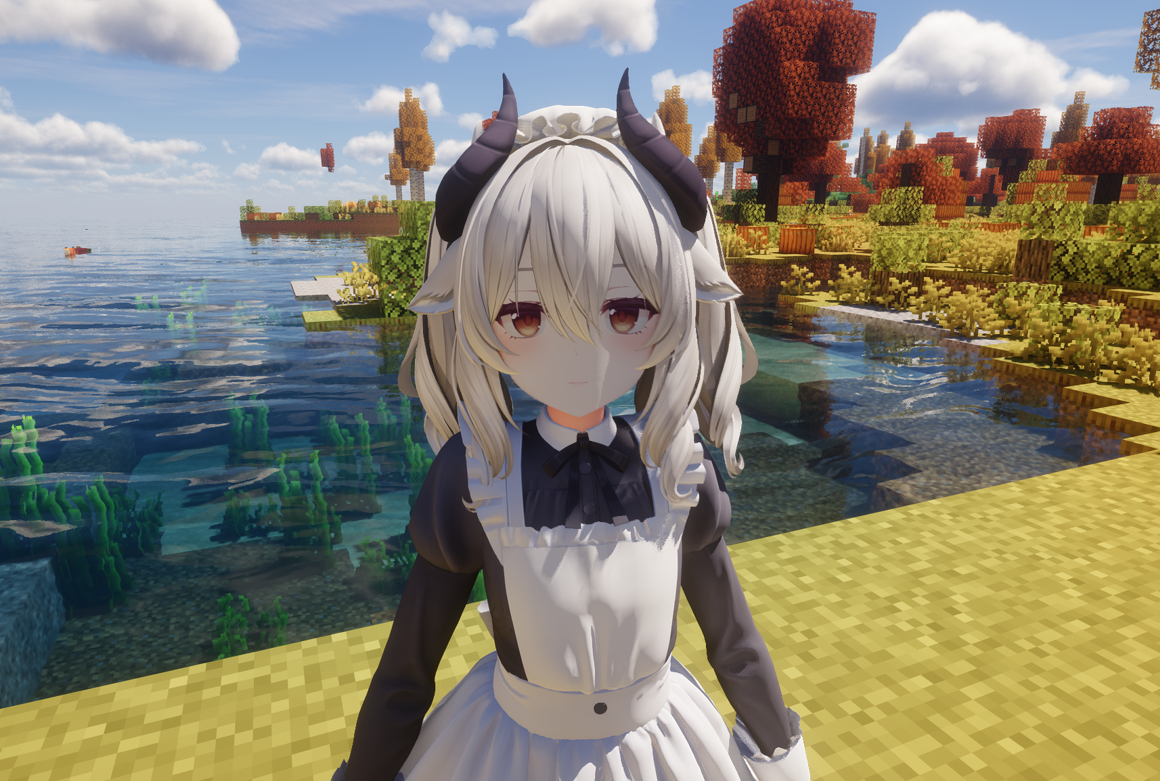 Milltina Creator:DOLOS MMD Editing:可璃亚
Versions
Files
Relations
Project Relations
More like this
Similar Mods
Suggestions use data such as tags, dependencies, dependents, descriptions, titles, and more to rank how much they overlap with this mod.
- Flower Expansion [Cobblemon]
- Lucario Overhaul [Cobblemon 1.6 Compatible]
- Tensura: Unique Skills as Items
- VSSW Turret Remodel
- Fnaf build & decor SB Java
- MC FNaF - SB MC Mod
- Pigeon's Poke Pack [1.7.0] - Fang and Claw
- Cobblemon Raid Dens Addon - Raid Den Designs
- MelloMons
- Cobble-Remodels
- FNAF Fazbear's Workshop
- Silver's Aftermarket & Customs Pack [IV/MTS]
On ModDex
Community snapshot
By the numbers
Statistics

Want to reach Minecraft players?
We're looking for a server hosting partner to feature here and other parts of the site. Interested? Send us a message!
Get in touchGet it on
Available Platforms
On ModDex
Community snapshot
By the numbers