
Community listing page, reviews here may not be monitored by the author.
Mine Mine no Mi: Crew Manager

No reviews yet
An Addon for Mine Mine no Mi that synchronizes your crews with Discord and allows you to manage the size of crews.

Community voices
Reviews
No reviews yet. Be the first to review this project!
Get it on
Available Platforms
Compatibility
Supported Environments
Runs entirely on the server. Also works in singleplayer.
About
Project Details
For authors
Embed Badge
If you're the author of this project, you can embed a live badge anywhere that supports HTML or Markdown. It updates automatically whenever ratings change.
Use HTML for any page that supports it, or Markdown for README files and Markdown-based descriptions.
Identifiers
Platform IDs
About
Description
Download the mod file directly here
It is imperative that for now this custom version is used. Changes in there are purely server sided. So only you need to install this version on your server.
Players can still use the normal Mine Mine no Mi Version.
Crew Manager
This Mine Mine no Mi Addon manages the sizes of your crews and can optionally use Discord Integration to synchronize your crews with Discord.
It can:
- Limit your crew sizes
- Dissolve existing crews that go over the crew limit
If Discord Integration is present it will additionally:
- List Crews neatly organized in a forum channel
- Show crew creation date
- Display captain
- Display members
- Display the crews banner
Config Options
["Crew Display"]
        "Sync Crew Members" = true
        "Show Crew Creation Date" = true
        #Has to be a Forum channel! Therefore your server MUST be a community server if you want to use this feature!
        #Range: 0 ~ 9223372036854775807
        "Crew Forum Channel Id" = 0
        "Show Captain of the crew" = true
        "Sync Crew Banner" = true

["Crew Manager"]
        #Leave it as -1 if you do not want any crew size limits. Crew size includes the captain! So 4 Members and 1 Captain would need a crew size of 5 to exist.
        # Setting this to 0 will disable crews on your server.
        #Range: > -1
        "Limit crew size" = -1
        #If set to true existing crews that are over the crew limit will be dissolved and removed
        "Dissolve existing crews" = false
Screenshots
Gallery
-
 Logo The Logo
 -
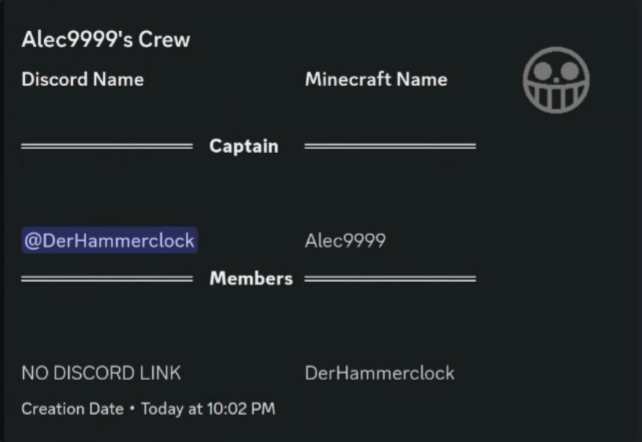 Crew Example The generated embed of a crew
 -
 Entry in the Forum Channel
 -
 Crew Limits The message shown to a player when they can not join the crew
 -
 Crew disabled on Server The message shown to someone with crews disabled on the server
Versions
Files
Relations
Project Relations
More like this
Similar Mods
Suggestions use data such as tags, dependencies, dependents, descriptions, titles, and more to rank how much they overlap with this mod.
- Mine Mine no Mi: Role Assigner
- Cobblemon Spawn Notification Discord Integration
- Mine Mine no Mi: Player Revive Compat
- MoreFruits - a MineMinenoMi Addon
- Integral
- Mmnm: Reforged
- Pixel Addon
- Mine Mine No Mi: Rank Rank No Mi Discontinued
- PirateRecruits
- VS Crews
- Mine Mine no Mi
- Mine Mine no Mi - Haki Bar
On ModDex
Community snapshot
By the numbers
Statistics

 (opens in a new tab)
Get it on
Available Platforms
On ModDex
Community snapshot
By the numbers