Community listing page, reviews here may not be monitored by the author.
Mo' Pickaxes

No reviews yet
Adds more pickaxes!
Community voices
Reviews
No reviews yet. Be the first to review this project!
Get it on
Available Platforms
About
Project Details
For authors
Embed Badge
If you're the author of this project, you can embed a live badge anywhere that supports HTML or Markdown. It updates automatically whenever ratings change.
Use HTML for any page that supports it, or Markdown for README files and Markdown-based descriptions.
Identifiers
Platform IDs
Resources
External Links
About
Description
Mo' Pickaxes!
3 new pickaxes! More to come!
This mod adds new pickaxes to the game.
I added:
Glass Pickaxe: 
About - 3 glass and 2 sticks to make. Looks like a stone pickaxe but it is realy see through Specs:
Durability (146)
Dig speed (4)
Damage vs entity (+3)
Netherrack Pickaxe: 
About - 3 netherrack and 2 sticks to make. Specs:
Durability(141)
Dig speed(2)
Damage vs entity(+3.5)
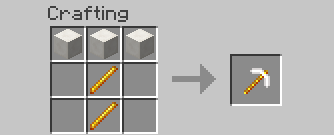
Quartz: 
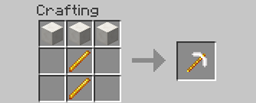
About - 3 quartz blocks and 2 blaze rods to make. Specs:
Durability(201)
Dig speed(6.5)
Damage vs entity(+4)
Wool Pickaxe (Idea by MrSmiley101KP):

This pick axe is the exact sam eas a wooden one! (Any color will work!)
Bone Pickaxe (Idea by MrSmiley101KP):

Same as wood!
Redstone Pickaxe (Idea by MrSmiley101KP):

Durability(230), Dig speed (5), Damage vs entity(+4.5)
Thats all for now! If you want to you can do a mod review! All reviews will be included in the post!
Installation:
Mac:
1: Browse to the minecraft folder (/Users/YOUR USER NAME HERE/Library/Application\ Support/minecraft )
2: !nstall Forge Mod Loader (FML) (files.minecraftforge.net) use 1.7.10 recomended.
3: Go to to the mods folder that forge generated when you ran it in teh launcher and put the .jar file in there (if you got a zip open it to get the jar.)
4: Play minecraft with the forge profile.
Windows:
1: Browse to the .minecraft folder :
Windows Vista/7 - Click windows symbol and search "run".
Then type "%appdata%".
You should see ".minecraft" and open it.
Windows 8 - Right click the windows symbol and hit s on your keyboard.
Then type "run"
After, type "%appdata%"
You should see ".minecraft", open it.
2: Install Forge Mod Loader (FML) (files.minecraftforge.net) use 1.7.10 recomended.
3: Go to to the mods folder that forge generated when you ran it in teh launcher and put the .jar file in there (if you got a zip open it to get the jar.).
4: Play minecraft
Enjoy :)
Screenshots
Gallery
-
 Quartz Pickaxe
Versions
Files
Relations
Project Relations
More like this
Similar Mods
Suggestions use data such as tags, dependencies, dependents, descriptions, titles, and more to rank how much they overlap with this mod.
On ModDex
Community snapshot
By the numbers
Statistics
Want to reach Minecraft players?
We're looking for a server hosting partner to feature here and other parts of the site. Interested? Send us a message!
Get in touchGet it on
Available Platforms
On ModDex
Community snapshot
By the numbers
Statistics
Resources