
Community listing page, reviews may not be monitored by the author.
Mob Control Apocalypse

No reviews yet
Advanced server-side mob spawning control with whitelist/blacklist, custom attributes, spawn zones, custom drops, mob persistence, and a real-time web dashboard. Fully JSON-configurable.

Community voices
Reviews
No reviews yet. Be the first to review this project!
Get it on
Available Platforms
About
Project Details
For authors
Embed Badge
If you're the author of this project, you can embed a live badge anywhere that supports HTML or Markdown. It updates automatically whenever ratings change.
Use HTML for any page that supports it, or Markdown for README files and Markdown-based descriptions.
Identifiers
Platform IDs
Resources
External Links
About
Description
🎮 Mob Control - CurseForge Description (EN)
Description longue (Full Description)
# Mob Control
**Mob Control** is a powerful server-side Forge mod for Minecraft 1.20.1 that gives server administrators complete
control over mob spawning, attributes, drops, and distribution. Whether you run a survival server, an RPG server, or a
custom adventure map, Mob Control lets you fine-tune every aspect of hostile mob behavior.
---
## Key Features
### Global Spawn Control
- **Whitelist / Blacklist mode**: Choose whether only configured mobs can spawn (whitelist) or configured mobs are
blocked (blacklist)
- **Per-player mob limit**: Cap the number of hostile mobs around each player (default: 30)
- **Global mob cap**: Set an absolute maximum of hostile mobs in the entire world (default: 200)
- **Spawn distance constraints**: Define minimum and maximum spawn distances from players
- **Force despawn**: Automatically remove mobs that wander too far from all players
- **Light level bypass**: Configured mobs can spawn regardless of light level, enabling daylight spawning
- **Passthrough system**: Completely ignore mobs from specific mods (e.g., `customnpcs:*`) so they spawn normally
### Custom Mob Attributes
Configure per-mob attributes via a simple JSON file:
- **Health range**: Random HP between min and max values
- **Movement speed**: Override vanilla speed
- **Knockback resistance**: 0.0 (none) to 1.0 (immune)
- **Aggro range**: Detection distance for players
- **Follow range**: Pursuit distance
- **Spawn chance**: 0-100% probability for each spawn attempt
- **Sun protection**: Prevent zombies, skeletons, and phantoms from burning in sunlight
### Spawn Zones
Create dedicated spawn zones with independent rules:
- **Cubic volumes**: Define zones with two corner positions in any dimension
- **Per-zone mob cap**: Limit total mobs within each zone
- **Mob groups**: Configure multiple mob types per zone, each with its own cooldown, max count, spawn ring distance,
and custom attributes
- **Entry boost**: Temporarily multiply spawn rates when a player first enters a zone (e.g., 4x faster spawns for 5
seconds)
- **Mob balancing**: Automatically redistribute mobs so no single player gets overwhelmed
- **Sun protection**: Zone-wide sunburn prevention for undead mobs
- **XP bonus**: Award extra experience for killing zone-spawned mobs
- **Fair distribution**: Mobs spawn near the least-loaded player, ensuring balanced gameplay
- **Retry system**: Failed spawn attempts are retried on the next cycle (up to 5x multiplier)
### Mob Persistence
Zone-spawned mobs survive chunk loading/unloading:
- Mobs are saved to disk when their chunk unloads
- Restored with their exact health and position when the chunk reloads
- Alive counts stay accurate across chunk cycles
### Custom Drops
Replace or supplement vanilla loot tables:
- Per-mob drop tables in JSON
- Variable item counts (min/max)
- Drop chance percentage (0-100%)
- Option to disable all vanilla drops
- Option to disable XP orb drops
- Zone XP bonus stacks on top of custom drops
### Real-Time Web Dashboard
A built-in web server provides a live monitoring dashboard:
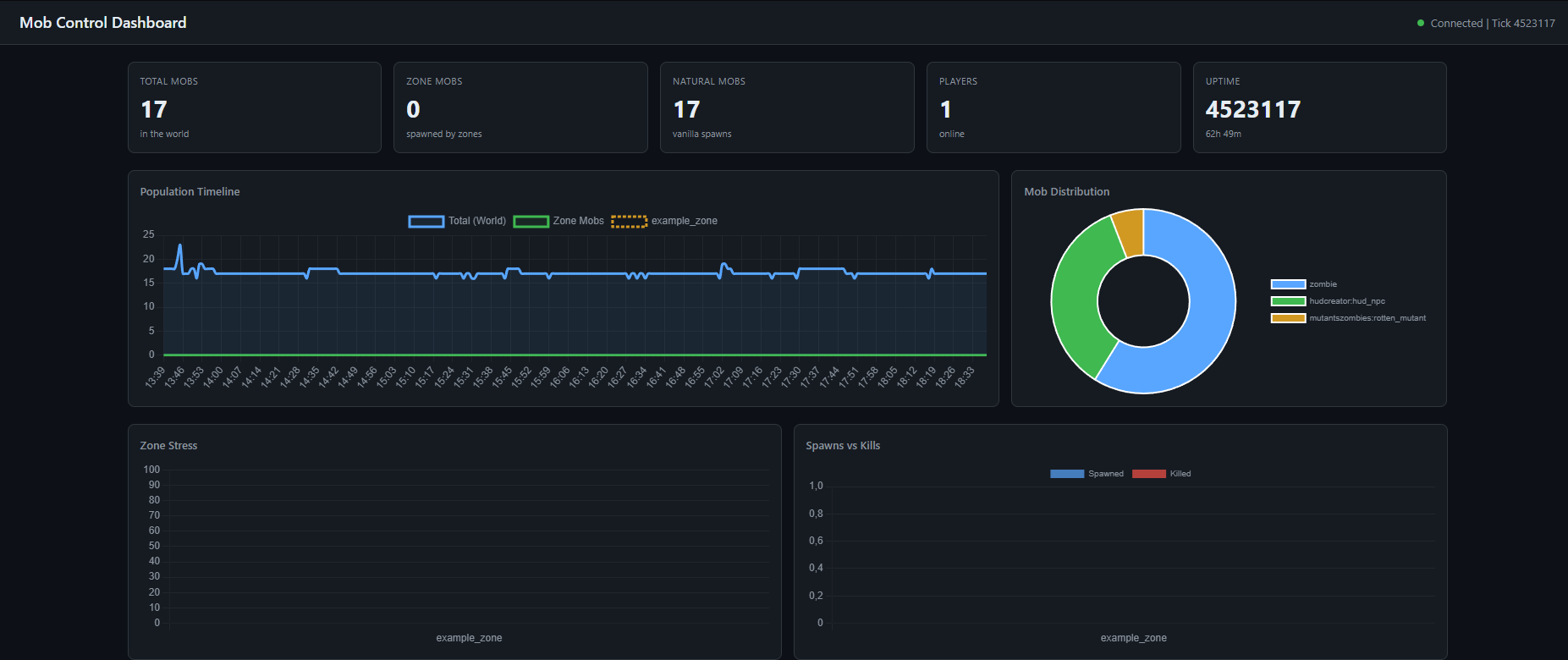
- **Population timeline**: 5-minute rolling graph of total, zone, and natural mob counts
- **Mob distribution**: Doughnut chart of mob types
- **Zone stress**: Bar chart showing how full each zone is
- **Spawns vs Kills**: Track spawn and death rates per zone
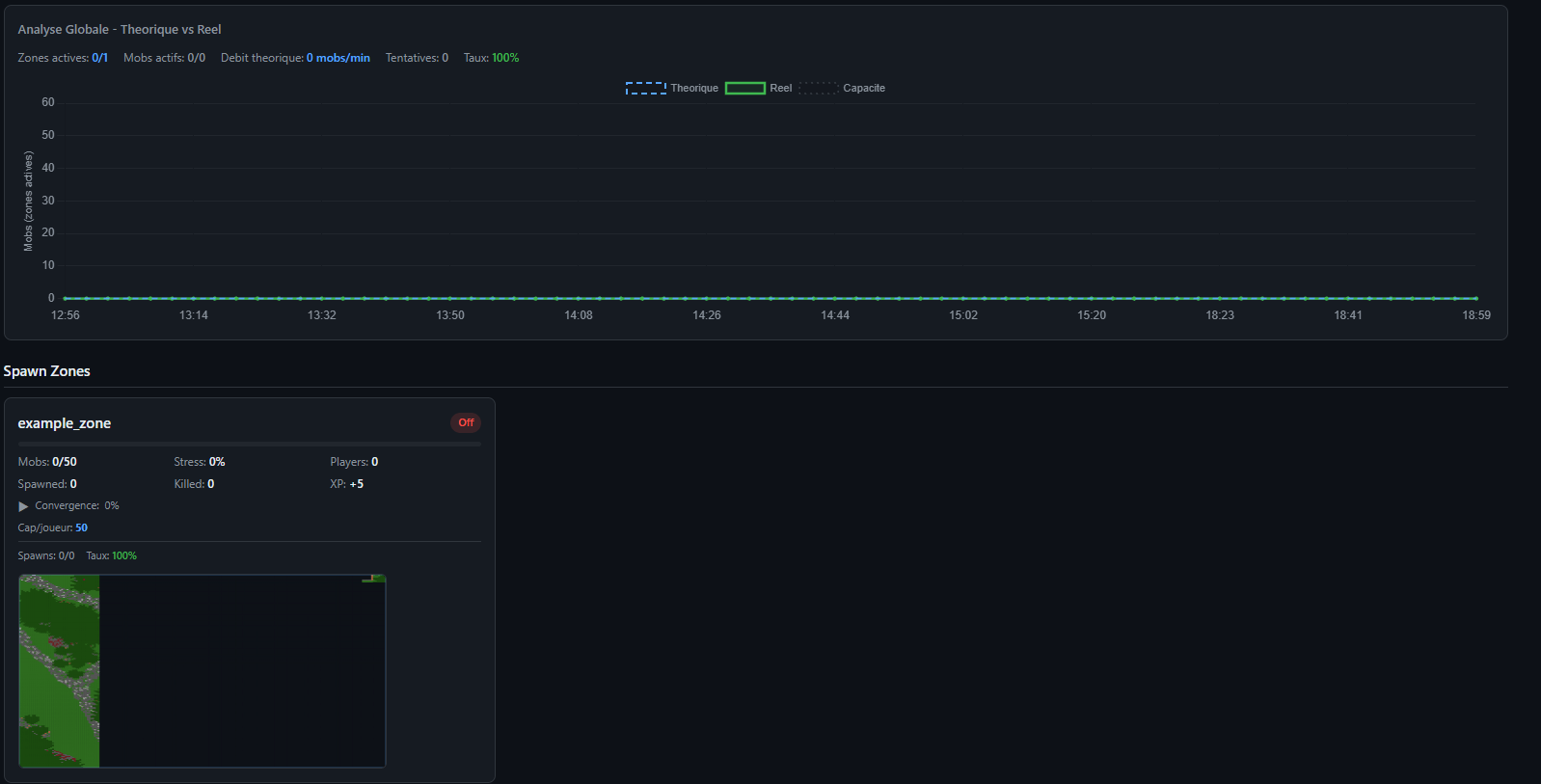
- **Global analysis**: Theoretical vs actual mob counts with efficiency tracking
- **Zone cards**: Click any zone for detailed stats, mob group breakdown, radar view, and analysis
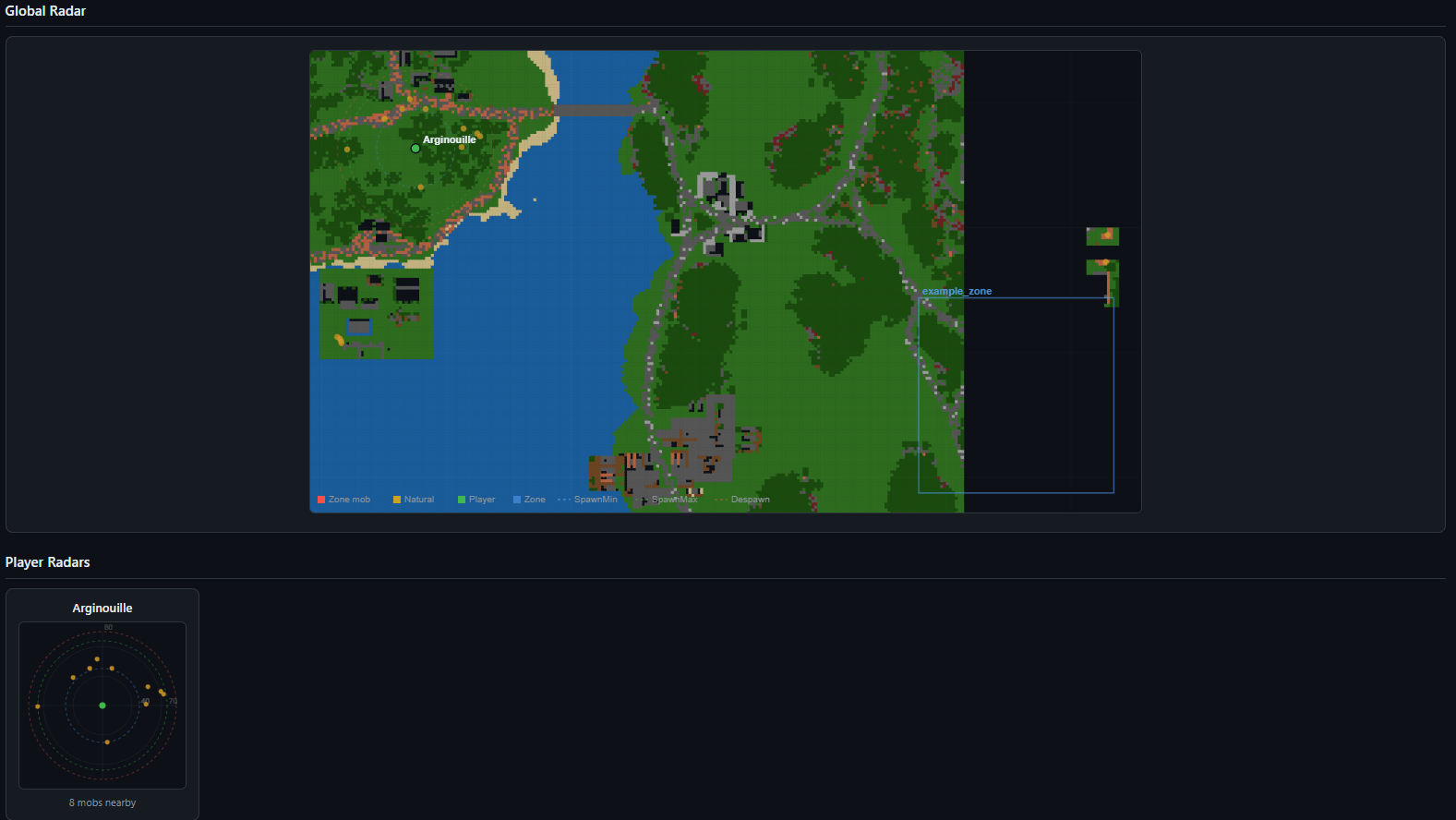
- **Entity radar**: Global map showing all mobs, players, zone boundaries, spawn rings, and despawn rings with terrain
overlay
- **Player radars**: Per-player mini-radars showing nearby mobs with distance rings
- **Player table**: Position, dimension, nearby mob count, and current zone for each player
- **Terrain mapping**: Automatic heightmap scanning with color-coded terrain types
- **Configuration view**: See all active settings at a glance
---
## Commands
| Command | Permission | Description |
|---------|-----------|-------------|
| `/mobcontrol reload` | OP level 2 | Reloads all configuration files (mobs, drops, zones). Refreshes passthrough
patterns, resets zone counters, and restarts the web server if settings changed. |
---
## Configuration Files
All configuration is done through files in the `config/` folder. No in-game GUI needed.
### mobcontrol-common.toml
General spawn control settings:
```toml
[general]
whitelistMode = true # true = whitelist, false = blacklist
controlAllMobs = true # Control all mob types, not just monsters
mobLimitPerPlayer = 30 # Max mobs around each player
mobCheckRadius = 64 # Radius to count nearby mobs
globalMobCap = 200 # Max hostile mobs in the world
spawnMinDistance = 24 # Min blocks from player to spawn
spawnMaxDistance = 128 # Max blocks from player to spawn
despawnDistance = 128 # Force despawn beyond this distance
passthroughMods = ["customnpcs:*"] # Mods to ignore completely
debugSpawner = false # Verbose spawn logging
mobcontrol-mobs.json
Per-mob configuration with attributes:
{
"minecraft:zombie": {
"spawnChance": 80,
"minHealth": 20,
"maxHealth": 40,
"speed": 0.23,
"knockbackResistance": 0.0,
"aggroRange": 35,
"followRange": 40,
"sunProof": true
},
"minecraft:skeleton": {
"spawnChance": 70,
"minHealth": 20,
"maxHealth": 30,
"speed": 0.25,
"knockbackResistance": 0.0,
"aggroRange": 16,
"followRange": 24,
"sunProof": true
}
}
Set any attribute to -1 to keep the vanilla default. Comes pre-configured with 30+ vanilla mobs.
mobcontrol-drops.json
Custom drop tables:
{
"minecraft:zombie": {
"drops": [
{ "item": "minecraft:rotten_flesh", "min": 1, "max": 3, "chance": 100 },
{ "item": "minecraft:iron_ingot", "min": 1, "max": 1, "chance": 5 }
]
}
}
mobcontrol-drops.toml
[drops]
disableVanillaDrops = false # Replace vanilla drops entirely
disableXPDrops = false # Disable XP orb drops
mobcontrol-zones.toml
Zone system settings:
[zones]
zonesEnabled = false # Enable/disable the zone system
webEnabled = false # Enable/disable web dashboard
webPort = 8080 # Web dashboard port
persistenceEnabled = true # Save/restore mobs on chunk unload
defaultDespawnDistance = 70 # Default zone despawn distance
defaultSpawnMinDistance = 16 # Default zone min spawn distance
defaultSpawnMaxDistance = 40 # Default zone max spawn distance
mobcontrol-zones.json
Zone definitions:
{
"my_zone": {
"enabled": true,
"dimension": "minecraft:overworld",
"corner1": { "x": 100, "y": 60, "z": 200 },
"corner2": { "x": 300, "y": 120, "z": 400 },
"maxMobs": 50,
"despawnDistance": 80,
"xpReward": 5,
"sunProof": true,
"entryBoost": {
"enabled": true,
"multiplier": 4.0,
"durationTicks": 100
},
"balance": {
"enabled": true,
"threshold": 30,
"maxDespawnPerCycle": 5
},
"mobGroups": [
{
"entityId": "minecraft:zombie",
"cooldownTicks": 60,
"maxAlive": 15,
"spawnMinDistance": 16,
"spawnMaxDistance": 40,
"attributes": {
"healthMin": 30,
"healthMax": 50,
"speed": 0.26,
"knockbackResistance": 0.0,
"followRange": 40
}
}
]
}
}
---
Web Dashboard
Access the dashboard at http://your-server-ip:8080 (default port).
Dashboard Sections
Overview Cards - Total mobs, zone mobs, natural mobs, player count, server uptime
Charts:
- Population Timeline (5-minute rolling history)
- Mob Type Distribution (top 12 types)
- Zone Stress (% capacity per zone)
- Spawns vs Kills (per zone)
- Global Analysis (theoretical vs actual population curves with efficiency %)
Zone Cards - Each zone displays:
- Current mob count / max capacity with stress bar
- Active boost indicator (pulsing orange badge)
- Convergence rate and ETA to full capacity
- Per-player mob distribution
- Spawn success rate with failure breakdown
- Mini entity radar with terrain overlay
Zone Detail Modal (click a zone card):
- Stats tab: Dimensions, bounds, boost status, balance settings, player distribution
- Groups tab: Per mob-group alive count, cooldown, spawn attempts/successes/failures, retry stats
- Radar tab: Large radar view with terrain, entities, spawn rings, and player positions
- Analyse tab: Detailed metrics comparing configured vs actual values (cooldown, spawn rate, saturation, death rate,
fill time), per-group theoretical vs real population curves
Global Radar - World map showing all zone boundaries, entities (red = zone mob, yellow = natural), players (green)
with spawn distance rings (cyan = min, green = max, red = despawn)
Player Radars - Individual mini-radars centered on each player showing nearby entities and distance rings
Player Table - Name, position, dimension, nearby mob count, current zone
Configuration - Live view of all active settings
Terrain Legend
┌──────┬───────────────────────────┐
│ Code │ Terrain │
├──────┼───────────────────────────┤
│ G │ Grass / Podzol / Mycelium │
├──────┼───────────────────────────┤
│ D │ Desert Sand │
├──────┼───────────────────────────┤
│ W │ Water │
├──────┼───────────────────────────┤
│ L │ Lava │
├──────┼───────────────────────────┤
│ N │ Snow / Ice │
├──────┼───────────────────────────┤
│ T │ Tree Leaves │
├──────┼───────────────────────────┤
│ B │ Dirt / Wood │
├──────┼───────────────────────────┤
│ S │ Stone / Rock │
├──────┼───────────────────────────┤
│ R │ Nether Blocks │
├──────┼───────────────────────────┤
│ E │ End Stone │
├──────┼───────────────────────────┤
│ V │ Gravel │
├──────┼───────────────────────────┤
│ C │ Clay / Terracotta │
└──────┴───────────────────────────┘
API Endpoint
GET /api/data returns a complete JSON snapshot of all statistics, updated every 3 seconds. Useful for building custom
monitoring tools or Discord bots.
---
How Spawn Control Works
1. A mob attempts to spawn naturally
2. Passthrough check: If the mob matches a passthrough pattern, it spawns normally
3. Whitelist/Blacklist check: Is the mob in the config? Allowed or blocked based on mode
4. Spawn chance: Roll the configured percentage (e.g., 80% for zombies)
5. Per-player limit: Count mobs around the nearest player. Block if over limit
6. Global cap: Check total world hostile mobs. Block if over cap
7. Distance check: Block if too close or too far from any player
8. Attribute application: Apply custom health, speed, knockback resistance, aggro range, follow range, and sun
protection
Zone mobs bypass all global checks and follow their own independent rules.
---
How Zones Work
1. Every server tick, active zones check for players inside their bounds
2. For each mob group, if the cooldown has elapsed and the group isn't full:
- Select the player with the fewest nearby zone mobs (fair distribution)
- Find a safe spawn location within the spawn ring (min/max distance from player)
- Spawn the mob with zone-specific attributes
- If spawning fails, queue a retry for the next cycle (up to 5x multiplier)
3. Every 3 seconds: despawn mobs beyond the zone's despawn distance
4. Every 5 seconds: balance mobs if any player has too many
5. Entry boost: When a player enters a zone, cooldowns are divided by the boost multiplier for the configured duration
---
Compatibility
- Minecraft: 1.20.1
- Mod Loader: Forge (47+)
- Side: Server-side only (clients don't need the mod)
- Modded mobs: Fully supported. Add any modded mob ID to the JSON configs
- Passthrough: Use modid:* to let entire mods bypass spawn control (essential for NPC mods, quest mobs, etc.)
---
Quick Start
1. Install the mod on your server
2. Start the server once to generate default config files
3. Edit config/mobcontrol-common.toml for global settings
4. Edit config/mobcontrol-mobs.json to configure mob attributes and spawn chances
5. (Optional) Edit config/mobcontrol-drops.json for custom drops
6. (Optional) Enable zones in config/mobcontrol-zones.toml and define zones in config/mobcontrol-zones.json
7. (Optional) Enable the web dashboard for real-time monitoring
8. Use /mobcontrol reload to apply changes without restarting
---
Screenshots
Gallery
-
 Capture dâécran 2026-03-12 131848.png Capture dâécran 2026-03-12 131848.png
 -
 Capture dâécran 2026-03-12 131925.png Capture dâécran 2026-03-12 131925.png
 -
 Capture dâécran 2026-03-12 131908.png Capture dâécran 2026-03-12 131908.png
 -
 Capture dâécran 2026-03-12 131941.png Capture dâécran 2026-03-12 131941.png
Versions
Files
Relations
Project Relations
More like this
Similar Mods
Suggestions use data such as tags, dependencies, dependents, descriptions, titles, and more to rank how much they overlap with this mod.
On ModDex
Community snapshot
By the numbers
Statistics
 (opens in a new tab)
Get it on
Available Platforms
On ModDex
Community snapshot
By the numbers
Statistics
Resources