
Community listing page, reviews may not be monitored by the author.
Mod and Resource Pack Checker (Abra's Additions)

No reviews yet
Matches the Client mods with the Server mods. Crashes the client when the client has mods that the server doesn't. Supports a whitelist for allowed client-sided mods on the server. Supports this feature for resource packs too.

Community voices
Reviews
No reviews yet. Be the first to review this project!
Get it on
Available Platforms
About
Project Details
For authors
Embed Badge
If you're the author of this project, you can embed a live badge anywhere that supports HTML or Markdown. It updates automatically whenever ratings change.
Use HTML for any page that supports it, or Markdown for README files and Markdown-based descriptions.
Identifiers
Platform IDs
Resources
External Links
About
Description
Adds support for server sided control for what mods and resource packs are allowed on the client. To do this, create a folder named database in your root directory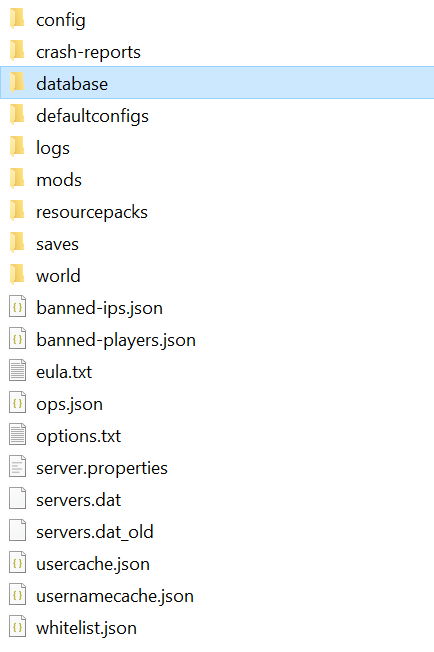
Inside, create a folder named allowedPacks and a file named abrasconfigs.json.
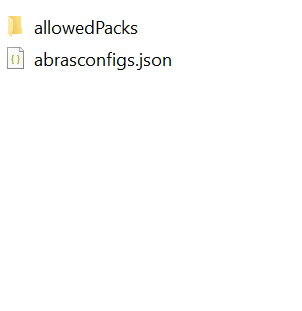
Put the whitelisted resource packs in to allowedPacks.
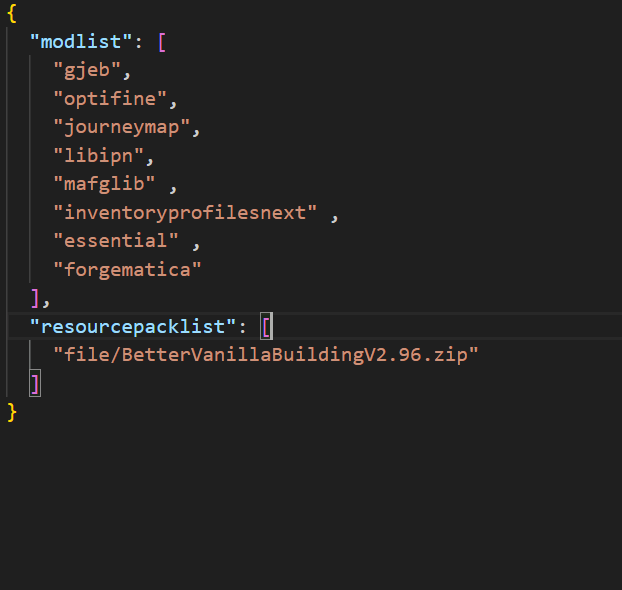
Inside of abrasconfigs.json, create these two arrays. Inside of these, add the whitelisted mods and resource packs. The mod whitelist should consist of modids (if you don't know how to find this, you can open the mod as a zip archive and check inside META-INF/pack.mcmeta) and resource pack file names. Format the resource pack names in file/{resourcepackname}.zip. The client and server file names should match, but this is only the first layer of defense. The resource pack put inside allowedpacks will be checked against the pack on the client to make sure the files match. Therefore, different version resource packs might be still banned.
On single player worlds, you can also choose to create these files to set in action the same features, but this is not very useful.
Without these files, the mod will ignore everything and have no function.
Besides this, the mod adds three items, being Fragments of Phantasm, Diamond dust, and liquid diamond. The mod adds crafting recipes for slime balls, diamond dust, and liquid diamond. This serves very little use though and Fragments of Phantasm are unobtainable.
The mod is required on both the client and server side so players cannot join the server without installing the mod.
On detecting a mod mismatch, the player's game will crash. The crash report will detail what illegal mods/resource packs were found.
Screenshots
Gallery
Versions
Files
Relations
Project Relations
More like this
Similar Mods
Suggestions use data such as tags, dependencies, dependents, descriptions, titles, and more to rank how much they overlap with this mod.
On ModDex
Community snapshot
By the numbers
Statistics
 (opens in a new tab)
Get it on
Available Platforms
On ModDex
Community snapshot
By the numbers
Statistics
Resources