
Community listing page, reviews here may not be monitored by the author.
ModAutoDownloader

No reviews yet
A Minecraft Full Automatic Mod That Downloads Files From Server !

Community voices
Reviews
No reviews yet. Be the first to review this project!
Get it on
Available Platforms
About
Project Details
For authors
Embed Badge
If you're the author of this project, you can embed a live badge anywhere that supports HTML or Markdown. It updates automatically whenever ratings change.
Use HTML for any page that supports it, or Markdown for README files and Markdown-based descriptions.
Identifiers
Platform IDs
About
Description
ModAutoDownload - Your Ultimate Minecraft Mod Manager 🚀
By SnowFinch-Loran | GitHub Repository
🌟 Introduction
Hey there, Minecraft enthusiasts! 👋 Ever been tired of manually downloading and managing mods for your favorite Minecraft servers? Say hello to ModAutoDownload – a sleek, efficient, and user-friendly client-side mod designed to automate the entire mod installation process!
This mod is currently optimized for Minecraft 1.16.5 Forge, but don’t worry—future updates will bring compatibility to other popular versions like 1.12.X, 1.14.X, 1.18.X, 1.20.X, and even 1.21.X! Plus, we’re exploring Fabric support to make it even more versatile.
With ModAutoDownload, you can:
✅ Automatically fetch and install mods from a server.
✅ Pause/resume downloads anytime.
✅ Skip files you already have (or choose to ignore).
✅ Clean up outdated mods with a single click.
✅ Monitor download speed and progress in real-time.
🔧 Requirements
Before diving in, make sure you have:
-
Minecraft 1.16.5 Forge (for now!).
-
JavaFX (since this mod uses it for the GUI , You can also use THIS JDK).
-
A server running SimpleDownload (the companion mod for servers).
🛠️ Features Breakdown
1️⃣ User-Friendly GUI
ModAutoDownload comes with a clean, intuitive interface built with JavaFX. No confusing commands—just enter the server URL, and let the magic happen!
UI Preview:
-
Server URL Input: Paste your server’s
getDurlDataendpoint (e.g.,http://example.com/getDurlData). -
Progress Tracking: See real-time updates on downloaded files, skipped files, and download speed.
-
Pause/Resume: Life got busy? Pause the download and resume later!
2️⃣ Smart File Management
-
Ignore List: Don’t want certain mods to be touched? Add them to the Ignore.json list, and the mod will skip them during downloads or cleanup.
-
Auto-Cleanup: The mod can remove outdated or unwanted mods that aren’t on the server’s list (unless they’re in your ignore list).
3️⃣ Error Handling & Notifications
-
If something goes wrong (e.g., server unreachable), you’ll get a clear error message.
-
After successful downloads, you’ll be prompted to restart Minecraft to apply changes.
4️⃣ Future Plans
We’re not stopping here! Here’s what’s coming:
-
Multi-Version Support: 1.12.X, 1.14.X, 1.18.X, 1.20.X, and 1.21.X.
-
Fabric Compatibility: Because why choose between Forge and Fabric when you can have both?
-
More Customization: Maybe even a dark mode? 👀
🚀 How to Use
Step 1: Installation
-
Download the mod from files , or from GitHub releases page
-
Drop it into your Minecraft
modsfolder. -
Launch Minecraft with Forge 1.16.5.
Step 2: Connecting to a Server
-
Enter your server’s mod list URL (e.g.,
http://yourserver.com/getDurlData). -
Click Fetch and let the mod do its thing!
Step 3: Managing Mods
-
Ignore Mods: Click the Ignore-mods button to select which mods should never be touched.
-
Cleanup: Before downloading, the mod can remove outdated mods (optional).
Step 4: Restart & Play!
Once all mods are downloaded, restart Minecraft, and you’re ready to go!
💡 Behind the Scenes (For Nerds 🤓)
How It Works
-
The client sends a request to the server’s
getDurlDataendpoint. -
The server responds with a JSON list of mod URLs.
-
The mod checks your local
modsfolder and compares it with the server’s list. -
It then downloads missing files (unless they’re ignored) and cleans up unused ones.
Technical Highlights
-
Multithreaded Downloads: No freezing—downloads happen in the background.
-
JavaFX for GUI: Smooth animations and responsive controls.
-
Gson for JSON Parsing: Efficiently handles server responses.
❓ FAQ
Q: Does this work with Fabric?
A: Not yet, but we’re working on it! Stay tuned.
Q: Can I use this without a SimpleDownload server?
A: Nope! The server must have SimpleDownload installed to provide the mod list.
Q: What if my download gets interrupted?
A: Just restart it! The mod skips already-downloaded files.
Q: Can I manually add mods while using this?
A: Absolutely! Just add them to the ignore list if you don’t want them overwritten.
🙌 Final Thoughts
ModAutoDownload is all about saving time and reducing hassle. No more manual mod management—just pure, uninterrupted Minecraft fun! 🎮
If you love the mod, star it on GitHub and let us know what features you’d like next!
Happy mining, and may your frames be high! ✨
📜 License: MIT (Open Source, baby!)
🐦 Follow Me: SnowFinch-Loran on GitHub
Last Updated: 2025 (because why not future-proof this doc? 😉)
Screenshots
Gallery
-
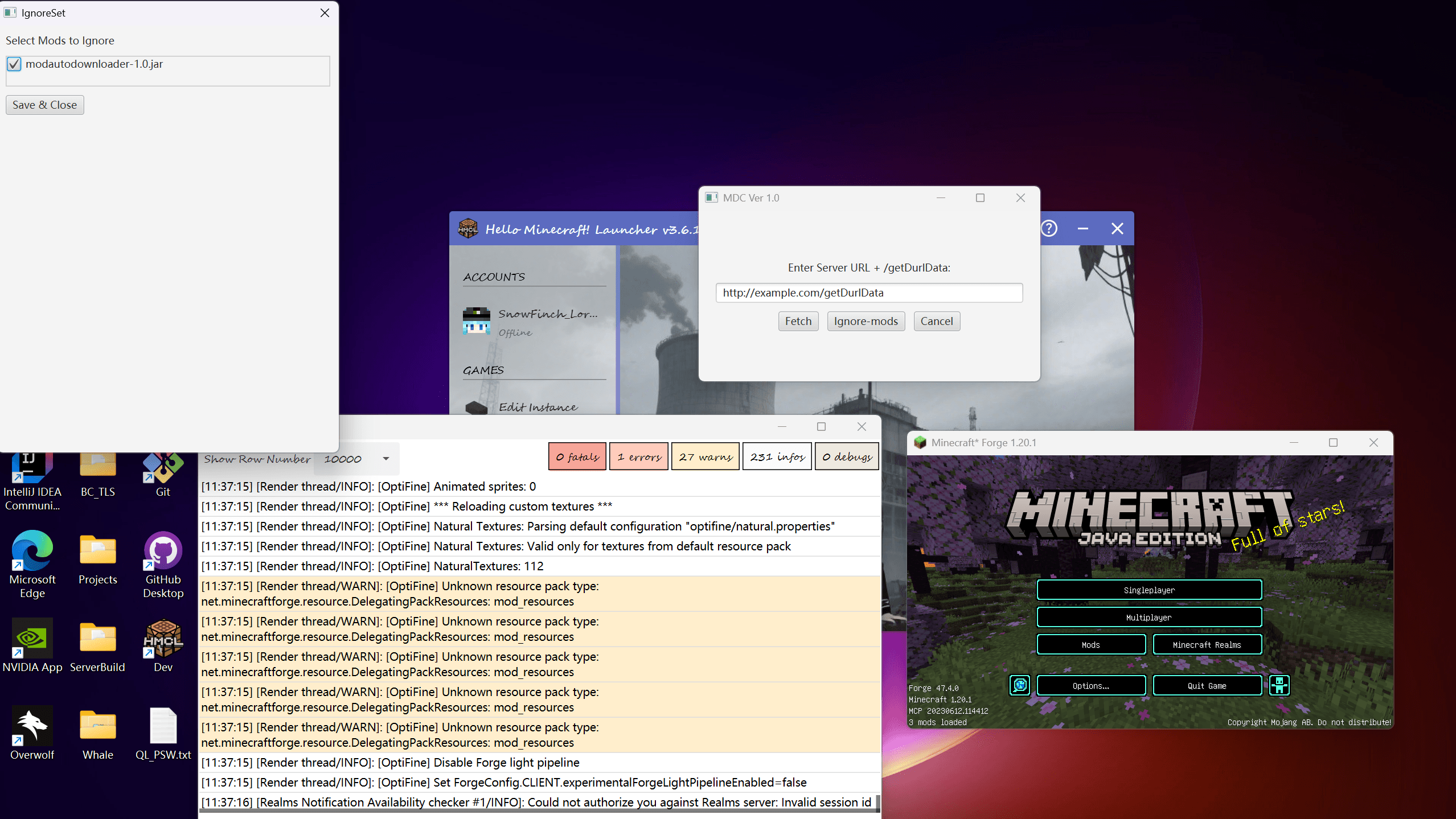 ModAutoDownloader_1.20.1.png 1.20.1 Developing ! Almost Complete ! Fabric will be supported in 3 Weeks !
Versions
Files
Relations
Project Relations
More like this
Similar Mods
Suggestions use data such as tags, dependencies, dependents, descriptions, titles, and more to rank how much they overlap with this mod.
On ModDex
Community snapshot
By the numbers
Statistics
 (opens in a new tab)
Get it on
Available Platforms
On ModDex
Community snapshot
By the numbers