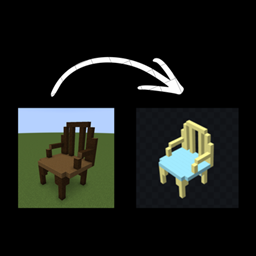
Model Exporter
No reviews yet
Export in-game Builds into Models. (Only works for Geckolib models at the moment!!!!)
Neoforge is a fork of the Minecraft Forge available for versions 1.20.1+ of Minecraft. Many Forge mods are compatible with Neoforge and vice versa.
Community voices
Reviews
Click once to include, again to exclude, again to clear
No reviews yet. Be the first to review this project!
Get it on
Available Platforms
 CurseForge
 Modrinth
Compatibility
Supported Environments
About
Project Details
For authors
Embed Badge
If you're the author of this project, you can embed a live badge anywhere that supports HTML or Markdown. It updates automatically whenever ratings change.
Use HTML for any page that supports it, or Markdown for README files and Markdown-based descriptions.
Identifiers
Platform IDs
Resources
External Links
About
Description
Model Exporter is a Minecraft NeoForge mod designed to turn in-game builds into exportable 3D model data.
It lets players record blocks using a layer system, where each layer acts like a “bone” in a model. You can select a layer, build normally in-game, and the mod tracks every block you place or remove. These layers can then be organized, parented, and assigned pivots to form structured models instead of just raw block collections.
The main goal is to bridge Minecraft building and modeling tools like Blockbench. Builds can be exported with proper structure, including per-face textures and UV mapping, making them suitable for animation or further editing outside the game.
This mod is aimed at builders, modders, and creators who want a way to convert in-game structures into usable model assets without manually rebuilding them in external software.
To start using Model Exporter, create a new world or open an existing one in creative mode. Begin by creating a layer using /layer create <name>. This layer will store any blocks you place while it is active.


Select your layer with /layer select <name>. Once selected, any blocks you place will automatically be recorded into that layer. You can confirm this through the on-screen feedback message.

Build your structure normally. If you make a mistake, breaking a block will remove it from its layer as well.

You can create multiple layers to organize different parts of your model. Layers can be parented together, and pivots can be set to control how each part rotates when exported.

When your build is complete, use the export command to generate your model data and texture atlas. The exported files can then be imported into tools like Blockbench for further editing, animation, or conversion into other formats.
Additional Details
This mod was rushed, so bugs may arise. If any issues occur during use, please leave a detailed comment explaining the issue.
If you are a mod maker and want to create a port or develop a more advanced version of this mod, you are welcome to make a comment as well. I will respond as soon as i get the time to, so we can discuss details.
Model Exporter is a Minecraft NeoForge mod designed to turn in-game builds into exportable 3D model data.
It lets players record blocks using a layer system, where each layer acts like a “bone” in a model. You can select a layer, build normally in-game, and the mod tracks every block you place or remove. These layers can then be organized, parented, and assigned pivots to form structured models instead of just raw block collections.
The main goal is to bridge Minecraft building and modeling tools like Blockbench. Builds can be exported with proper structure, including per-face textures and UV mapping, making them suitable for animation or further editing outside the game.
This mod is aimed at builders, modders, and creators who want a way to convert in-game structures into usable model assets without manually rebuilding them in external software.
To start using Model Exporter, create a new world or open an existing one in creative mode. Begin by creating a layer using /layer create <name>. This layer will store any blocks you place while it is active.
Select your layer with /layer select <name>. Once selected, any blocks you place will automatically be recorded into that layer. You can confirm this through the on-screen feedback message.
Build your structure normally. If you make a mistake, breaking a block will remove it from its layer as well.
You can create multiple layers to organize different parts of your model. Layers can be parented together, and pivots can be set to control how each part rotates when exported.
When your build is complete, use the export command to generate your model data and texture atlas. The exported files can then be imported into tools like Blockbench for further editing, animation, or conversion into other formats.
Additional Details
This mod was rushed, so bugs may arise. If any issues occur during use, please leave a detailed comment explaining the issue.
If you are a mod maker and want to create a port or develop a more advanced version of this mod, you are welcome to make a comment as well. I will respond as soon as i get the time to, so we can discuss details.
Screenshots
Gallery
-
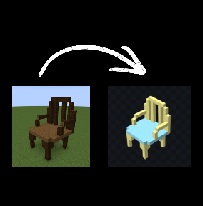 In-game Chair => Blockbench Geckolib Model.
-
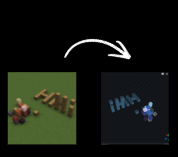 Second Example of what the mod can do. Some bugs need to be addressed, such as the immediate mirroring upon export, which will likely be patched in the next update.
 -
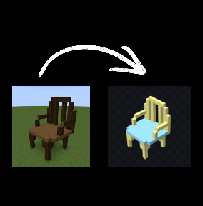 In-game Chair => Blockbench Geckolib Animated Model I hadn't added the actual texture file (the Atlas file) to the model since i actually liked it better without.
Versions
Files
Relations
Project Relations
More like this
Similar Mods
Suggestions use data such as tags, dependencies, dependents, descriptions, titles, and more to rank how much they overlap with this mod.
On ModDex
Community snapshot
By the numbers
Statistics
Want to reach Minecraft players?
We're looking for a server hosting partner to feature here and other parts of the site. Interested? Send us a message!
Get in touchGet it on
Available Platforms
On ModDex
Community snapshot
By the numbers
Statistics
Resources