Community listing page, reviews here may not be monitored by the author.
ModernUI+


No reviews yet
Simple mod for better hud for your game play
Community voices
Reviews
No reviews yet. Be the first to review this project!
Get it on
Available Platforms
Compatibility
Supported Environments
Runs entirely on the client. Works on vanilla servers.
About
Project Details
For authors
Embed Badge
If you're the author of this project, you can embed a live badge anywhere that supports HTML or Markdown. It updates automatically whenever ratings change.
Use HTML for any page that supports it, or Markdown for README files and Markdown-based descriptions.
Identifiers
Platform IDs
About
Description
ModernUI+ Feature Description
Overview
ModernUI+ is a comprehensive HUD and GUI mod designed to provide a futuristic, efficient, and highly customizable user experience for Minecraft. It replaces standard HUD elements with modern counterparts and introduces essential PVP utilities.
Main Features
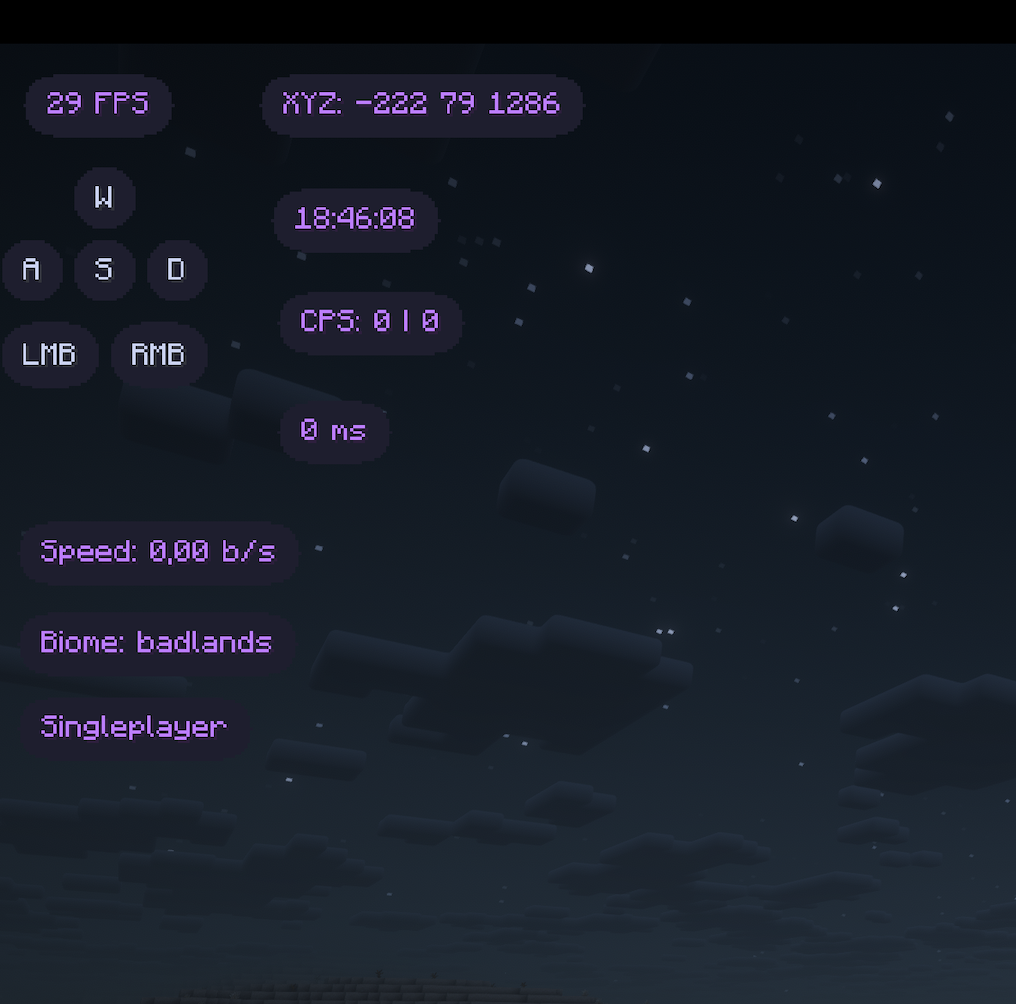
🖥️ Modern Draggable HUD
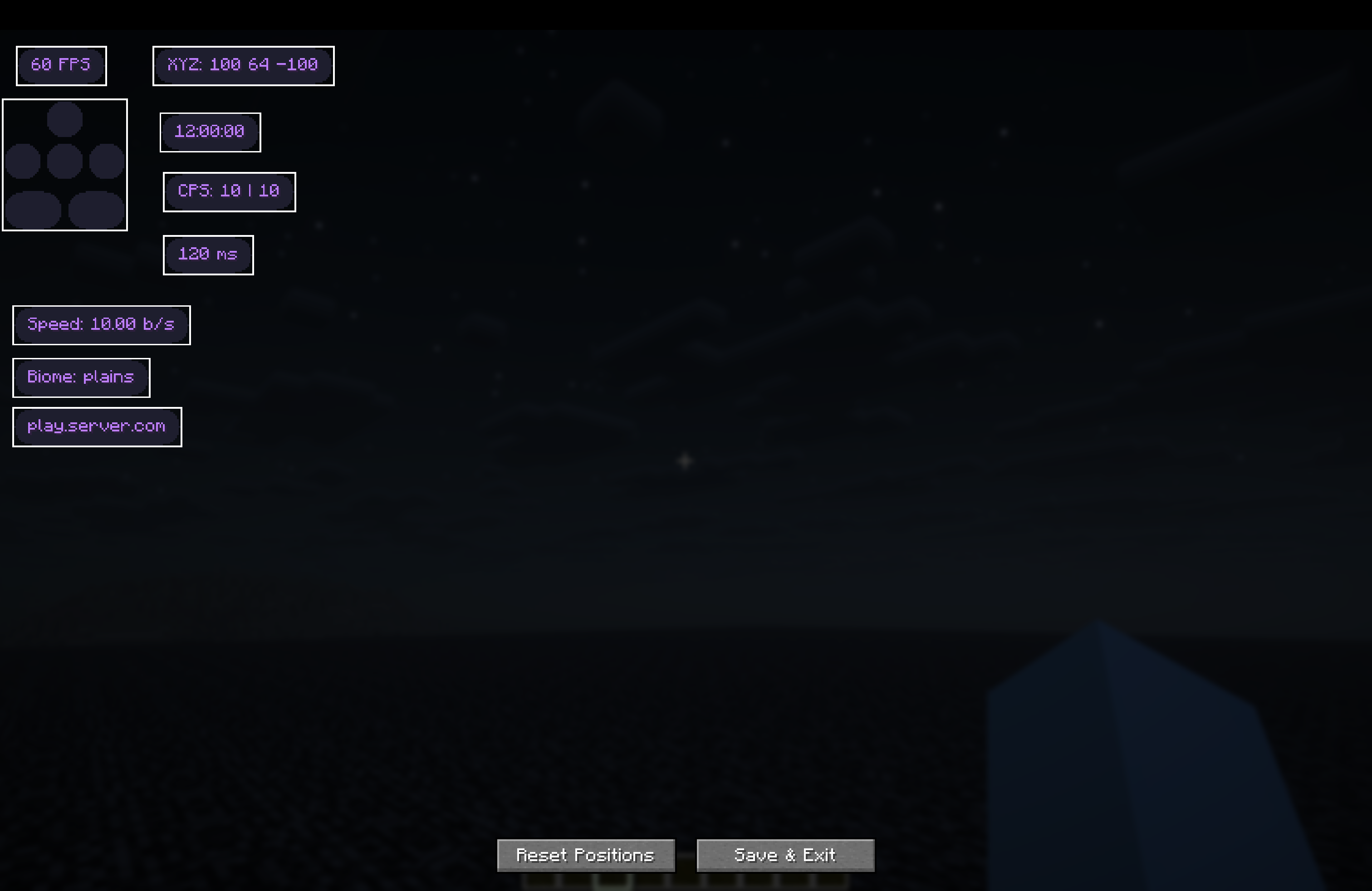
All HUD elements can be positioned anywhere on the screen using the Layout Editor.
- Scale: Adjust the global scale of all HUD elements (0.5x to 2.0x).
- Draggable: Open the editor to drag and drop elements.
- Live Preview: See exact positions before saving.
⚔️ PVP Utilities
Enhanced information for combat scenarios.
- Toggle Sprint: Automatically sprints when moving forward. No need to hold the sprint key.
- Armor Status: Displays currently equipped armor (Helmet, Chestplate, Leggings, Boots) with durability bars.
- Potion Status: Shows active potion effects with amplifier and duration remaining.
- CPS Counter: Tracks Left and Right clicks per second in real-time.
- Ping Display: Shows your current latency to the server.
🌍 Info & Navigation
- FPS Counter: Real-time Frames Per Second.
- Coordinates: Display your X, Y, Z position.
- Biome: Shows the current biome you are in.
- Server IP: Displays the current server address (or "Singleplayer").
- Real Time: Shows the current local time (HH:mm:ss).
- Speedometer: Displays your movement speed in specific blocks per second (b/s).
⌨️ Keystrokes
Visualizes your movement keys (WASD) and mouse clicks (LMB/RMB).
- Animations: Smooth fading animations when keys are pressed.
- Layout: Compact and clean design.
🎨 Extensive Customization
Tailor the look and feel to your preference.
- Theme Colors:
- Global Accent: Set a primary color for all elements.
- Per-Element Color: Override colors for specific elements (e.g., make FPS red and Speed blue).
- Styling:
- Background Opacity: Adjust transparency of the element backgrounds (0-100%).
- Background Color: Choose a custom background color.
- Border: Toggle a clean border around elements and choose its color.
- Text Shadow: Toggle text shadows for better readability or a cleaner flat look.
- Review Corner Radius: Adjust the roundness of the element corners.
How to Use
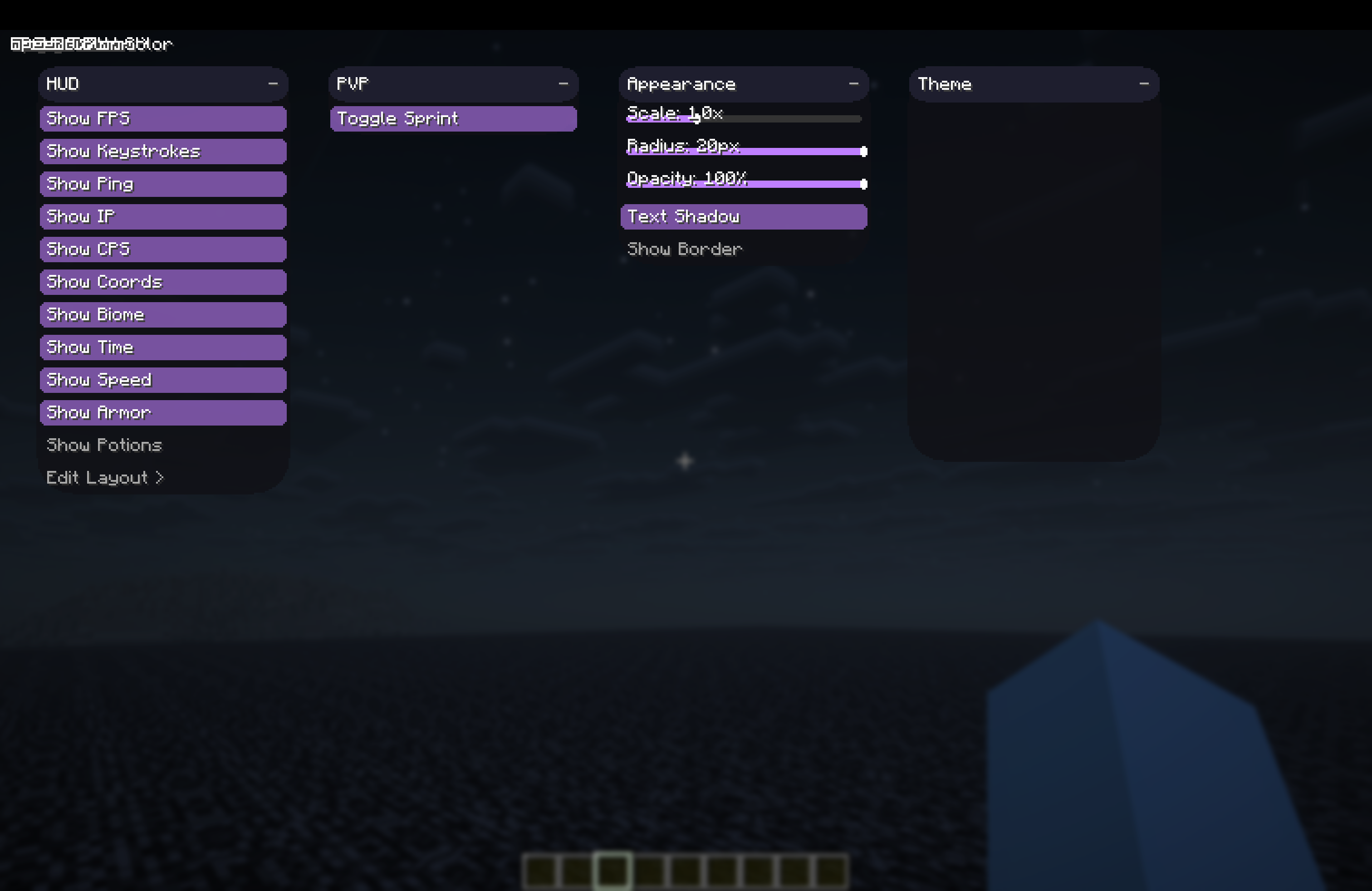
- Open Menu: Press Right Shift (default) to open the ClickGUI. from there you can toggle features and adjust settings.
- Edit HUD: In the ClickGUI, click "Edit Layout >" to enter the HUD Editor. Drag elements to your desired position.
ModernUI+ Feature Description
Overview
ModernUI+ is a comprehensive HUD and GUI mod designed to provide a futuristic, efficient, and highly customizable user experience for Minecraft. It replaces standard HUD elements with modern counterparts and introduces essential PVP utilities.
Main Features
🖥️ Modern Draggable HUD
All HUD elements can be positioned anywhere on the screen using the Layout Editor.
- Scale: Adjust the global scale of all HUD elements (0.5x to 2.0x).
- Draggable: Open the editor to drag and drop elements.
- Live Preview: See exact positions before saving.
⚔️ PVP Utilities
Enhanced information for combat scenarios.
- Toggle Sprint: Automatically sprints when moving forward. No need to hold the sprint key.
- Armor Status: Displays currently equipped armor (Helmet, Chestplate, Leggings, Boots) with durability bars.
- Potion Status: Shows active potion effects with amplifier and duration remaining.
- CPS Counter: Tracks Left and Right clicks per second in real-time.
- Ping Display: Shows your current latency to the server.
🌍 Info & Navigation
- FPS Counter: Real-time Frames Per Second.
- Coordinates: Display your X, Y, Z position.
- Biome: Shows the current biome you are in.
- Server IP: Displays the current server address (or "Singleplayer").
- Real Time: Shows the current local time (HH:mm:ss).
- Speedometer: Displays your movement speed in specific blocks per second (b/s).
⌨️ Keystrokes
Visualizes your movement keys (WASD) and mouse clicks (LMB/RMB).
- Animations: Smooth fading animations when keys are pressed.
- Layout: Compact and clean design.
🎨 Extensive Customization
Tailor the look and feel to your preference.
- Theme Colors:
- Global Accent: Set a primary color for all elements.
- Per-Element Color: Override colors for specific elements (e.g., make FPS red and Speed blue).
- Styling:
- Background Opacity: Adjust transparency of the element backgrounds (0-100%).
- Background Color: Choose a custom background color.
- Border: Toggle a clean border around elements and choose its color.
- Text Shadow: Toggle text shadows for better readability or a cleaner flat look.
- Review Corner Radius: Adjust the roundness of the element corners.
How to Use
- Open Menu: Press Right Shift (default) to open the ClickGUI. from there you can toggle features and adjust settings.
- Edit HUD: In the ClickGUI, click "Edit Layout >" to enter the HUD Editor. Drag elements to your desired position.
Screenshots
Gallery
-
 HUD
HUD -
 Editing Layout's
 -
 GUI
GUI
Versions
Files
Relations
Project Relations
More like this
Similar Mods
Suggestions use data such as tags, dependencies, dependents, descriptions, titles, and more to rank how much they overlap with this mod.
On ModDex
Community snapshot
By the numbers
Statistics
Want to reach Minecraft players?
We're looking for a server hosting partner to feature here and other parts of the site. Interested? Send us a message!
Get in touchGet it on
Available Platforms
On ModDex
Community snapshot
By the numbers