
Mod Helper Admin
No reviews yet
Mod Helper Admin - a tool for Minecraft server moderators. Simplifies dealing with rule breakers and automates routine tasks. Fully customizable to fit your moderation team's needs.
Fabric is a mod loader for versions 1.14+ of Minecraft, particularly popular for client side and optimization mods.
Community voices
Reviews
Click once to include, again to exclude, again to clear
No reviews yet. Be the first to review this project!
Get it on
Available Platforms
 Modrinth
Compatibility
Supported Environments
About
Project Details
For authors
Embed Badge
If you're the author of this project, you can embed a live badge anywhere that supports HTML or Markdown. It updates automatically whenever ratings change.
Use HTML for any page that supports it, or Markdown for README files and Markdown-based descriptions.
Identifiers
Platform IDs
Resources
External Links
About
Description
🎯 Player Actions - Clickable Nicknames & Player Management
Powerful mod for server administrators, helpers, and trainees!
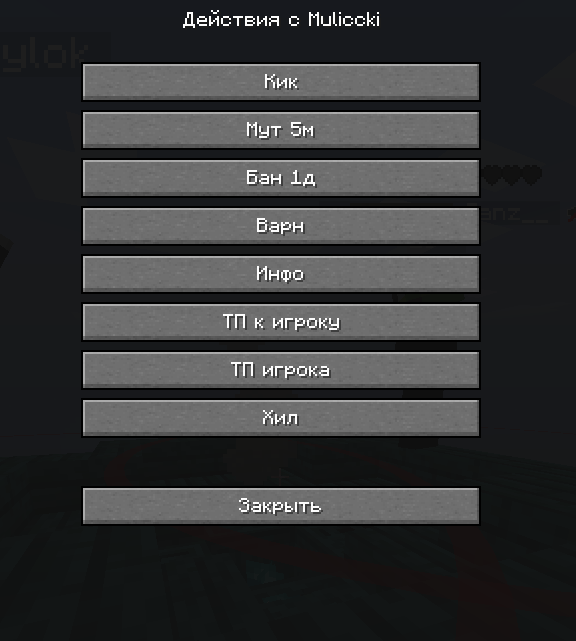
Automatically makes all nicknames in chat clickable and provides quick access to administrative commands.
✨ Key Features
🖱️ Clickable Nicknames
- All nicknames in chat are automatically highlighted in green
- Shift + Left Click - insert nickname into chat field
- Regular Left Click - open player action menu
- Support for nicknames starting with numbers (
2Player,24Admin)
⚙️ Player Action Menu
- Kick -
/kick {player} - Ban -
/ban {player} - Mute -
/mute {player} - Teleport to Player -
/tp {player} - Teleport Player -
/tp {player} spawn - Player Info -
/whois {player} - Warning -
/warn {player} - Private Message -
/msg {player}
🚀 How to Use
- Install the mod in your
modsfolder - Launch the game - mod activates automatically
- Click on nicknames in chat to interact
- Configure commands through the configuration file
📁 Configuration Setup
Configuration file location:
.minecraft/config_player.json
Example configuration:
{
  "showTooltips": true,
  "showCommands": true,
  "buttons": [
    {
      "name": "Kick Player",
      "command": "/kick {player}",
      "description": "Kick player from server"
    },
    {
      "name": "Ban Player",
      "command": "/ban {player}",
      "description": "Ban player permanently"
    }
  ]
}
🔧 Adding Custom Commands:
- Open the
config_player.jsonfile - Add a new button to the
buttonsarray:
{
  "name": "Your Command",
  "command": "/your_command {player}",
  "description": "Command description"
}
- Save the file and restart the game
📝 Configuration Parameters:
showTooltips- show tooltips on hovershowCommands- display commands in menu{player}- automatically replaced with player nickname
🎯 Who is this mod for?
- Server Administrators - quick player management
- Helpers & Moderators - convenient moderation tools
- Trainees - simple interface for learning
- Server Owners - increase team efficiency
🔧 Technical Requirements
- Minecraft: 1.21.4
- Mod Loader: Fabric
- Java: 21+
📞 Support & Contact
💬 Telegram Channel
💰 Support Development
Your donations help develop the mod and add new features!
💳 Donation Methods:
🪙 Cryptocurrency (USDT):
9tkTft2E8XqYZVwyQTvgxdph9nkUmK1F5fmGVHXLNyNY
📱 QR Code for Quick Donation:

Scan the QR code with your phone camera for quick donation access
🌟 Features
- ✅ Automatic Detection of all nicknames in chat
- ✅ Smart Filtering - excludes system messages
- ✅ Customizable Commands - add your own actions
- ✅ Intuitive Interface - easy to use
- ✅ High Performance - doesn't affect FPS
- ✅ Compatibility with other mods
📋 Installation Guide
- Download Fabric Loader for Minecraft 1.21.4
- Install Java 21 or newer
- Place the mod file in
.minecraft/mods/folder - Launch the game using Fabric profile
- Configure settings in
config_player.jsonfile
🎮 Usage Examples
For Administrators:
- Quick ban of rule violators with one click
- Teleport to players for inspection
- Instant warning messages
For Helpers:
- Assist newcomers through private messages
- Quick chat moderation
- Gather player information
For Trainees:
- Learn commands through user-friendly interface
- Safe use of administrative functions
- Gradual moderation skill development
📈 Updates
The mod is actively developed! Follow updates in our Telegram channel.
Planned Features:
- Group actions with players
- Extended filter system
- Integration with popular plugins
- Additional administrative commands
🛠️ Advanced Configuration
Custom Button Examples:
{
  "name": "Freeze Player",
  "command": "/freeze {player}",
  "description": "Freeze player movement"
},
{
  "name": "Check Inventory",
  "command": "/invsee {player}",
  "description": "View player inventory"
},
{
  "name": "Heal Player",
  "command": "/heal {player}",
  "description": "Restore player health"
}
Multiple Commands:
You can create buttons that execute multiple commands by using semicolons:
{
  "name": "Full Restore",
  "command": "/heal {player}; /feed {player}; /repair {player}",
  "description": "Heal, feed and repair player items"
}
Screenshots
Gallery


Versions
Files
Relations
Project Relations
More like this
Similar Mods
Suggestions use data such as tags, dependencies, dependents, descriptions, titles, and more to rank how much they overlap with this mod.
On ModDex
Community snapshot
By the numbers
Statistics

Want to reach Minecraft players?
We're looking for a server hosting partner to feature here and other parts of the site. Interested? Send us a message!
Get in touchGet it on
Available Platforms
On ModDex
Community snapshot
By the numbers
Statistics
Resources