
Community listing page, reviews here may not be monitored by the author.

Community voices
Reviews
No reviews yet. Be the first to review this project!
Get it on
Available Platforms
Compatibility
Supported Environments
Must be installed on both the client and the server.
About
Project Details
For authors
Embed Badge
If you're the author of this project, you can embed a live badge anywhere that supports HTML or Markdown. It updates automatically whenever ratings change.
Use HTML for any page that supports it, or Markdown for README files and Markdown-based descriptions.
Identifiers
Platform IDs
Resources
External Links
About
Description
ModVerifier🔍
a server and client side Fabric mod for Minecraft servers that allow both Java besides Bedrock Edition players to connect. For server administrators, this tool verifies the mods that Java players use while it allows Bedrock players to join without any interference.
To avoid large amounts of data in the server console, ModVerifier sends connection information to Discord webhooks. With those webhooks, staff members can see in real time which players are joining and which modifications the players are using.
On servers that use Geyser or Floodgate for cross play, administrators must manage different types of users. Java players can use powerful client side mods that might break server rules. In contrast Bedrock players use mobile devices or consoles that do not have mod folders.
ModVerifier manages those two environments in specific ways
For Java Players - It checks the list of client side mods when a player connects so that the server remains fair and the mod usage is clear.
For Bedrock Players - It identifies the platform and does not perform a check, which allows the players to join immediately. By doing this the mod avoids sending extra data packets or causing players to lose their connection.
ModVerifier exists within the network login pipeline of the server so that it can manage connections
The Handshake & Platform Check When a player starts a connection, ModVerifier intercepts the login event. It
Who is this for? (Important Note)
ModVerifier is specifically designed for small, private servers and tight-knit friend groups.
It is not meant for large public networks with hundreds of players at once. Since it uses direct Discord webhooks and external avatar APIs for each connection, using this on a big public server could quickly hit Discord's rate limits and create unwanted network congestion.
If you run a friendly survival server, a private SMP, or a community hub for your friends to play Java and Bedrock together, this mod is perfect for you!
Setting up ModVerifier on your private server only takes a few minutes. Follow these simple steps to get it running:
Step 1: Install the Mod Download the ModVerifier .jar file.
Drop the file into your server's mods folder and your client's mods folder.
Note: Make sure you also have Fabric API and Floodgate (if you are running a cross-play server) installed in your mods folder.
Start your server once to let it generate the configuration files, then stop it.
Step 2: Create a Discord Webhook Open your Discord server and go to the channel settings where you want the connection reports to appear.
Navigate to Integrations -> Webhooks -> Create Webhook.
Customize the default name if you like, and click Copy Webhook URL.
Step 3: Configure the Mod Go to your server files and open the config folder.
Locate and open the file named mod_verifier.json.
Paste your Discord Webhook URL inside the quotation marks next to "discordWebhookUrl". It should look like this:
JSON { "discordWebhookUrl": "https://discord.com/api/webhooks/your-copied-url-here" }
Screenshots
Gallery
-
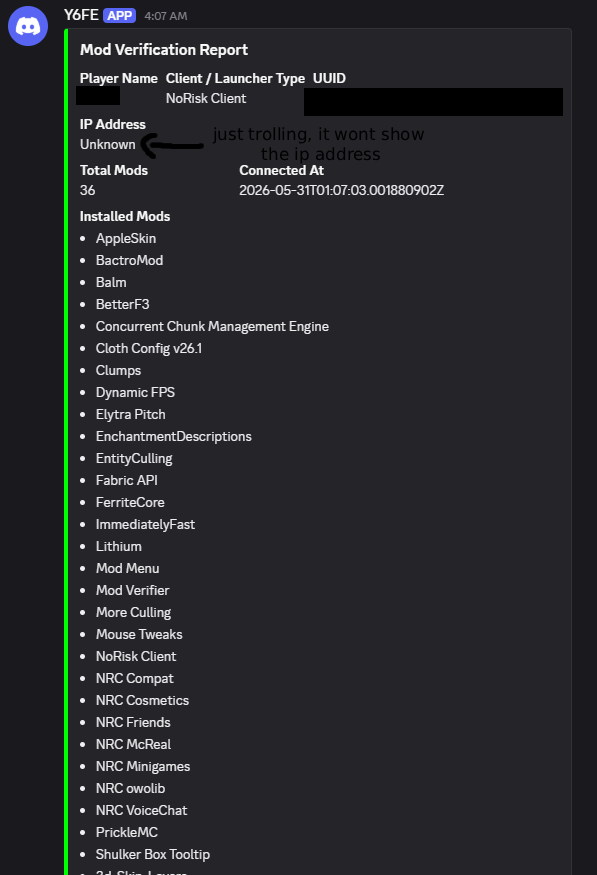 what will you see after the setup:
 -
 ModVerifier
Versions
Files
Relations
Project Relations
More like this
Similar Mods
Suggestions use data such as tags, dependencies, dependents, descriptions, titles, and more to rank how much they overlap with this mod.
On ModDex
Community snapshot
By the numbers
Statistics

Want to reach Minecraft players?
We're looking for a server hosting partner to feature here and other parts of the site. Interested? Send us a message!
Get in touchGet it on
Available Platforms
On ModDex
Community snapshot
By the numbers
Statistics
Resources