
MonServer
No reviews yet
Control what discord status is sent to players status!
Fabric is a mod loader for versions 1.14+ of Minecraft, particularly popular for client side and optimization mods.
Paper is a fork of Spigot that adds its own plugin API on top of the Bukkit API. All Spigot plugins are compatible with paper, not all paper plugins are compatible with Spigot.
Spigot is a popular software for running dedicated servers that can load Plugins created with the Bukkit API.
Community voices
Reviews
Click once to include, again to exclude, again to clear
No reviews yet. Be the first to review this project!
Get it on
Available Platforms
 Modrinth
Compatibility
Supported Environments
About
Project Details
For authors
Embed Badge
If you're the author of this project, you can embed a live badge anywhere that supports HTML or Markdown. It updates automatically whenever ratings change.
Use HTML for any page that supports it, or Markdown for README files and Markdown-based descriptions.
Identifiers
Platform IDs
About
Description
MonServer is an official addon for the mod Minecraft On Discord that allows server administrators to change what should be showing on the status of players to either reflect the server's branding or to hide the IP and Name, if used on an SMP
This works for players with Minecraft On Discord v0.1.3 or above

Default config file
# WARNING: Changing ANY of these settings will modify the discord status shown to players
# Doing so may make people's status not available to use when they are on your server
# But this also WILL alert the users when they join that you are changing these settings
settings:
  # The Custom Application ID
  # This sets the Discord Application ID that players will use specifically when they connect to your server.
  #
  # To get one:
  # 1. Go to https://discord.com/developers/applications
  # 2. Create a "New Application"
  # 3. Copy the "Application ID" and paste it below
  #
  # If this value is left blank (""), the client will use either the mod's built-in default ID
  # or the custom ID the player has manually set in their own mod config.
  #
  # Default: "" (Blank to usually prevent any errors)
  discord-client-id: ""


  # Details and State
  # These settings below define the text shown in the player's Discord Rich Presence
  # below the application's title, so when players join your server, instead of showing
  # generic text like "Playing <Server> (Multiplayer)", "<IP Address>", you can
  # edit it to reflect your branding, something like "Playing on My Awesome Server" or
  # "Online: 5/20 players", this works with PlaceholderAPI to show dynamic values

  # Details
  # This defines the text appearing below the application name, this can give examples of "Playing on Server Name"
  details: "Playing on Server Name"

  # State
  # This defines the text appearing below the details, this can give examples of "Online: 5/20"
  state: "Online: %server_online%/%server_max_players%"

  # Privacy Settings

  # If true, this hides the actual Server IP/Address in the player's status.
  # This is useful for protecting server privacy and preventing accidental exposure
  # of private server details in public profiles.
  hide-ip: false

  # If true, this hides the detected Server Name (from the server list of the client).
  # If enabled, the default status will show as "Playing Multiplayer" unless you override
  # it with the 'details' setting above. This is useful when you want to keep the server name
  # private but still show the player’s activity.
  hide-server-name: false

  # Button Settings
  # These settings allow you to configure custom buttons that appear on the player's profile
  # while they are playing on your server.
  #
  # IMPORTANT: If 'enable' is set to true, these buttons will override any buttons the player
  # has configured in their own local settings, This effectively forces these buttons to appear.
  buttons:

    # Set to true to enable server-controlled buttons.
    # If false, the player's local button settings (if any) will be used.
    enable: false

    # Button 1 Configuration
    button-1:
      # The text displayed on the first button (Max 32 characters)
      label: "SpigotMC"

      # The URL opened when the button is clicked
      # Must start with http:// or https://
      url: "https://www.spigotmc.org/"

    # Button 2 Configuration
    button-2:
      # The text displayed on the second button (Max 32 characters)
      label: "Discord Server"

      # The URL opened when the button is clicked
      # Must start with http:// or https://
      url: "https://discord.gg/changethisinvitewithyourown"
Screenshots
Gallery
-
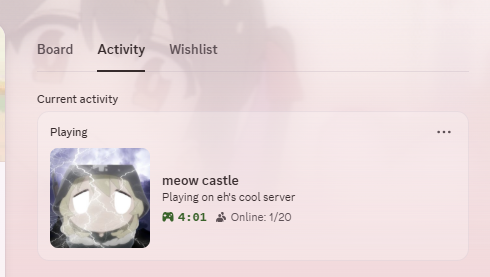 Plugin Showcase
Versions
Files
Relations
Project Relations
More like this
Similar Mods
Suggestions use data such as tags, dependencies, dependents, descriptions, titles, and more to rank how much they overlap with this mod.
On ModDex
Community snapshot
By the numbers
Statistics

Want to reach Minecraft players?
We're looking for a server hosting partner to feature here and other parts of the site. Interested? Send us a message!
Get in touchGet it on
Available Platforms
On ModDex
Community snapshot
By the numbers