Community listing page, reviews here may not be monitored by the author.
More Functional Storage


No reviews yet
Did you ever want... more functional storage? This Functional Storage addon adds breaker upgrades, placer upgrades and more

Community voices
Reviews
No reviews yet. Be the first to review this project!
Get it on
Available Platforms
Compatibility
Supported Environments
Must be installed on both the client and the server.
About
Project Details
For authors
Embed Badge
If you're the author of this project, you can embed a live badge anywhere that supports HTML or Markdown. It updates automatically whenever ratings change.
Use HTML for any page that supports it, or Markdown for README files and Markdown-based descriptions.
Identifiers
Platform IDs
About
Description
This is a Functional Storage addon that adds drawer upgrades with more advanced functionality.
Breaker Upgrade
Breaks blocks and places them in the drawer. Requires a tool inserted in the upgrade (durability is not consumed).
Placer Upgrade
Places blocks from the drawer.
Refill Upgrade
Refills the player's hotbar, inventory or ender chest with items from the drawer. Will only refill slots with at least one item. Use the dimensional variant for it to work cross dimensionally.
Stonecutting Upgrade
Stonecuts items from the drawer automatically. The stonecutting output can be configured via the filter. Therefore, a tag filter can be used to for example turn any stones into stairs by matching on the stairs tag.
The direction of the upgrades can be configured in the GUI using the arrow button.
All upgrades added by this mod have a base processing time (usually once every 3 seconds) which can be reduced via Speed Upgrade Augments (placing the maximum 6 augments will make the upgrade work every tick).
Upgrade GUIs can be accessed by placing the upgrade in a drawer's utility slot, hovering over it and then right clicking. There you can configure the upgrade (redstone control, slot selection, filtering, augments etc.).
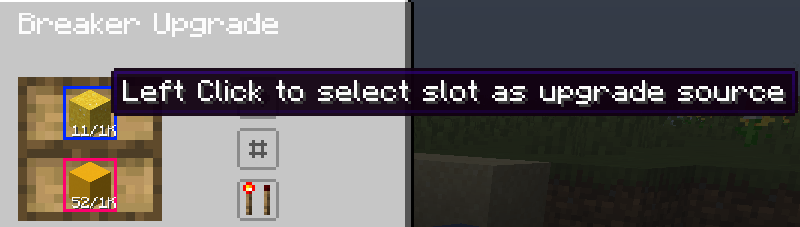
Upgrades have redstone control which makes them work only if the power the drawer receives meets the configured criteria. The slots with which an upgrade interacts can be selected on a per-upgrade basis by clicking them:
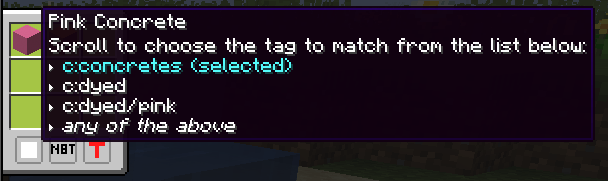
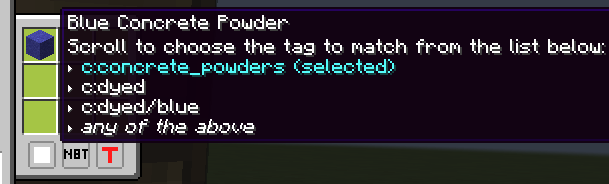
Filtering is also supported, in a panel opened by clicking the second button (the one below the direction button). The filters support blacklisting or whitelisting, matching NBT strictly or matching based on tags (see the image below)
More upgrades will be added in the future!
Example setups
Making concrete from powder
To make a drawer convert concrete powder into wet concrete, you will need a Placer Upgrade, a Breaker Upgrade and a pickaxe (iron suffices). Place a 2x2 drawer and a Water source one block apart. For the purposes of this example, the water is placed to the right.
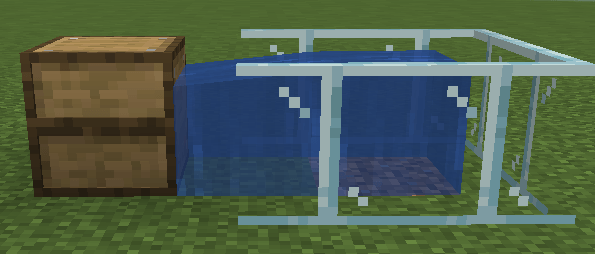
Next, insert the placer upgrade in the drawer, hover over it and right click it:
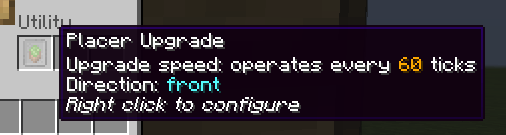
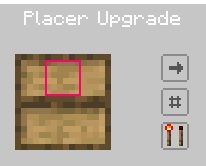
Right click the second slot on the left to deselect the bottom drawer slot and prevent the placer from placing from it. Click the arrow button until it points in the direction of the water block (right in my case).
Next, open the filter panel. Click the T button to enable tag matching and place a concrete powder block in the filter (any colour). Hover over it and scroll until you select the c:concrete_powders tag.
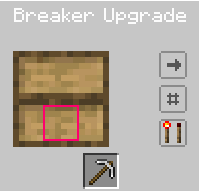
Now exit the placer upgrade and insert a Breaker Upgrade. Open its GUI and place the pickaxe in the middle slot at the bottom. Click the first drawer slot to prevent wet concrete from being placed there and point the arrow towards your water block (again, right in my case).
Next, open the filters. Click the T button to enable tag matching and place a concrete block in the filter (any colour). Hover over it and scroll until you select the c:concretes tag.
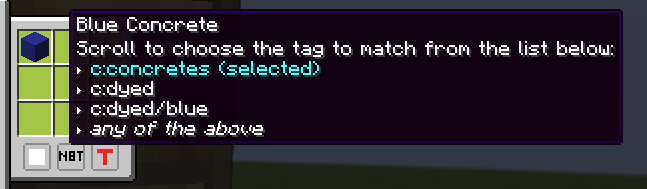
And that's it! Now you may place concrete powder of any colour in the first slot and see the drawer place it against the water and break it when it converts to wet concrete until you ran out of powder. The final concrete will be placed in the second slot.
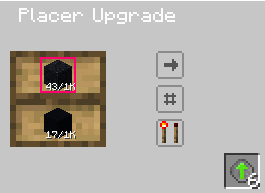
By default, this setup will convert a powder every 3 seconds. You may make it faster (up to 20 powder blocks a second!) by inserting Speed Upgrade Augments in the bottom right slot of both upgrades:
This is a Functional Storage addon that adds drawer upgrades with more advanced functionality.
Breaker Upgrade
Breaks blocks and places them in the drawer. Requires a tool inserted in the upgrade (durability is not consumed).
Placer Upgrade
Places blocks from the drawer.
Refill Upgrade
Refills the player's hotbar, inventory or ender chest with items from the drawer. Will only refill slots with at least one item. Use the dimensional variant for it to work cross dimensionally.
Stonecutting Upgrade
Stonecuts items from the drawer automatically. The stonecutting output can be configured via the filter. Therefore, a tag filter can be used to for example turn any stones into stairs by matching on the stairs tag.
The direction of the upgrades can be configured in the GUI using the arrow button.
All upgrades added by this mod have a base processing time (usually once every 3 seconds) which can be reduced via Speed Upgrade Augments (placing the maximum 6 augments will make the upgrade work every tick).
Upgrade GUIs can be accessed by placing the upgrade in a drawer's utility slot, hovering over it and then right clicking. There you can configure the upgrade (redstone control, slot selection, filtering, augments etc.).
Upgrades have redstone control which makes them work only if the power the drawer receives meets the configured criteria. The slots with which an upgrade interacts can be selected on a per-upgrade basis by clicking them:
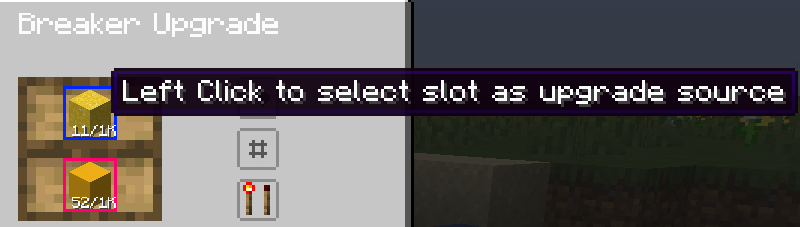
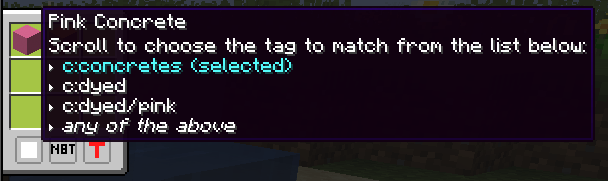
Filtering is also supported, in a panel opened by clicking the second button (the one below the direction button). The filters support blacklisting or whitelisting, matching NBT strictly or matching based on tags (see the image below)
More upgrades will be added in the future!
Screenshots
Gallery
Versions
Files
Relations
Project Relations
More like this
Similar Mods
Suggestions use data such as tags, dependencies, dependents, descriptions, titles, and more to rank how much they overlap with this mod.
- More Functional Storage Upgrade
- Functional Storage Downgrade Fix
- Functional Aether
- Compatibility addon for MineColonies
- Crafting Station: J/EMI Edition Updated
- More Functional Storage Upgrades for ExNihilo
- Functional Storage
- Aesthetic Storage
- Minekea (Fabric/NeoForge)
- More Flux Storage
- Phone Stuff
- Emerald But More Functional
On ModDex
Community snapshot
By the numbers
Statistics
 (opens in a new tab)
Get it on
Available Platforms
On ModDex
Community snapshot
By the numbers