
Community listing page, reviews may not be monitored by the author.


Community voices
Reviews
No reviews yet. Be the first to review this project!
Get it on
Available Platforms
Compatibility
Supported Environments
Works in singleplayer only; does not function in multiplayer.
About
Project Details
For authors
Embed Badge
If you're the author of this project, you can embed a live badge anywhere that supports HTML or Markdown. It updates automatically whenever ratings change.
Use HTML for any page that supports it, or Markdown for README files and Markdown-based descriptions.
Identifiers
Platform IDs
About
Description
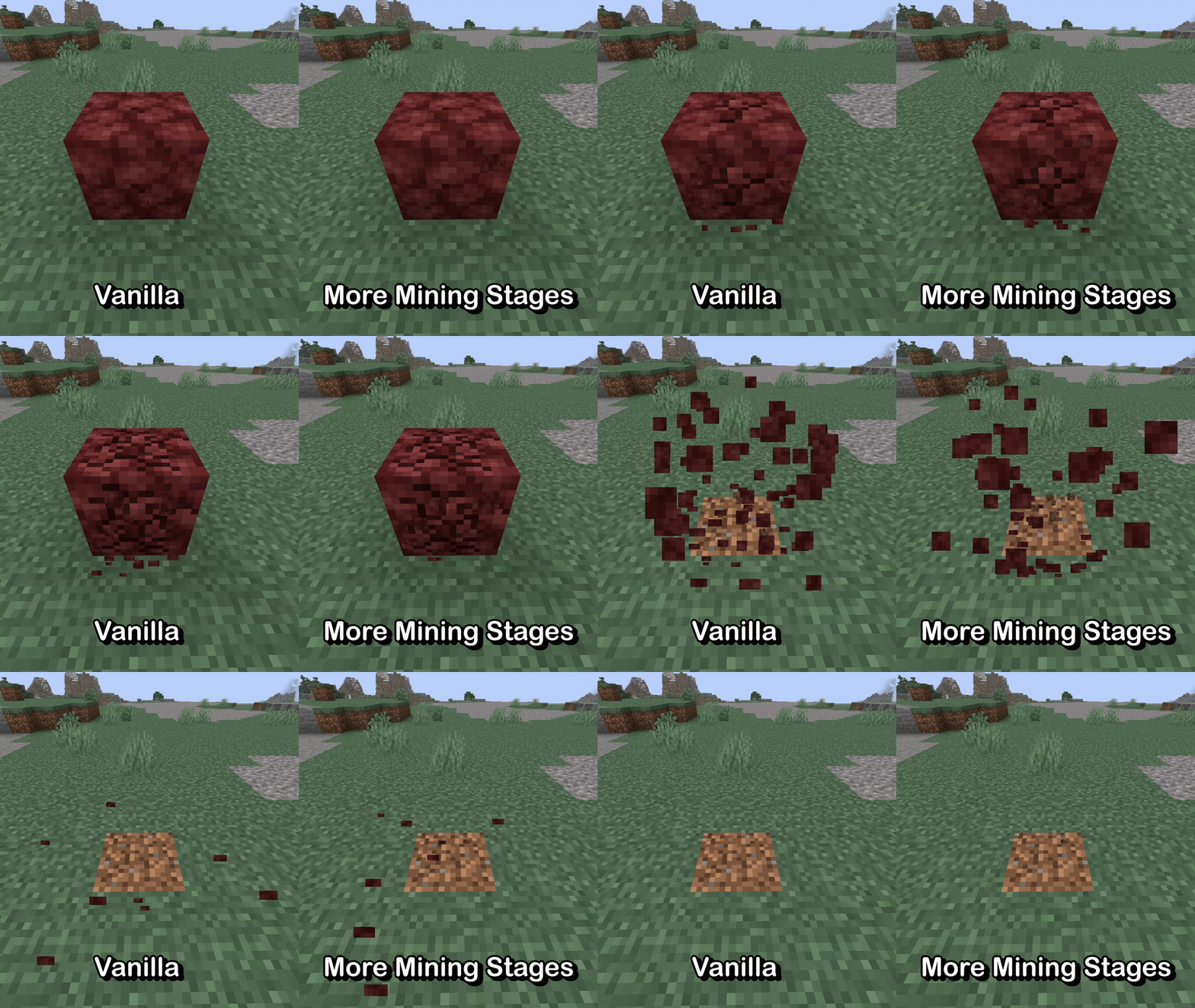


More Mining Stages allows for full, resource-driven customization of the block breaking animation! It also contains a built-in resource pack which doubles the number of frames in the animation in a very vanilla-friendly style.
📂 Resource Pack Guide
Making a resource pack for More Mining Stages is very, very easy.
Under your assets/ directory, add a new folder called moreminingstages. Create a new JSON file inside that folder, and call it mining_stages. That file should have a single array object inside named "textures" which contains a list of texture locations.
In the following example, 3 frames have been added to the array. You can add as many frames as you'd like here: they will spread out evenly across the entire mining animation.
{
  "textures": [
    "block/destroy_stage_0", // vanilla reference with implicit namespace
    "minecraft:block/destroy_stage_1", // vanilla reference with explicit namespace
    "example_pack:my_texture" // non-vanilla reference for outside textures/block/
    // ...
  ]
}
🪟 Order-Independent Transparency
Since 26.3, each texture must also have a counterpart for translucent blocks (e.g. stained glass) when Improved Transparency is enabled in the video settings.
More Mining Stages handles this by expecting textures at the same specified locations with the suffix _oit. If you'd like to specify unique paths instead, you can use the following syntax in place of the simple string:
{
  "textures": [
    {
      "texture": "example_pack:first_texture",
      "texture_oit": "example_pack:first_oit_texture"
    },
    {
      "texture": "example_pack:second_texture",
      "texture_oit": "example_pack:second_oit_texture"
    },
    "example_pack:third_texture_with_suffixed",
    // ...
  ]
}
Note that the file for vanilla Minecraft uses this because its OIT textures are named destroy_oit_stage_<index> and not destroy_stage_<index>_oit. It was handled this way for 3 reasons:
- To be more convenient for resource pack developers
- To be easier to update resource packs from 26.2
- To provide resource packs with additional backwards compatibility for 26.2
Screenshots
Gallery
Versions
Files
Relations
Project Relations
More like this
Similar Mods
Suggestions use data such as tags, dependencies, dependents, descriptions, titles, and more to rank how much they overlap with this mod.
On ModDex
Community snapshot
By the numbers
Statistics


Get it on
Available Platforms
On ModDex
Community snapshot
By the numbers