
Community listing page, reviews may not be monitored by the author.
MoreGameRules

No reviews yet
MoreGameRules is a lightweight, server-side Fabric mod that adds extra gamerules to Minecraft, giving you more control over world mechanics, block interactions, and mob behavior.

Community voices
Reviews
No reviews yet. Be the first to review this project!
Get it on
Available Platforms
About
Project Details
For authors
Embed Badge
If you're the author of this project, you can embed a live badge anywhere that supports HTML or Markdown. It updates automatically whenever ratings change.
Use HTML for any page that supports it, or Markdown for README files and Markdown-based descriptions.
Identifiers
Platform IDs
About
Description

MoreGameRules
MoreGameRules is a lightweight, server-side Fabric mod that adds extra gamerules to Minecraft, giving you more control over world mechanics, block interactions, and mob behavior.
All gamerules are disabled by default, meaning Minecraft behaves normally until you choose to enable other behavior.
Installation
- Install Minecraft 26.2 with Fabric Loader.
- Install the compatible Fabric API version.
- Download MoreGameRules.
- Place the MoreGameRules JAR in your
modsfolder. - Launch Minecraft and configure your gamerules!
⭐ Features
- Adds many new gamerules for finer control over Minecraft.
- Adds
/mgrcommand to replace/gamerule moregamerules:. - Customize world mechanics, block behavior, and mob interactions independently.
- All gamerules are disabled by default, preserving vanilla behavior.
- Server-side only. Players do not need to install the mod to join a server using MoreGameRules.
- No configuration files required; everything is controlled through Minecraft's
/gamerulecommand. - Gamerules can be changed at any time without restarting the server.
Available Gamerules
All gamerules use the moregamerules: namespace and accept true or false.
Setting a gamerule to true disables the specified mechanic. Setting it to false restores normal vanilla behavior.
World & Environment
| Gamerule | Description |
|---|---|
disable_spruce_podzol |
Prevents large spruce trees from converting nearby grass and dirt into podzol. |
disable_ice_formation |
Prevents water from naturally freezing into ice. |
disable_bamboo_growth |
Prevents bamboo from growing naturally. |
disable_leaf_decay |
Prevents leaves from naturally decaying when no longer connected to logs. |
disable_grass_spread |
Prevents grass blocks from spreading to nearby dirt. |
disable_mycelium_spread |
Prevents mycelium from spreading to nearby dirt. |
disable_coral_death |
Prevents coral blocks, fans, and wall fans from dying when outside water. |
Blocks & Redstone
| Gamerule | Description |
|---|---|
disable_farmland_trampling |
Prevents farmland from turning into dirt when entities jump or fall onto it. |
disable_concrete_hardening |
Prevents concrete powder from hardening into concrete when touching water. |
disable_copper_oxidation |
Prevents copper blocks from naturally oxidizing over time. |
disable_piston_block_breaking |
Prevents pistons from breaking blocks during movement. |
disable_observer_updates |
Prevents observers from producing redstone pulses when detecting block updates. |
disable_tnt_block_damage |
Prevents TNT explosions from destroying blocks while preserving their other effects. |
Mobs
| Gamerule | Description |
|---|---|
disable_enderman_griefing |
Prevents endermen from picking up and placing blocks. |
disable_creeper_block_damage |
Prevents creeper explosions from destroying blocks while still allowing them to damage entities. |
disable_ghast_block_damage |
Prevents ghast fireball explosions from destroying blocks. |
disable_ghast_fire |
Prevents ghast fireball explosions from creating fire. |
disable_slime_spawning |
Prevents slimes from spawning naturally. |
disable_drowned_conversion |
Prevents zombies from converting into drowned when submerged in water. |
disable_zombie_villager_conversion |
Prevents zombies from converting villagers into zombie villagers. |
disable_zombie_door_breaking |
Prevents zombies from breaking wooden doors. |
disable_villager_crop_harvesting |
Prevents villagers from harvesting crops on farmland. |
disable_fox_item_pickup |
Prevents foxes from picking up dropped items. |
disable_wolf_teleporting |
Prevents tamed wolves from teleporting to their owners. |
disable_cat_teleporting |
Prevents tamed cats from teleporting to their owners. |
Items & Players
| Gamerule | Description |
|---|---|
disable_anvil_damage |
Prevents anvils from degrading or breaking through normal use, while preserving falling-anvil damage. |
disable_anvil_too_expensive |
Removes the anvil's 40-level Too Expensive! restriction while preserving XP costs. |
disable_item_despawn |
Prevents dropped items from naturally despawning after five minutes. |
disable_experience_despawn |
Prevents experience orbs from naturally despawning after five minutes. |
disable_hunger |
Prevents players from losing hunger and saturation through exhaustion. |
disable_tool_durability |
Prevents swords, pickaxes, axes, shovels, and hoes from losing durability. |
disable_elytra_durability |
Prevents elytra from losing durability during use. |
Commands
| Gamerule | Description |
|---|---|
disable_mgr_command |
Disables the /mgr command without affecting the gamerules themselves. |
Using the /mgr Command
MoreGameRules includes a server-side /mgr command that provides a shorter way to view and change its gamerules.
Instead of typing:
/gamerule moregamerules:disable_elytra_durability true
You can simply use:
/mgr disable_elytra_durability true
You can also check a gamerule's current value:
/mgr disable_elytra_durability
The /mgr command uses the same permission requirements as Minecraft's /gamerule command.
To disable the shortcut:
/mgr disable_mgr_command true
To re-enable it, use the vanilla command:
/gamerule moregamerules:disable_mgr_command false
All gamerules are disabled by default, preserving vanilla Minecraft behavior until explicitly enabled.
Configuration
MoreGameRules uses Minecraft's built-in /gamerule command. No external configuration files are needed.
For example, to prevent creepers from destroying blocks:
/gamerule moregamerules:disable_creeper_block_damage true
To prevent copper from oxidizing:
/gamerule moregamerules:disable_copper_oxidation true
To prevent tamed wolves from teleporting:
/gamerule moregamerules:disable_wolf_teleporting true
To restore normal behavior, set the corresponding gamerule to false:
/gamerule moregamerules:disable_wolf_teleporting false
All gamerules are set to false by default. You can enable only the mechanics you want to change.
Gamerule settings are saved with your world and persist across restarts.
Server-Side Support
MoreGameRules is designed to run entirely on the server.
- Works in singleplayer and on dedicated Fabric servers.
- Players can connect using an unmodified vanilla client, so no client-side installation is required.
- Gamerules are managed by server operators or players with the appropriate permissions.
Bug Reports & Suggestions
If you encounter a bug, please open an issue in the GitHub Issues section, or report them on my Discord. Suggestions are also heavily appreciated.
When reporting a bug, please include:
- Your NoMorePodzol version
- Your Minecraft version
- Steps to reproduce the issue
- Relevant logs or screenshots, if available
Screenshots
Gallery
-
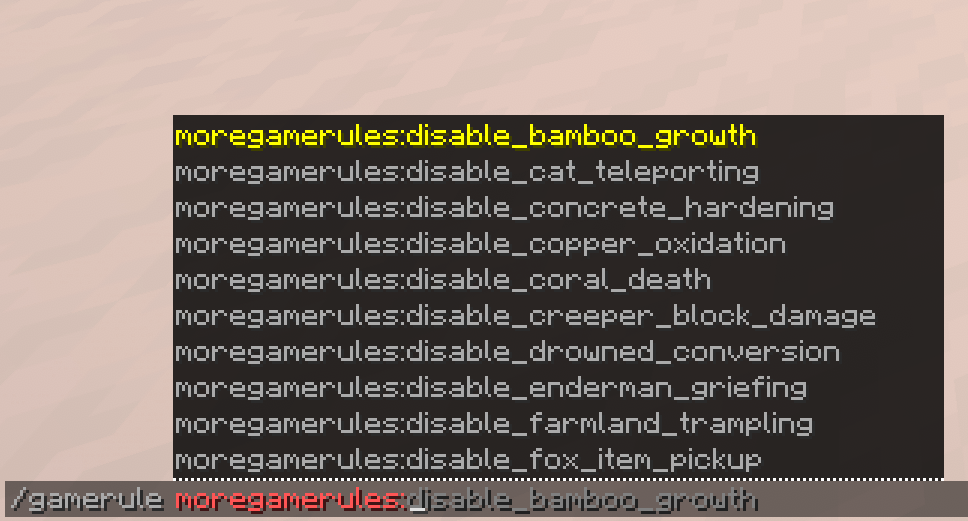 gamerules.png gamerules.png
Versions
Files
Relations
Project Relations
More like this
Similar Mods
Suggestions use data such as tags, dependencies, dependents, descriptions, titles, and more to rank how much they overlap with this mod.
On ModDex
Community snapshot
By the numbers
Statistics

Get it on
Available Platforms
On ModDex
Community snapshot
By the numbers