
Community listing page, reviews here may not be monitored by the author.
MPKMod 2

No reviews yet
A client side mod that adds many minecraft parkour related features and overlays
Community voices
Reviews
No reviews yet. Be the first to review this project!
Get it on
Available Platforms
Compatibility
Supported Environments
Runs entirely on the client. Works on vanilla servers.
About
Project Details
For authors
Embed Badge
If you're the author of this project, you can embed a live badge anywhere that supports HTML or Markdown. It updates automatically whenever ratings change.
Use HTML for any page that supports it, or Markdown for README files and Markdown-based descriptions.
Identifiers
Platform IDs
About
Description
MPK Mod


MPK Mod is a minecraft mod that adds some features for minecraft parkour to your client. It's a client side only mod, that means it can be used on any server.
MPK Mod 2 is a complete rewrite of version 1, so don't expect it to work the same way.
Most of the original features do exist in version 2, but version 2 does NOT have commands for example.
An explanation for how to use the mod can be found below in the Using the mod section.
If you think that mpkmod should have a specific feature, encounter any bugs or if you need any support regarding the mod, don't hesitate to join the discord server with the invite at the top
Content
Supported versions
I aim to keep the mod updated for the latest version of minecraft.
To use the mod with other versions please check out the ViaFabricPlus project.
Installation
Download the version you want from releases. (See snapshots for how to download a snapshot version)
Then move the mod file (for example mpkmod-2.0.0-pre.9-forge-1.8.9.jar) into your .minecraft/mods folder and start the game to use it.
Using the mod
MPK Mod 2 uses four keybinds which have to be set in minecraft controls.
The MPK Mod GUI is where you can edit the label overlay
Click and drag or select and use the arrow keys to move labels.
Right clicking on an empty space will let you add labels.
Right clicking on a label will let you edit and delete it.
Some labels can be resized by dragging the edge/corner.
Every label that only displays some information as text, like the player position for example is called an InfoLabel.
When you edit an InfoLabel you can see a list of usable InfoVars on the right on the screen and a list of possible colorCodes on the left.
Write either of those inside curly braces: {INFOVAR} or {COLORCODE} to insert that variable: {yaw} or {gold}
A sub-variable of another InfoVar is written with its parent name followed by a dot as the prefix: {pos.x} or {lastLanding.pos.x}.
You can adjust the number of decimals shown for any variable that as a number or a vector by writing ,DECIMALS after the var name: {pos.x,5} will show pos.x with a precision of 5 decimals.
Typing an exclamation point after the number of decimals will force that precision: {pos.x,5!} will show 5.12000 while {pos.x,5} will show 5.12 when pos.x is equal to 5.12
ColorCodes will color all text after it that color: {gold}I'm gold! {lpurple}I'm light purple!.
The Landing Block GUI is where you can edit your current landing blocks
Landing blocks can be set with the keybind set in controls.
The landing mode is Land by default, which will compare the specified bounding box with the player hitbox at the landing tick. This will probably be what you want for any jump where you are trying to land on a block.
Hit will use the player hitbox of the hit tick, which is one tick after the landing tick. You will probably want this when trying to bounce on slime.
Z Neo will use the hitbox of the tick before the landing tick. You will probably want this when trying to land a Z facing neo (or trying to pass a blockage in the direction with less velocity for 1.14+). See the MCPK Wiki article for the reason this is neeeded.
Enter will compare the player hitbox at every tick the player is close to the bounding box. You will probably want this when trying to catch a climbable block like ladders or vines.
[!NOTE]
The Options GUI is where you can set general settings for MPK!
Snapshots
[!IMPORTANT]
GitHub only displays artifacts if you are logged in.
Go to Actions,
click the build you want to download (first is newest) and scroll down to Artifacts.
The zip file (mpkmod.DATE-TIME.zip) will contain the mod jar for every supported version.
Screenshots
Gallery
-
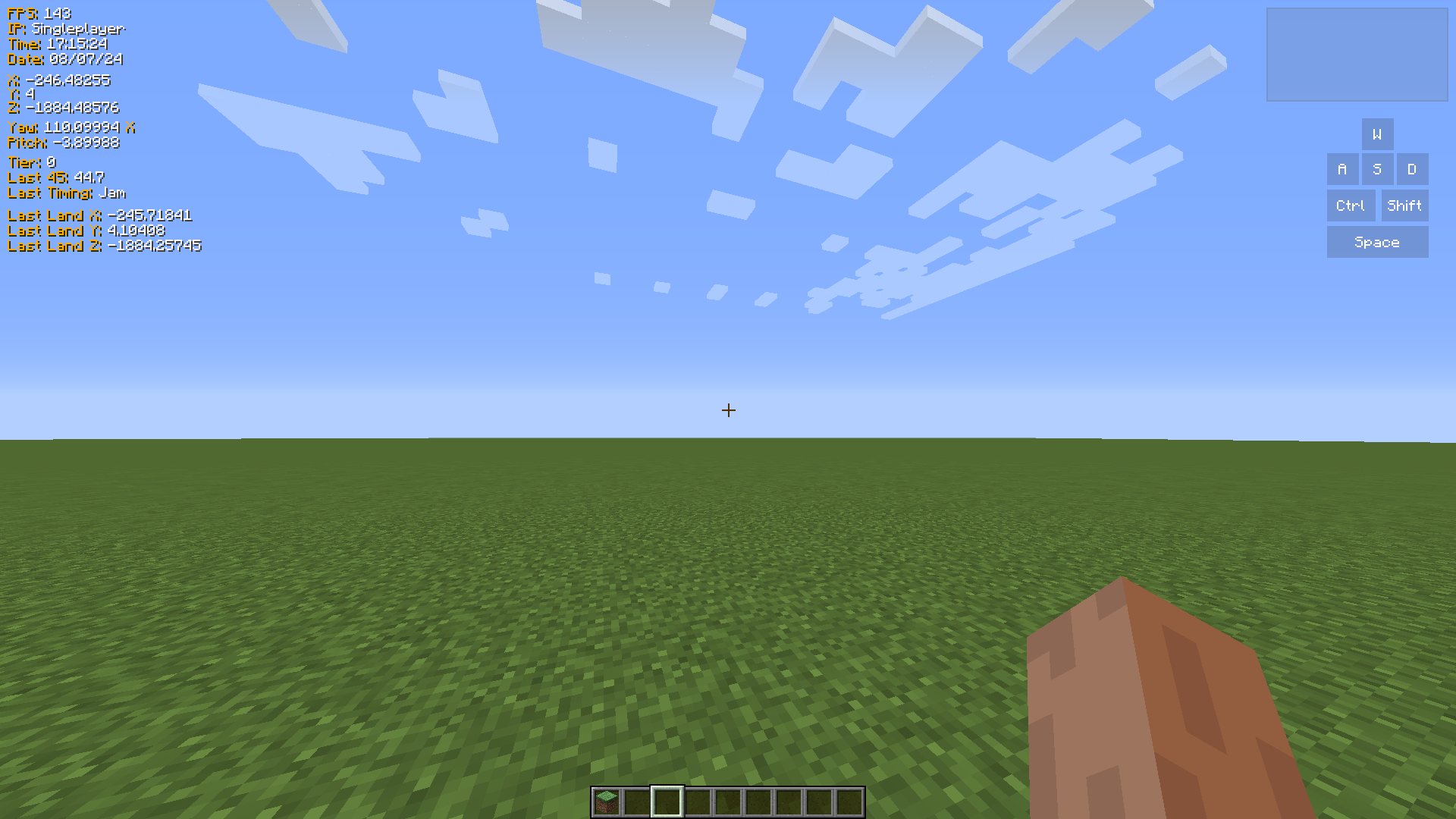 Default Overlay The default overlay you will see when entering the game. Can be fully customized
 -
 Label Edit Screen A label can have any text you want, and will format colors and variables if they exist
 -
 Keystroke Edit Screen You can change color, size, text and the button that triggers keystrokes
 -
 Landing Block Overlay You can set any amount of landing blocks, which will be displayed ingame with a red overlay and list the offsets of your jump attempts in a GUI component, here in the top right corner of the screen
Versions
Files
Relations
Project Relations
More like this
Similar Mods
Suggestions use data such as tags, dependencies, dependents, descriptions, titles, and more to rank how much they overlap with this mod.
On ModDex
Community snapshot
By the numbers
Statistics

Want to reach Minecraft players?
We're looking for a server hosting partner to feature here and other parts of the site. Interested? Send us a message!
Get in touchGet it on
Available Platforms
On ModDex
Community snapshot
By the numbers