
CommandAPI
No reviews yet
An API to use the command UI introduced in Minecraft 1.13
Paper is a fork of Spigot that adds its own plugin API on top of the Bukkit API. All Spigot plugins are compatible with paper, not all paper plugins are compatible with Spigot.
Spigot is a popular software for running dedicated servers that can load Plugins created with the Bukkit API.
Community voices
Reviews
Click once to include, again to exclude, again to clear
No reviews yet. Be the first to review this project!
Get it on
Available Platforms
 Modrinth
Compatibility
Supported Environments
About
Project Details
For authors
Embed Badge
If you're the author of this project, you can embed a live badge anywhere that supports HTML or Markdown. It updates automatically whenever ratings change.
Use HTML for any page that supports it, or Markdown for README files and Markdown-based descriptions.
Identifiers
Platform IDs
About
Description
A Bukkit/Spigot API to use the command UI introduced in Minecraft 1.13
Everything you'll ever need can be found on the GitHub page
What is the CommandAPI?
The CommandAPI provides full support for the new command UI which was implemented in Minecraft's 1.13 update.

Wanna stay up to date? We've got a Discord server!
Brief overview of features
- Better commands - Prevent players from running invalid commands, making it easier for developers
- Better arguments - Automatic argument parsing with built-in validation
- Support for proxied command senders - Run your command as other entities using /execute as ... run command
- Support for the /execute command - Let your command to be executed by the built in /execute command
- Support for Minecraft's functions - Allow your command to be executed from Minecraft's functions and tags
- No plugin.yml registration - Commands don't need to be registered in the plugin.yml file anymore
- No other dependencies - You don't need to import Brigadier in your projects to use the CommandAPI
- No tracking - The CommandAPI doesn't collect any stats about its plugin; what you see is what you get!
Argument type casting
Instead of checking if an argument is an integer after they run the command like this:
onCommand(CommandSender sender, Command command, String label, String[] args) {
    try {
        int i = Integer.parseInt(args[0]);
        // Do something with this number
    catch (NumberFormatException e) {
        // Do something with the fact this isn't a number...
    }
}
You can rest assured that the CommandAPI has inferred whatever type you want and can jump straight to this:
new CommandAPICommand("mycommand")
    .withArguments(new IntegerArgument("myint"))
    .executes((sender, args) -> {
        int i = (int) args.get("myint");
        // Do something with this number
    })
    .register();
The CommandAPI offers over 40 different arguments to tailor to your needs! Automatic casting to Enchantments, EntityTypes, Locations, ItemStacks, PotionEffects and many more!
CommandSender type checks
Never again will you have to check if your sender is a player! The CommandAPI provides automatic command sender checks for all sorts of command senders:
new CommandAPICommand("mycommand")
    .withArguments(arguments)
    .executesPlayer((player, args) -> {
        player.sendMessage("Hi " + player.getDisplayName());
    })
    .register();
Documentation
The latest documentation can be found here. Trust me, you've never, ever seen documentation this good before.
Built-in plugin converter
Bummed that your plugin's commands can't be used with the /execute command and don't know how to write code? The CommandAPI has you covered! With its built-in plugin command conversion system, you can make any plugin command compatible with Minecraft's /execute command and datapacks!
Still not convinced?
Here's what else it can do:
- Parse integers with ranges automatically (force your command to only accept values within a range)
- Handle integer and floating point locations, as well as relative locations using the ~ symbol
- Parse raw JSON and convert it straight into a BaseComponent[]
- Parse online players, with suggestions based on who's online
- Create custom arguments that parse Strings into custom defined objects
- Apply permissions to specific arguments - you need permissions to even see the suggested arguments as well as run it
- Make other plugins that weren't written with the CommandAPI compatible with the /execute command
- Handle results and successes of commands just like you can with command blocks
- Set context-aware suggestions based on what the user has already entered into their command prompt
Need I say more?
Screenshots
Gallery
-
 Argument tooltips Let your users know exactly what their command will do using argument tooltips
 -
 Support for proxied command senders Run your command as other entities using /execute as ... run command
 -
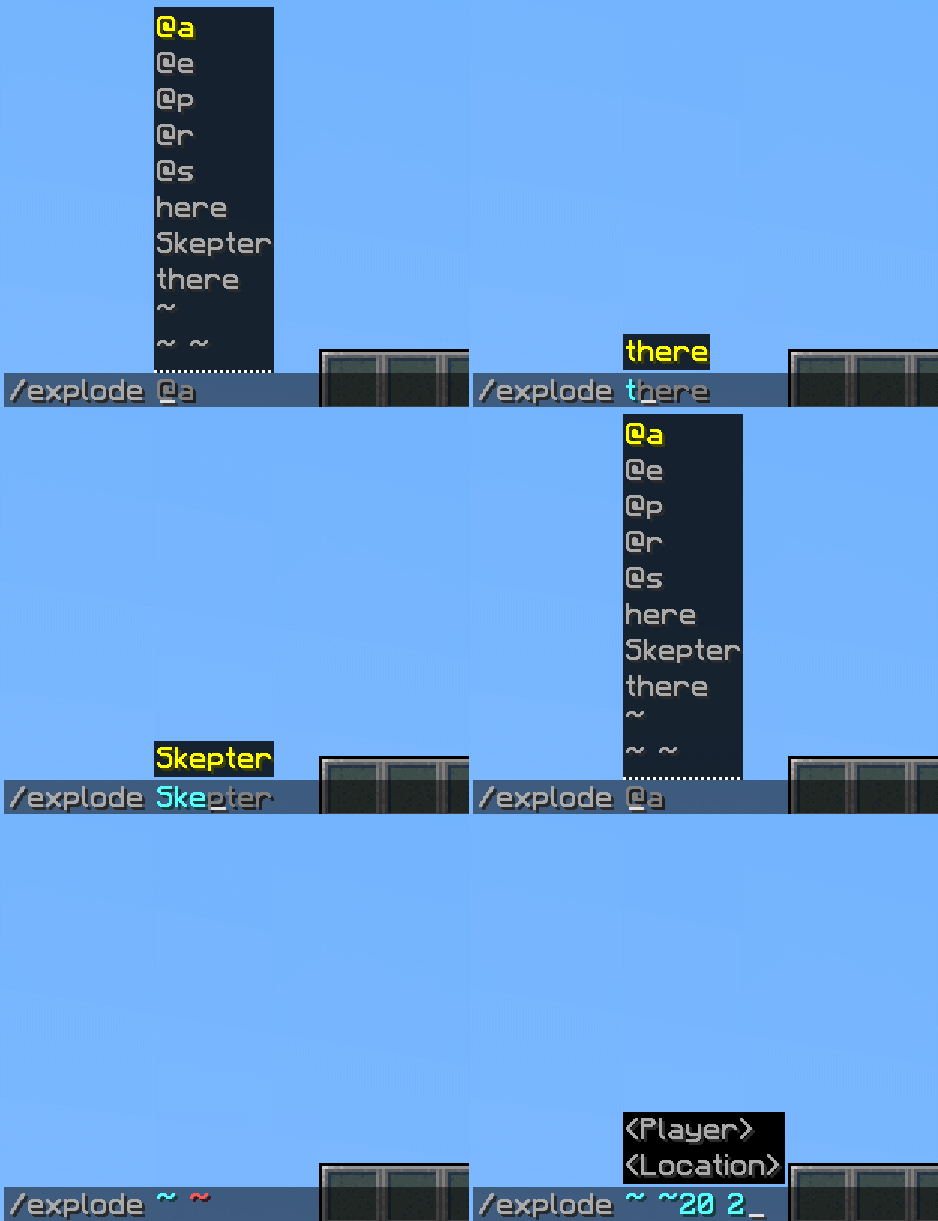 Better arguments Choose from over 50 arguments including location arguments, raw JSON, enchantments, lists, particles... all fully supported with built-in error checking!
Versions
Files
Relations
Project Relations
More like this
Similar Mods
Suggestions use data such as tags, dependencies, dependents, descriptions, titles, and more to rank how much they overlap with this mod.
On ModDex
Community snapshot
By the numbers
Statistics

Want to reach Minecraft players?
We're looking for a server hosting partner to feature here and other parts of the site. Interested? Send us a message!
Get in touchGet it on
Available Platforms
On ModDex
Community snapshot
By the numbers