
maze mod
No reviews yet
An advanced Minecraft maze generator with themes, life rooms, timed resets, exits control, and deep gameplay customization.
Features small, self-contained games within Minecraft.
Forge is a popular mod loader for versions 1.1+ of Minecraft.
Neoforge is a fork of the Minecraft Forge available for versions 1.20.1+ of Minecraft. Many Forge mods are compatible with Neoforge and vice versa.
Fabric is a mod loader for versions 1.14+ of Minecraft, particularly popular for client side and optimization mods.
Community voices
Reviews
Click once to include, again to exclude, again to clear
No reviews yet. Be the first to review this project!
Get it on
Available Platforms
 Modrinth
Compatibility
Supported Environments
About
Project Details
For authors
Embed Badge
If you're the author of this project, you can embed a live badge anywhere that supports HTML or Markdown. It updates automatically whenever ratings change.
Use HTML for any page that supports it, or Markdown for README files and Markdown-based descriptions.
Identifiers
Platform IDs
Resources
External Links
About
Description
Maze Mod
A Minecraft mod that generates random mazes with configurable settings, including life rooms, chests, and difficulty parameters. This version features a comprehensive GUI for maze management and customization.
Features
- Maze Generation: Creates random mazes with adjustable dimensions and complexity.
- GUI Control Panel: A tabbed interface to manage maze settings without using commands.
- Multi-Version Support: Compatible with Minecraft 1.16.5, 1.18.2, 1.19.4, and 1.20.1.
- Network Sync: Real-time synchronization of maze states between client and server.
- HUD Integration: In-game hints for maze controls and status.
Installation
- Download the mod JAR file.
- Place it in your Minecraft
modsfolder. - Launch Minecraft with Forge for the corresponding version.
Usage
Controls
- Press M to open the Maze Control Panel.
- Use the < and > arrows to navigate between the 4 tabs.
Tabs
-
Maze Setup:
- Set Position 1 & 2 using in-game buttons.
- Adjust Height, Wall Width, and Path Width.
- Configure Life Room, Roof, Center Room, Torches, and Exits.
- Choose Wall Color and Floor Color.
- Select a Theme.
-
Advanced Settings:
- Set Timer, Zombie Count, and Chest Count.
- Adjust Stone Chance and Erosion.
- Configure Life Room Chest Count (LRCC).
- Toggle Loot Drops, Mob Spawning, and Life Chests.
-
Actions:
- Create, Rebuild, Refresh, or Delete Mazes.
- Start, Stop, or Reset the Timer.
- Reset Wins and Clear Positions.
- List Mazes and Positions.
- Apply Settings (Timer, Zombie Count, Chest Count).
-
GUI Customization:
- Adjust GUI Scale (50%–150%).
- Modify Background Opacity.
- Change Text Color.
Commands
While the GUI is the primary control method, the following commands are available:
/maze - Press M: Opens the Maze Control Panel./maze - List Mazes: Lists all created mazes./maze - List Positions: Lists all saved positions./maze - Clear Positions: Clears all saved positions./maze - Reset Wins: Resets the win counter./maze - Delete <name>: Deletes a maze by name./maze - Rebuild <name>: Rebuilds a maze by name./maze - Refresh <name>: Refreshes a maze by name./maze - Start <name>: Starts a maze by name./maze - Stop <name>: Stops a maze by name./maze - Reset <name>: Resets a maze by name./maze - Apply <name> <timer> <zombie_count> <chest_count>: Applies settings to a maze.
API Compatibility
| Version | Button API | Render API | Component API | Send Command |
|---|---|---|---|---|
| 1.20.1 | Button.builder().build() |
GuiGraphics |
Component.literal() |
connection.sendCommand() |
| 1.19.4 | Button.builder().bounds().build() |
PoseStack |
Component.literal() |
connection.sendCommand() |
| 1.18.2 | new Button(x,y,w,h,text,onPress) |
PoseStack |
new TextComponent() |
player.chat("/cmd") |
| 1.16.5 | new Button(x,y,w,h,text,IPressable) |
MatrixStack |
new StringTextComponent() |
player.chat("/cmd") |
License
MIT License
Screenshots
Gallery
-
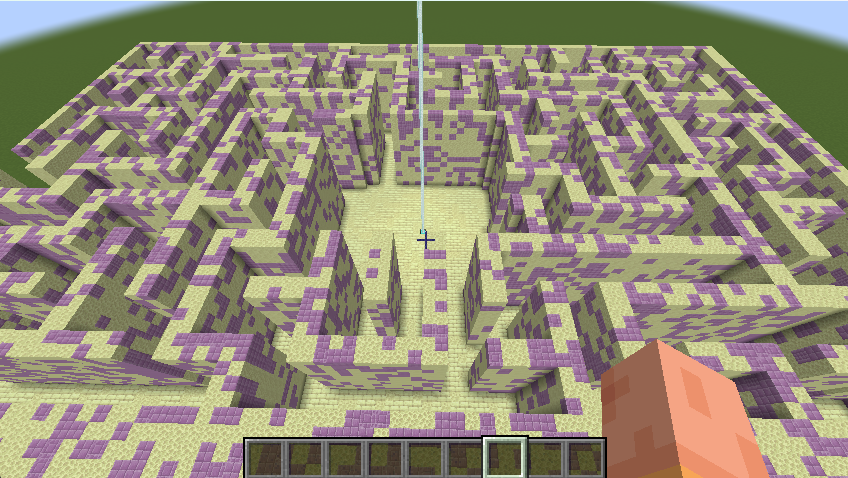 theme theme end . maze_theme.yml
 -
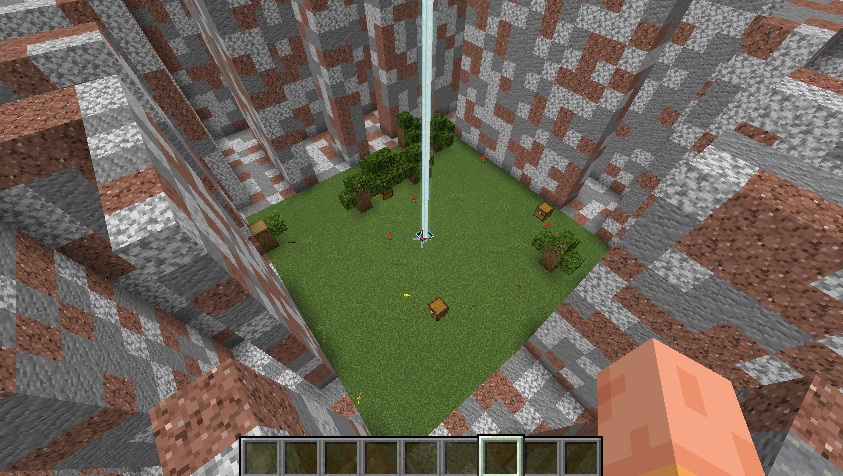 life room L:true
 -
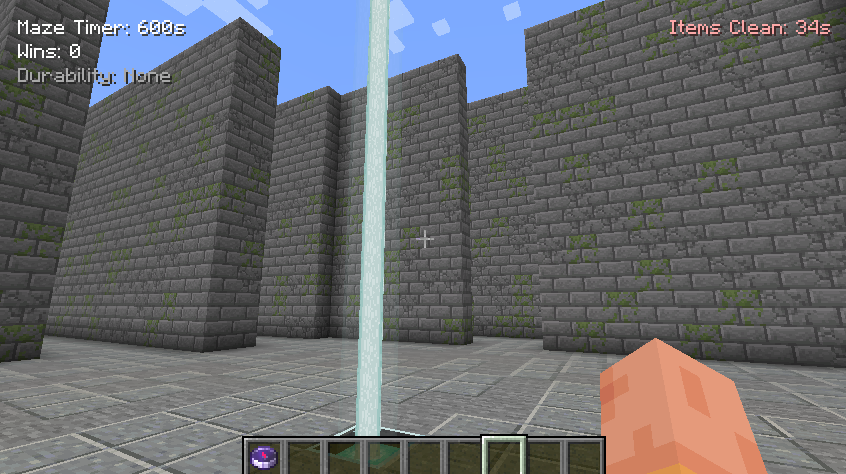 maze cool maze with maze timer,wins,durability and items cleaner
 -
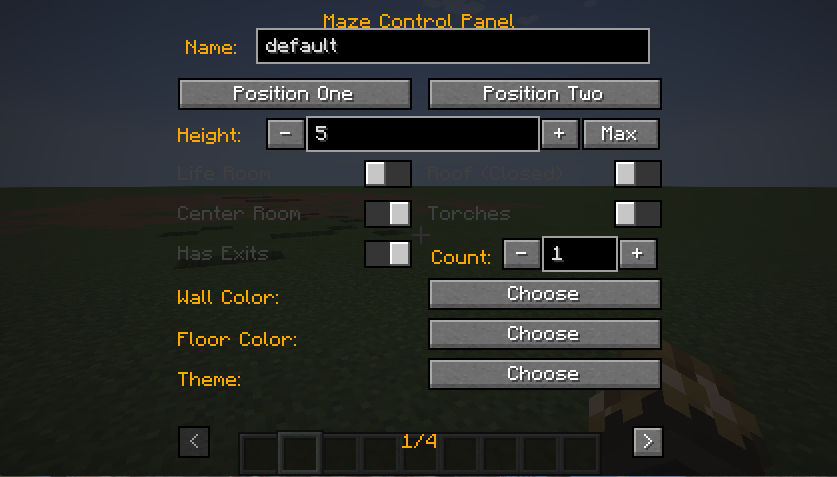 Maze Control Panel 1 page
 -
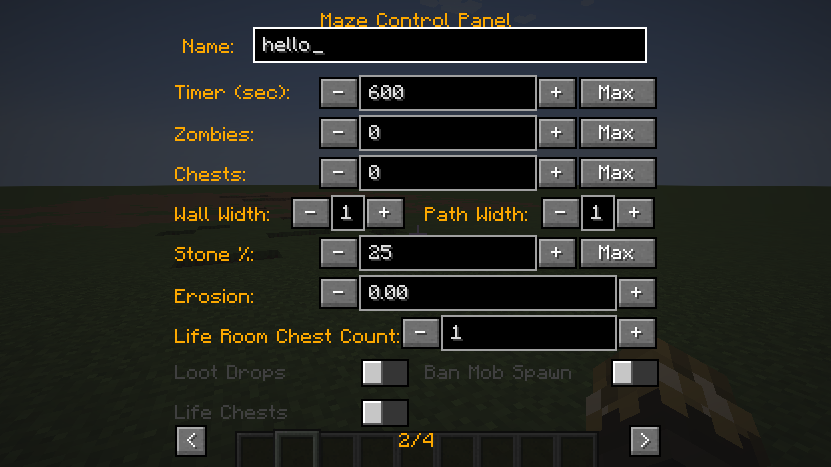 2 page
 -
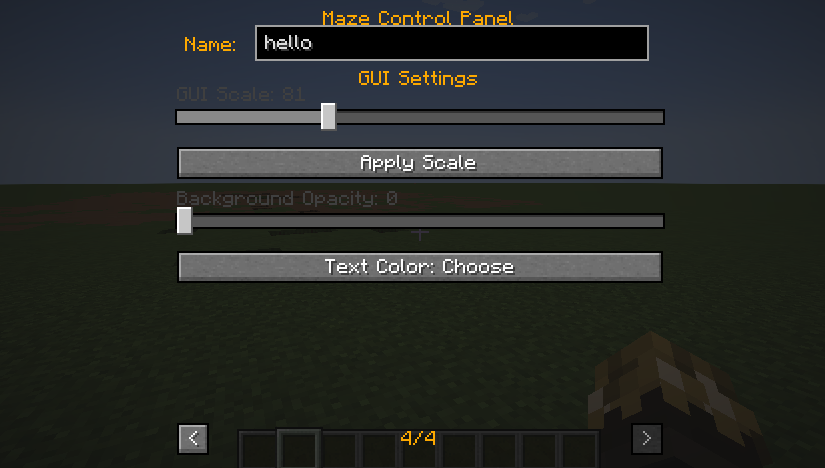 4
4 -
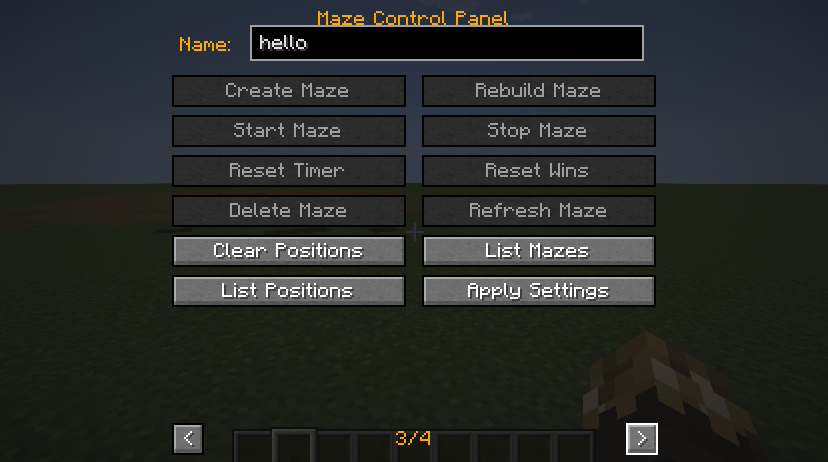 3 page
Versions
Files
Relations
Project Relations
More like this
Similar Mods
Suggestions use data such as tags, dependencies, dependents, descriptions, titles, and more to rank how much they overlap with this mod.
On ModDex
Community snapshot
By the numbers
Statistics

Want to reach Minecraft players?
We're looking for a server hosting partner to feature here and other parts of the site. Interested? Send us a message!
Get in touchGet it on
Available Platforms
On ModDex
Community snapshot
By the numbers
Statistics
Resources