
Chat Sync
No reviews yet
Syncs client-side Minecraft chat to a Discord webhook.
Fabric is a mod loader for versions 1.14+ of Minecraft, particularly popular for client side and optimization mods.
Community voices
Reviews
Click once to include, again to exclude, again to clear
No reviews yet. Be the first to review this project!
Get it on
Available Platforms
 Modrinth
Compatibility
Supported Environments
About
Project Details
For authors
Embed Badge
If you're the author of this project, you can embed a live badge anywhere that supports HTML or Markdown. It updates automatically whenever ratings change.
Use HTML for any page that supports it, or Markdown for README files and Markdown-based descriptions.
Identifiers
Platform IDs
Resources
External Links
About
Description
ChatSync - Minecraft to Discord Chat Sync
A client-side Fabric mod for Minecraft 1.21.10 that syncs in-game chat messages to a Discord webhook.
Features
- 🔄 Syncs both chat messages and game messages to Discord
- 🎯 Configurable message filtering with regex patterns
- ⚙️ Easy JSON configuration
- 🎮 In-game config screen via Mod Menu
- 🚀 Asynchronous webhook sending (doesn't lag the game)
- 🔒 Client-side only (works on any server)
Installation
- Make sure you have Fabric Loader installed for Minecraft 1.21.10
- Install Mod Menu (optional, but required for in-game config)
- Download the ChatSync mod JAR file
- Place it in your
.minecraft/modsfolder - Launch Minecraft
Configuration
You can configure ChatSync in two ways:
Option 1: In-Game Config Screen (Recommended)
- Install Mod Menu
- In Minecraft, go to: Mods → ChatSync → Config
- Enter your Discord webhook URL
- Customize the message prefix
- Toggle enabled/disabled
- Click "Done" to save
Option 2: Manual Configuration File
On first launch, the mod will create a configuration file at .minecraft/config/chatsync.json
Setting up your Discord Webhook
- Go to your Discord server settings
- Navigate to Integrations → Webhooks
- Click "New Webhook"
- Copy the webhook URL
- Open
.minecraft/config/chatsync.json - Replace
YOUR_WEBHOOK_URL_HEREwith your actual webhook URL
Configuration File Structure
{
  "webhookUrl": "https://discord.com/api/webhooks/YOUR_WEBHOOK_URL_HERE",
  "enabled": true,
  "messagePrefix": "> ",
  "ignoredMessages": [
    "^\\[.*\\].*",
    "^>.*"
  ]
}
Configuration Options
- webhookUrl: Your Discord webhook URL
- enabled: Set to
falseto temporarily disable the mod without removing it - messagePrefix: Text to prepend to every message (default:
"> ")- Use
""for no prefix - Examples:
"> ","[MC] ","🎮 ", etc.
- ignoredMessages: Array of regex patterns for messages to ignore
- Use
Ignored Messages Examples
The ignoredMessages array uses regex patterns to filter out unwanted messages:
"ignoredMessages": [
  "^\\[.*\\].*",           // Ignore messages starting with [brackets]
  "^>.*",                  // Ignore messages starting with >
  ".*joined the game.*",   // Ignore join messages
  ".*left the game.*",     // Ignore leave messages
  "^!.*",                  // Ignore commands starting with !
  "^/.*"                   // Ignore commands starting with /
]
How It Works
The mod listens to two Minecraft events:
- Chat Messages: Player chat messages
- Game Messages: System messages (deaths, achievements, etc.)
When a message is received, it:
- Checks if the mod is enabled
- Checks if the webhook URL is configured
- Checks if the message matches any ignored patterns
- If all checks pass, sends the message to Discord asynchronously
Troubleshooting
Messages aren't appearing in Discord
- Check that your webhook URL is correct in the config file
- Make sure
enabledis set totrue - Check the Minecraft logs for any error messages
- Verify your webhook is still active in Discord
Some messages are being ignored
Check your ignoredMessages patterns - they use regex, so make sure your patterns are correct.
The mod isn't loading
- Ensure you have Fabric Loader 0.18.4 or higher
- Ensure you have Fabric API 0.138.4+1.21.10 or higher
- Check the Minecraft logs for errors
License
This project is licensed under the MIT License - see the LICENSE file for details.
Support
Join our discord! Discord
Screenshots
Gallery
-
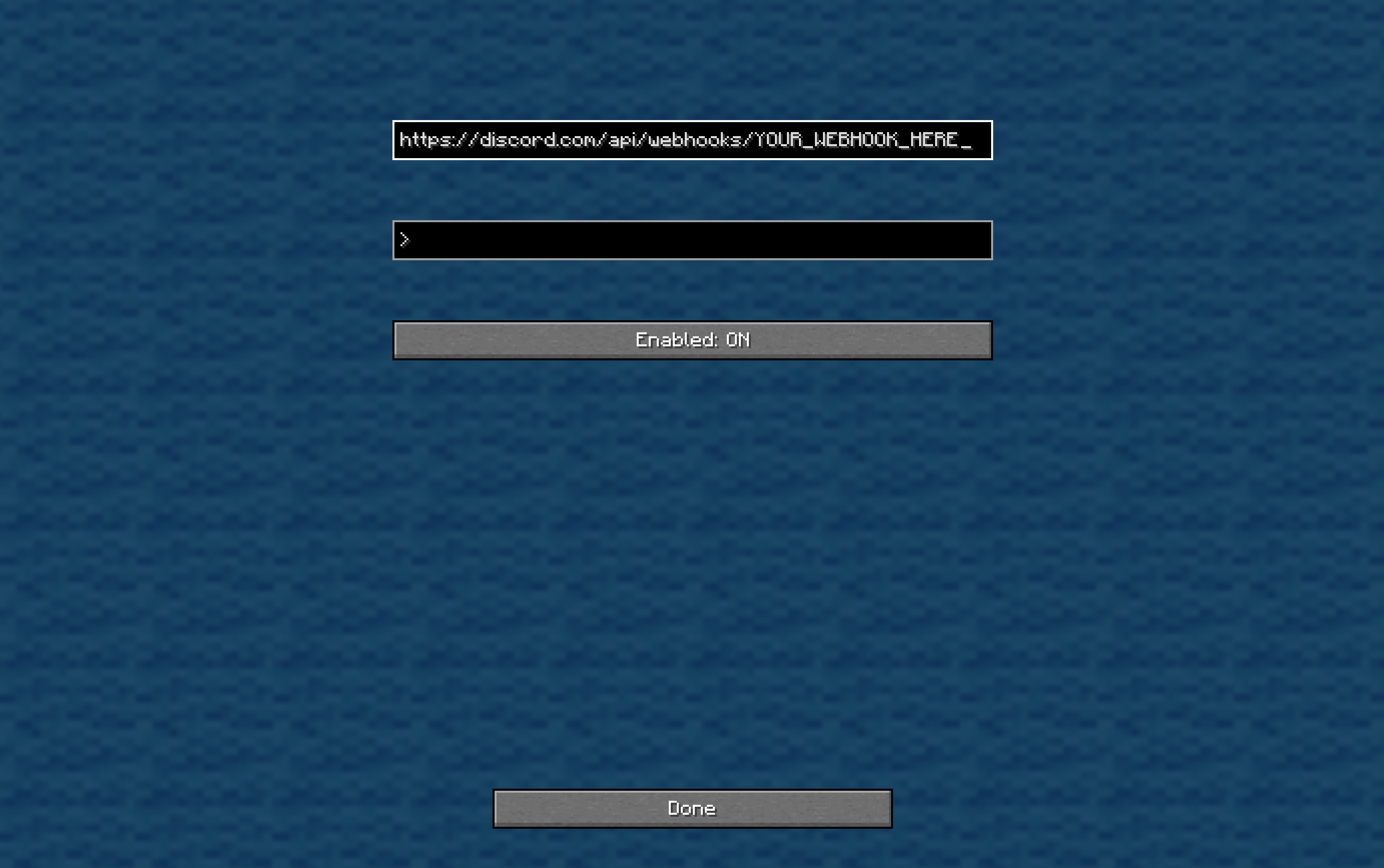 Settings Menu
Versions
Files
Relations
Project Relations
More like this
Similar Mods
Suggestions use data such as tags, dependencies, dependents, descriptions, titles, and more to rank how much they overlap with this mod.
On ModDex
Community snapshot
By the numbers
Statistics

Want to reach Minecraft players?
We're looking for a server hosting partner to feature here and other parts of the site. Interested? Send us a message!
Get in touchGet it on
Available Platforms
On ModDex
Community snapshot
By the numbers
Statistics
Resources