
Storage Finder
No reviews yet
Find items in previously opened storage and item frames with colored highlights, multiple searches, and safe A* routes.
Features systems for better item storage and organization.
Fabric is a mod loader for versions 1.14+ of Minecraft, particularly popular for client side and optimization mods.
Community voices
Reviews
Click once to include, again to exclude, again to clear
No reviews yet. Be the first to review this project!
Get it on
Available Platforms
 Modrinth
Compatibility
Supported Environments
About
Project Details
For authors
Embed Badge
If you're the author of this project, you can embed a live badge anywhere that supports HTML or Markdown. It updates automatically whenever ratings change.
Use HTML for any page that supports it, or Markdown for README files and Markdown-based descriptions.
Identifiers
Platform IDs
About
Description
Storage Finder
Storage Finder is a client-side Fabric mod that helps you locate items stored in nearby containers.
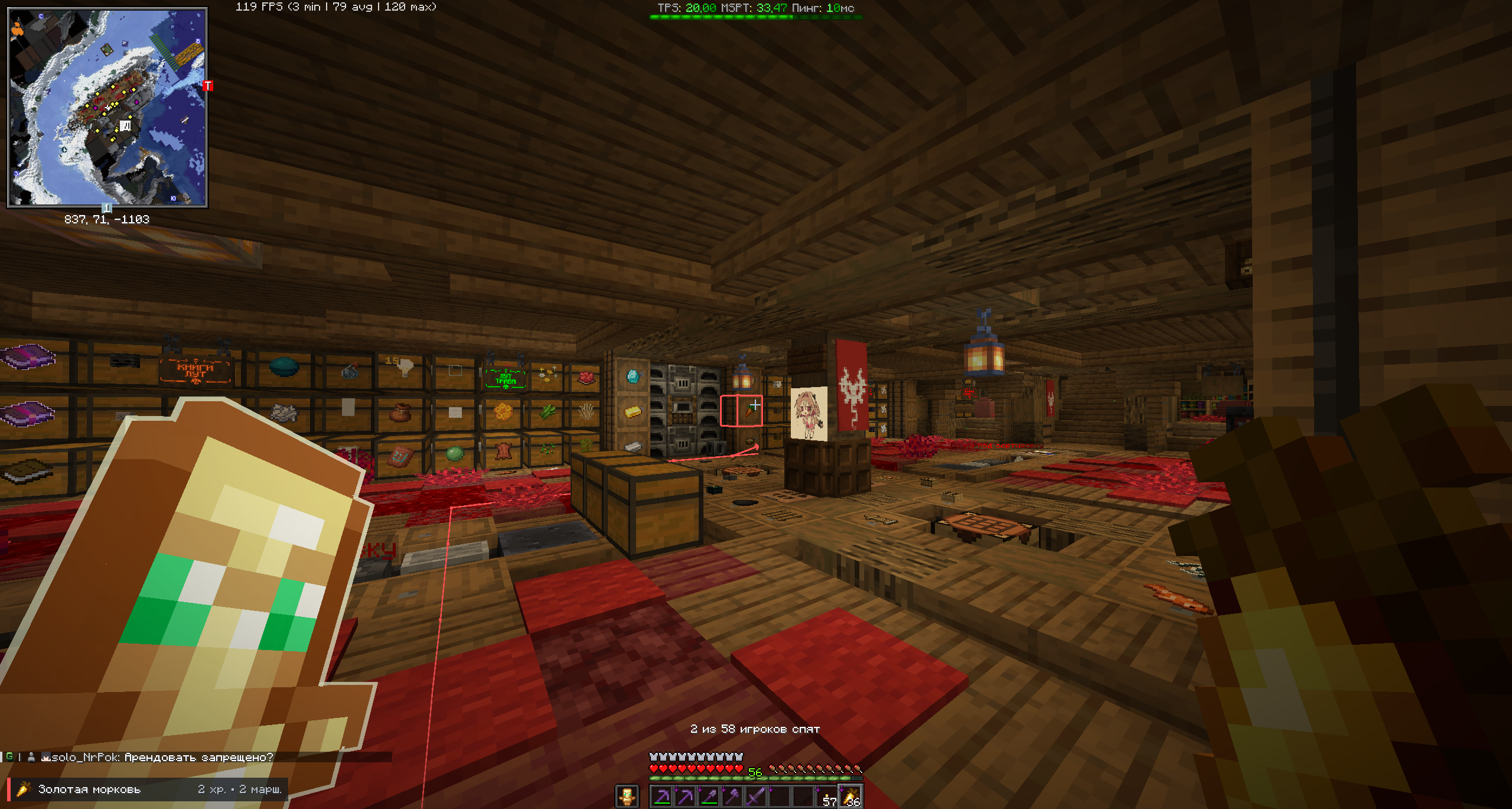
It remembers the contents of containers you have previously opened, combines that information with visible item frames, highlights every matching storage block, and calculates safe ground routes to up to three of the nearest reachable targets.
No server-side installation is required.
Features
- Search chests, trapped chests, barrels, and placed shulker boxes.
- Use visible item frames as an additional search source.
- Search with an item in your hand or by its localized name.
- Run multiple color-coded searches simultaneously.
- Highlight every matching storage block.
- Display active searches, item icons, match counts, and route status in a compact HUD panel.
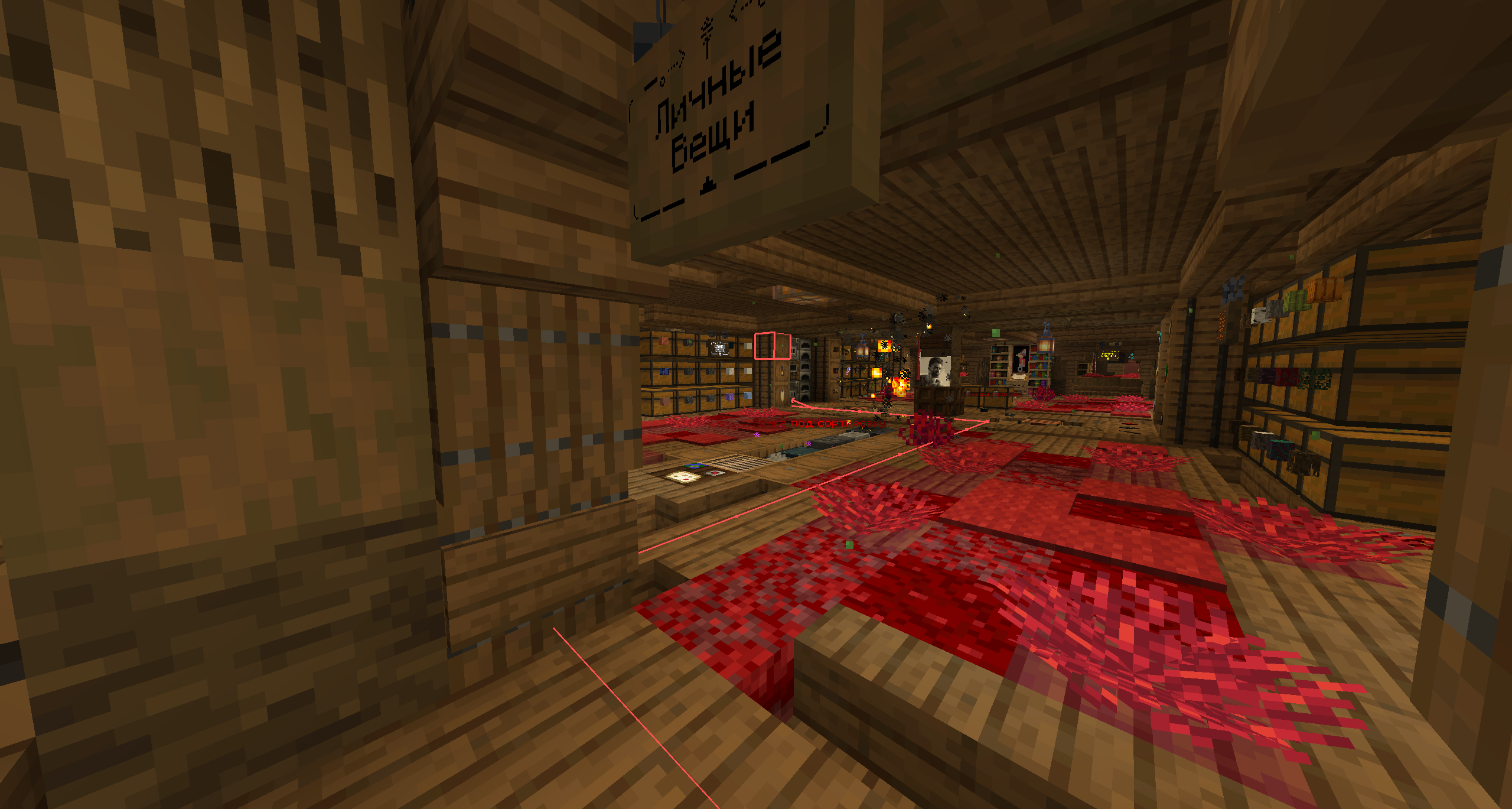
- Build safe ground routes to up to three nearby reachable targets.
- Configure the search radius from 1 to 8 chunks.
- Store container information locally with automatic backups.
- Configure the mod through Mod Menu.
Ender Chests are intentionally excluded from indexing and search results.
Searching with a held item
- Hold the item you want to find in your main hand.
- Press the Storage Finder search key.
- Press the key again with the same item to remove that search.
The default search key is Right Alt. It can be changed in the standard Minecraft Controls menu.
Different held items can be added as simultaneous searches. Each active query receives a separate highlight color.
Searching by name
- Empty your main hand.
- Press the Storage Finder search key.
- Type the localized item name.
- Select a suggestion with the mouse or keyboard.
The catalog follows the language currently selected in Minecraft.
Active searches appear at the top of the catalog and can be removed individually. A separate button clears every active search.
Container indexing
Minecraft clients cannot inspect arbitrary closed containers. Storage Finder can search a container after you have opened it at least once.
The mod indexes only the storage inventory. Items in the player's inventory are never included.
Container snapshots are updated:
- when a container is opened for the first time;
- when its contents change while open;
- before the container screen closes;
- when the world changes;
- when the client stops.
Double chests are stored as one logical container, while both physical halves are highlighted in the world.
Item matching
Regular items are matched by their base registry type.
The following properties are ignored:
- custom names;
- durability;
- regular enchantments;
- other stack-specific components.
For example, searching for a diamond pickaxe will match diamond pickaxes with any durability, name, or enchantments.
Enchanted books are handled separately. Each stored enchantment is indexed as an individual search identity, while enchantment levels and custom book names are ignored.
Item frames
Visible item frames can act as labels for the storage block behind them.
Item-frame results are combined with remembered container contents. Current observations take priority over older saved information.
Only item frames and containers in chunks already loaded by the client are searched.
Highlights and HUD
Every matching storage block receives a colored outline.
The HUD panel displays:
- the item icon;
- localized item name;
- query color;
- number of matching storage blocks;
- route calculation status;
- number of available routes.
Opening a matching container automatically removes only the searches satisfied by that container. Unrelated searches remain active.
Safe routes
Storage Finder uses incremental multi-goal A* pathfinding instead of drawing only a straight line to the target.
Routes account for:
- walls and block collision shapes;
- the player's full bounding box;
- slabs, stairs, carpets, and snow layers;
- elevation changes;
- reachable positions beside the target;
- both halves of a double chest.
When hazard avoidance is enabled, routes also avoid fluids, fire, cactus, magma blocks, powder snow, and other unsafe surfaces.
Pathfinding runs incrementally across game ticks to reduce frame stalls during complex searches. Calculated paths are cached, validated, and periodically refreshed.
Routing is designed for normal ground movement. It does not plan:
- opening doors;
- swimming;
- flying;
- climbing ladders;
- complex parkour jumps.
A difficult target may remain highlighted even if no valid route can be calculated.
Search radius
The search radius can be configured from 1 to 8 chunks.
The maximum range is a strict horizontal Euclidean radius of 128 blocks.
The mod never forces chunks to load for searching, highlighting, or routing.
Screenshots
Gallery
Versions
Files
Relations
Project Relations
More like this
Similar Mods
Suggestions use data such as tags, dependencies, dependents, descriptions, titles, and more to rank how much they overlap with this mod.
On ModDex
Community snapshot
By the numbers
Statistics

Want to reach Minecraft players?
We're looking for a server hosting partner to feature here and other parts of the site. Interested? Send us a message!
Get in touchGet it on
Available Platforms
On ModDex
Community snapshot
By the numbers