Community listing page, reviews may not be monitored by the author.
Munch Munch!


No reviews yet
You are what you eat!

Community voices
Reviews
No reviews yet. Be the first to review this project!
Get it on
Available Platforms
Compatibility
Supported Environments
Runs entirely on the client. Works on vanilla servers.
About
Project Details
For authors
Embed Badge
If you're the author of this project, you can embed a live badge anywhere that supports HTML or Markdown. It updates automatically whenever ratings change.
Use HTML for any page that supports it, or Markdown for README files and Markdown-based descriptions.
Identifiers
Platform IDs
About
Description
Munch Munch!
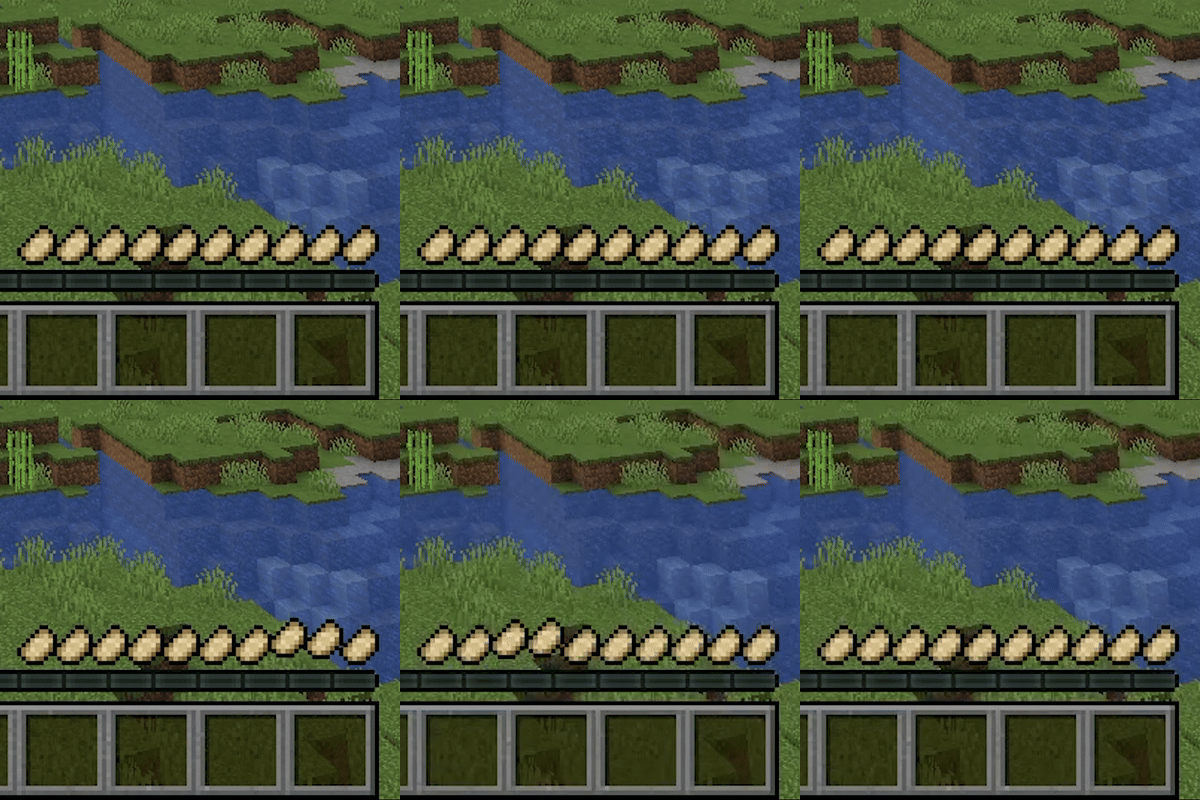
You are what you eat! See your hunger bar change to the food you're enjoying - delicious! 😋
Features:
- Hunger bar icons dynamically change based on what your eating
- Animations when idle or after eating to feel more alive
- Easily add/change hunger icon textures or animations with a resource pack or mod respectively!
Currently incompatible with Appleskin unless you turn off "Show saturation overlay" in the Appleskin config. I am planning to add a similar (but not identical) feature to see saturation in Munch Munch.
If you have any issues, feature requests or anything else please feel free to submit them on the GitHub.
Munch Munch allows for easily adding new textures for foods added by other mods. If you want your mod to support Munch Munch textures, you will need six 9x9 textures for:
<food_id>_full.png<food_id>_half.png<food_id>_empty.png<food_id>_full_hunger.png<food_id>_half_hunger.png<food_id>_empty_hunger.png
These files should be located in assets/<mod_namespace>/textures/gui/sprites/hunger/<food_id>/.
If you want to add new animations to expand on the default ones, there is a simple API allowing you to do so. The first thing necessary is to add Munch Munch as a dependency to your mod.
build.gradle
repositories {
  maven {
    url = "https://api.modrinth.com/maven/"
  }
}

dependencies {
  modImplementation "maven.modrinth:munchmunch:${project.munchmunch_version}"
}
gradle.properies
munchmunch_version=0.1.0Now that Munch Munch works, the way to add new animations is simple. First we will create our animation:
public class ExampleAnimation implements HungerAnimation {
  @Override
  public HungerState getState() {
    return HungerState.IDLE; // This will constantly run until HungerState is changed
  }

  @Override
  public Vector2f offset(int slot, float time) {
    return new Vector2f(0f, 1f); // Translate all icons 1px down
  }

  @Override
  public Vector2f scale(int slot, float time) {
    return new Vector2f(1f, 1f); // Leave scale as default for now
  }

  @Override
  public boolean isFinished() { return true; } // An idle animation can be overriden whenever necessary

  @Override
  public boolean isTimed() { return false; } // This is for an animation that only lasts for a certain amount of time
}
This is a simple example of what an animation you make could look like. All that is needed to register this animation is the entrypoint.
public class ModAnimationEntrypoint implements AnimationEntrypoint {
  @Override
  public void registerAnimations() {
    AnimationRegistry.register(ExampleAnimation::new);
  }
}
Then in your fabric.mod.json:
{
  entrypoints: {
    "munchmunch": [
      "com.munchmunch.examplemod.ModAnimationEntrypoint"
    ]
  }
}
If your animation needs to run at a different time than the built in IDLE and GAIN (gain hunger) states, a new HungerState can be added simply with:
public class ExampleMod implements ClientModInitializer {
  public static final HungerState CUSTOM_STATE = register(Identifier.of("examplemod_id", "custom_state"));
}
To make this custom HungerState be used, it is necessary to call AnimationSelector.getInstance().setState(HungerState.CUSTOM_STATE) which will play a random animation from all available animations with the HungerState of CUSTOM_STATE until they are finished. If they do not end, you will have to add another AnimationSelector.getInstance().setState() but this time set it back to HungerState.IDLE when you want your animation to stop. Otherwise just use the IDLE animation.
Munch Munch!
You are what you eat! See your hunger bar change to the food you're enjoying - delicious! 😋
Features:
- Hunger bar icons dynamically change based on what your eating
- Animations when idle or after eating to feel more alive
- Easily add/change hunger icon textures or animations with a resource pack or mod respectively!
Currently incompatible with Appleskin unless you turn off "Show saturation overlay" in the Appleskin config. I am planning to add a similar (but not identical) feature to see saturation in Munch Munch.
If you have any issues, feature requests or anything else please feel free to submit them on the GitHub.
Developers
Munch Munch allows for easily adding new textures for foods added by other mods. If you want your mod to support Munch Munch textures, you will need six 9x9 textures for:
<food_id>_full.png<food_id>_half.png<food_id>_empty.png<food_id>_full_hunger.png<food_id>_half_hunger.png<food_id>_empty_hunger.png
These files should be located in assets/<mod_namespace>/textures/gui/sprites/hunger/<food_id>/.
If you want to add new animations to expand on the default ones, there is a simple API allowing you to do so. The first thing necessary is to add Munch Munch as a dependency to your mod.
build.gradle
repositories {
  maven {
    url = "https://api.modrinth.com/maven/"
  }
}

dependencies {
  modImplementation "maven.modrinth:munchmunch:${project.munchmunch_version}"
}
gradle.properies
munchmunch_version=0.1.0
Now that Munch Munch works, the way to add new animations is simple. First we will create our animation:
public class ExampleAnimation implements HungerAnimation {
  @Override
  public HungerState getState() {
    return HungerState.IDLE; // This will constantly run until HungerState is changed
  }

  @Override
  public Vector2f offset(int slot, float time) {
    return new Vector2f(0f, 1f); // Translate all icons 1px down
  }

  @Override
  public Vector2f scale(int slot, float time) {
    return new Vector2f(1f, 1f); // Leave scale as default for now
  }

  @Override
  public boolean isFinished() { return true; } // An idle animation can be overriden whenever necessary

  @Override
  public boolean isTimed() { return false; } // This is for an animation that only lasts for a certain amount of time
}
This is a simple example of what an animation you make could look like. All that is needed to register this animation is the entrypoint.
public class ModAnimationEntrypoint implements AnimationEntrypoint {
  @Override
  public void registerAnimations() {
    AnimationRegistry.register(ExampleAnimation::new);
  }
}
Then in your fabric.mod.json:
{
  entrypoints: {
    "munchmunch": [
      "com.munchmunch.examplemod.ModAnimationEntrypoint"
    ]
  }
}
If your animation needs to run at a different time than the built in IDLE and GAIN (gain hunger) states, a new HungerState can be added simply with:
public class ExampleMod implements ClientModInitializer {
  public static final HungerState CUSTOM_STATE = register(Identifier.of("examplemod_id", "custom_state"));
}
To make this custom HungerState be used, it is necessary to call AnimationSelector.getInstance().setState(HungerState.CUSTOM_STATE) which will play a random animation from all available animations with the HungerState of CUSTOM_STATE until they are finished. If they do not end, you will have to add another AnimationSelector.getInstance().setState() but this time set it back to HungerState.IDLE when you want your animation to stop. Otherwise just use the IDLE animation.
Screenshots
Gallery
Versions
Files
Relations
Project Relations
More like this
Similar Mods
Suggestions use data such as tags, dependencies, dependents, descriptions, titles, and more to rank how much they overlap with this mod.
On ModDex
Community snapshot
By the numbers
Statistics

Get it on
Available Platforms
On ModDex
Community snapshot
By the numbers