Community listing page, reviews here may not be monitored by the author.



Community voices
Reviews
No reviews yet. Be the first to review this project!
Get it on
Available Platforms
Compatibility
Supported Environments
Runs entirely on the client. Works on vanilla servers.
About
Project Details
For authors
Embed Badge
If you're the author of this project, you can embed a live badge anywhere that supports HTML or Markdown. It updates automatically whenever ratings change.
Use HTML for any page that supports it, or Markdown for README files and Markdown-based descriptions.
Identifiers
Platform IDs
About
Description
(icon temporary)
Music Config
Configure how much a music track should be played in Minecraft.
Features
- Set frequency of each music track grouped by context
- Search through every track by name and artist
- Preview randomly selected, context-specific, music
- Support for additional music from resource packs or other mods!
How it works
Usually, when Minecraft plays background music, it selects a random music track to play. These tracks exist in a pool based on the current context (things such as your location, your gamemode, whether you're in a world at all, etc.). For example, when you visit a Swamp Biome Minecraft attempts to play music, it picks a random track from a list of three (Aerie, Firebugs and Labyrinthine). (This is internally known as the sound event minecraft:music.overworld.swamp and is accessible with the /playsound command.)
Music Config allows you to set how often each track should be played in each context. You can select the frequency of each track, so that some tracks play more often than others, or you can disable some tracks entirely. In the previous example, the context would be "overworld: swamp." You could set the frequency of Aerie to Often, Firebugs to Sometimes and Labyrinthine to Never. This would mean that Aerie plays almost every time Minecraft attempts to play music in a Swamp, Firebugs plays occasionally and Labyrinthine never plays.
How to use
- Install the mod & start Minecraft
- Go to the config screen (Options > Music & Sounds > Music Config)
- Optionally, search for tracks by name or artist and/or collapse unimportant contexts
- In a context, set the frequency of each track by adjusting the slider
- Test the randomness of the music from this context, by clicking the play button (▶️) next to the context name
- Click "Done" to save your changes (writes to file
.minecraft/music_config.json)
Now you can enjoy your custom music experience in Minecraft!
 Example: setting play frequency per track from the "nether: crimson forest" context.
Here's a short summary of what every context in the game exactly represents:
| Context | Description |
|---|---|
| A context prefixed by "overworld:" | Represents a biome in the Overworld. Music plays when player is in that biome. |
| A context prefixed by "nether:" | Represents a biome in the Nether. Music plays when player is in that biome. |
| "end" | Music plays when player is in the End. |
| "creative" | Music plays when player is in Creative mode. |
| "credits" | Music plays during the game's credits sequence. |
| "dragon" | Music plays when fighting the Ender Dragon. |
| "game" | A sort of fallback; music plays when no other context requirement is met. |
| "menu" | Music plays on the Main Menu. |
| "under water" | Music plays when the player is submerged in water. |
Report an Issue
Use GitHub's Issue Tracker to report Issues such as requests or bugs.
Music Config
Configure how much a music track should be played in Minecraft.
Features
- Set frequency of each music track grouped by context
- Search through every track by name and artist
- Preview randomly selected, context-specific, music
- Support for additional music from resource packs or other mods!
How it works
Usually, when Minecraft plays background music, it selects a random music track to play. These tracks exist in a pool based on the current context (things such as your location, your gamemode, whether you're in a world at all, etc.). For example, when you visit a Swamp Biome Minecraft attempts to play music, it picks a random track from a list of three (Aerie, Firebugs and Labyrinthine). (This is internally known as the sound event minecraft:music.overworld.swamp and is accessible with the /playsound command.)
Music Config allows you to set how often each track should be played in each context. You can select the frequency of each track, so that some tracks play more often than others, or you can disable some tracks entirely. In the previous example, the context would be "overworld: swamp." You could set the frequency of Aerie to Often, Firebugs to Sometimes and Labyrinthine to Never. This would mean that Aerie plays almost every time Minecraft attempts to play music in a Swamp, Firebugs plays occasionally and Labyrinthine never plays.
How to use
- Install the mod & start Minecraft
- Go to the config screen (Options > Music & Sounds > Music Config)
- Optionally, search for tracks by name or artist and/or collapse unimportant contexts
- In a context, set the frequency of each track by adjusting the slider
- Test the randomness of the music from this context, by clicking the play button (▶️) next to the context name
- Click "Done" to save your changes (writes to file
.minecraft/music_config.json)
Now you can enjoy your custom music experience in Minecraft!
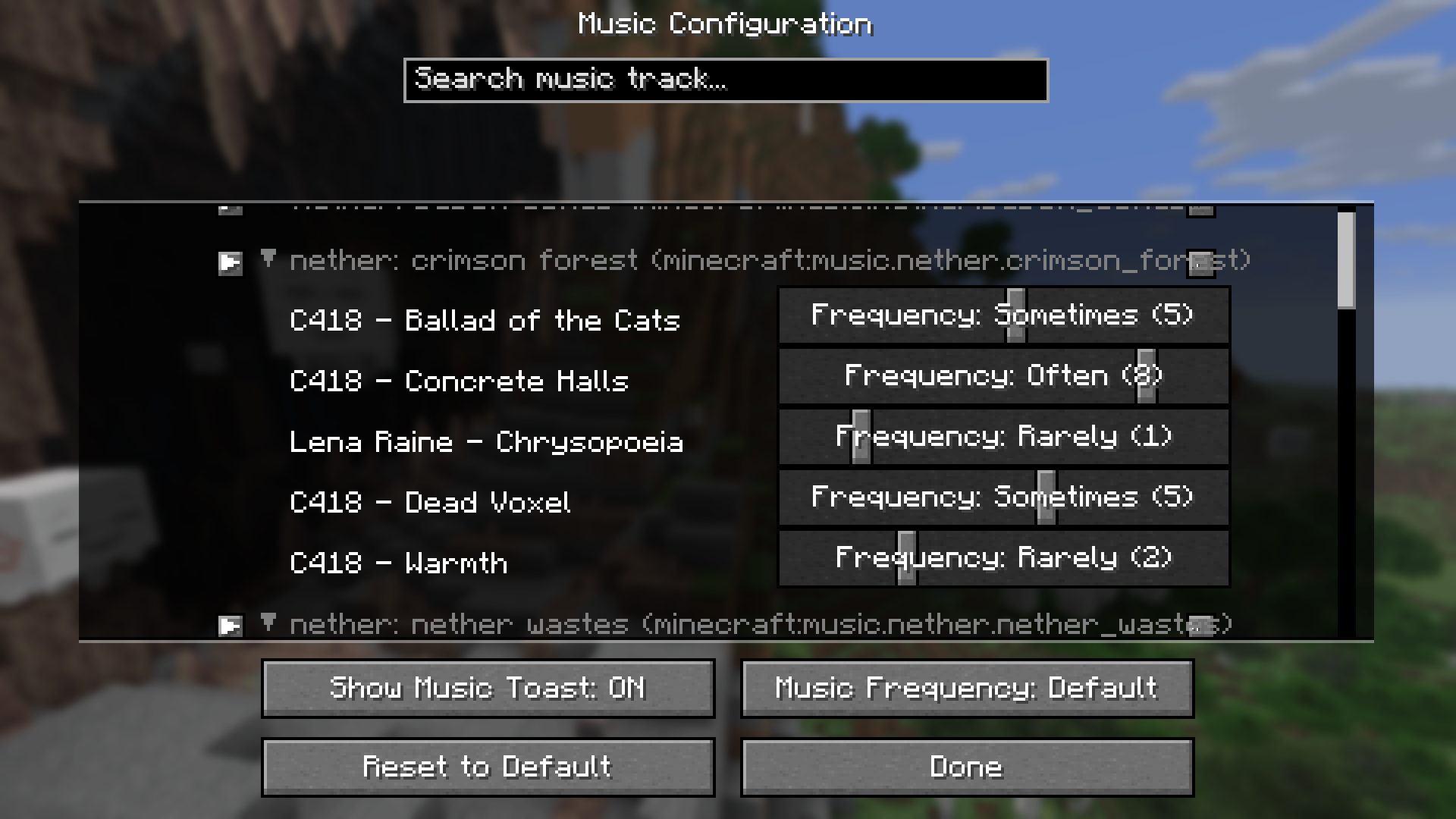 Example: setting play frequency per track from the "nether: crimson forest" context.
Here's a short summary of what every context in the game exactly represents:
| Context | Description |
|---|---|
| A context prefixed by "overworld:" | Represents a biome in the Overworld. Music plays when player is in that biome. |
| A context prefixed by "nether:" | Represents a biome in the Nether. Music plays when player is in that biome. |
| "end" | Music plays when player is in the End. |
| "creative" | Music plays when player is in Creative mode. |
| "credits" | Music plays during the game's credits sequence. |
| "dragon" | Music plays when fighting the Ender Dragon. |
| "game" | A sort of fallback; music plays when no other context requirement is met. |
| "menu" | Music plays on the Main Menu. |
| "under water" | Music plays when the player is submerged in water. |
Report an Issue
Use GitHub's Issue Tracker to report Issues such as requests or bugs.
Screenshots
Gallery
-
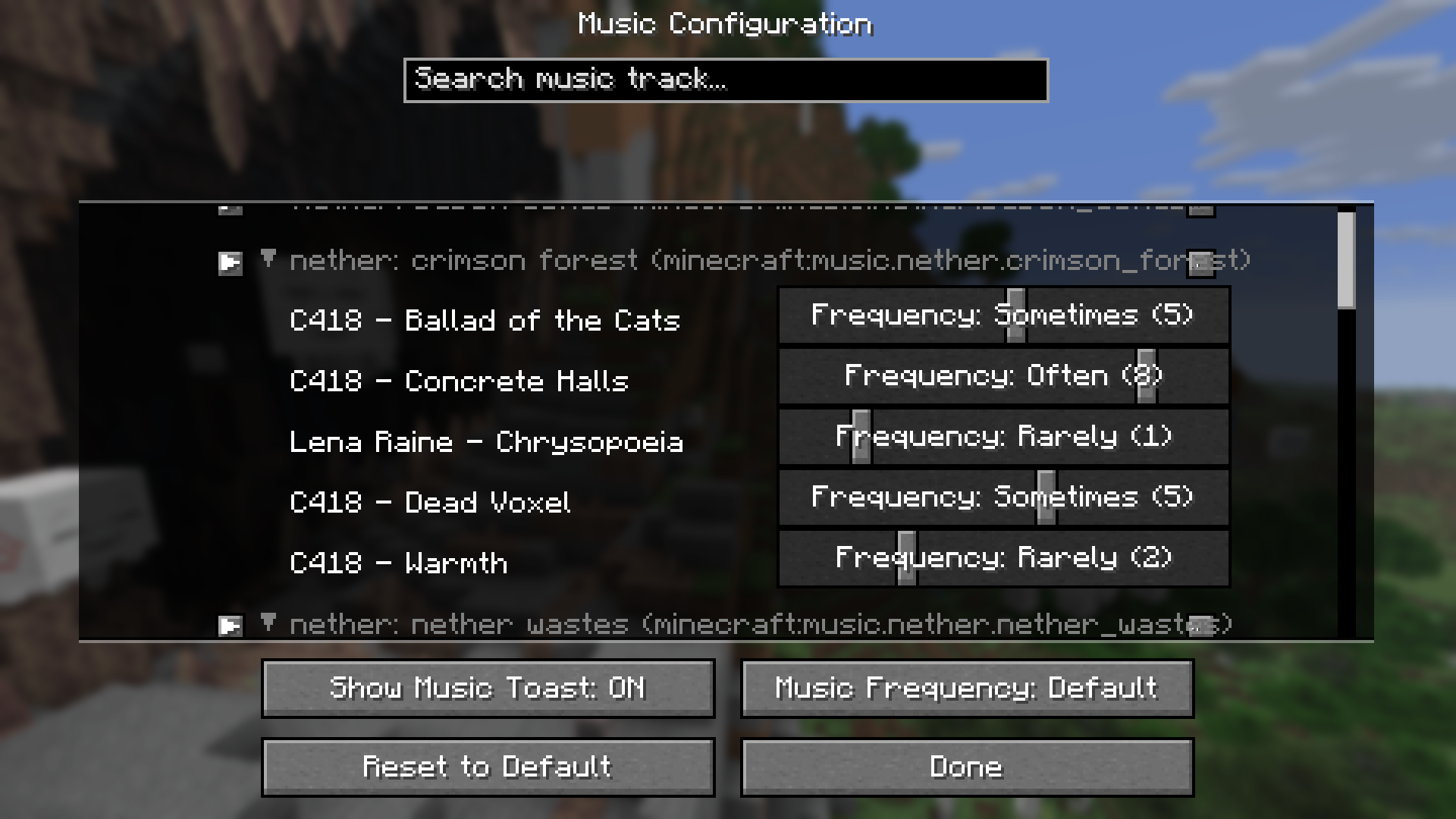 Screenshot of Mod Config screen Setting play frequency per track from the "nether: crimson forest" context.
Versions
Files
Relations
Project Relations
More like this
Similar Mods
Suggestions use data such as tags, dependencies, dependents, descriptions, titles, and more to rank how much they overlap with this mod.
On ModDex
Community snapshot
By the numbers
Statistics
 (opens in a new tab)
Get it on
Available Platforms
On ModDex
Community snapshot
By the numbers