
Music Machine
No reviews yet
A Minecraft mod allowing of control over individual tracks and their priorities
Forge is a popular mod loader for versions 1.1+ of Minecraft.
Neoforge is a fork of the Minecraft Forge available for versions 1.20.1+ of Minecraft. Many Forge mods are compatible with Neoforge and vice versa.
Fabric is a mod loader for versions 1.14+ of Minecraft, particularly popular for client side and optimization mods.
Community voices
Reviews
Click once to include, again to exclude, again to clear
No reviews yet. Be the first to review this project!
Get it on
Available Platforms
 Modrinth
Compatibility
Supported Environments
About
Project Details
For authors
Embed Badge
If you're the author of this project, you can embed a live badge anywhere that supports HTML or Markdown. It updates automatically whenever ratings change.
Use HTML for any page that supports it, or Markdown for README files and Markdown-based descriptions.
Identifiers
Platform IDs
Resources
External Links
About
Description
Music Machine
Music Machine is a client-side mod that gives you complete, granular control over Minecraft's dynamic background music.
Tired of hearing the same track play when you're building? Wish the game played music a bit more often? Want to listen exclusively to the classic C418 soundtrack? Music Machine lets you do exactly that through an easy-to-use in-game configuration menu.
🎵 Features
🎛️ Complete Track Control
The mod automatically hooks into the game's music system and provides a categorized list of every single vanilla music track (Menu, Creative, Overworld, Nether, The End, etc.). From the config menu, you can:
- Toggle Tracks: Turn individual songs ON or OFF. Dislike a specific ambient track? Disable it forever.
- Weight Sliders: Adjust the "weight" of each track to increase or decrease its chance of playing. Boost the odds of hearing your favorite songs!
- Resource Pack Support: Playing with custom music from resource packs? Music Machine automatically detects and registers custom tracks from your
sounds.jsonfiles so you can toggle and weigh them just like vanilla tracks!
⏱️ Music Frequency Settings
Take control of how often music actually plays in your world. The config allows you to switch between four distinct modes:
- Never: Completely mutes all background music.
- Sometimes: The standard vanilla pacing with long delays between tracks.
- Often: Shortens the delays so music plays more frequently.
- Nonstop: Music loops continuously with almost zero downtime between tracks.
🎭 Pre-Configured Profiles
Don't want to manually tweak every song? Use the built-in music profiles to instantly change the vibe:
- Default: Plays all tracks exactly as vanilla Minecraft intended.
- Legacy: Automatically restricts all music to only tracks composed by C418.
- Custom: Activates your personalized settings, custom toggles, and track weights.
💿 "Now Playing" Display
When opening the configuration menu, a stylish animated display will show you the exact title and author of the song currently playing in the background.
⚙️ How to Use
- Install the mod on your client.
- Launch the game and load into a world.
- Press
Mon your keyboard (rebindable in the Controls menu) to open the music management screen. - Adjust the settings to your liking—changes apply instantly!
🛠️ Compatibility & Installation
- Supported Loaders: Available for Fabric, Forge, and NeoForge (refer to the downloads section for specific Minecraft versions). Note: Fabric users must install the Fabric API.
- Environment: Client-Side Only. You can install this on your client and safely connect to vanilla servers, realms, or modded servers without the server needing the mod installed.
Screenshots
Gallery
-
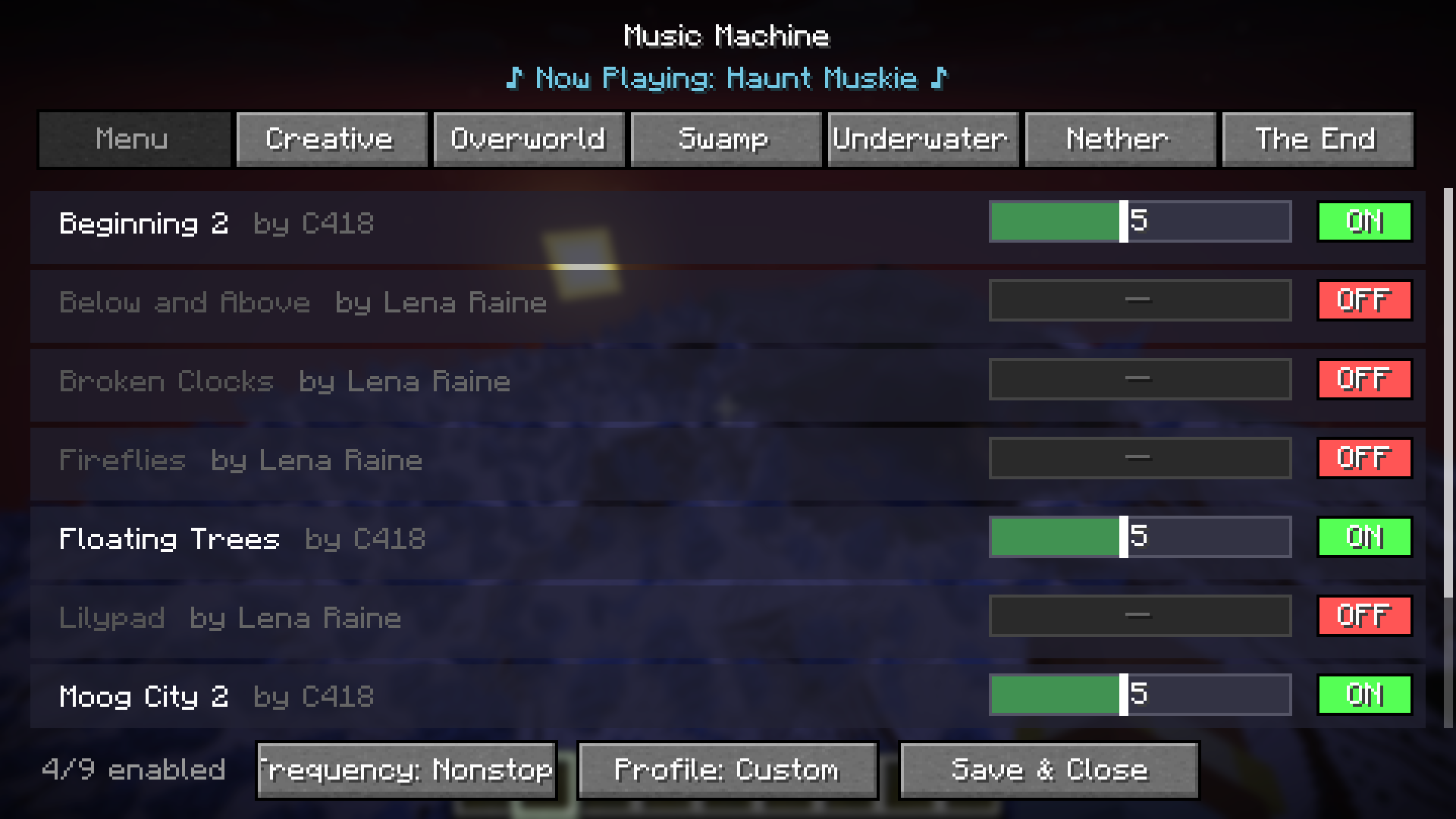 mod config
Versions
Files
Relations
Project Relations
More like this
Similar Mods
Suggestions use data such as tags, dependencies, dependents, descriptions, titles, and more to rank how much they overlap with this mod.
On ModDex
Community snapshot
By the numbers
Statistics

Want to reach Minecraft players?
We're looking for a server hosting partner to feature here and other parts of the site. Interested? Send us a message!
Get in touchGet it on
Available Platforms
On ModDex
Community snapshot
By the numbers
Statistics
Resources