
Community listing page, reviews here may not be monitored by the author.
music player by pisankus

No reviews yet
adds a music player keybind: M
Community voices
Reviews
No reviews yet. Be the first to review this project!
Get it on
Available Platforms
Compatibility
Supported Environments
Runs entirely on the client. Works on vanilla servers.
About
Project Details
For authors
Embed Badge
If you're the author of this project, you can embed a live badge anywhere that supports HTML or Markdown. It updates automatically whenever ratings change.
Use HTML for any page that supports it, or Markdown for README files and Markdown-based descriptions.
Identifiers
Platform IDs
Resources
External Links
About
Description
This mod is a client-side music player for Minecraft that lets you listen to your own songs from inside the game without needing a server plugin or any multiplayer setup. Instead of replacing Minecraft sounds, it acts like a personal in-game audio player. You place music files into the .minecraft/musicplayer folder, open the mod’s menu in-game, and control playback from there. The music is only heard by you, so it is designed as a personal background player rather than a shared world sound system.
The main goal of the mod is convenience. You do not need to alt-tab out of Minecraft just to start, pause, or change a song. Once your files are inside the folder, the mod scans them and shows them in a simple interface. From that menu, you can play a selected track, pause it, resume it, stop it, skip to the next song, or go back to the previous one. The menu also includes a search bar, so if you have a large collection of songs, you can quickly filter the list instead of scrolling through everything manually.
One of the nicest parts of the mod is that it supports common local audio formats such as .mp3, .ogg, and .wav. That means you can build your own music folder however you want and use songs you already have on your computer. The mod creates the folder automatically if it does not exist, so setup is very straightforward. In practice, this makes the mod feel more like a lightweight built-in jukebox for Minecraft than a traditional content mod.
The playback controls are designed to feel familiar. You can open the menu with a hotkey, choose a track, and immediately start listening. There are buttons for play, pause, resume, stop, previous, and next, plus optional shuffle and loop behavior. Shuffle allows tracks to play in random order, while loop lets you repeat either the full playlist or a single track. This makes the mod useful both for casual listening and for longer sessions where you want background music to continue while building, exploring, mining, or just relaxing in your world.
Another important feature is the volume system. The mod lets you adjust volume from 0% all the way up to 1000%. That means it can be completely silent, normal, or much louder than standard playback if you want a more intense audio level. In the interface, this is handled with a slider so the value is easy to change while you are playing. This is especially useful if your songs have very different mastering levels or if you want the music to sit above Minecraft’s normal ambient sounds.
The menu also includes quality-of-life features for organization. If a song’s file name is ugly, too long, or not very readable, you can rename it inside the mod without changing the actual file on disk. The mod stores a custom display name for that track and uses it in the list and in the “Now Playing” section. This is helpful if your music files have downloaded names, numeric suffixes, or messy titles. It gives the library a cleaner, more curated feel while keeping the original files untouched.
The keybind system is customizable as well. By default, the menu opens with M, but you can change that directly from inside the interface. When you press the menu’s keybind button, the mod waits for your next key press and assigns that key as the new menu shortcut. This makes it easy to adapt the mod to your own controls without editing config files manually.
Visually, the mod is built around a clear, practical in-game screen. At the top, you have search, refresh, folder access, and keybind controls. In the middle, you see the list of available tracks. At the bottom, you get playback buttons and a volume slider. There is also a “Now Playing” area that shows the current track and playback progress, so you always know what is active. Even if the menu is closed, the music can continue playing in the background while you keep playing Minecraft normally.
Because the mod is entirely client-side, it is simple to use and safe for singleplayer or multiplayer from the user’s perspective. It does not require a server to support it, it does not broadcast songs to other players, and it does not depend on custom server-side packets. In other words, it behaves like a personal utility mod that improves your own experience rather than altering the game world for everyone.
In short, this mod turns Minecraft into a more comfortable place to enjoy your own music library. It is best described as an in-game local music player with folder-based song loading, playback controls, search, renaming, keybind customization, shuffle, loop, and very flexible volume control. It is ideal for players who want their own soundtrack while playing Minecraft and want that experience to feel integrated directly into the game instead of relying on external apps all the time.
Screenshots
Gallery
-
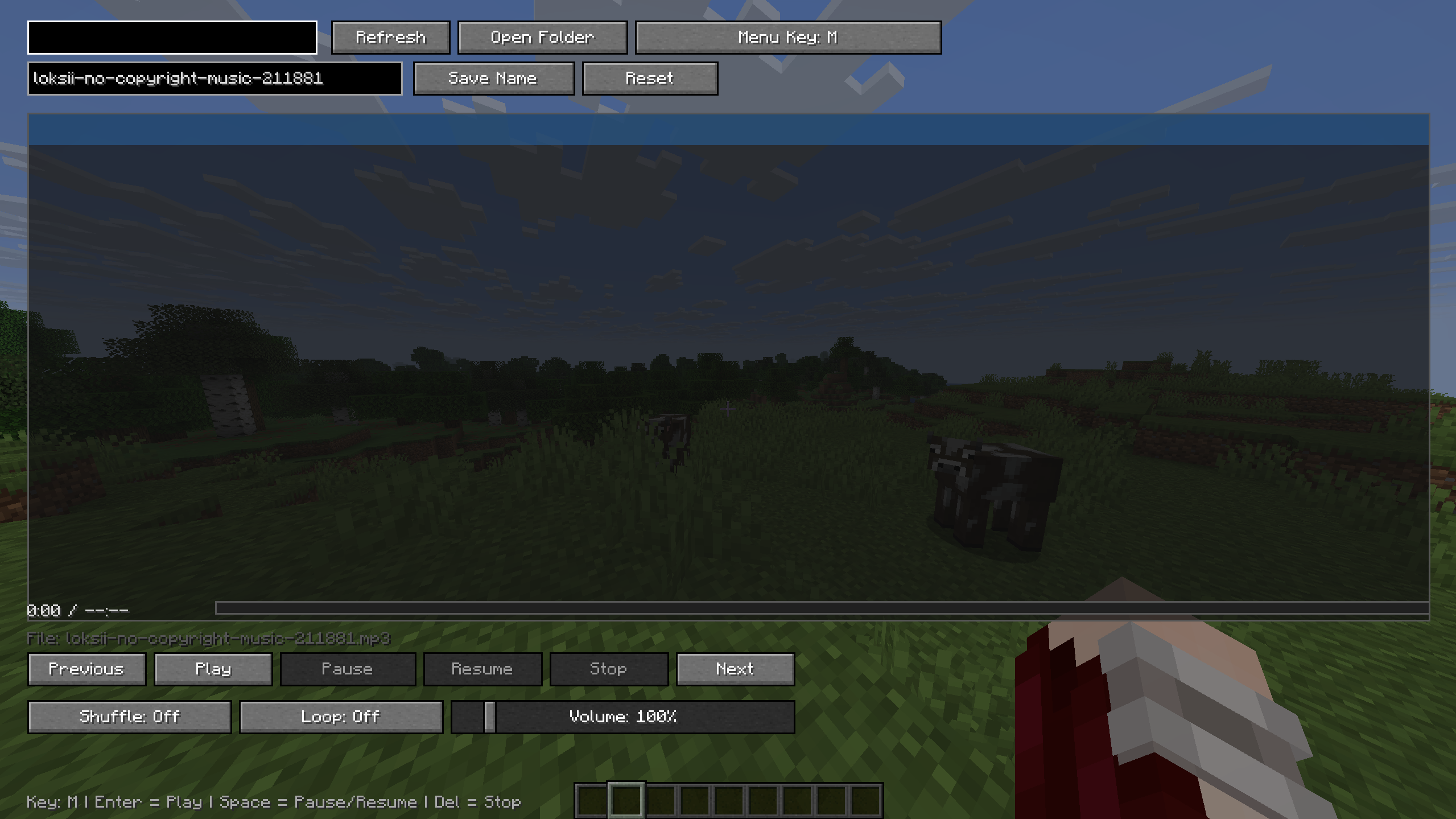 menu (bind:M) you can upload your audio file, adjust the volume, and rename your file.
Versions
Files
Relations
Project Relations
More like this
Similar Mods
Suggestions use data such as tags, dependencies, dependents, descriptions, titles, and more to rank how much they overlap with this mod.
On ModDex
Community snapshot
By the numbers
Statistics

Want to reach Minecraft players?
We're looking for a server hosting partner to feature here and other parts of the site. Interested? Send us a message!
Get in touchGet it on
Available Platforms
On ModDex
Community snapshot
By the numbers
Statistics
Resources