
MusicDisplay
No reviews yet
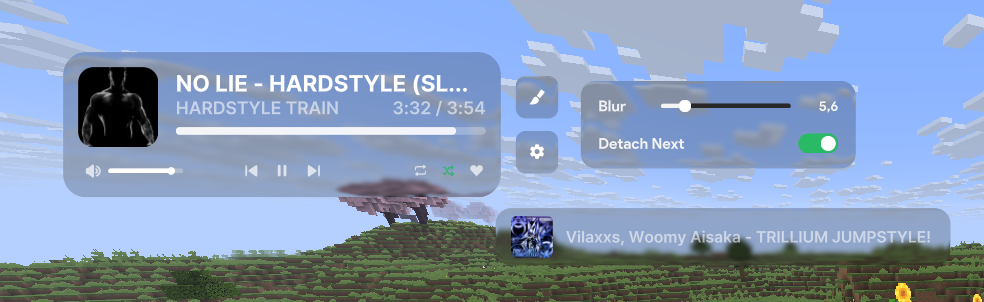
This mod displays the currently playing music on Spotify. You can easily adjust the volume, pause the song, and more.
Centers around fantasy elements such as spells, rituals, and magical energies, often involving personal empowerment and magical automation.
Fabric is a mod loader for versions 1.14+ of Minecraft, particularly popular for client side and optimization mods.
Community voices
Reviews
Click once to include, again to exclude, again to clear
No reviews yet. Be the first to review this project!
Get it on
Available Platforms
 Modrinth
Compatibility
Supported Environments
About
Project Details
For authors
Embed Badge
If you're the author of this project, you can embed a live badge anywhere that supports HTML or Markdown. It updates automatically whenever ratings change.
Use HTML for any page that supports it, or Markdown for README files and Markdown-based descriptions.
Identifiers
Platform IDs
About
Description
MusicDisplay
Version 2.5 is now available, supporting Minecraft version 26.1.x! Check the changelog here.
Take full control of your music without ever leaving the game! This mod seamlessly integrates Spotify into your Minecraft client, offering a sleek overlay and easy access to playback controls.
Features
- Full Playback Control: Pause, resume, skip, or rewind tracks directly from the game.
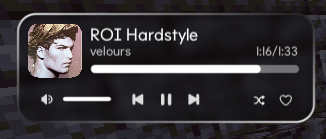
- Live Overlay: Displays the current song title, artist, album art, and a real-time progress bar.
- Search Spotify: You can search for your song or playlist directly from the GUI!
- Volume Management: Adjust Spotify volume instantly without Alt-Tabbing.
- Interactive Controls:
- Play/Pause
- Previous / Next Track
- Shuffle Toggle
- Loop Toggle
- Like/Save Songs
- State Synchronization: Automatically syncs with changes made on other devices (e.g., your phone).
- Custom API Keys: Use your own Spotify Client ID and Secret for full privacy and control.
How to Use
1. Initial Setup
To connect the mod to your Spotify account:
- Open the client GUI in the game (default key: Right Shift).
- Click the Setup Spotify button at the bottom of the panel. This will launch a local setup server and automatically open the setup page in your web browser (
http://127.0.0.1:8888/setup). - Follow the instructions on the web page:
- Log in to the Spotify Developer Dashboard.
- Create a new application.
- Edit the app settings and add
http://127.0.0.1:8888/callbackas a Redirect URI. - Copy your Client ID and Client Secret.
- Enter your Client ID and Client Secret in the web form and click Connect Spotify Account.
- Approve the authorization in your browser. Once completed, you can close the browser tab and return to the game!
2. State & Control
Enable the Spotify module in your client's GUI. Your music will start syncing instantly!
Configuration
Configuration files are stored locally at: .minecraft/config/spotify-config.json
Keybinds
- Right Shift - Opens the Client GUI
Requirements
- Spotify Account (Premium is required).
- Minecraft Java Edition (Fabric).
- Java 25 or higher.
Preview

Showcase
Screenshots
Gallery
-
 Preview
Versions
Files
Relations
Project Relations
More like this
Similar Mods
Suggestions use data such as tags, dependencies, dependents, descriptions, titles, and more to rank how much they overlap with this mod.
On ModDex
Community snapshot
By the numbers
Statistics

Want to reach Minecraft players?
We're looking for a server hosting partner to feature here and other parts of the site. Interested? Send us a message!
Get in touchGet it on
Available Platforms
On ModDex
Community snapshot
By the numbers