
Community listing page, reviews here may not be monitored by the author.
MySB

No reviews yet
サーバー側のみで動作するスコアボード管理Mod。バニラクライアント対応、クライアント側インストール不要。プレイヤーは各自のスコアボード表示をGUIで自由に切り替えられます。 A scoreboard management mod that runs on the server side. Compatible with vanilla clients. Players can freely toggle their individual scoreboard displays via a GUI.
Community voices
Reviews
No reviews yet. Be the first to review this project!
Get it on
Available Platforms
Compatibility
Supported Environments
Runs on a dedicated server only; does not work in singleplayer.
About
Project Details
For authors
Embed Badge
If you're the author of this project, you can embed a live badge anywhere that supports HTML or Markdown. It updates automatically whenever ratings change.
Use HTML for any page that supports it, or Markdown for README files and Markdown-based descriptions.
Identifiers
Platform IDs
About
Description
MySB - My Scoreboard
A server-side only scoreboard management mod for Fabric 1.19.4. Players can pick and switch their own sidebar display through an intuitive chest GUI — without installing anything on the client.
Built for ASTRAL-SMP, a Japanese Minecraft Fabric server.
✨ Features
- ✅ 100% server-side — vanilla clients work out of the box
- ✅ Chest-based GUI — no commands to memorize
- ✅ Per-player scoreboard selection — each player picks their own sidebar
- ✅ Persistent settings — choices are saved across sessions
- ✅ Server-wide total statistics — aggregate stats across all players to encourage friendly competition
- ✅ Discord Bot integration — auto-post statistics to Discord forum channels on an hourly schedule
- ✅ Permission & rate limiting — safe for public servers
- ✅ Admin GUI — enable/disable stats, exclude players, manage fake players (Carpet)
📦 Installation
⚠️ Server-side only. Do NOT install on the client — it will have no effect.
- Drop
mysb-1.19.4-2.3.jarinto your server'smods/folder - Make sure Fabric API is also installed
- Start the server
Players join with vanilla Minecraft 1.19.4 — no mods needed on their side.
🎮 Commands
Player commands
| Command | Description |
|---|---|
/mysb |
Open the scoreboard selection GUI |
/mysb version |
Show mod version |
Admin commands (OP required)
| Command | Description |
|---|---|
/mysb reload |
Reload configuration (OP4) |
/mysb admin gui |
Open the admin GUI (OP3+) |
/mysb admin stats enable <stat> |
Enable a statistic |
/mysb admin stats disable <stat> |
Disable a statistic |
/mysb admin stats list |
List enabled/disabled stats |
/mysb admin exclude <player> |
Exclude a player from totals |
/mysb admin include <player> |
Re-include an excluded player |
/mysb admin fakeplayerscore enable|disable |
Toggle Carpet fake-player display |
/mysb total list |
List total statistics |
/mysb total update |
Manually refresh totals |
/mysb total add <id> <displayName> <statType> |
Add a custom total stat |
/mysb total remove <id> |
Remove a custom total stat |
Discord integration (OP3+)
| Command | Description |
|---|---|
/mysbdiscord |
Open Discord settings GUI |
/mysbdiscord channel <ID> |
Set the target forum channel |
/mysbdiscord status |
Show integration status |
/mysbdiscord reconnect |
Reconnect the Discord Bot |
/mysbdiscord test |
Send a test message |
/mysbdiscord update |
Force-update statistics |
📊 Available Total Stat Types
- Total Blocks Mined
- Total Blocks Placed
- Total Deepslate Mined
- Total Coral Blocks Mined
- Total Stained Glass Placed
- Total Anvils Placed
- Total Villager Trades
- Total All Ores Mined
🤖 Discord Bot Setup
- Create a Discord Bot and get its token
- Set the token in
config/mysb/discord_config.properties - Invite the bot with these permissions: Send Messages, Create Threads, Use Slash Commands
- Run
/mysbdiscord channel <forum-channel-id>in-game - Statistics will auto-post every hour
🔧 Technical Specs
- Minecraft: 1.19.4
- Loader: Fabric
- Dependencies: Fabric API
- Environment: Server only
- Client compatibility: Vanilla clients
📄 License
MIT License — see LICENSE for details.
日本語版
サーバー側のみで動作するFabric 1.19.4用スコアボード管理Modです。プレイヤーはチェスト型GUIから自分のサイドバー表示を自由に選択・切り替えできます。クライアント側のインストールは一切不要、バニラクライアントでそのまま使えます。
日本のMinecraft FabricサーバーASTRAL-SMP向けに開発されました。
✨ 機能
- ✅ サーバー側のみで動作 — バニラクライアントでそのままOK
- ✅ チェスト型GUI — コマンドを覚える必要なし
- ✅ プレイヤーごとの個別スコアボード選択 — 各プレイヤーが自分の好きな表示を選べる
- ✅ 設定の永続化 — 選択はセッションを跨いで保存
- ✅ サーバー全体のトータル統計 — 全プレイヤーの統計を集計、競争意識を刺激
- ✅ Discord Bot連携 — Discordフォーラムチャンネルに統計を毎時自動投稿
- ✅ 権限管理 & レート制限 — 公開サーバーでも安心
- ✅ 管理者GUI — 統計の有効/無効切替、プレイヤー除外、Carpet fake player対応
📦 インストール
⚠️ サーバー側専用です。 クライアントには入れないでください(入れても効果はありません)。
mysb-1.19.4-2.3.jarをサーバーのmods/フォルダに配置- Fabric API も導入
- サーバー起動
プレイヤーはバニラのMinecraft 1.19.4で参加するだけ、追加Modは不要です。
⚙️ 技術仕様
- 対応バージョン: Minecraft 1.19.4
- ローダー: Fabric
- 依存: Fabric API
- 環境: サーバー専用
- クライアント互換性: バニラクライアント
📄 ライセンス
MIT License
Screenshots
Gallery
-
 Discord bot側の接続をゲーム内でテスト出来ます。 /mysbdiscord reconnect
 -
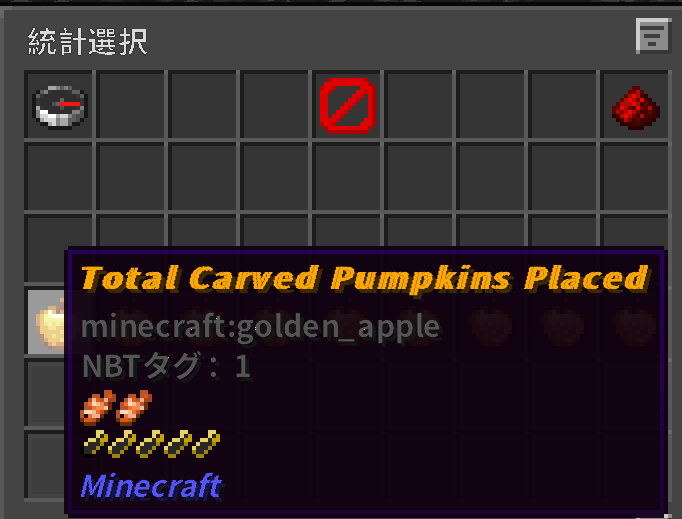 メイン画面。/mysbで見れます
 -
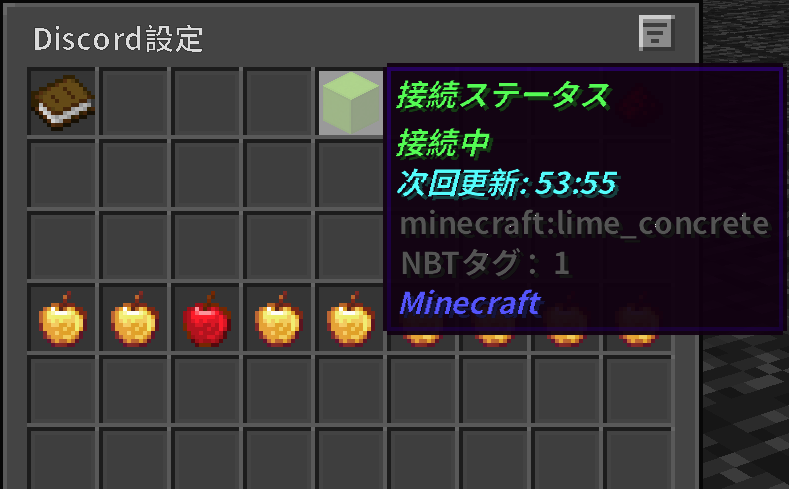 接続完了した際の画像。ステータスが変わります
 -
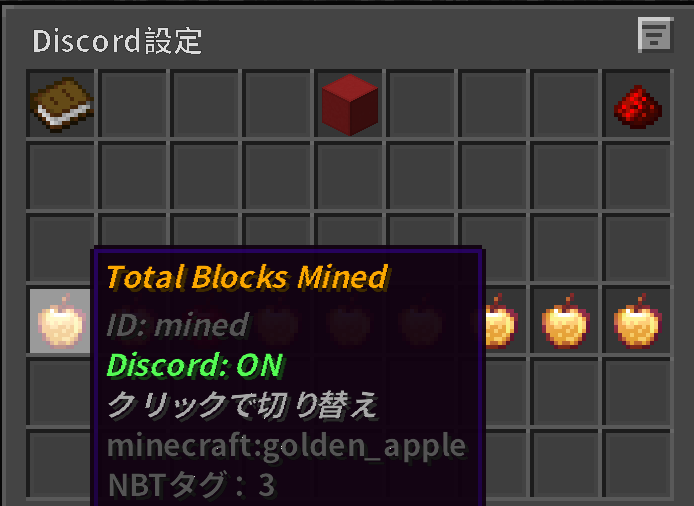 Discord設定画面。Discord側に通知する項目を設定できます
Versions
Files
Relations
Project Relations
More like this
Similar Mods
Suggestions use data such as tags, dependencies, dependents, descriptions, titles, and more to rank how much they overlap with this mod.
On ModDex
Community snapshot
By the numbers
Statistics

Want to reach Minecraft players?
We're looking for a server hosting partner to feature here and other parts of the site. Interested? Send us a message!
Get in touchGet it on
Available Platforms
On ModDex
Community snapshot
By the numbers