
Community listing page, reviews here may not be monitored by the author.
NBT For Give

No reviews yet
Copy any item as a precise /give command, inspect its components, or restore it from clipboard
Community voices
Reviews
No reviews yet. Be the first to review this project!
Get it on
Available Platforms
Compatibility
Supported Environments
Runs entirely on the client. Works on vanilla servers.
About
Project Details
For authors
Embed Badge
If you're the author of this project, you can embed a live badge anywhere that supports HTML or Markdown. It updates automatically whenever ratings change.
Use HTML for any page that supports it, or Markdown for README files and Markdown-based descriptions.
Identifiers
Platform IDs
Resources
External Links
About
Description
NBT For Give
Scroll down for English description
Клиентский мод позволяющий извлечь готовую команду /give из предмета который держит игрок в руке, экспортировать его компоненты в JSON/SNBT или восстановить предмет обратно.
| Команда | Описание |
|---|---|
/extract (или /extract give) |
Скопировать готовую команду /give из предмета в руке прямо в буфер обмена. |
/extract give full |
Скопировать полную команду /give без оптимизации и сокращений. |
/extract save |
Сохранить полный текстовый отчёт (.txt) о предмете в папку на диске. |
/extract raw |
Извлечь сырые данные предмета из руки (SNBT). |
/extract json |
Извлечь полное форматированное JSON представление компонентов предмета в буфер обмена. |
/extract pretty |
Извлечь читаемое описание структуры компонентов предмета. |
/extract paste |
Мгновенно выдать предмет прямо из буфера обмена в инвентарь (в творческом режиме). |
/extract load <файл>(или latest / clipboard) |
Восстановить предмет из файла отчёта в папке экспорта (с автодополнением по Tab), из самого свежего отчёта или текста в буфере обмена. |
/extract look(или /extract look on|off) |
Переключить функцию, которая автоматически отслеживает и извлекает данные из выброшенных на сервере предметов с кастомными компонентами. |
/extract path |
Показать текущую папку сохранения отчётов и статус записи файлов при копировании. |
/extract path <directory> |
Установить собственную папку сохранения отчётов. |
/extract path reset |
Сбросить папку сохранения на рабочий стол (Desktop/NbtForGive). |
/extract path on|off |
Включить или выключить автоматическое сохранение файла при обычном копировании в буфер обмена (по умолчанию выключено — off). |
/extract chatlimit on|off |
Включить или выключить безлимит по символам в чате. |
/extract help |
Показать список всех команд и их описание в чате. |
Отключение лимита чата: Обычные сообщения из текста при длинне больше 256 символов делятся на части (по 256 симв.) и отправляются в чат.
По умолчанию обычные команды сразу копируют результат в буфер обмена. Если вам нужен текстовый файл отчёта, используйте /extract save или включите автосохранение командой /extract path on.
English
A client-side mod that allows you to extract a ready-to-use /give command from the item in the player's hand, export its components to JSON/SNBT, or restore the item back.
| Command | Description |
|---|---|
/extract(or /extract give) |
Copy the ready /give command for the held item directly to the clipboard. |
/extract give full |
Copy the uncompressed /give command without any syntax reductions. |
/extract save |
Save a complete text report (.txt) for the held item to a folder on disk. |
/extract raw |
Extract raw item serialization data from your hand (SNBT). |
/extract json |
Extract the full formatted JSON representation of the item components to the clipboard. |
/extract pretty |
Extract a human-readable structure tree of the item's components. |
/extract paste |
Instantly spawn the item directly from the clipboard into your inventory (creative mode only). |
/extract load <file>(or latest / clipboard) |
Restore an item from a report file in the export directory (supports Tab completion), from the newest report, or from clipboard text. |
/extract look(or /extract look on|off) |
Toggle the monitor that automatically watches and extracts data from dropped items on servers with custom components. |
/extract path |
Show the current output directory and report file-saving status. |
/extract path <directory> |
Set a custom output directory for exported reports. |
/extract path reset |
Reset the output directory to desktop (Desktop/NbtForGive). |
/extract path on|off |
Enable or disable automatic file saving when copying to clipboard (disabled by default — off). |
/extract chatlimit on|off |
Disable the chat character limit. |
/extract help |
Show the command list and descriptions in chat. |
Bypass chat limit: Regular text messages longer than 256 characters are automatically split into 256-char chunks and sent one by one.
By default, extraction commands immediately copy the result directly to your clipboard. If you need a saved text report, use /extract save or enable auto-saving with /extract path on.
Screenshots
Gallery
-
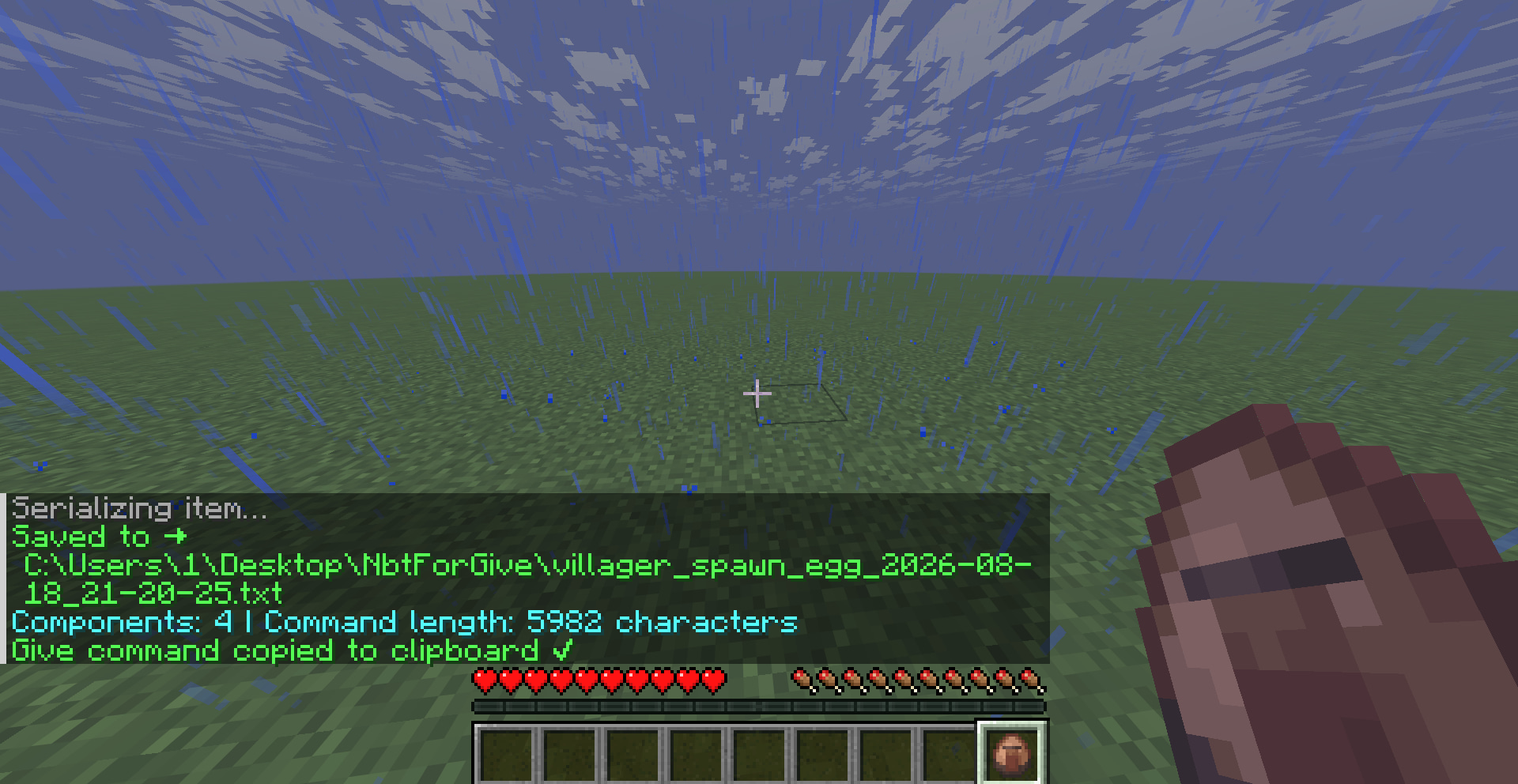 Extract item
Versions
Files
Relations
Project Relations
More like this
Similar Mods
Suggestions use data such as tags, dependencies, dependents, descriptions, titles, and more to rank how much they overlap with this mod.
On ModDex
Community snapshot
By the numbers
Statistics

Want to reach Minecraft players?
We're looking for a server hosting partner to feature here and other parts of the site. Interested? Send us a message!
Get in touchGet it on
Available Platforms
On ModDex
Community snapshot
By the numbers
Statistics
Resources