Community listing page, reviews here may not be monitored by the author.
NBT Manipulator

No reviews yet
Allows editing of NBT during runtime
Community voices
Reviews
No reviews yet. Be the first to review this project!
Get it on
Available Platforms
About
Project Details
For authors
Embed Badge
If you're the author of this project, you can embed a live badge anywhere that supports HTML or Markdown. It updates automatically whenever ratings change.
Use HTML for any page that supports it, or Markdown for README files and Markdown-based descriptions.
Identifiers
Platform IDs
About
Description
This mod adds a set of commands which open a simple NBT editing GUI; literally a text editor with the raw NBT of the thing you are editing
WARNING; SAVING EDITED NBT TO AN OBJECT CAN CAUSE CRASHES AND WORLD CORRUPTION IF YOU MAKE A MISTAKE!!!
If you're not sure, make a world backup first, and be extremely careful about who you let use this on a server (command is normally only accessible for OPs)
/nbtman hand
Edits the item in your main hand
/nbtman self
Edits YOU
/nbtman nearesttileentity
Edits the nearest tile entity
/nbtman nearestentity
Edits the nearest entity (not you)
IF YOU SAVE NEW NBT TO AN ENTITY, AND THE NEW NBT CONTAINS A POSITION, IT WILL SPAWN THERE INSTEAD OF WHERE IT IS NOW. YOU CAN SAVE A TEMPLATE AFTER DELETING THE "Pos" BLOCK IN THE NBT TO PREVENT THIS WHEN LOADING THE TEMPLATE AND SAVING TO AN ENTITY
Once the GUI is open, you can edit the raw NBT and save it to the object.
You can also save and load NBT templates, on either the server-side (shared) or the client-side
Note that when playing single player or when hosting a LAN game from client, your "server templates" and "client templates" are the same thing, so you'll see all of them in both lists
There are a couple of basic examples in the images section. You can do some much more interesting stuff with it though; I suggest using the command to open up items / entities / tile entities and see what data they have stored in them. It will give you a better idea of what you can mess with.
Yes, you can use it in your modpack if you want (MIT license).
A list of my curseforge mods can be found here
Screenshots
Gallery
-
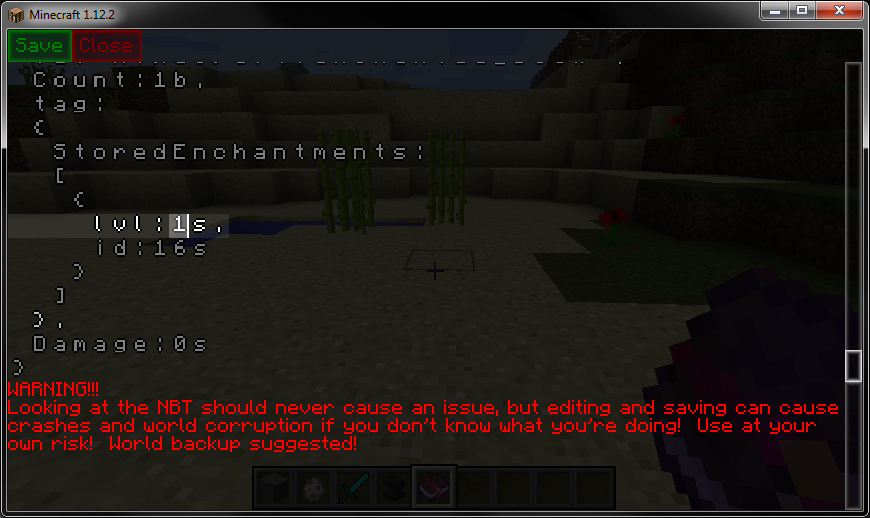 Enchanted Book Edit This is a book of sharpness 1. Changing the 1 here to a 10 would create a sharpness 10 book.
 -
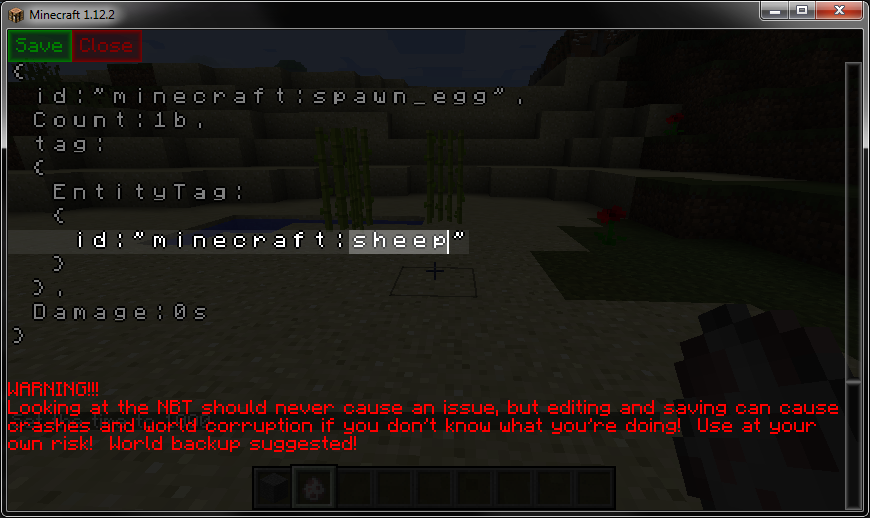 Spawn Egg Edit Changing "sheep" to "pig" will change the sheep egg into a pig egg.
Versions
Files
Relations
Project Relations
More like this
Similar Mods
Suggestions use data such as tags, dependencies, dependents, descriptions, titles, and more to rank how much they overlap with this mod.
On ModDex
Community snapshot
By the numbers
Statistics
Want to reach Minecraft players?
We're looking for a server hosting partner to feature here and other parts of the site. Interested? Send us a message!
Get in touchGet it on
Available Platforms
On ModDex
Community snapshot
By the numbers