Community listing page, reviews here may not be monitored by the author.
NBT Tooltip


No reviews yet
Show the item's NBT in its tooltip
Community voices
Reviews
No reviews yet. Be the first to review this project!
Get it on
Available Platforms
Compatibility
Supported Environments
Runs entirely on the client. Works on vanilla servers.
About
Project Details
For authors
Embed Badge
If you're the author of this project, you can embed a live badge anywhere that supports HTML or Markdown. It updates automatically whenever ratings change.
Use HTML for any page that supports it, or Markdown for README files and Markdown-based descriptions.
Identifiers
Platform IDs
About
Description
A little map dev/mod dev utility to help people working with nbt items and tiles.
Item NBT
To see an Item NBT tag just activate the advanced tooltips by pressing F3+H, the tag will appear inside the tooltip. Longer tags will be presented in an auto scrolling view, the scroll speed can be controlled with SHIFT, to pause scrolling, and ALT, to speed it up. The default scrolling speed and the maximum number of tag lines shown at once can be configured.
Tile Entity NBT (Not available in newer versions)
To see a Tile Entity NBT right click with an arrow on the block you're interested in. One or two popup windows will appear, depending on your configuration and what mode (SP/MP/LAN) you're playing.
One window will hold the server-side information (Only if you're playing SP) the other one will show client-side information (Both SP and MP). What windows are shown is configurable.
The client tag will often be a subset of the information contained inside the server one, this is because of how minecraft deals with syncing the tags. In general, it's up to the TE's creator to decide what data gets sent to the client (A modder should remove all the data unecessary to the client, to reduce the network load: this prevents you from seeing all the data if playing on a server).
The windows are separate from the Minecraft window, and should appear in the background, without interrupting your game, and they can be closed without effects on the game. Only one set (Server + Client) will be shown at a time, to prevent flooding your screen with popups: opening a new one will just replace the existing one.
Other Info
- This mod is client-side, it does not need to be installed on servers.
- Some servers might consider this mod cheating, check with your server admin if it's fine to install this on your client.
- You are free to use this mod on whatever pack you desire
- Don’t ask for updates. Development is active, just wait, it will eventually be updated
A little map dev/mod dev utility to help people working with nbt items and tiles.
To see an Item NBT tag just activate the advanced tooltips by pressing F3+H, the tag will appear inside the tooltip. Longer tags will be presented in an auto scrolling view, the scroll speed can be controlled with SHIFT, to pause scrolling, and ALT, to speed it up. The default scrolling speed and the maximum number of tag lines shown at once can be configured.
More toggling options are available in the config menu.
Keybinds to copy the NBT tag to your system clipboard are configurable in the "controls" settings.
Multiple presentation formats are available both for tooltips (default: custom human readable and color coded format) and for copying (default: json), all configurable.
Using ModMenu to edit configuration files is highly suggested.
Other Info
Some servers might consider this mod cheating, check with your server admin if it's fine to install this on your client.
You are free to use this mod on whatever pack you desire
Screenshots
Default view:

Non-colored version:

Json view:

Screenshots
Gallery
-
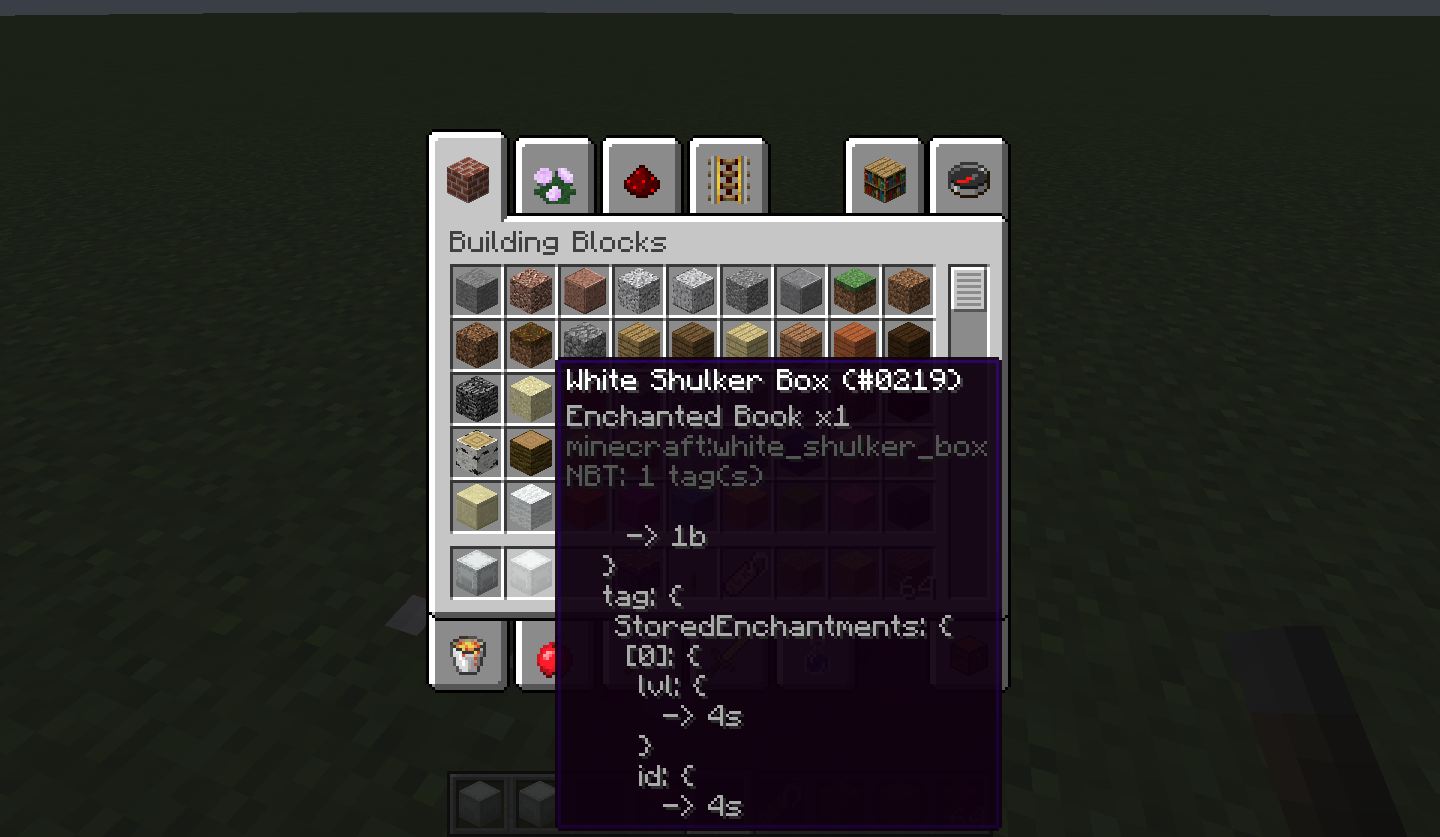 A too-big-to-be-displayed NBT The tooltip is caught mid-scrolling in here
 -
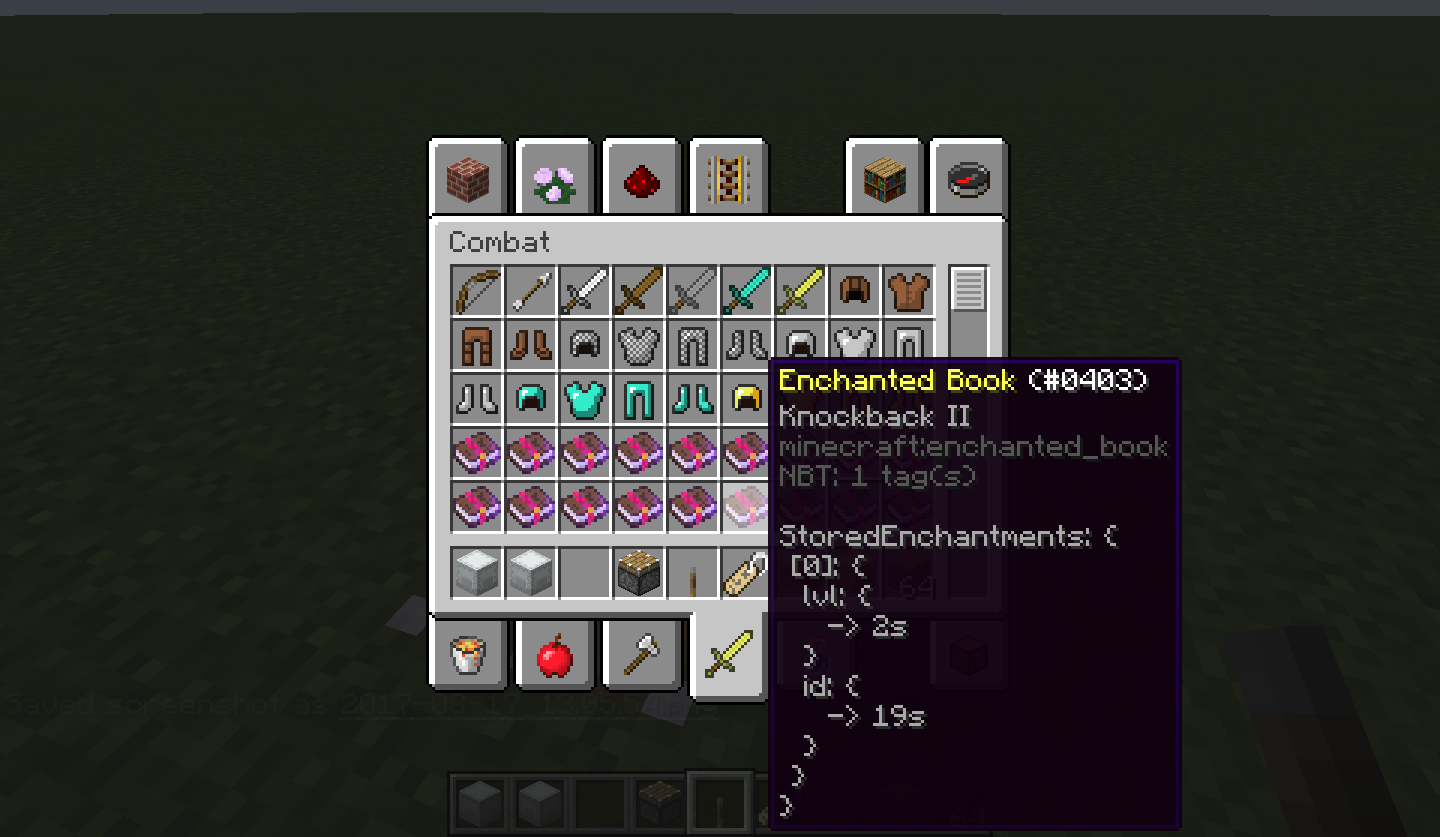 A full Enchantment nbt
Versions
Files
Relations
Project Relations
More like this
Similar Mods
Suggestions use data such as tags, dependencies, dependents, descriptions, titles, and more to rank how much they overlap with this mod.
On ModDex
Community snapshot
By the numbers
Statistics
Want to reach Minecraft players?
We're looking for a server hosting partner to feature here and other parts of the site. Interested? Send us a message!
Get in touchGet it on
Available Platforms
On ModDex
Community snapshot
By the numbers