Community listing page, reviews may not be monitored by the author.
NCL Skins


No reviews yet
Build complete looks with skins, capes, Classic or Slim models, and outer layers, then switch between them right in Minecraft

Community voices
Reviews
No reviews yet. Be the first to review this project!
Get it on
Available Platforms
Compatibility
Supported Environments
Required on the client. Installing it on the server adds functionality.
About
Project Details
For authors
Embed Badge
If you're the author of this project, you can embed a live badge anywhere that supports HTML or Markdown. It updates automatically whenever ratings change.
Use HTML for any page that supports it, or Markdown for README files and Markdown-based descriptions.
Identifiers
Platform IDs
About
Description


Mod overview (Russian, English, German, and Ukrainian dubbing)
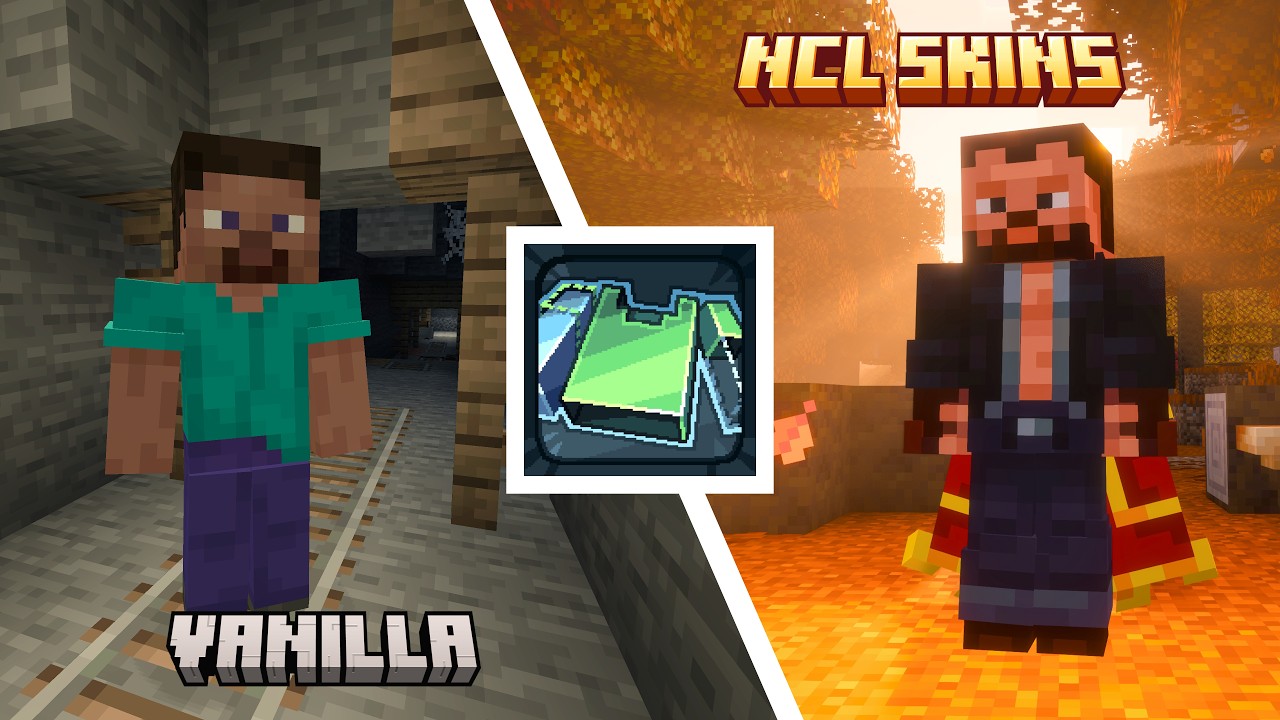
Managing your appearance in Minecraft should feel as natural as everything else in the game. NCL Skins brings skins, Classic and Slim models, capes, outer-layer settings, and saved looks together in one built-in gallery. With Customizable Player Models installed, you can use custom character models too.
Create complete looks and switch between them with one click. Each look remembers its skin, Classic or Slim model, selected cape or elytra, and the visibility of every outer-layer part.
Your library is shared across every Minecraft instance on this computer that uses the same account.
🧩 Build your look in-game
- Preview the complete look before saving
- Rotate and zoom the player model while editing
- Choose a Classic or Slim model
- Use capes from your Minecraft account, import your own from files, or choose from resource packs. Switch between cape and elytra previews
- Configure the hat, jacket, sleeves, and pants legs separately for each look
- Search, edit, duplicate, and delete looks in My looks
🔎 Discover and import skins
Import a skin from a file or direct link, or find a player's current skin by name or UUID. NCL Skins automatically detects whether it uses the Classic or Slim model, and you can change it in the editor when needed.
Bring over saved looks from Minecraft Launcher, Modrinth App, CurseForge App, Prism Launcher, Skin Shuffle, SimpleSkinSwapper / Skin Swapper, and Quick Skin. Before importing, NCL Skins separates new skins from ones already in your catalog so you can select only the ones you want.
The built-in Catalog includes the standard Minecraft characters and optional collections of official Mojang event skins. Resource packs can add their own skin collections.
🎭 Customizable Player Models
Save skins with CPM models in your looks and switch between them without restarting the game. After you join a world, the editor shows the model and its animations. Without a world loaded, it shows the base skin. Customizable Player Models must be installed to display models and import model files.
Import .cpmmodel and .cpmproject files from your device or a direct link without manually exporting them to a skin first. If a model needs a base skin, choose one during import, then preview and save the finished look.
If importing a model requires its data to be hosted externally, NCL Skins automatically uploads it to CPM Paste. This requires a licensed Minecraft account. Models that use external data depend on that data remaining available at its link. Saving the look does not make them fully self-contained.
Capes and elytra built into a CPM model follow the same provider priorities as other sources. You can use a regular cape instead of CPM accessories while keeping the model and its animations. After you join a world, the Embedded collection lets you inspect the model's available accessories without changing the look's saved assignments. Embedded Sneaky Capes can also be inspected without joining a world.
🦸 Custom capes and collections
Import your own capes from files, give them names, and save them in your looks. Browse capes from active resource packs, including the bundled Mojang cape collections. Once you save a cape in a look, it stays available even if you disable its resource pack.
Static and animated capes are supported, including HD textures. PNG and GIF frame sizes can be 64×32, 128×64, 256×128, 512×256, 1024×512, or 2048×1024 pixels, with up to 64 frames per animation. Static PNGs at 46×22 and 92×44 and JPEGs at 64×32 are also supported.
Import GIF animations or PNGs with vertically stacked frames, or add them through resource packs. The full animation is saved with the cape in your look. Thumbnails play it on hover, while the full player preview plays it continuously. The new HD formats and animated capes require NCL Skins 1.3.0 and do not appear in older versions.
Search capes by name and filter them by whether they include an elytra texture. The catalog grid adjusts to fit your window.
Custom capes and resource pack capes are visible only to you and do not replace the official cape on your Minecraft profile. Installing the server mod or plugin does not make these capes visible to other players.
🎛️ Appearance providers
Choose where your skins and capes come from. Configure Offline and Minecraft separately for each component: enable the sources you want, change their priority, and mix your local appearance with the skin or cape from your Minecraft profile.
For capes, OptiFine, SkinMC, MinecraftCapes, and Sneaky Capes are also available, along with CPM when Customizable Player Models is installed. Set their priority relative to official and offline capes.
Use OptiFine, SkinMC, and MinecraftCapes capes for yourself and other players without installing the services' separate mods. You can still use OptiFine alongside NCL Skins. MinecraftCapes supports HD textures, animations, and cape enchantment glint, including with Wavey Capes.
Open a service's website from Providers to manage your cape. After changing it on the website, click Refresh to see the result and notify other NCL Skins players when the server supports appearance updates. With a row selected, only that source is refreshed. With no row selected, all enabled sources in the current tab are refreshed. Loading does not block the entire screen.
Sneaky Capes lets you use a cape embedded in a skin without a separate mod. Open its web editor from Providers to create a skin with an embedded cape.
Capability icons show which providers accept a look's skin or cape, limit your choices to their own catalog, or let other users of the service see your appearance.
If your provider configuration makes the gallery unavailable, you can adjust a regular skin's outer layers right here. Three buttons control the head, body, and legs. Changes apply immediately and are saved in Minecraft settings without overwriting your saved look. These buttons are hidden when a CPM model is displayed.
Turning off Minecraft for both skins and capes hides Minecraft profile skins and capes for you and other players from your view. These settings only affect what you see.
✨ Check skin compatibility
The mod recognizes extra skin features for Ears, Fresh Moves, Just Expressions, Sneaky Capes, and Customizable Player Models and shows in advance how each skin will work in your setup. Compatibility badges appear in the Catalog, My looks, the editor, and before import.
If an active mod or resource pack uses the skin's pixels in a conflicting way, NCL Skins explains the cause. This includes warnings about conflicts between Sneaky Capes or CPM and Fresh Moves or Just Expressions facial animations, as well as damaged CPM data. You can also hide incompatible skins separately in the Catalog and My looks in Settings.
With My Totem Doll set to Holding Player, your totem's texture updates as soon as you switch looks.
🌐 Client and server use
For official skin or cape changes, only the player changing their appearance needs the mod. Without a server-side component, the change is still saved to their Minecraft profile, but other players may need to reconnect, or the changed player may need to be reloaded by the server, before the result becomes visible.
To let other players see changes without reconnecting, install a compatible version of NCL Skins on a modded server or NCL Skins Plugin on a supported server and proxy, if one is used. Official skin and cape updates are visible to everyone, including players without the mod. Players with NCL Skins also receive updates from other providers, including OptiFine, SkinMC, and MinecraftCapes, even when your Minecraft profile has not changed. Each player sees the result according to their own enabled providers and priorities. Viewers must also have Customizable Player Models installed to see CPM models.
📴 Local-first and offline support
Your gallery remains available even when Minecraft services are temporarily unavailable. Create, edit, and preview looks, apply your appearance locally, and keep playing. If you choose a look while your game session is unavailable, NCL Skins remembers your choice and syncs your skin and official cape with your Minecraft profile once your session and the services are available again.
If Minecraft temporarily limits skin or cape changes, NCL Skins keeps your latest choice, shows the waiting progress on the affected action, and applies it automatically when the limit ends.
Data is isolated by account but shared by every Minecraft instance launched with the same account on this computer. You will not have to recreate your looks for every setup. Loading external CPM models from links still depends on their source being available.
🕹️ Part of the familiar Minecraft interface
NCL Skins integrates with existing game screens, so managing your skins does not require a separate launcher or website:
- Click your player on the title screen or pause menu to open My looks.
- The Appearance… button in Settings opens the same gallery, while the main-hand setting is available under accessibility options.
- Place the player preview on the left or right, or turn it off. The title screen and pause menu have separate settings.
- After you join a world, the editor can show the combined result of compatible mods and resource packs that change the player model.
- Set keybindings to open My looks, the active look editor, Providers, the skin catalog, and skin import while playing. No keys are assigned by default.
- Use FancyMenu actions to open these same five screens from your custom menus.
📦 Create your own skin and cape collections
Collections are distributed as regular Java Edition resource packs. For a minimal collection, give it a unique ID, place the PNG skins in the wide and slim folders, and use the following structure:
<pack-root>/
├── pack.mcmeta
└── assets/<collection-id>/textures/entity/player/
    ├── wide/<skin-id>.png
    └── slim/<skin-id>.png
The wide folder is for the Classic model, while slim is for the Slim model. Matching file names in both folders create two variants of the same skin. Collection IDs and file names must use lowercase Latin letters, numbers, hyphens, and underscores. If no localization is provided, NCL Skins automatically turns the IDs into display names.
To add details about a collection, create standard resource-pack localization files under assets/<any-namespace>/lang/<locale>.json. Each collection and skin can have a localized name, description, and author credits using the following keys:
nclskins.<collection-id>.name
nclskins.<collection-id>.description
nclskins.<collection-id>.authors
nclskins.<collection-id>.skin.<skin-id>.name
nclskins.<collection-id>.skin.<skin-id>.description
nclskins.<collection-id>.skin.<skin-id>.authors
For cape collections, place PNG, GIF, or JPEG files in the supported sizes at the path below, using the appropriate extension. No separate manifest is needed. For an animated PNG, stack 2 to 64 complete frames vertically. Frames play from top to bottom at 100 ms per frame and loop indefinitely. GIFs retain their frame timing and repeat settings. Do not add animation .mcmeta files to cape textures: textures with these files are excluded from the catalog. If a cape includes an elytra texture, it must be part of the same layout.
<pack-root>/assets/<collection-id>/textures/entity/cape/<cape-id>.pngThe same ID and collection localization rules apply to capes. To add a name, description, and author credits for an individual cape, use these keys:
nclskins.<collection-id>.cape.<cape-id>.name
nclskins.<collection-id>.cape.<cape-id>.description
nclskins.<collection-id>.cape.<cape-id>.authors
When publishing a collection on Modrinth or CurseForge, we recommend adding x NCL Skins to the resource pack's title. This makes compatible collections easier to find through platform search.
⚖️ License
- You may include NCL Skins in modpacks and install it on your servers
- You may create and distribute forks under the GPL-3.0-only license. Any distributed fork must remain under this license, and recipients must be given access to its complete corresponding source code
- Minecraft event skins and Mojang capes belong to Mojang Studios and/or Microsoft and are not distributed by NaoCraftLab under the GPL
Mod overview (Russian, English, German, and Ukrainian dubbing)

Managing your appearance in Minecraft should feel as natural as everything else in the game. NCL Skins brings skins, Classic and Slim models, capes, outer-layer settings, and saved looks together in one built-in gallery. With Customizable Player Models installed, you can use custom character models too.
Create complete looks and switch between them with one click. Each look remembers its skin, Classic or Slim model, selected cape or elytra, and the visibility of every outer-layer part.
Your library is shared across every Minecraft instance on this computer that uses the same account.
🧩 Build your look in-game
- Preview the complete look before saving
- Rotate and zoom the player model while editing
- Choose a Classic or Slim model
- Use capes from your Minecraft account, import your own from files, or choose from resource packs. Switch between cape and elytra previews
- Configure the hat, jacket, sleeves, and pants legs separately for each look
- Search, edit, duplicate, and delete looks in My looks
🔎 Discover and import skins
Import a skin from a file or direct link, or find a player's current skin by name or UUID. NCL Skins automatically detects whether it uses the Classic or Slim model, and you can change it in the editor when needed.
Bring over saved looks from Minecraft Launcher, Modrinth App, CurseForge App, Prism Launcher, Skin Shuffle, SimpleSkinSwapper / Skin Swapper, and Quick Skin. Before importing, NCL Skins separates new skins from ones already in your catalog so you can select only the ones you want.
The built-in Catalog includes the standard Minecraft characters and optional collections of official Mojang event skins. Resource packs can add their own skin collections.
🎭 Customizable Player Models
Save skins with CPM models in your looks and switch between them without restarting the game. After you join a world, the editor shows the model and its animations. Without a world loaded, it shows the base skin. Customizable Player Models must be installed to display models and import model files.
Import .cpmmodel and .cpmproject files from your device or a direct link without manually exporting them to a skin first. If a model needs a base skin, choose one during import, then preview and save the finished look.
If importing a model requires its data to be hosted externally, NCL Skins automatically uploads it to CPM Paste. This requires a licensed Minecraft account. Models that use external data depend on that data remaining available at its link. Saving the look does not make them fully self-contained.
Capes and elytra built into a CPM model follow the same provider priorities as other sources. You can use a regular cape instead of CPM accessories while keeping the model and its animations. After you join a world, the Embedded collection lets you inspect the model's available accessories without changing the look's saved assignments. Embedded Sneaky Capes can also be inspected without joining a world.
🦸 Custom capes and collections
Import your own capes from files, give them names, and save them in your looks. Browse capes from active resource packs, including the bundled Mojang cape collections. Once you save a cape in a look, it stays available even if you disable its resource pack.
Static and animated capes are supported, including HD textures. PNG and GIF frame sizes can be 64×32, 128×64, 256×128, 512×256, 1024×512, or 2048×1024 pixels, with up to 64 frames per animation. Static PNGs at 46×22 and 92×44 and JPEGs at 64×32 are also supported.
Import GIF animations or PNGs with vertically stacked frames, or add them through resource packs. The full animation is saved with the cape in your look. Thumbnails play it on hover, while the full player preview plays it continuously. The new HD formats and animated capes require NCL Skins 1.3.0 and do not appear in older versions.
Search capes by name and filter them by whether they include an elytra texture. The catalog grid adjusts to fit your window.
Custom capes and resource pack capes are visible only to you and do not replace the official cape on your Minecraft profile. Installing the server mod or plugin does not make these capes visible to other players.
🎛️ Appearance providers
Choose where your skins and capes come from. Configure Offline and Minecraft separately for each component: enable the sources you want, change their priority, and mix your local appearance with the skin or cape from your Minecraft profile.
For capes, OptiFine, SkinMC, MinecraftCapes, and Sneaky Capes are also available, along with CPM when Customizable Player Models is installed. Set their priority relative to official and offline capes.
Use OptiFine, SkinMC, and MinecraftCapes capes for yourself and other players without installing the services' separate mods. You can still use OptiFine alongside NCL Skins. MinecraftCapes supports HD textures, animations, and cape enchantment glint, including with Wavey Capes.
Open a service's website from Providers to manage your cape. After changing it on the website, click Refresh to see the result and notify other NCL Skins players when the server supports appearance updates. With a row selected, only that source is refreshed. With no row selected, all enabled sources in the current tab are refreshed. Loading does not block the entire screen.
Sneaky Capes lets you use a cape embedded in a skin without a separate mod. Open its web editor from Providers to create a skin with an embedded cape.
Capability icons show which providers accept a look's skin or cape, limit your choices to their own catalog, or let other users of the service see your appearance.
If your provider configuration makes the gallery unavailable, you can adjust a regular skin's outer layers right here. Three buttons control the head, body, and legs. Changes apply immediately and are saved in Minecraft settings without overwriting your saved look. These buttons are hidden when a CPM model is displayed.
Turning off Minecraft for both skins and capes hides Minecraft profile skins and capes for you and other players from your view. These settings only affect what you see.
✨ Check skin compatibility
The mod recognizes extra skin features for Ears, Fresh Moves, Just Expressions, Sneaky Capes, and Customizable Player Models and shows in advance how each skin will work in your setup. Compatibility badges appear in the Catalog, My looks, the editor, and before import.
If an active mod or resource pack uses the skin's pixels in a conflicting way, NCL Skins explains the cause. This includes warnings about conflicts between Sneaky Capes or CPM and Fresh Moves or Just Expressions facial animations, as well as damaged CPM data. You can also hide incompatible skins separately in the Catalog and My looks in Settings.
With My Totem Doll set to Holding Player, your totem's texture updates as soon as you switch looks.
🌐 Client and server use
For official skin or cape changes, only the player changing their appearance needs the mod. Without a server-side component, the change is still saved to their Minecraft profile, but other players may need to reconnect, or the changed player may need to be reloaded by the server, before the result becomes visible.
To let other players see changes without reconnecting, install a compatible version of NCL Skins on a modded server or NCL Skins Plugin on a supported server and proxy, if one is used. Official skin and cape updates are visible to everyone, including players without the mod. Players with NCL Skins also receive updates from other providers, including OptiFine, SkinMC, and MinecraftCapes, even when your Minecraft profile has not changed. Each player sees the result according to their own enabled providers and priorities. Viewers must also have Customizable Player Models installed to see CPM models.
📴 Local-first and offline support
Your gallery remains available even when Minecraft services are temporarily unavailable. Create, edit, and preview looks, apply your appearance locally, and keep playing. If you choose a look while your game session is unavailable, NCL Skins remembers your choice and syncs your skin and official cape with your Minecraft profile once your session and the services are available again.
If Minecraft temporarily limits skin or cape changes, NCL Skins keeps your latest choice, shows the waiting progress on the affected action, and applies it automatically when the limit ends.
Data is isolated by account but shared by every Minecraft instance launched with the same account on this computer. You will not have to recreate your looks for every setup. Loading external CPM models from links still depends on their source being available.
🕹️ Part of the familiar Minecraft interface
NCL Skins integrates with existing game screens, so managing your skins does not require a separate launcher or website:
- Click your player on the title screen or pause menu to open My looks.
- The Appearance... button in Settings opens the same gallery, while the main-hand setting is available under accessibility options.
- Place the player preview on the left or right, or turn it off. The title screen and pause menu have separate settings.
- After you join a world, the editor can show the combined result of compatible mods and resource packs that change the player model.
- Set keybindings to open My looks, the active look editor, Providers, the skin catalog, and skin import while playing. No keys are assigned by default.
- Use FancyMenu actions to open these same five screens from your custom menus.
📦 Create your own skin and cape collections
Collections are distributed as regular Java Edition resource packs. For a minimal collection, give it a unique ID, place the PNG skins in the wide and slim folders, and use the following structure:
<pack-root>/
├── pack.mcmeta
└── assets/<collection-id>/textures/entity/player/
    ├── wide/<skin-id>.png
    └── slim/<skin-id>.png
The wide folder is for the Classic model, while slim is for the Slim model. Matching file names in both folders create two variants of the same skin. Collection IDs and file names must use lowercase Latin letters, numbers, hyphens, and underscores. If no localization is provided, NCL Skins automatically turns the IDs into display names.
To add details about a collection, create standard resource-pack localization files under assets/<any-namespace>/lang/<locale>.json. Each collection and skin can have a localized name, description, and author credits using the following keys:
nclskins.<collection-id>.name
nclskins.<collection-id>.description
nclskins.<collection-id>.authors
nclskins.<collection-id>.skin.<skin-id>.name
nclskins.<collection-id>.skin.<skin-id>.description
nclskins.<collection-id>.skin.<skin-id>.authors
For cape collections, place PNG, GIF, or JPEG files in the supported sizes at the path below, using the appropriate extension. No separate manifest is needed. For an animated PNG, stack 2 to 64 complete frames vertically. Frames play from top to bottom at 100 ms per frame and loop indefinitely. GIFs retain their frame timing and repeat settings. Do not add animation .mcmeta files to cape textures: textures with these files are excluded from the catalog. If a cape includes an elytra texture, it must be part of the same layout.
<pack-root>/assets/<collection-id>/textures/entity/cape/<cape-id>.png
The same ID and collection localization rules apply to capes. To add a name, description, and author credits for an individual cape, use these keys:
nclskins.<collection-id>.cape.<cape-id>.name
nclskins.<collection-id>.cape.<cape-id>.description
nclskins.<collection-id>.cape.<cape-id>.authors
When publishing a collection on Modrinth or CurseForge, we recommend adding x NCL Skins to the resource pack's title. This makes compatible collections easier to find through platform search.
⚖️ License
- You may include NCL Skins in modpacks and install it on your servers
- You may create and distribute forks under the GPL-3.0-only license. Any distributed fork must remain under this license, and recipients must be given access to its complete corresponding source code
- Minecraft event skins and Mojang capes belong to Mojang Studios and/or Microsoft and are not distributed by NaoCraftLab under the GPL
Screenshots
Gallery
-
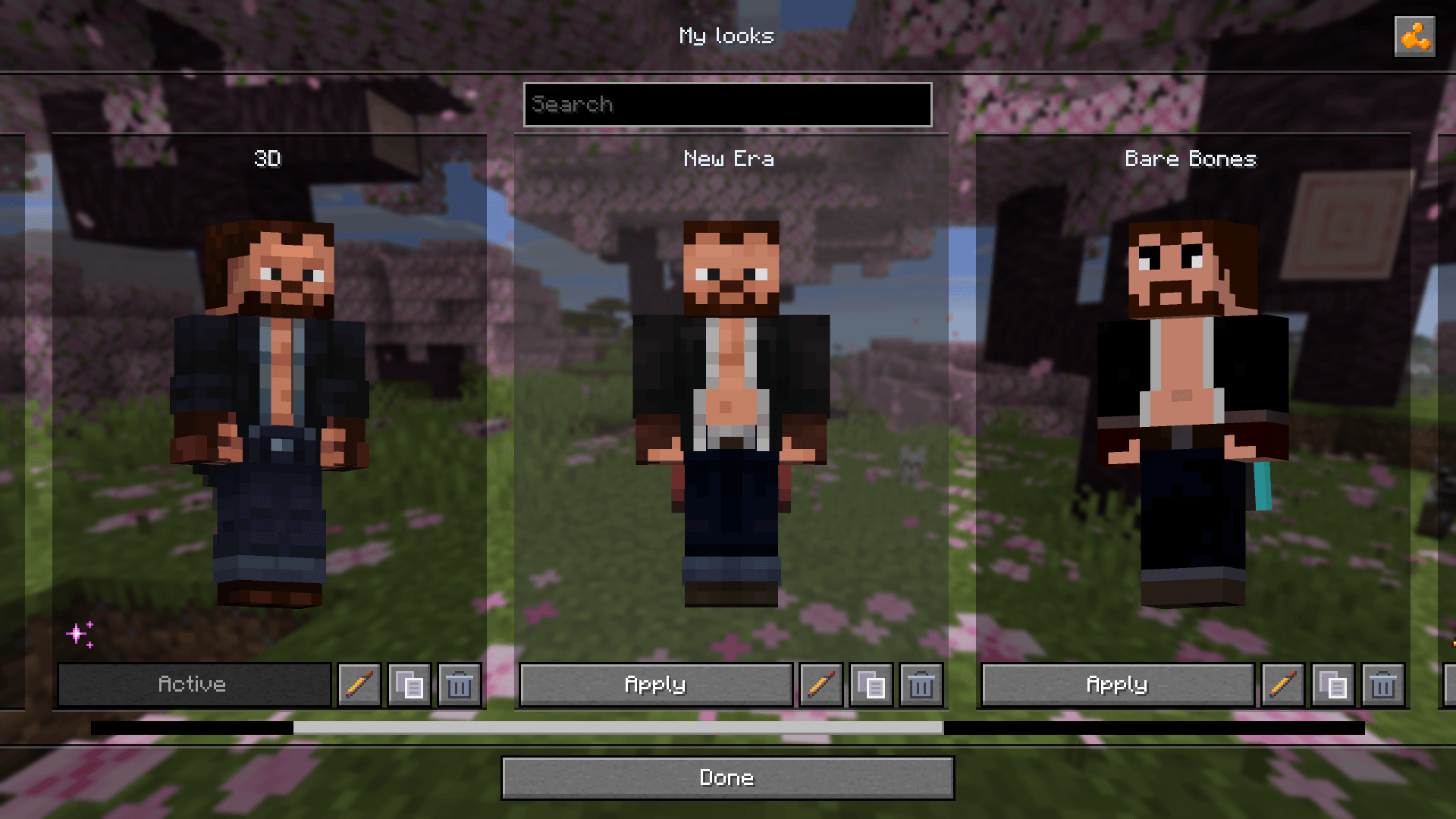 Every look in one gallery Save your skin, model, cape, and outer layers as complete looks, then switch between them with a single click
 -
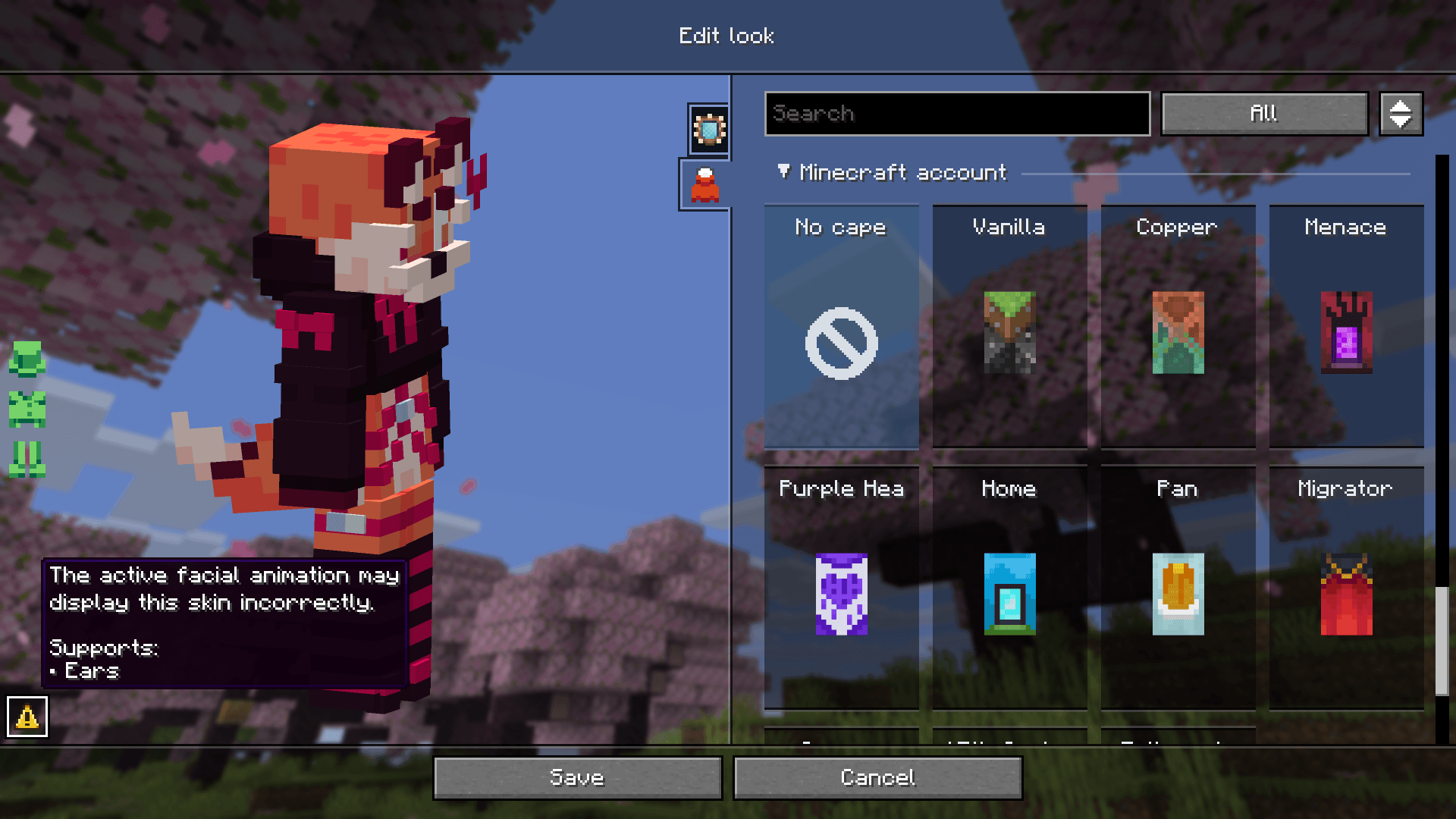 See skin compatibility at a glance Badges show support for Ears, Fresh Moves, and Just Expressions and warn you about conflicts with active mods and resource packs
 -
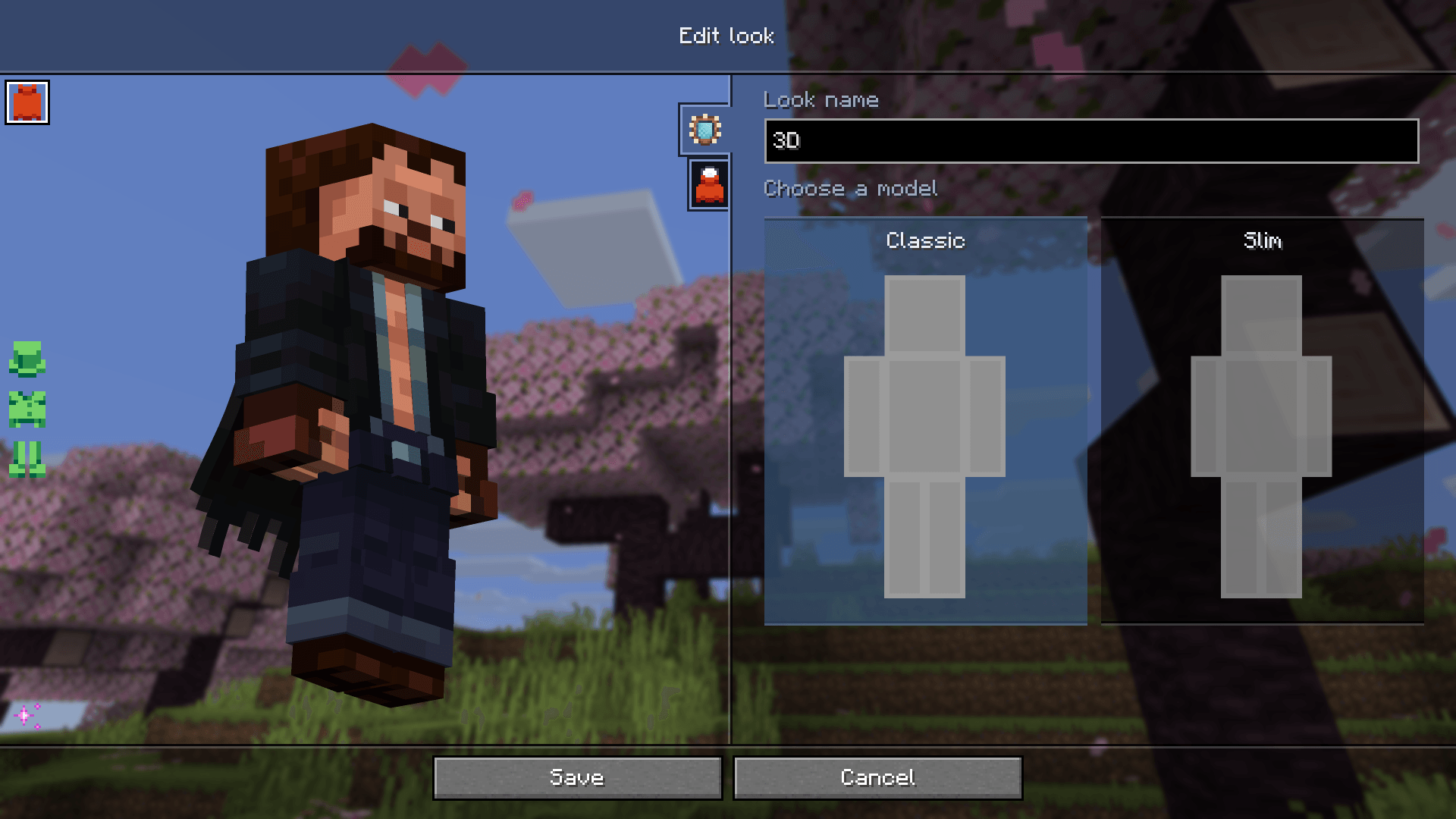 Build your look with a live preview Choose your model from visual cards and customize your appearance across dedicated tabs, with a live preview right in the game
 -
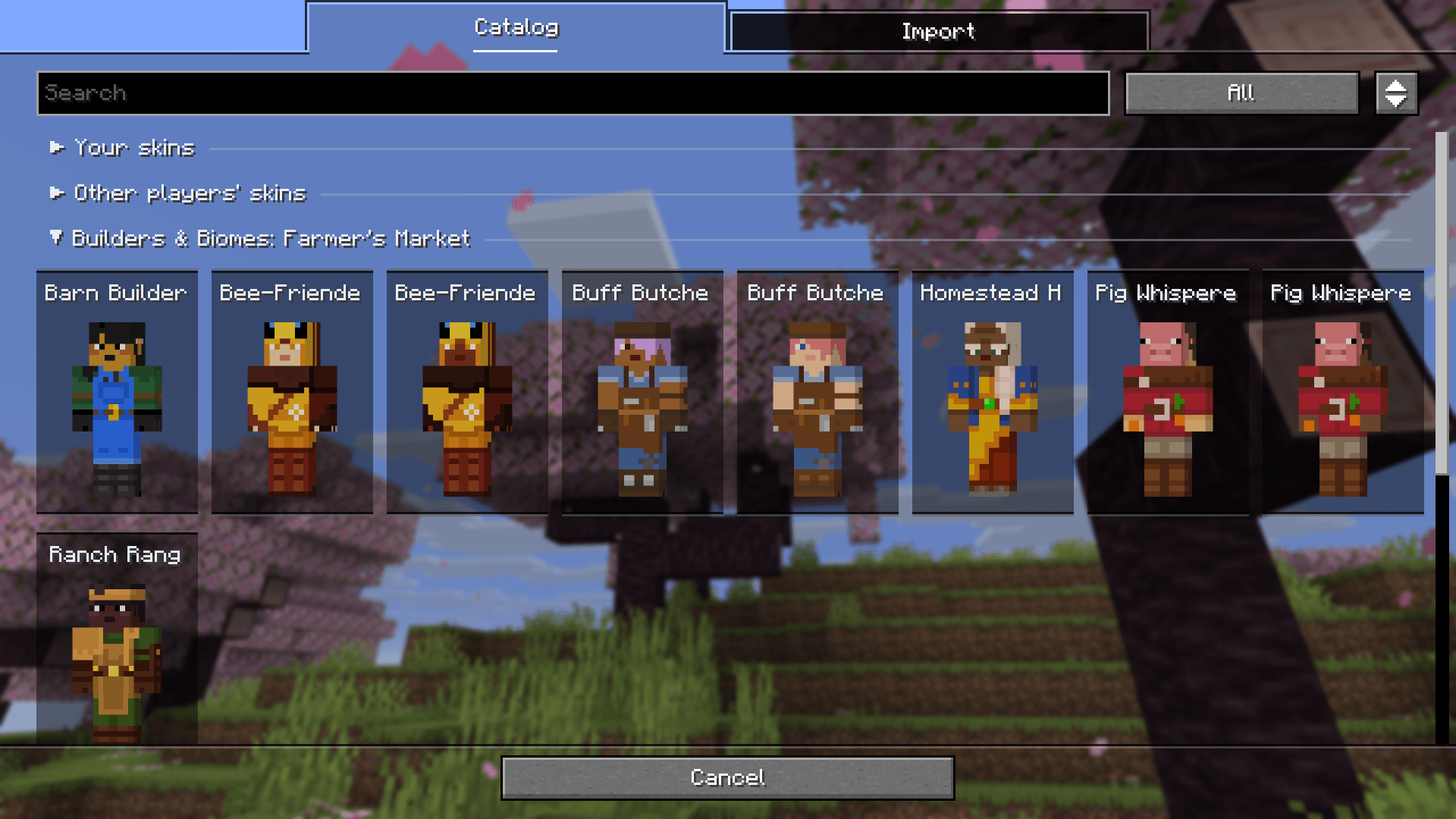 Explore skin collections Browse standard Minecraft characters, Mojang event skins, and resource pack collections with search and model filters
 -
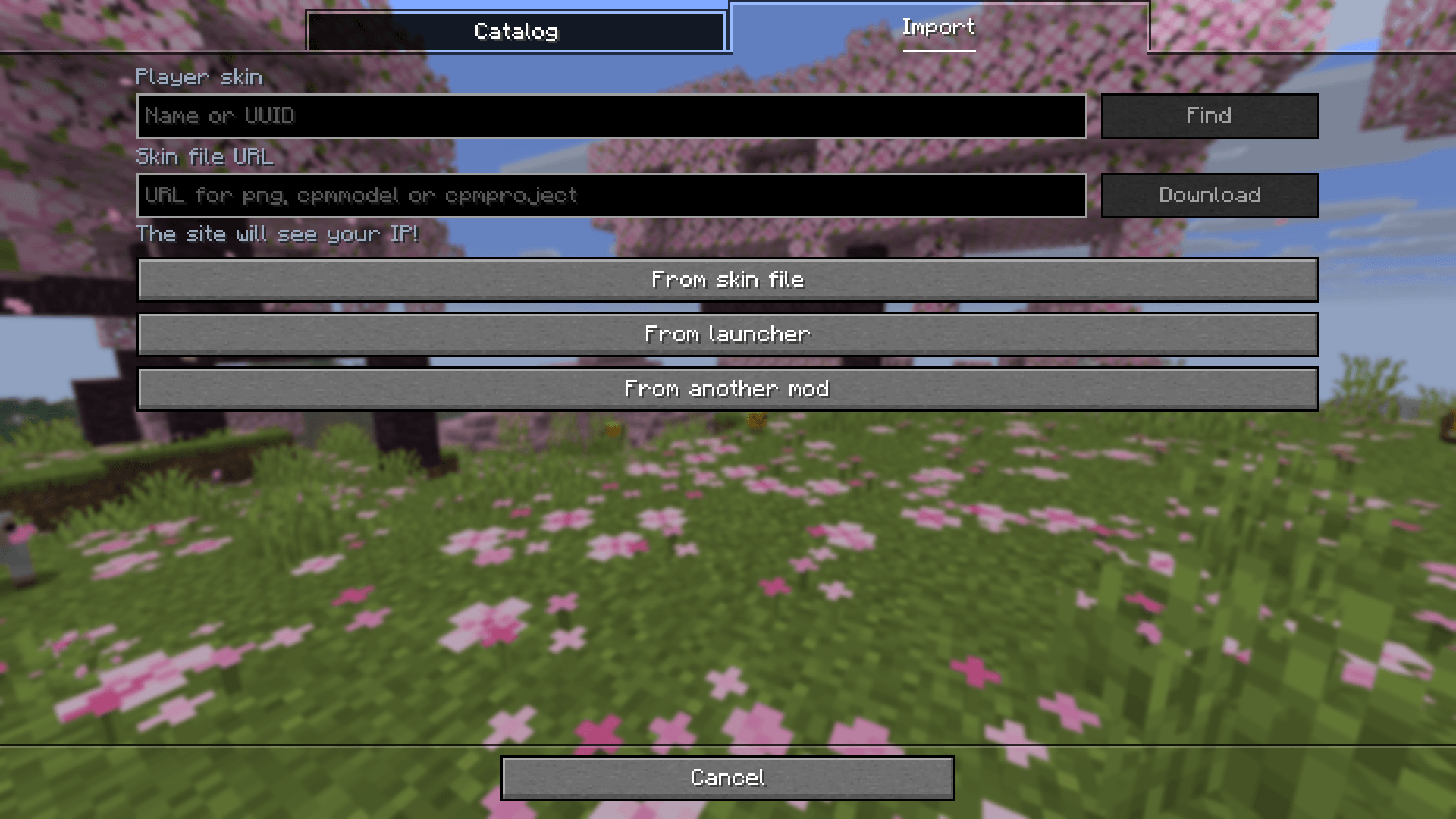 Import skins and models your way Add skins from files, links, or player names, and bring over looks from launchers and mods. With CPM installed, you can import model files too
 -
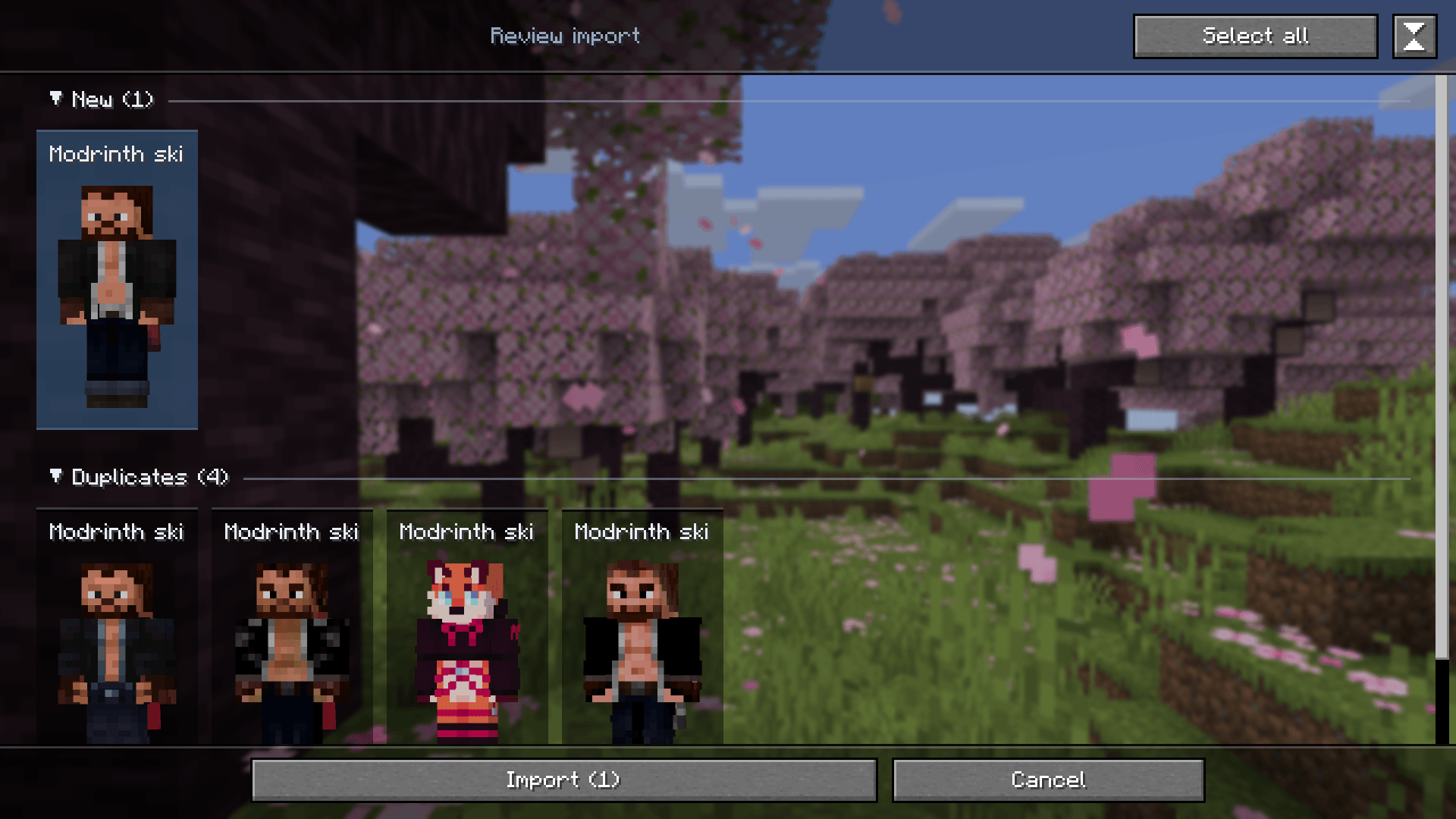 Review your looks before importing See which looks are new and which are duplicates, check skin compatibility, and select only the ones you want
 -
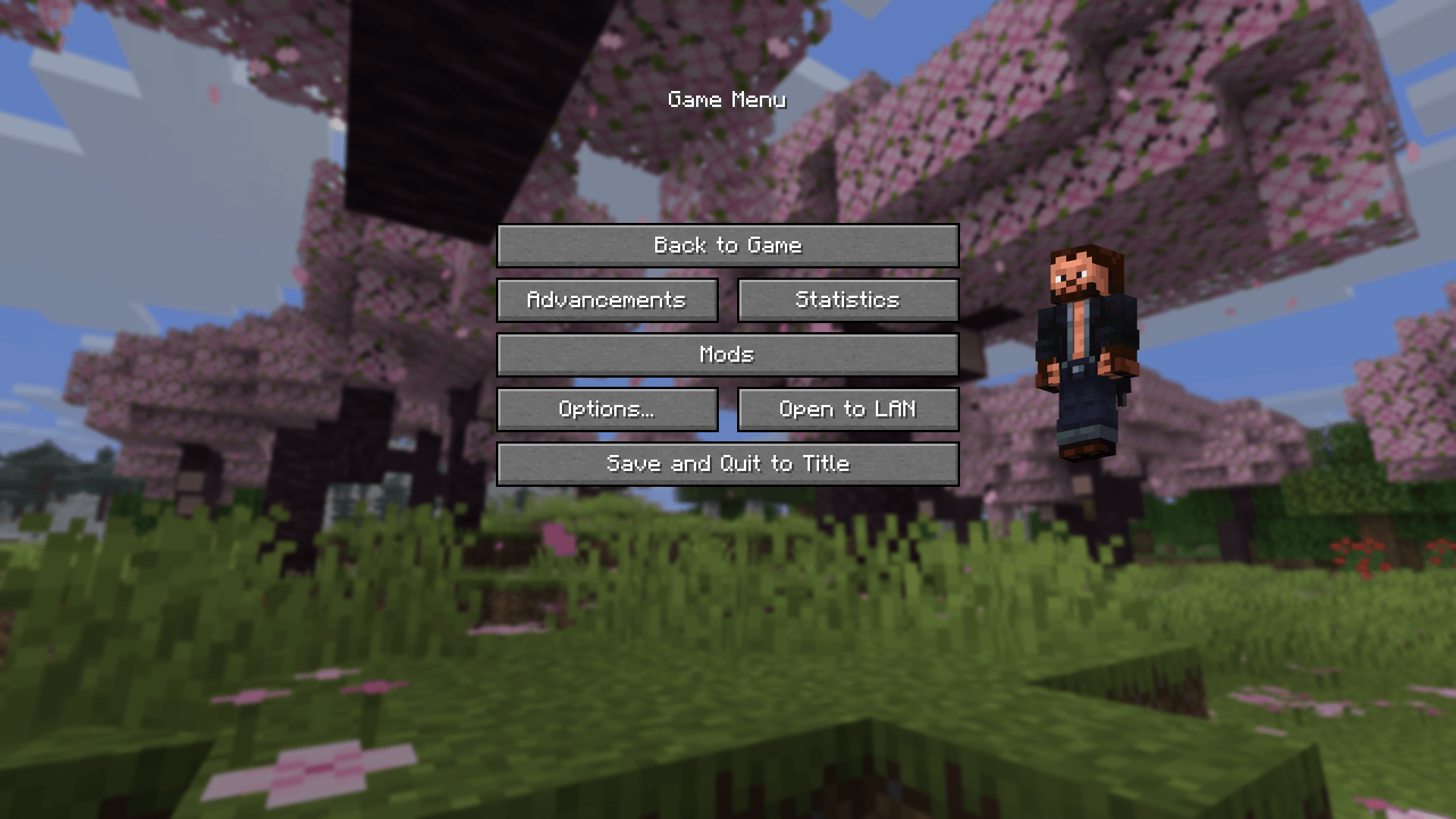 Open your looks right from Minecraft Click your player preview on the title screen or pause menu to open My looks
 -
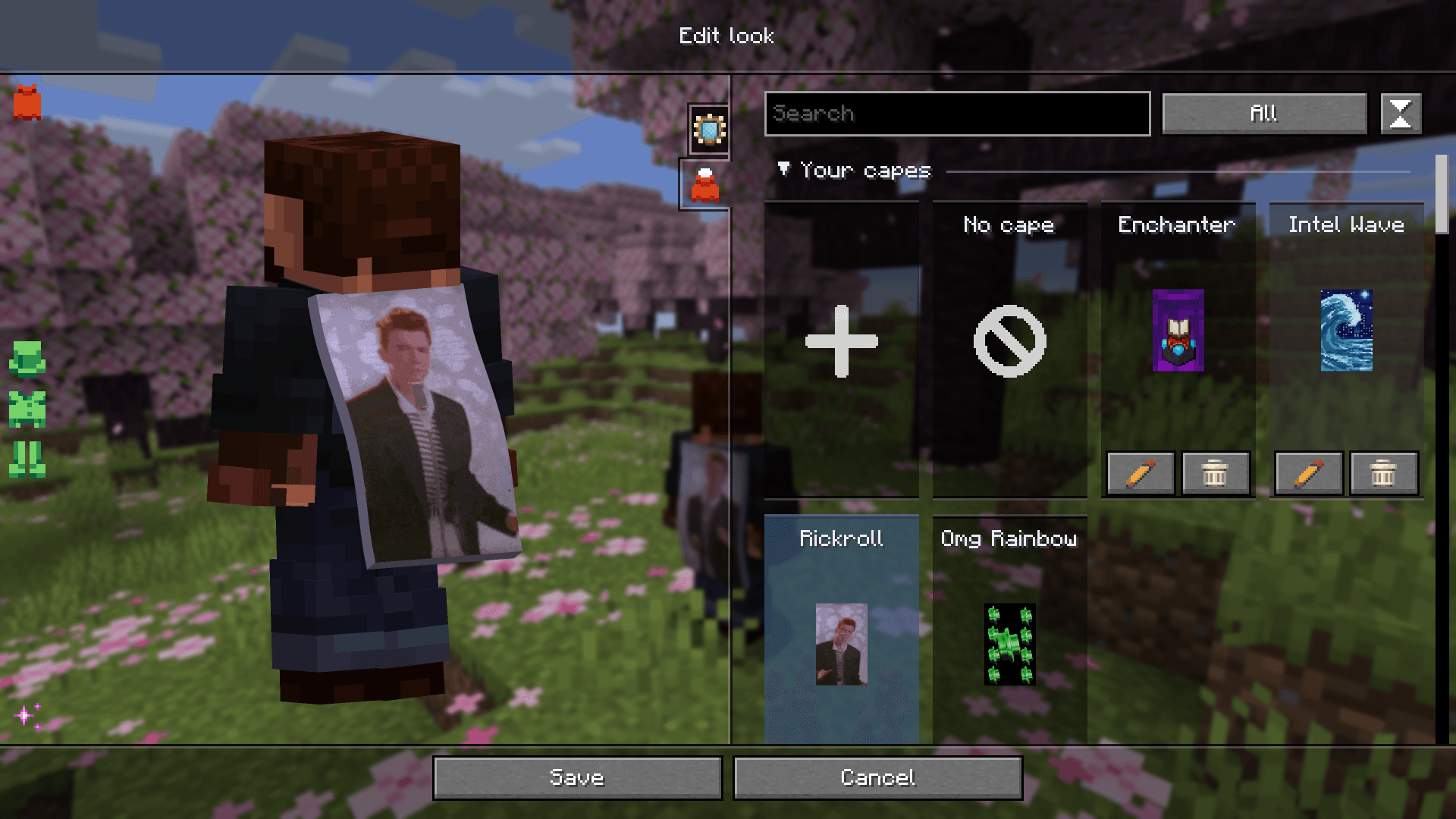 Your own capes, HD textures, and animated collections Import static and animated capes, including HD textures, and save them in your looks. Resource pack collections support the same formats. These capes are visible only to you
 -
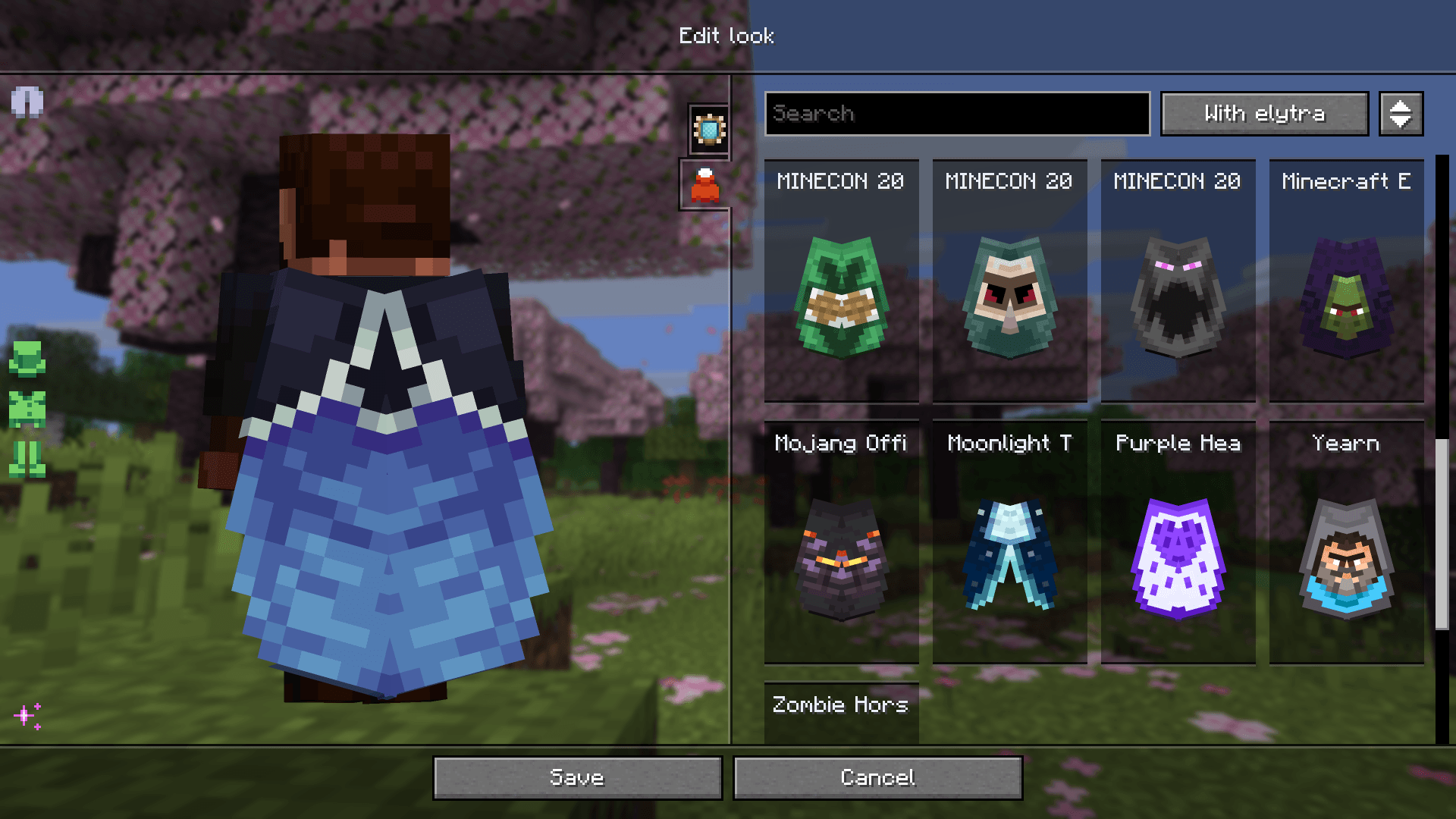 Find a cape with an elytra texture Search capes by name, filter by whether they include an elytra texture, and preview the result
 -
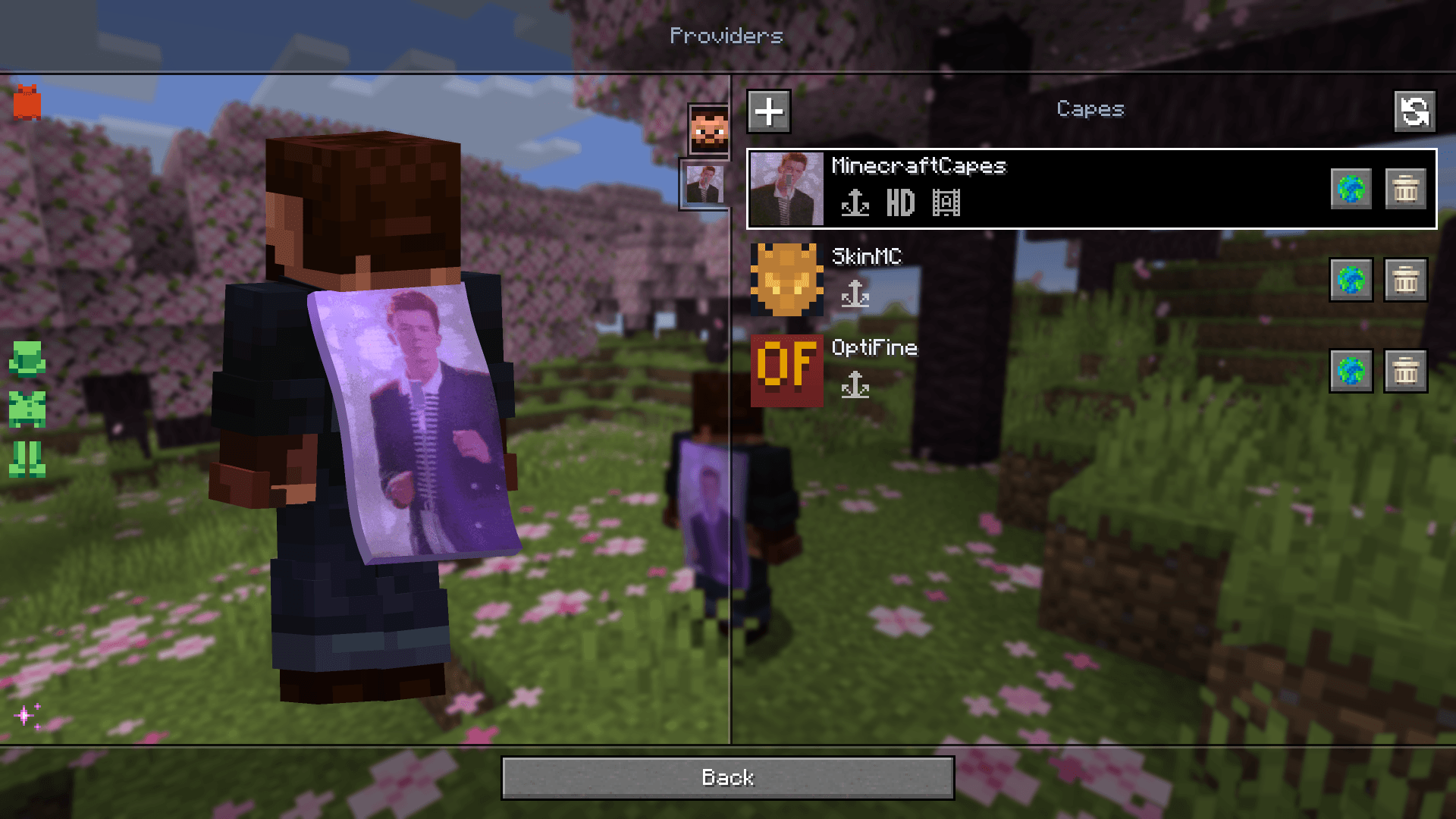 Appearance providers and outer layers Configure skin and cape sources separately. When your provider settings make the gallery unavailable, adjust a regular skin's outer layers directly on the Providers screen
 -
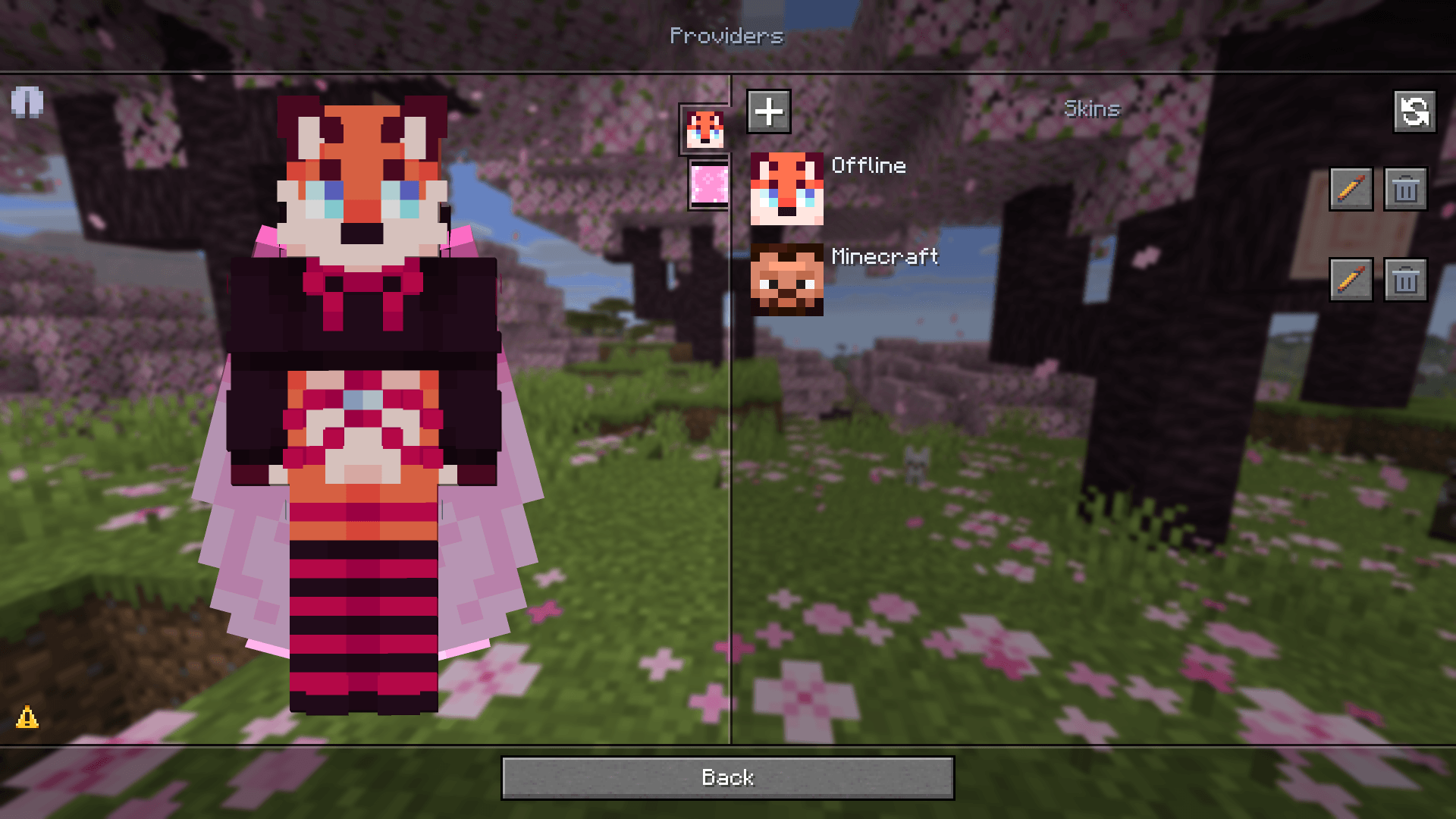 Keep changing your look offline Create and apply looks locally. Syncing with your Minecraft profile can wait until your game session is available again
 -
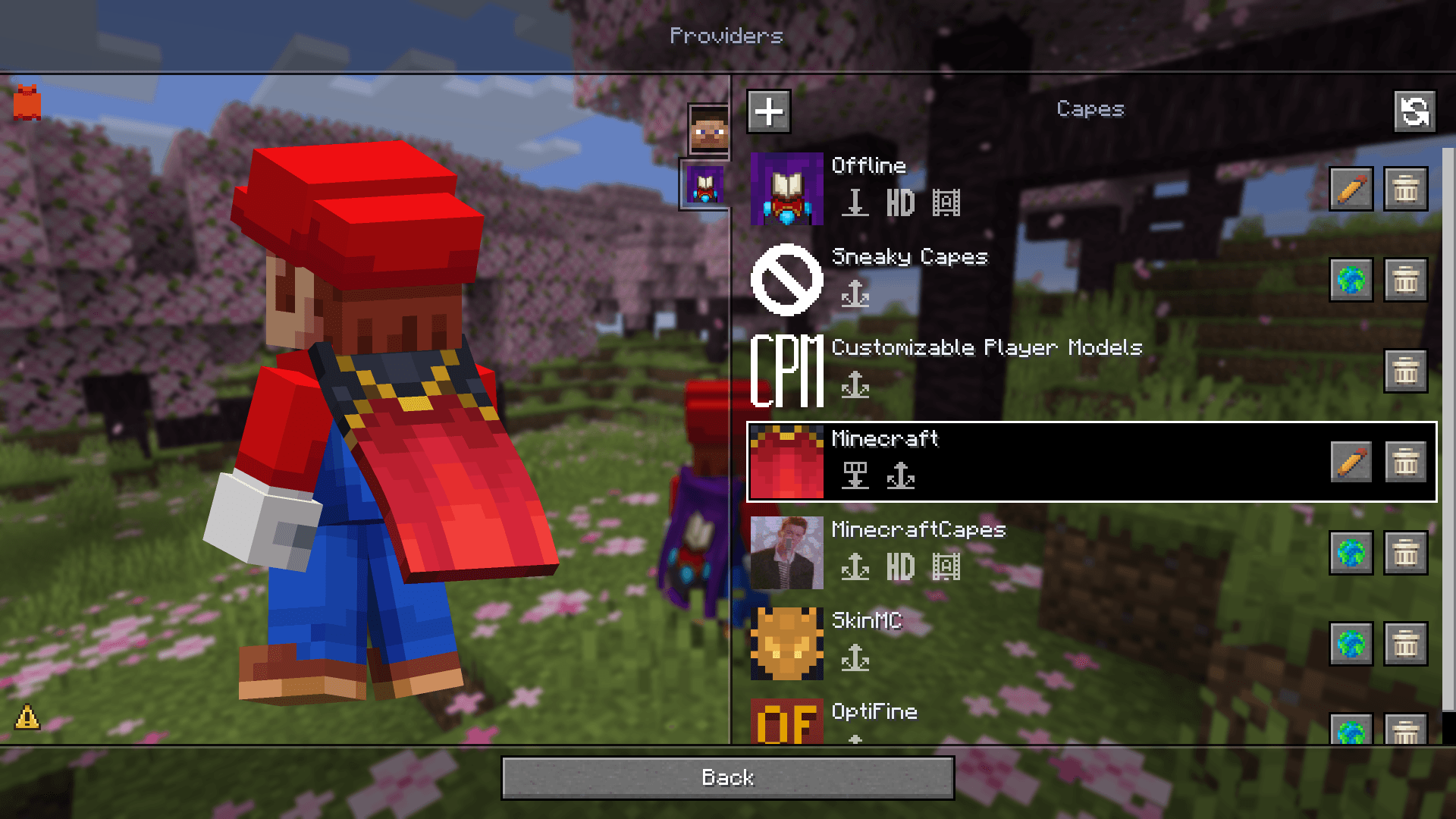 Capes from different sources Combine OptiFine, SkinMC, MinecraftCapes, Sneaky Capes, and CPM accessories with official and local capes. Set their priorities and check provider capabilities using the badges
 -
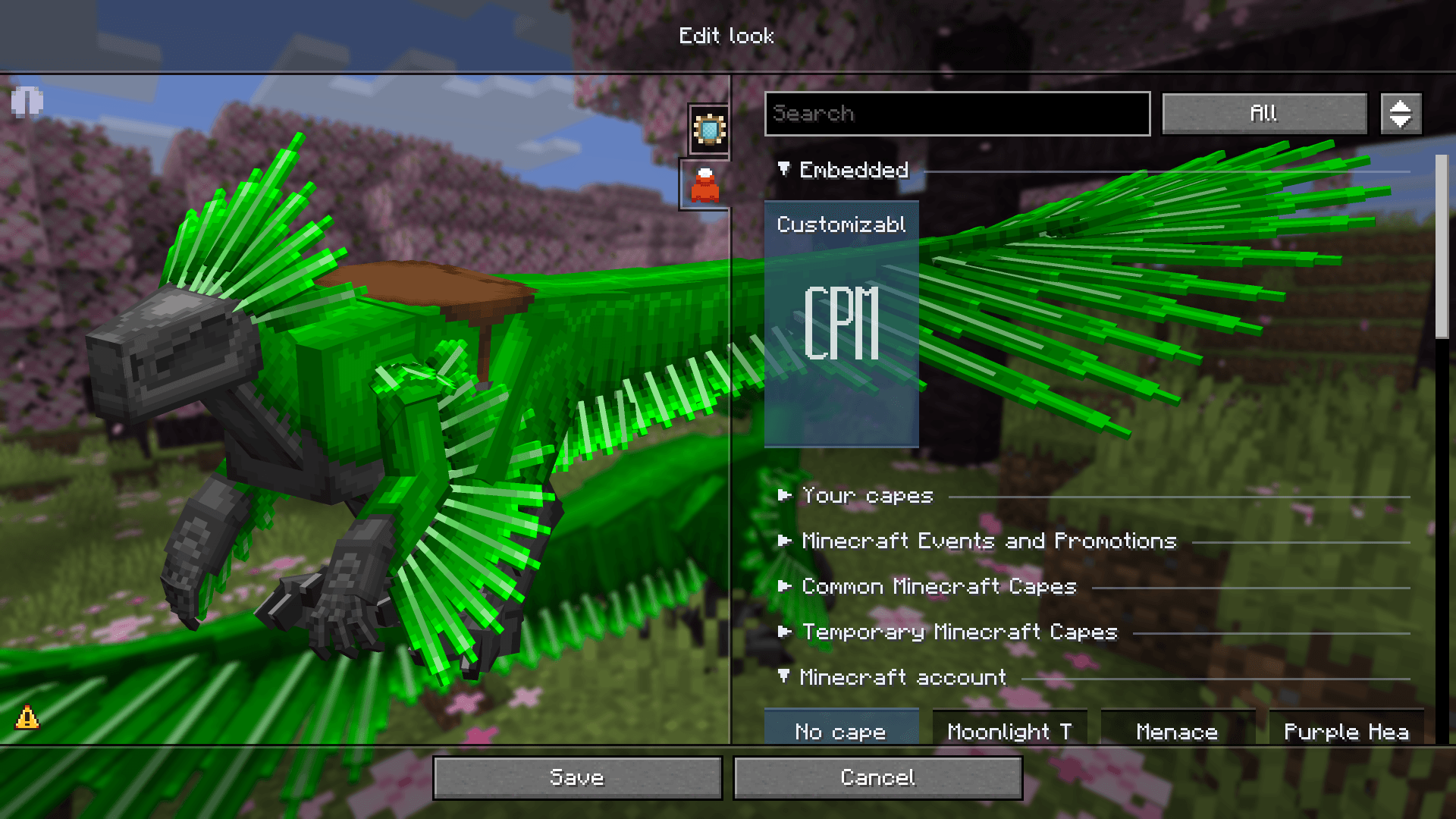 CPM models in your saved looks Use Customizable Player Models and inspect the model's built-in capes and elytra directly in the editor after joining a world. Inspection does not change the look's saved assignments
 -
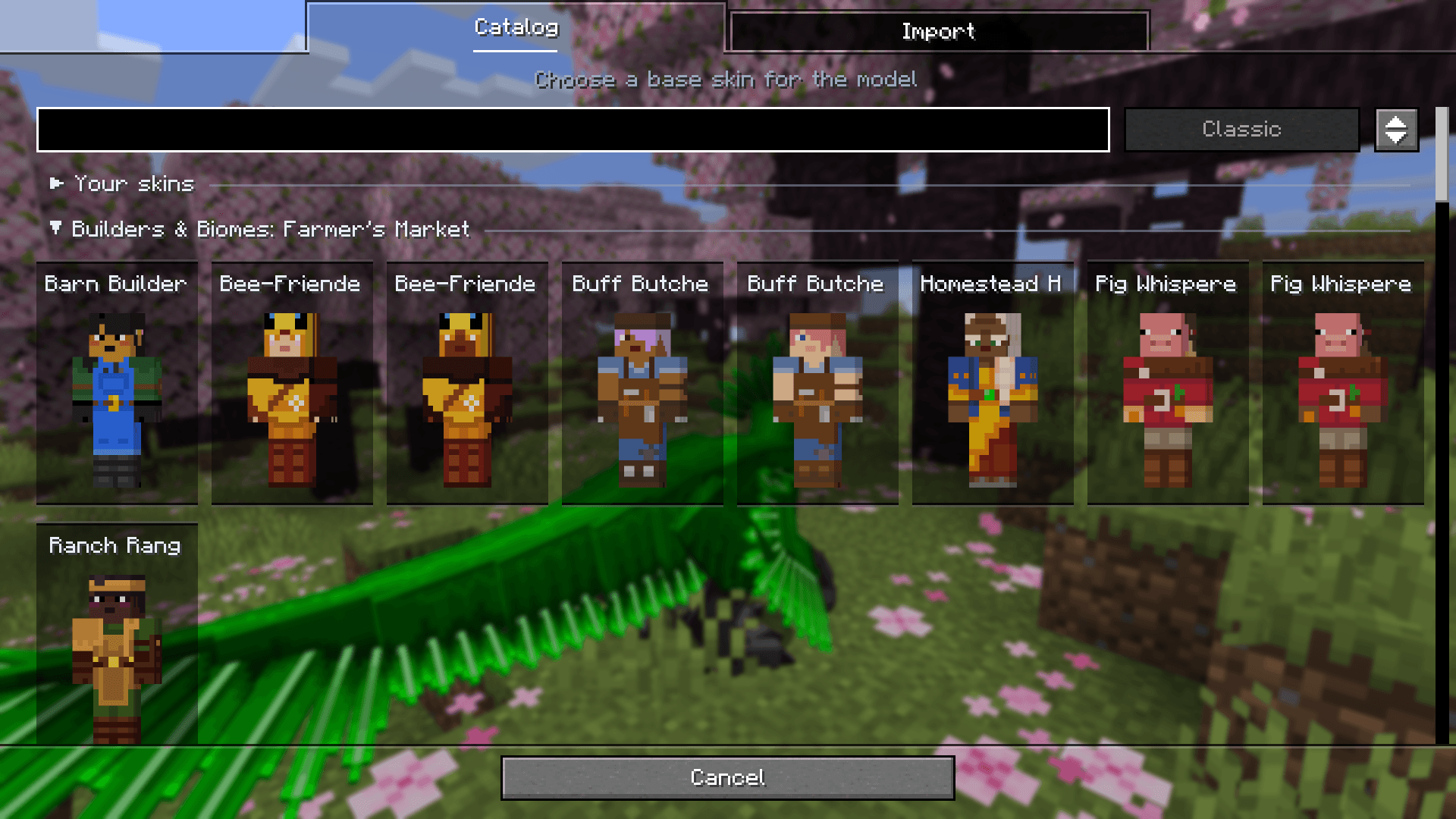 Import a model without manual export Open a cpmmodel or cpmproject file from your device or a link. If the model needs a base skin, choose one during import and continue creating your look
-
 Every look in one gallery Save your skin, model, cape, and outer layers as complete looks, then switch between them with a single click
 -
 See skin compatibility at a glance Badges show support for Ears, Fresh Moves, and Just Expressions and warn you about conflicts with active mods and resource packs
 -
 Build your look with a live preview Choose your model from visual cards and customize your appearance across dedicated tabs, with a live preview right in the game
 -
 Explore skin collections Browse standard Minecraft characters, Mojang event skins, and resource pack collections with search and model filters
 -
 Import skins and models your way Add skins from files, links, or player names, and bring over looks from launchers and mods. With CPM installed, you can import model files too
 -
 Review your looks before importing See which looks are new and which are duplicates, check skin compatibility, and select only the ones you want
 -
 Open your looks right from Minecraft Click your player preview on the title screen or pause menu to open My looks
 -
 Your own capes, HD textures, and animated collections Import static and animated capes, including HD textures, and save them in your looks. Resource pack collections support the same formats. These capes are visible only to you
 -
 Find a cape with an elytra texture Search capes by name, filter by whether they include an elytra texture, and preview the result
 -
 Appearance providers and outer layers Configure skin and cape sources separately. When your provider settings make the gallery unavailable, adjust a regular skin's outer layers directly on the Providers screen
 -
 Keep changing your look offline Create and apply looks locally. Syncing with your Minecraft profile can wait until your game session is available again
 -
 Capes from different sources Combine OptiFine, SkinMC, MinecraftCapes, Sneaky Capes, and CPM accessories with official and local capes. Set their priorities and check provider capabilities using the badges
 -
 CPM models in your saved looks Use Customizable Player Models and inspect the model's built-in capes and elytra directly in the editor after joining a world. Inspection does not change the look's saved assignments
 -
 Import a model without manual export Open a cpmmodel or cpmproject file from your device or a link. If the model needs a base skin, choose one during import and continue creating your look
Versions
Files
Relations
Project Relations
More like this
Similar Mods
Suggestions use data such as tags, dependencies, dependents, descriptions, titles, and more to rank how much they overlap with this mod.
On ModDex
Community snapshot
By the numbers
Statistics

Get it on
Available Platforms
On ModDex
Community snapshot
By the numbers