
Community listing page, reviews here may not be monitored by the author.
Network Tool Plus


No reviews yet
AE2 Network Tool enhancement mod with auto card collection and 21 upgrade slots.
Community voices
Reviews
No reviews yet. Be the first to review this project!
Get it on
Available Platforms
Compatibility
Supported Environments
Must be installed on both the client and the server.
About
Project Details
For authors
Embed Badge
If you're the author of this project, you can embed a live badge anywhere that supports HTML or Markdown. It updates automatically whenever ratings change.
Use HTML for any page that supports it, or Markdown for README files and Markdown-based descriptions.
Identifiers
Platform IDs
Resources
External Links
About
Description
Network Tool Plus
A Minecraft NeoForge mod that enhances AE2's Network Tool with auto-collection, expanded inventory, and toolbox improvements.
Features
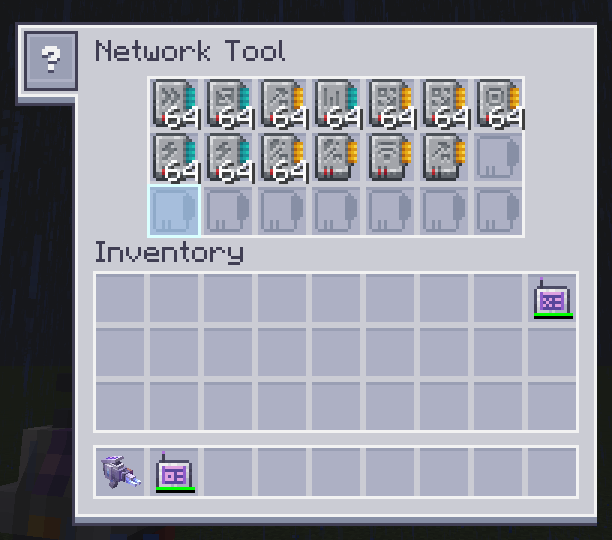
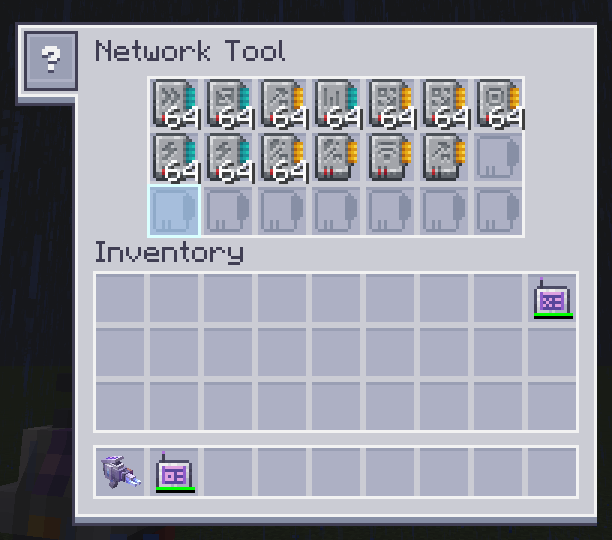
- Collector Mode — Sneak + right-click to toggle. When active, the tool gains an enchantment glint and automatically pulls upgrade cards from your inventory into the tool
- Auto-Collect — Works whether the tool is in your inventory or a Curios slot. Scans your inventory every 10 ticks for AE2 upgrade cards and moves them into the tool
- 21 Upgrade Slots — Expanded from the vanilla 9 slots to 21 (7×3 grid), with custom GUI textures
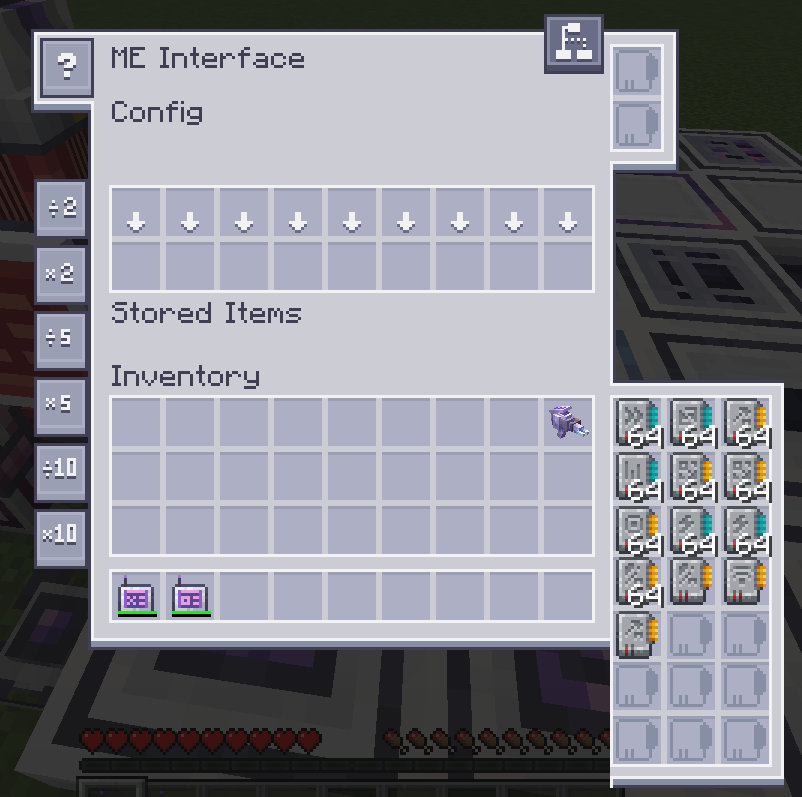
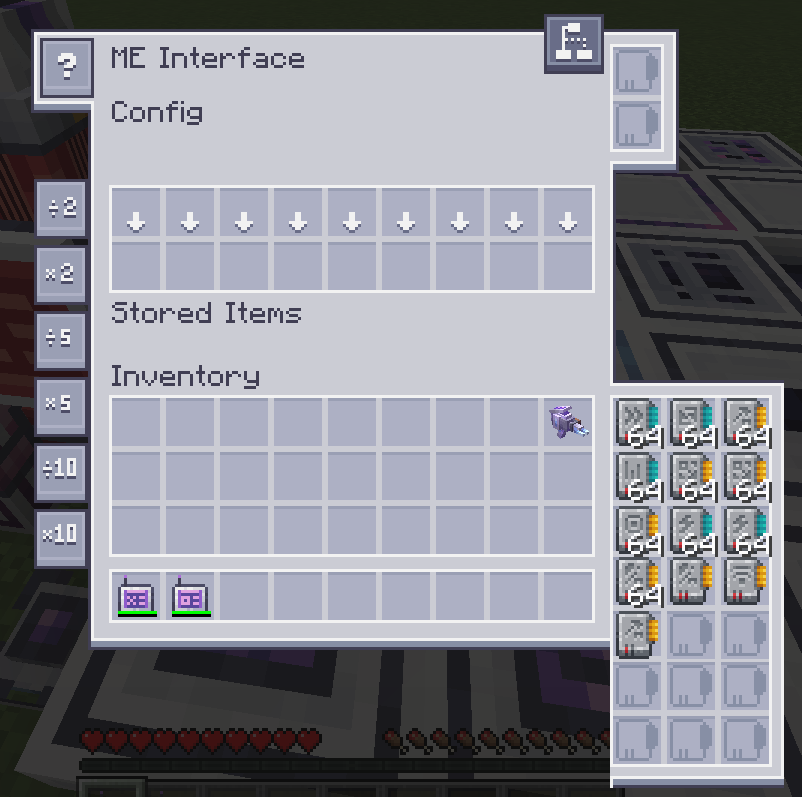
- Toolbox Smart-Fill — Shift-clicking upgrade cards from the toolbox in a machine GUI directly fills upgrade slots. Incompatible cards stay put. Terminal GUIs retain original behavior
Usage
- Hold a Network Tool and sneak + right-click to toggle Collector Mode (tool gains enchantment glow)
- Any upgrade cards in your inventory will be automatically collected into the tool
- Open any AE2 machine GUI — the tool's upgrade slots appear in the toolbox panel (7×3 instead of 3×3)
Network Tool Plus
A Minecraft NeoForge mod that enhances AE2's Network Tool with auto-collection, expanded inventory, and toolbox improvements.
Features
- Collector Mode — Sneak + right-click to toggle. When active, the tool gains an enchantment glint and automatically pulls upgrade cards from your inventory into the tool
- Auto-Collect — Works whether the tool is in your inventory or a Curios slot. Scans your inventory every 10 ticks for AE2 upgrade cards and moves them into the tool
- 21 Upgrade Slots — Expanded from the vanilla 9 slots to 21 (7×3 grid), with custom GUI textures
- Toolbox Smart-Fill — Shift-clicking upgrade cards from the toolbox in a machine GUI directly fills upgrade slots. Incompatible cards stay put. Terminal GUIs retain original behavior
- Tool Slot Locking — When any AE2 menu is open, Network Tools in your inventory are locked to prevent accidental shift-click movement
- Curios Integration — (Optional) Wear the Network Tool in a Curios slot. Full collector mode and auto-collect support
Dependencies
| Dependency | Version | Required |
|---|---|---|
| Minecraft | 1.21.1 | Yes |
| NeoForge | 21.1.219+ | Yes |
| AE2 | 19.0+ | Yes |
| Curios | 9.1.0+ | No |
Usage
- Hold a Network Tool and sneak + right-click to toggle Collector Mode (tool gains enchantment glow)
- Any upgrade cards in your inventory will be automatically collected into the tool
- Open any AE2 machine GUI — the tool's upgrade slots appear in the toolbox panel (7×3 instead of 3×3)
License
GNU LGPL 3.0
Screenshots
Gallery
-
 37dfebae2ddca95ab4a3e7941073b10900195a44.png 37dfebae2ddca95ab4a3e7941073b10900195a44.png
 -
 608c5bfeb46aed8ce78a778deb8075e593913055.png 608c5bfeb46aed8ce78a778deb8075e593913055.png
-
-
 1. Hold a Network Tool and sneak + right-click to toggle Collector Mode (tool gains enchantment glow) 2. Any upgrade cards in your inventory will be automatically collected into the tool 3. Open any AE2 machine GUI — the tool's upgrade slots appear in the
Versions
Files
Relations
Project Relations
More like this
Similar Mods
Suggestions use data such as tags, dependencies, dependents, descriptions, titles, and more to rank how much they overlap with this mod.
On ModDex
Community snapshot
By the numbers
Statistics
Want to reach Minecraft players?
We're looking for a server hosting partner to feature here and other parts of the site. Interested? Send us a message!
Get in touchGet it on
Available Platforms
On ModDex
Community snapshot
By the numbers
Statistics
Resources