
NetworkJS-Reloaded
No reviews yet
KubeJS addon for NeoForge 1.21.1: HTTP fetch, Discord bot & PostgreSQL in server_scripts. Server-wide or per-world scripts. Singleplayer: network off by default — /networkjs enable.
Provides a framework or library for other mods to use.
Neoforge is a fork of the Minecraft Forge available for versions 1.20.1+ of Minecraft. Many Forge mods are compatible with Neoforge and vice versa.
Community voices
Reviews
Click once to include, again to exclude, again to clear
No reviews yet. Be the first to review this project!
Get it on
Available Platforms
 Modrinth
Compatibility
Supported Environments
About
Project Details
For authors
Embed Badge
If you're the author of this project, you can embed a live badge anywhere that supports HTML or Markdown. It updates automatically whenever ratings change.
Use HTML for any page that supports it, or Markdown for README files and Markdown-based descriptions.
Identifiers
Platform IDs
About
Description
NetworkJS Reloaded is a server-side addon for KubeJS on NeoForge 1.21.1. It lets your KubeJS server scripts make HTTP requests, connect to a Discord bot, and run SQL queries against PostgreSQL. You write logic in JavaScript under kubejs/server_scripts like any other KubeJS script.
This project is a fork of NetworkJS by SSnowly, extended with PostgreSQL support (connection pool, async queries, prepared statements).
What it does
- HTTP: synchronous and async requests (
fetch,fetchAsync) - PostgreSQL: read and write data from scripts (
postgresQuery,postgresExecute,Postgres) - Discord: send messages and listen to chat (
DiscordBot) - Server helpers: broadcast colored messages and read player list (
Server) - Safety: on singleplayer / integrated server, network access is off until an operator runs
/networkjs enable
Requirements
- Minecraft 1.21.1
- NeoForge 21.1.200 or newer (21.1.x only)
- KubeJS 2101.7.1 or newer
- Java 21
- Server only (not needed on client)
Installation
- Install NeoForge 1.21.1, KubeJS, and this mod in the
modsfolder. - Restart the dedicated server (or your singleplayer world).
- On a dedicated server, features are enabled automatically.
- In singleplayer: run
/networkjs enable, then/kubejs reload server.
Where to put KubeJS files
Scripts can live at the server root (all worlds) or inside one world folder (that world only).
Server-wide (recommended for dedicated):
- Scripts:
kubejs/server_scripts/ - PostgreSQL config:
kubejs/config/networkjs/postgres.json(only at server root, not inside a world folder)
Per world only:
- Scripts:
world/kubejs/server_scripts/(or your world save path)
PostgreSQL configuration
NetworkJS reads one JSON file at server root only:
kubejs/config/networkjs/postgres.json
Do not put this file inside a world folder (world/.../kubejs/). Scripts can still use the database from any world's server_scripts, but the config is always loaded from the instance / dedicated server root (same folder as mods/).
Setup steps
- Create folders if needed:
kubejs/config/networkjs/ - Copy the example from the repo:
examples/kubejs/config/networkjs/postgres.json.example→kubejs/config/networkjs/postgres.json - Edit the file (see fields below). Set
"enabled": true. - Restart the server or run
/networkjs postgres reload(operator). - Check:
/networkjs postgres status— should show host, port, and database name. - Run
/kubejs reload serverafter your scripts are in place.
On singleplayer, run /networkjs enable before database queries will work.
Example postgres.json
{
  "enabled": true,
  "host": "localhost",
  "port": 5432,
  "database": "minecraft",
  "username": "postgres",
  "password": "your_secret_here",
  "maxPoolSize": 5,
  "connectionTimeoutMs": 10000
}
Config fields
| Field | Type | Default | Description |
|---|---|---|---|
enabled |
boolean | false |
true — connect on load / reload. false — PostgreSQL bindings stay off. |
host |
string | localhost |
PostgreSQL server hostname or IP. |
port |
number | 5432 |
PostgreSQL port. |
database |
string | minecraft |
Database name. |
username |
string | postgres |
DB user. |
password |
string | "" |
DB password. Keep this file private; do not commit it to git. |
maxPoolSize |
number | 5 |
HikariCP connection pool size (max concurrent connections). |
connectionTimeoutMs |
number | 10000 |
Timeout in ms when waiting for a connection from the pool. |
The mod builds the JDBC URL automatically:
jdbc:postgresql://<host>:<port>/<database>
Remote database example
{
  "enabled": true,
  "host": "db.example.com",
  "port": 5432,
  "database": "my_server",
  "username": "mc_user",
  "password": "strong_password",
  "maxPoolSize": 10,
  "connectionTimeoutMs": 15000
}
Ensure PostgreSQL accepts connections from your Minecraft server IP (pg_hba.conf / firewall).
If connection fails
- File path must be
<server root>/kubejs/config/networkjs/postgres.json "enabled"must betrue- Wrong password or database name — check server
latest.logfor[NetworkJS]/ PostgreSQL errors /networkjs status— shows registry + postgres connected / disconnected/networkjs postgres reload— re-read config without full restart- Dedicated server: registry is on by default; singleplayer needs
/networkjs enable
Security
- Never paste real passwords in public issue trackers or Modrinth comments.
- Use SQL placeholders
?in scripts — do not build SQL from player chat input. - Give the DB user only the permissions your scripts need (SELECT/INSERT/UPDATE on specific tables).
Examples
After adding scripts, run /kubejs reload server. In singleplayer, run /networkjs enable first.
Async callbacks run off the main thread — use event.server.scheduleInTicks(0, ...) before chat, teleport, or world changes.
HTTP — sync GET
PlayerEvents.loggedIn(function (event) {
  var name = String(event.player.username)
  var response = fetch('https://httpbin.org/get')
  if (response.isOk()) {
    event.server.scheduleInTicks(0, function () {
      Server.sendRawMessageToPlayer(name, '&aHTTP &8' + response.getStatus())
    })
  }
})
HTTP — async GET
ServerEvents.loaded(function (event) {
  fetchAsync('https://httpbin.org/get').thenAccept(function (response) {
    console.info('Status: ' + response.getStatus() + ' — body length: ' + response.text().length)
  })
})
HTTP — POST with JSON
ServerEvents.loaded(function (event) {
  fetchAsync('https://httpbin.org/post', {
    method: 'POST',
    headers: { 'Content-Type': 'application/json' },
    body: JSON.stringify({
      online: true,
      players: Server.getPlayerCount(),
      names: Server.getPlayerNames()
    })
  }).thenAccept(function (response) {
    console.info('Posted status: ' + response.getStatus())
  })
})
HTTP — mini example (chat on join, multi-line)
PlayerEvents.loggedIn(function (event) {
  var name = String(event.player.username)
  var r = fetch('https://api.github.com/repos/initialfox/NetworkJS-Reloaded')
  if (!r.isOk()) return
  var repo = JSON.parse(r.text())
  var lines = [
    '&6✦ &aGitHub',
    '&f  ' + repo.full_name,
    '&7  ' + repo.language + ' &8│ &b' + repo.license.spdx_id + ' &8│ &e' + repo.default_branch
  ]
  if (repo.fork && repo.parent) lines.push('&7  fork &f' + repo.parent.full_name)
  event.server.scheduleInTicks(0, function () {
    for (var i = 0; i < lines.length; i++) Server.sendRawMessageToPlayer(name, lines[i])
  })
})
PostgreSQL — SELECT on join
PlayerEvents.loggedIn(function (event) {
  var name = String(event.player.username)
  postgresQuery('SELECT username, role FROM users WHERE username = ? LIMIT 1', [name])
    .thenAccept(function (result) {
      event.server.scheduleInTicks(0, function () {
        if (!result.isOk()) {
          Server.sendRawMessageToPlayer(name, '&cDB error: ' + result.getError())
          return
        }
        if (result.getRowCount() === 0) {
          Server.sendRawMessageToPlayer(name, '&eNo row in database for this player')
          return
        }
        var row = result.getRows().get(0)
        Server.sendRawMessageToPlayer(name, '&aRole: &e' + row.get('role'))
      })
    })
})
PostgreSQL — INSERT session row
PlayerEvents.loggedIn(function (event) {
  var uuid = String(event.player.uuid)
  var name = String(event.player.username)
  postgresExecute(
    'INSERT INTO player_sessions (uuid, username, joined_at) VALUES (?, ?, NOW())',
    [uuid, name]
  ).thenAccept(function (result) {
    if (result.isOk()) {
      console.info('Session insert, rows affected: ' + result.getUpdateCount())
    }
  })
})
PostgreSQL — class API (Postgres)
PlayerEvents.loggedOut(function (event) {
  var uuid = String(event.player.uuid)
  Postgres.executeAsync(
    'UPDATE player_sessions SET left_at = NOW() WHERE uuid = ? AND left_at IS NULL',
    [uuid]
  )
})
PostgreSQL — check connection
ServerEvents.loaded(function (event) {
  if (Postgres.isConnected()) {
    console.info('[NetworkJS] PostgreSQL pool is ready')
  } else {
    console.warn('[NetworkJS] PostgreSQL not connected — check kubejs/config/networkjs/postgres.json')
  }
})
Discord — send a message
var bot = new DiscordBot({
  token: 'YOUR_BOT_TOKEN',
  guild: 'GUILD_ID',
  channels: { chat: 'CHANNEL_ID', log: 'ANOTHER_CHANNEL_ID' }
})

ServerEvents.loaded(function (event) {
  bot.sendMessage('log', 'Server started!')
})
Discord — embed
bot.sendEmbed('chat', {
  title: 'Server online',
  description: 'Players: ' + Server.getPlayerCount(),
  color: 0x00ff00
})
Discord — Minecraft chat to Discord
PlayerEvents.chat(function (event) {
  var player = String(event.player.username)
  var msg = String(event.message)
  bot.sendMessage('chat', '**' + player + '**: ' + msg)
})
Discord — Discord to Minecraft
bot.onMessage(function (msg) {
  if (msg.isFromConfiguredChannel() && !msg.isBot()) {
    Server.sendRawMessage('&9[Discord] &f' + msg.getAuthor() + ': ' + msg.getContent())
  }
})
Server — broadcast and player list
ServerEvents.loaded(function (event) {
  Server.sendRawMessage('&a[NetworkJS] &7Server loaded. Online: &f' + Server.getPlayerCount())
  var names = Server.getPlayerNames()
  console.info('Players: ' + names)
})
Server — message one player
PlayerEvents.loggedIn(function (event) {
  Server.sendRawMessageToPlayer(event.player.username, '&aWelcome! &7NetworkJS is active.')
})
Commands (operator, level 2)
/networkjs enable— enable network bindings (singleplayer)/networkjs disable— disable network access/networkjs reload— reload bindings/networkjs status— registry and database status/networkjs postgres reload— reload database config/networkjs postgres status— database connection info
Links
- Source and more examples: https://github.com/initialfox/NetworkJS-Reloaded/tree/main/examples/kubejs
- Original NetworkJS: https://github.com/SSnowly/NetworkJS
License: MIT
Screenshots
Gallery
-
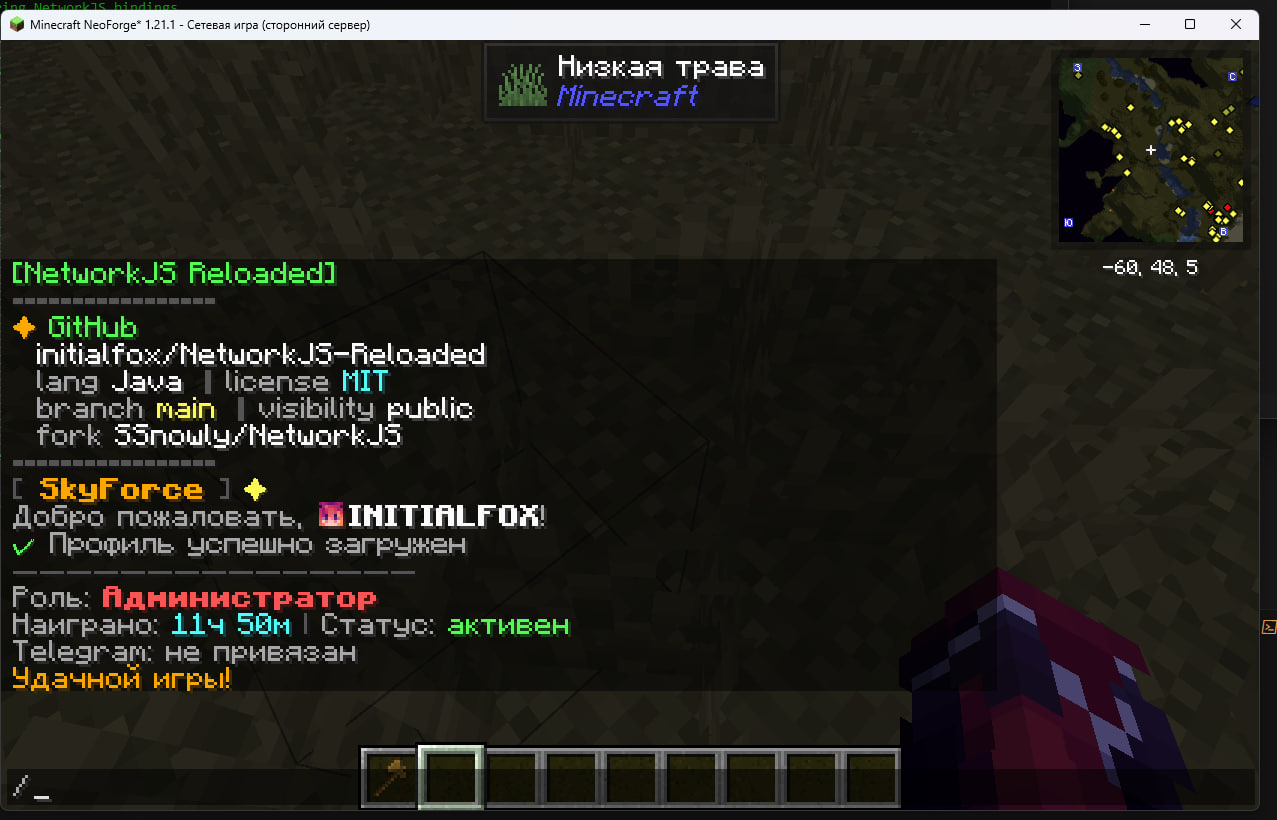 From Example: Github repo info
Versions
Files
Relations
Project Relations
More like this
Similar Mods
Suggestions use data such as tags, dependencies, dependents, descriptions, titles, and more to rank how much they overlap with this mod.
On ModDex
Community snapshot
By the numbers
Statistics

Want to reach Minecraft players?
We're looking for a server hosting partner to feature here and other parts of the site. Interested? Send us a message!
Get in touchGet it on
Available Platforms
On ModDex
Community snapshot
By the numbers