
Community listing page, reviews may not be monitored by the author.
New Super Virtual Chest

No reviews yet
A virtual chest mod, for server

Community voices
Reviews
No reviews yet. Be the first to review this project!
Get it on
Available Platforms
Compatibility
Supported Environments
Runs entirely on the server. Also works in singleplayer.
About
Project Details
For authors
Embed Badge
If you're the author of this project, you can embed a live badge anywhere that supports HTML or Markdown. It updates automatically whenever ratings change.
Use HTML for any page that supports it, or Markdown for README files and Markdown-based descriptions.
Identifiers
Platform IDs
About
Description
A New Super Virtual Chest
A server-side virtual chest solution. Create public or private virtual chests that store items persistently without needing any client-side installation.






Why I Made This Mod? / 制作原因
English: The main reason I created this project is that there wasn't an up-to-date virtual chest solution for newer Minecraft versions that allows creating multiple persistent chests. I needed a simple, server-side solution for my own server, so I built it.
中文: 我制作这个项目的主要原因是没有新版本的可创建多个且持久化的虚拟箱子方案。我自己的服务器需要一个简单的纯服务端方案,于是就有了它。
Q&A
Q: There are already other virtual chest mods. Why did you make another one? A: While similar mods exist, none of them supported Minecraft 1.21.11+ when I started this project.
Q: Why did you upload the source code JAR? A: I don't have a GitHub account and I'm not familiar with how to use it.
📦 Features
- 🗃️ Virtual Chests – Create chests that are not tied to any physical block.
- 🌍 Public & Private –
allplayercreates a public chest anyone can open. Use a player name to create a private chest only that player (and admins) can access. - ⏳ Delayed Public Deletion – When a non-admin deletes a public chest, it enters a 3 in-game day waiting period before being permanently removed. Anyone can cancel the deletion during this time.
- ✅ Instant Admin Actions – Players with the
nsvc_admintag (or console/command blocks) can create, open, and instantly delete any chest. - 💾 Persistent Storage – All chest contents are saved to disk inside the world folder and survive server restarts.
- 🌐 Multi-language Support – English and Simplified Chinese are included. (Your client language determines which is shown.)
- 🖥️ Pure Server‑side – No client-side installation required! Players connect with a vanilla client and still see the normal chest GUI.
⌨️ Commands
All commands use the prefix /NSvc.
New command style
| Command | Description |
|---|---|
/NSvc create <name> [small|large] |
Create a private chest for yourself. |
/NSvc mcreate <name> [small|large] |
Alias for create. |
/NSvc pcreate <name> [small|large] |
Create a public chest. |
/NSvc padd <name> [small|large] |
Alias for pcreate. |
/NSvc open <name> |
Open a chest you have access to. |
/NSvc popen <name> |
Open a public chest. |
/NSvc delete <name> [close] |
Delete a chest. Use close to cancel pending deletion. |
/NSvc remove <name> [close] |
Alias for delete. |
/NSvc pdelete <name> [close] |
Delete a public chest. |
/NSvc premove <name> [close] |
Alias for pdelete. |
/NSvc name <chest> open |
Open a chest by name. |
/NSvc name <chest> delete [close] |
Delete a chest by name. |
/NSvc name <chest> remove [close] |
Alias for name <chest> delete. |
/NSvc list [player|allplayer] |
List all chests, a player’s chests, or public chests. |
/NSvc plist |
List public chests. |
/NSvc mlist |
List your own chests. |
/NSvc players <player> list |
List a player’s chests. |
/NSvc players <player> create <chest> [small|large] |
Create a chest for a player. |
/NSvc players <player> open <chest> |
Open a chest with permission checks. |
/NSvc players <player> delete <chest> [close] |
Delete a player’s chest. |
/NSvc players <player> remove <chest> [close] |
Alias for players <player> delete. |
/NSvc save |
Save chest data manually. Admin only. |
/NSvc help / newhelp / oldhelp |
Show help. |
Legacy command style
| Command | Description |
|---|---|
/NSvc <player|allplayer> create <chest> [small|large] |
Create a chest for a player, or a public chest with allplayer. |
/NSvc <player|allplayer> open <chest> |
Open a chest. |
/NSvc <player|allplayer> delete <chest> [close] |
Delete a chest. |
/NSvc <player|allplayer> remove <chest> [close] |
Alias for delete. |
/NSvc <player|allplayer> list |
List chests. |
allplayeris the special target for public chests.
Old Command Style Usage
📝 Create a Chest
/NSvc <target> create <name> [small|large]
<target>–allplayerfor a public chest, or an online player name for a private chest.<name>– A unique name for the chest (e.g.,community_farm).[size]–small(27 slots) orlarge(54 slots). Defaults tolarge.
Examples:
/NSvc allplayer create PublicStorage large
/NSvc Steve create StevePrivate small
📂 Open a Chest
/NSvc <target> open <name>
Opens the virtual chest GUI.
Non-admin players can only open public chests or their own private chests.
Example:
/NSvc allplayer open PublicStorage
🗑️ Delete a Chest
/NSvc <target> delete <name> [close]
- Without
close– Starts deletion (public chests go into a 3 in-game day waiting period; private chests ask for confirmation). - With
close– Cancels a pending deletion.
Examples:
/NSvc allplayer delete PublicStorage
/NSvc allplayer delete PublicStorage close
📋 List Chests
/NSvc <target> list
Shows all chests belonging to the target (allplayer for public chests, or a player name for private chests).
Admins see all private chests; normal players only see their own.
🛡️ Admin Permissions
This project does not use a separate permission plugin/file.
Instead, admins are identified by the nsvc_admin tag.
🏷️ Granting Admin
Run this command in the server console or as an existing admin:
/tag <player> add nsvc_admin
❌ Removing Admin
/tag <player> remove nsvc_admin
👀 Checking a Player's Tags
/tag <player> list
💡 Tip: The console and command blocks always have full admin permissions and do not need the tag.
📁 Data Storage
Virtual chest data is saved in the world folder as nsvc_virtualchests.dat.
This file is created automatically and is compatible with world backups.
🌍 Language Support
The mod/plugin automatically uses your Minecraft client language. Currently supported languages:
- English (
en_us) - Simplified Chinese (
zh_cn)
Want to add another language? Contributions are welcome!
Outher Project page: https://www.mcmod.cn/class/27467.html
Enjoy hassle‑free virtual storage!
Screenshots
Gallery
-
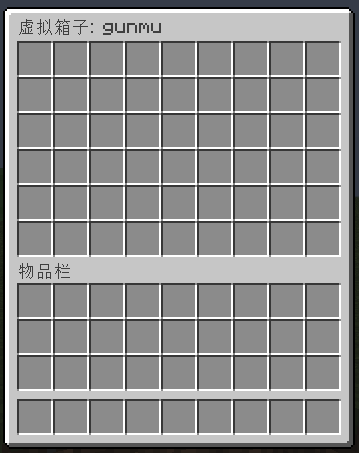 Open A Chest.
Versions
Files
Relations
Project Relations
More like this
Similar Mods
Suggestions use data such as tags, dependencies, dependents, descriptions, titles, and more to rank how much they overlap with this mod.
On ModDex
Community snapshot
By the numbers
Statistics


Get it on
Available Platforms
On ModDex
Community snapshot
By the numbers