
Community listing page, reviews here may not be monitored by the author.
Nexus Characters - Cross-World Progression


No reviews yet
A mod that lets you play with multiple characters between multiple worlds, while keeping each character's individual progress between them. Works both in singleplayer and multiplayer (if the server has this mod installed).

Community voices
Reviews
No reviews yet. Be the first to review this project!
Get it on
Available Platforms
Compatibility
Supported Environments
Must be installed on both the client and the server.
About
Project Details
For authors
Embed Badge
If you're the author of this project, you can embed a live badge anywhere that supports HTML or Markdown. It updates automatically whenever ratings change.
Use HTML for any page that supports it, or Markdown for README files and Markdown-based descriptions.
Identifiers
Platform IDs
About
Description



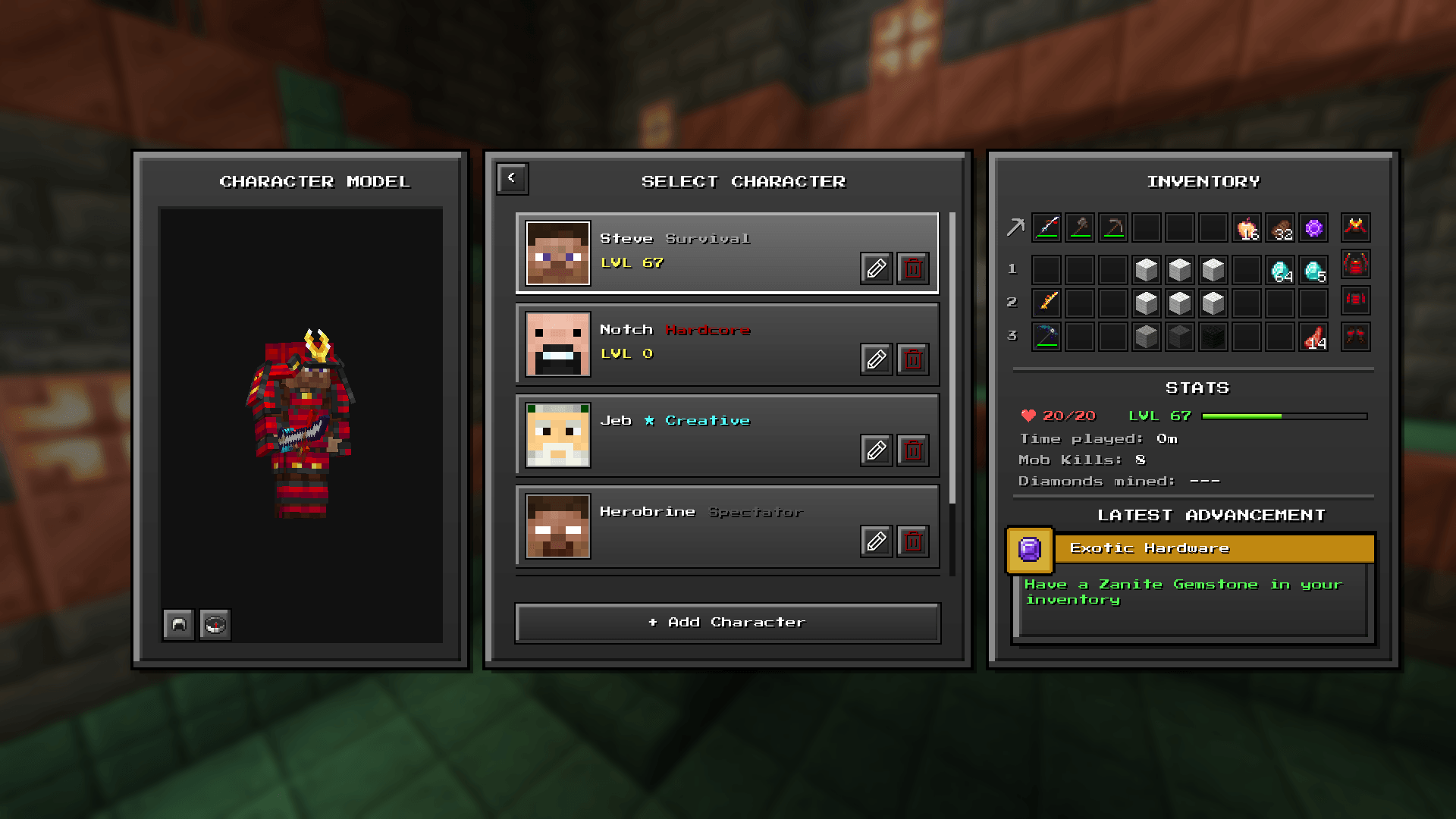
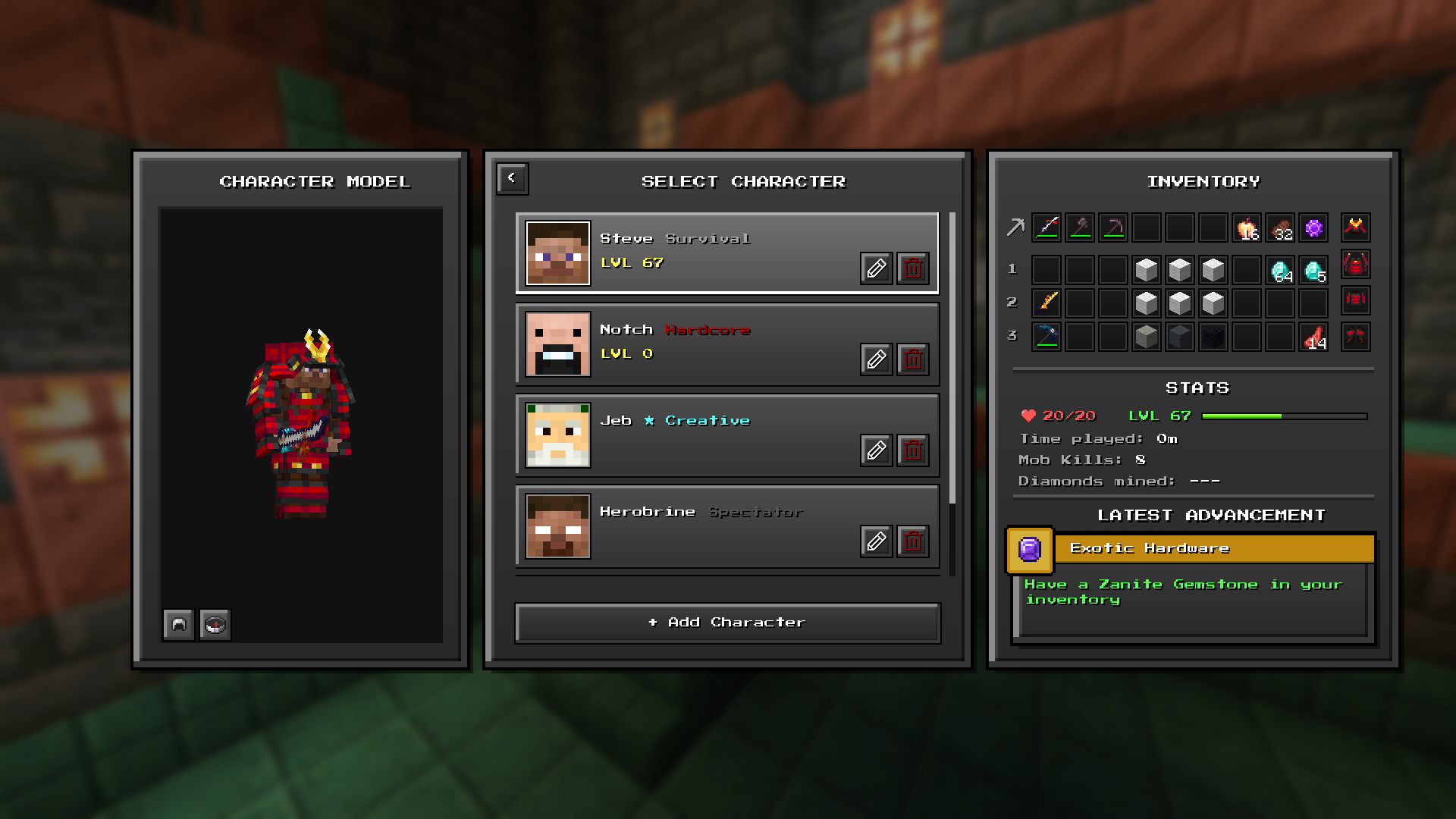
Welcome to Nexus Characters! This mod fundamentally changes how you experience Minecraft by shifting the focus from world-bound progression to character-bound progression.
Instead of starting from scratch every time you create a new world, Nexus Characters allows you to seamlessly carry your inventory, stats, and identity across all your single-player saves and multiplayer servers. Build your character, explore infinite worlds, and never lose your hard-earned progress again.
📚 Table of Contents
✨ Core Features
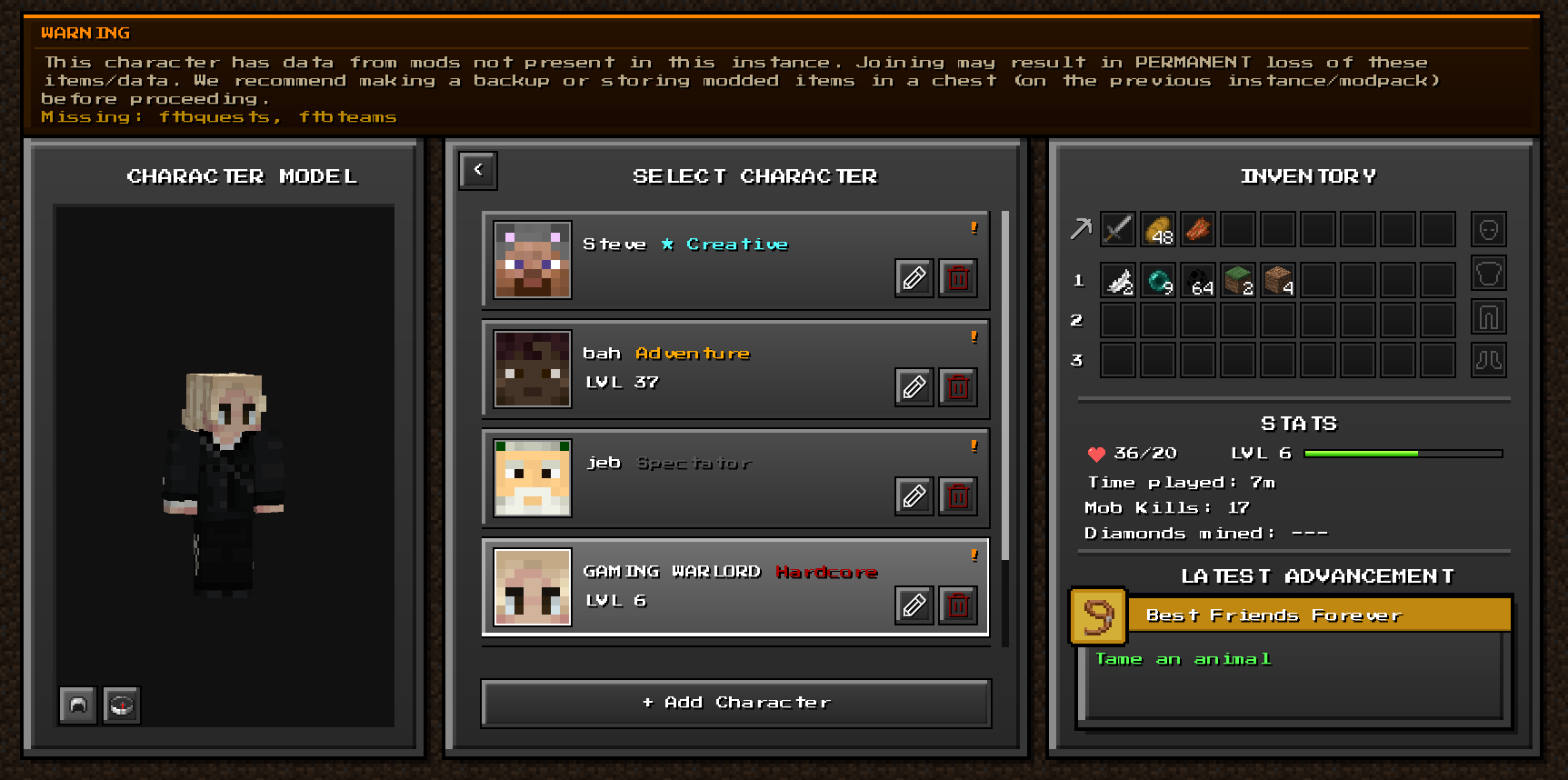
Character Creation
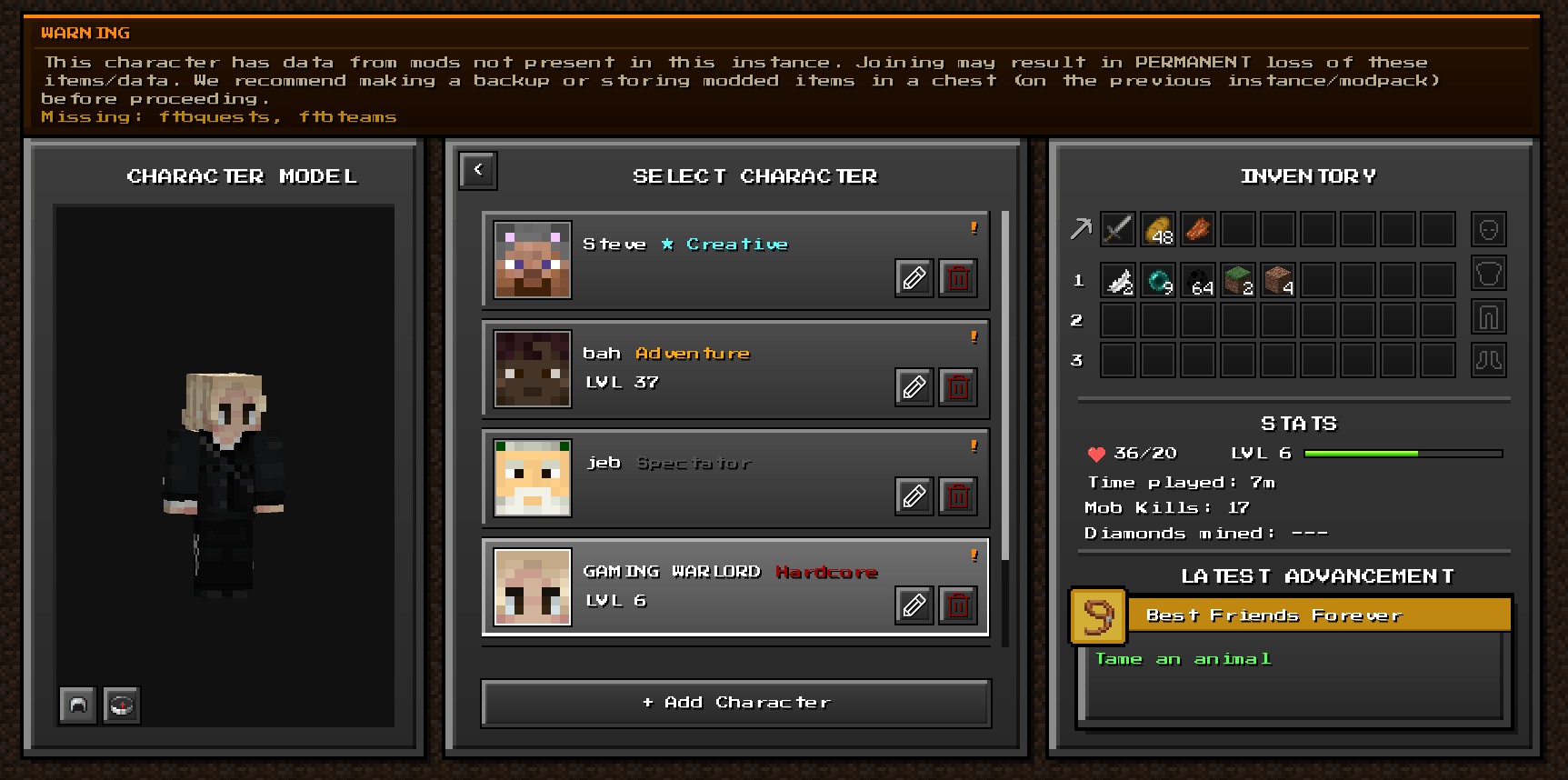
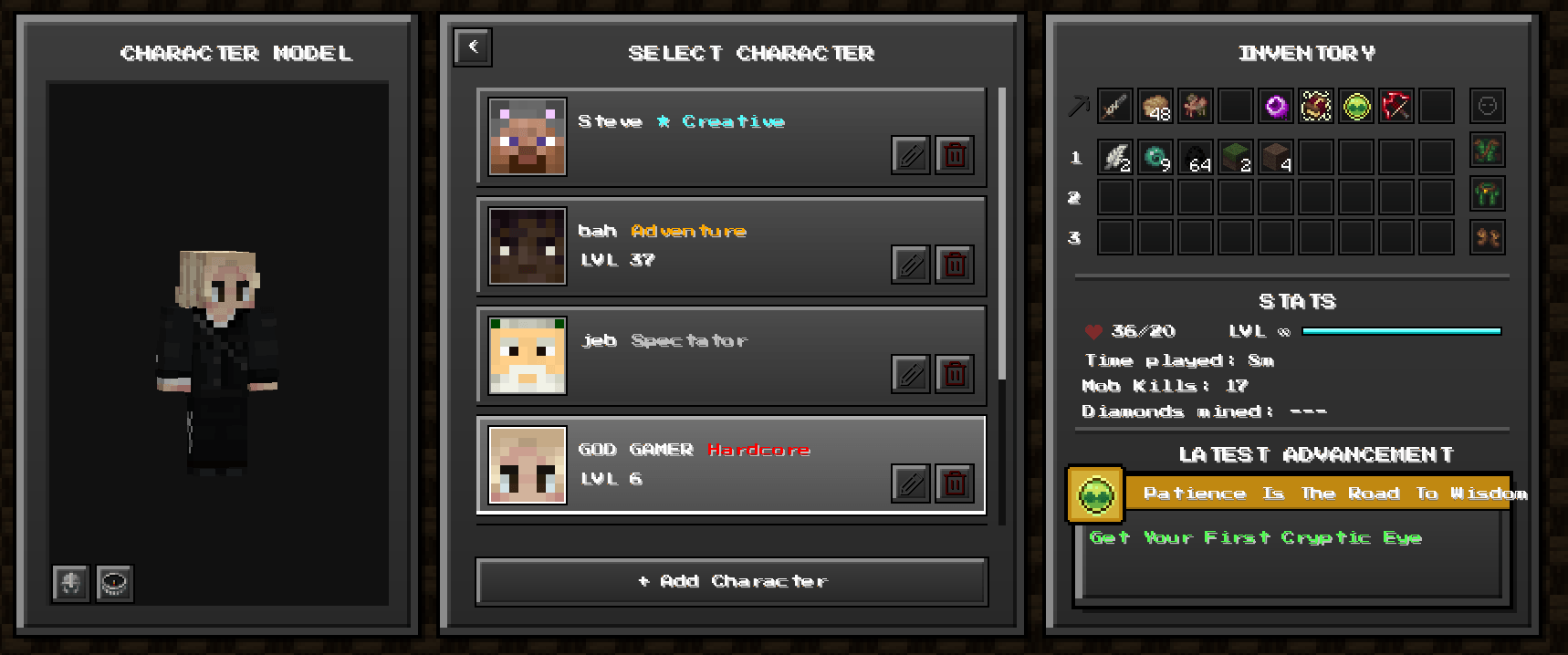
Create unique identities for your different playthroughs. When making a new character, you have complete control over their identity and playstyle:
- Custom Naming: Give your character a unique identity.
- Skin Syncing: Simply input an existing Mojang username, and your character will automatically adopt that skin.
- Bound Gamemodes: Gamemodes (Survival, Creative, Adventure) are tied to the character, rather than the world.

Cross-World Progression
Your character's journey doesn't end when you leave a world. Everything that defines your character travels with them:
- Health and hunger stats
- Experience levels (XP)
- Full inventory and equipped armor
- Advancements and statistics

Hardcore Characters
Love the thrill of Hardcore but hate losing a beautiful world you spent hours building? Nexus Characters introduces Hardcore Characters.
- If your Hardcore Character dies, they are permanently erased from your character list.
- The World Survives: The world they died in remains perfectly intact. You can roll a brand-new character, travel to that same world, and find your fallen character's base (or avenge them!).
🚀 Extended Capabilities
Deep Mod Compatibility
Nexus Characters doesn't just save vanilla data. It integrates deeply with your favorite mods to ensure that external progression is saved directly to your character. For example, if you are playing with Cobblemon, your party of Pokémon and your PC boxes will travel with your character across dimensions and worlds!
Multiplayer Support
Take your characters online! Nexus Characters is fully compatible with dedicated servers. Server owners can install the mod to allow players to bring their cross-world characters into the community, or restrict servers to specific character types.
Legacy Data Migration
If you are adding Nexus Characters to an existing world where you already have progress, you can easily inherit your old data!
- How to Inherit: Create a new character and set the Character Name to perfectly match your Minecraft Username (the account that originally played in that world).
- Security: You can only inherit your own legacy data. For example, if you are
Player1and your friend isPlayer2, you cannot create a character namedPlayer2to steal their progress.
Important: When you do this, your character's current progress will be completely overwritten by the legacy data from that world. If you want to enter a legacy world but keep your cross-world character's existing progress, ensure your character is named differently from your Minecraft username!
Autosave Interval Command (Server/LAN only)
If you are hosting a Server or a LAN world, you can manage how often non-vanilla data is synced to players:
/nexus saveinterval <time in seconds>(Default: 30s) Alters the time between autosaves for data coming from external mods (e.g., catching a Pokémon or updating your Pokédex).
Syncing Delay: Even if you define the interval to 1 second, it still takes time for the server to send the data to the client, and for the client to save it properly to disk. Because of this, you should wait 1 to 2 minutes before disconnecting after doing something important related to mods to avoid losing progress! Also, the shorter the interval, the heavier will be server load.
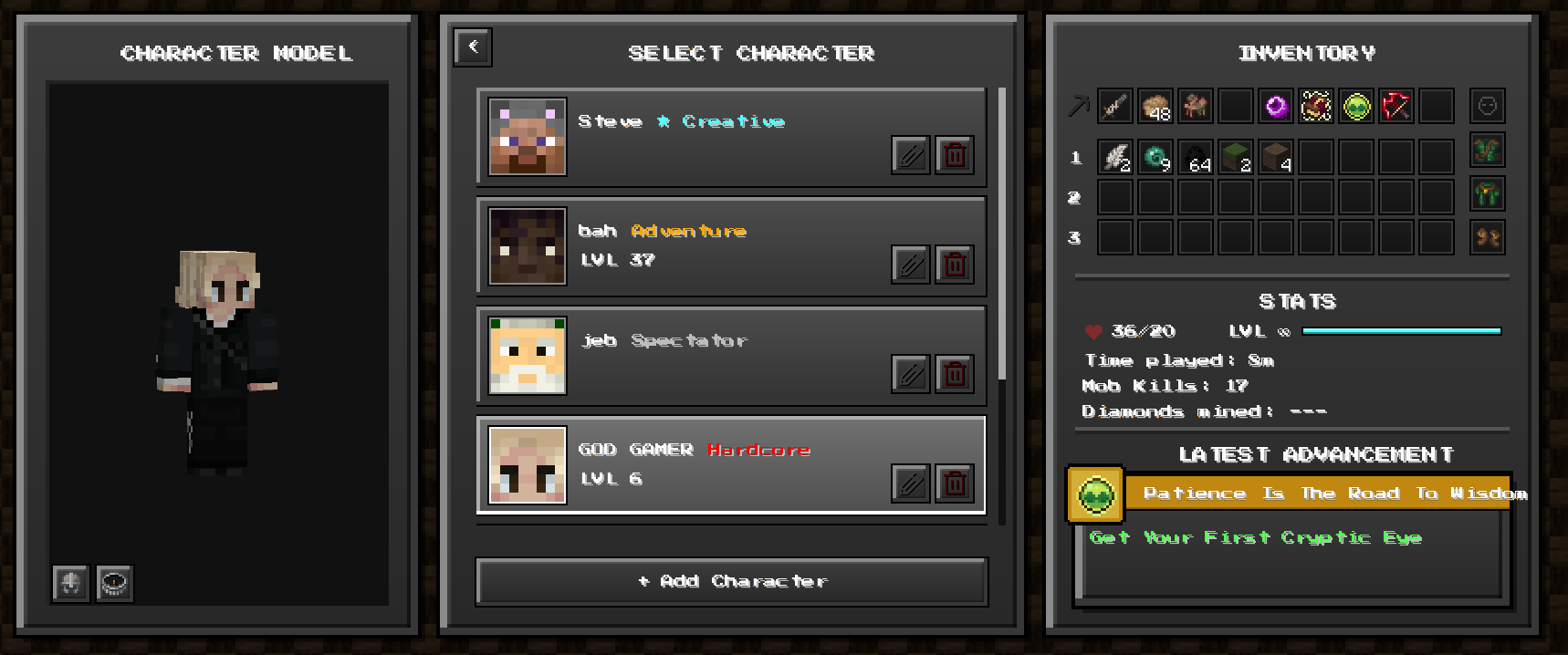
Character Model Showcase in RPG Origins modpack
🛠️ Installation & Setup
Note: Make sure you are using Fabric as your mod loader and Minecraft 1.21.1.
- Download the latest version of Nexus Characters from the releases page
- Drop the
.jarfile into your Minecraftmodsfolder (do the same for servers) - Launch the game and access the new "Characters" menu from the title screen
🤝 Feedback and Support
Found a bug or have a feature request? Please open an issue on the GitHub Issues tab or send me an email. I am always looking for ways to improve the user experience! Also if you wish to support my work, I'll happily take a coffee!


📄 License
This project is licensed under the MIT License — see the LICENSE file for details.
Welcome to Nexus Characters! This mod fundamentally changes how you experience Minecraft by shifting the focus from world-bound progression to character-bound progression.
Instead of starting from scratch every time you create a new world, Nexus Characters allows you to seamlessly carry your inventory, stats, and identity across all your single-player saves and multiplayer servers. Build your character, explore infinite worlds, and never lose your hard-earned progress again.
📚 Table of Contents
✨ Core Features
Character Creation
Create unique identities for your different playthroughs. When making a new character, you have complete control over their identity and playstyle:
- Custom Naming: Give your character a unique identity.
- Skin Syncing: Simply input an existing Mojang username, and your character will automatically adopt that skin.
- Bound Gamemodes: Gamemodes (Survival, Creative, Adventure) are tied to the character, rather than the world.
Cross-World Progression
Your character's journey doesn't end when you leave a world. Everything that defines your character travels with them:
- Health and hunger stats
- Experience levels (XP)
- Full inventory and equipped armor
- Advancements and statistics

Hardcore Characters
Love the thrill of Hardcore but hate losing a beautiful world you spent hours building? Nexus Characters introduces Hardcore Characters.
- If your Hardcore Character dies, they are permanently erased from your character list.
- The World Survives: The world they died in remains perfectly intact. You can roll a brand-new character, travel to that same world, and find your fallen character's base (or avenge them!).
🚀 Extended Capabilities
Deep Mod Compatibility
Nexus Characters doesn't just save vanilla data. It integrates deeply with your favorite mods to ensure that external progression is saved directly to your character. For example, if you are playing with Cobblemon, your party of Pokémon and your PC boxes will travel with your character across dimensions and worlds!
Multiplayer Support
Take your characters online! Nexus Characters is fully compatible with dedicated servers. Server owners can install the mod to allow players to bring their cross-world characters into the community, or restrict servers to specific character types.
Legacy Data Migration
If you are adding Nexus Characters to an existing world where you already have progress, you can easily inherit your old data!
- How to Inherit: Create a new character and set the Character Name to perfectly match your Minecraft Username (the account that originally played in that world).
- Security: You can only inherit your own legacy data. For example, if you are
Player1and your friend isPlayer2, you cannot create a character namedPlayer2to steal their progress.
Important: When you do this, your character's current progress will be completely overwritten by the legacy data from that world. If you want to enter a legacy world but keep your cross-world character's existing progress, ensure your character is named differently from your Minecraft username!
Autosave Interval Command (Server/LAN only)
If you are hosting a Server or a LAN world, you can manage how often non-vanilla data is synced to players:
/nexus saveinterval <time in seconds>(Default: 30s) Alters the time between autosaves for data coming from external mods (e.g., catching a Pokémon or updating your Pokédex).
Syncing Delay: Even if you define the interval to 1 second, it still takes time for the server to send the data to the client, and for the client to save it properly to disk. Because of this, you should wait 1 to 2 minutes before disconnecting after doing something important related to mods to avoid losing progress! Also, the shorter the interval, the heavier will be server load.
Character Model Showcase in RPG Origins modpack
🛠️ Installation & Setup
Note: Make sure you are using Fabric as your mod loader and Minecraft 1.21.1.
- Download the latest version of Nexus Characters from the releases page
- Drop the
.jarfile into your Minecraftmodsfolder (do the same for servers) - Launch the game and access the new "Characters" menu from the title screen
🤝 Feedback and Support
Found a bug or have a feature request? Please open an issue on the GitHub Issues tab or send me an email. I am always looking for ways to improve the user experience! Also if you wish to support my work, I'll happily take a coffee!


📄 License
This project is licensed under the MIT License — see the LICENSE file for details.
Screenshots
Gallery
-
 2026-04-02_17.53.06.png 2026-04-02_17.53.06.png
 -
 m6ORHDh.png m6ORHDh.png
 -
 ZrrJH5Z.png ZrrJH5Z.png
Versions
Files
Relations
Project Relations
More like this
Similar Mods
Suggestions use data such as tags, dependencies, dependents, descriptions, titles, and more to rank how much they overlap with this mod.
On ModDex
Community snapshot
By the numbers
Statistics
 (opens in a new tab)
Get it on
Available Platforms
On ModDex
Community snapshot
By the numbers