Community listing page, reviews here may not be monitored by the author.
Ngrok LAN


No reviews yet
A FabricMC mod that exposes your local LAN server to the internet with Ngrok.

Community voices
Reviews
No reviews yet. Be the first to review this project!
Get it on
Available Platforms
Compatibility
Supported Environments
Runs entirely on the client. Works on vanilla servers.
About
Project Details
For authors
Embed Badge
If you're the author of this project, you can embed a live badge anywhere that supports HTML or Markdown. It updates automatically whenever ratings change.
Use HTML for any page that supports it, or Markdown for README files and Markdown-based descriptions.
Identifiers
Platform IDs
About
Description
Due to a lack of bandwidth in the development team, we've unfortunately had to halt progress on this project, we appreciate your understanding.
We recommend alternatives such as e4mc for a similar featureset.
Thanks you for your support :)
Kind regards, Alujjdnd/Flooflez
Read more here
Help Needed!
We are trying to port this mod to QuiltMC, many thanks to those who have contributed already! However, we are hope that a Quilt specific config library will become available to use soon, since our mod requires editing a config file we want the process to be as easy as possible for our users.
Ngrok LAN
Ngrok LAN is a Fabric mod that enables you to share your singleplayer world with your friends across the globe, all via clicking on the new "Open Public Server" button! This mod uses Ngrok, a free service to ease the creation of servers, to "tunnel" your connection to the internet, and will generate a link for your friends to connect to after you click on "Open Public Server".
Installation/Quick Start
Dependencies
The mod requires the following mods:
Install Fabric Loader and Ngrok-LAN
- Go to the FabricMC website and download the latest installer
- Run the JAR, a window will pop up. Choose the correct version of Minecraft and loader (this mod currently requires Minecraft v1.18.2 and loader v0.13.3), and click on "Install".
- A new game version and profile will be created in the launcher's menu, which you can now use to launch Fabric.
- Put the mod JAR (available under Releases) into your "mods" folder, along with the ClothConfig API and ModMenu JARs. (The Fabric API JAR should already be in your mods folder from the previous section)
- Run the newly installed profile from step 3, and Ngrok LAN should load
Configuring Ngrok-LAN
In your Minecraft menu screen, a new "Mods" button should be visible, click on it. In the list of mods on the left hand side, find Ngrok LAN, and click on the sliders button on the top right corner, above the "issues" button. You should be presented with a few options:
- "Enabled?": This will enable/disable the mod, so you can configure whether the world is shared with Ngrok
- "Ngrok Auth Token": This is the field to input your Ngrok auth token, see getting your auth token
- "Region": This is where you can select the region of the Ngrok datacenter that you wish to use, use ones that are closest to you to minimise latency
- "Require Authentication": Ticking this box will start the server in online mode. If this box is unchecked, the server will be started in offline mode. This is mainly for when the other players are using cracked Minecraft accounts.
- "Spawn Protection Radius": Prevents non-opped players from breaking and placing blocks within `X` blocks of spawn
Starting Ngrok LAN
- Make sure that Ngrok LAN is enabled, the auth token is valid, and the correct region is selected
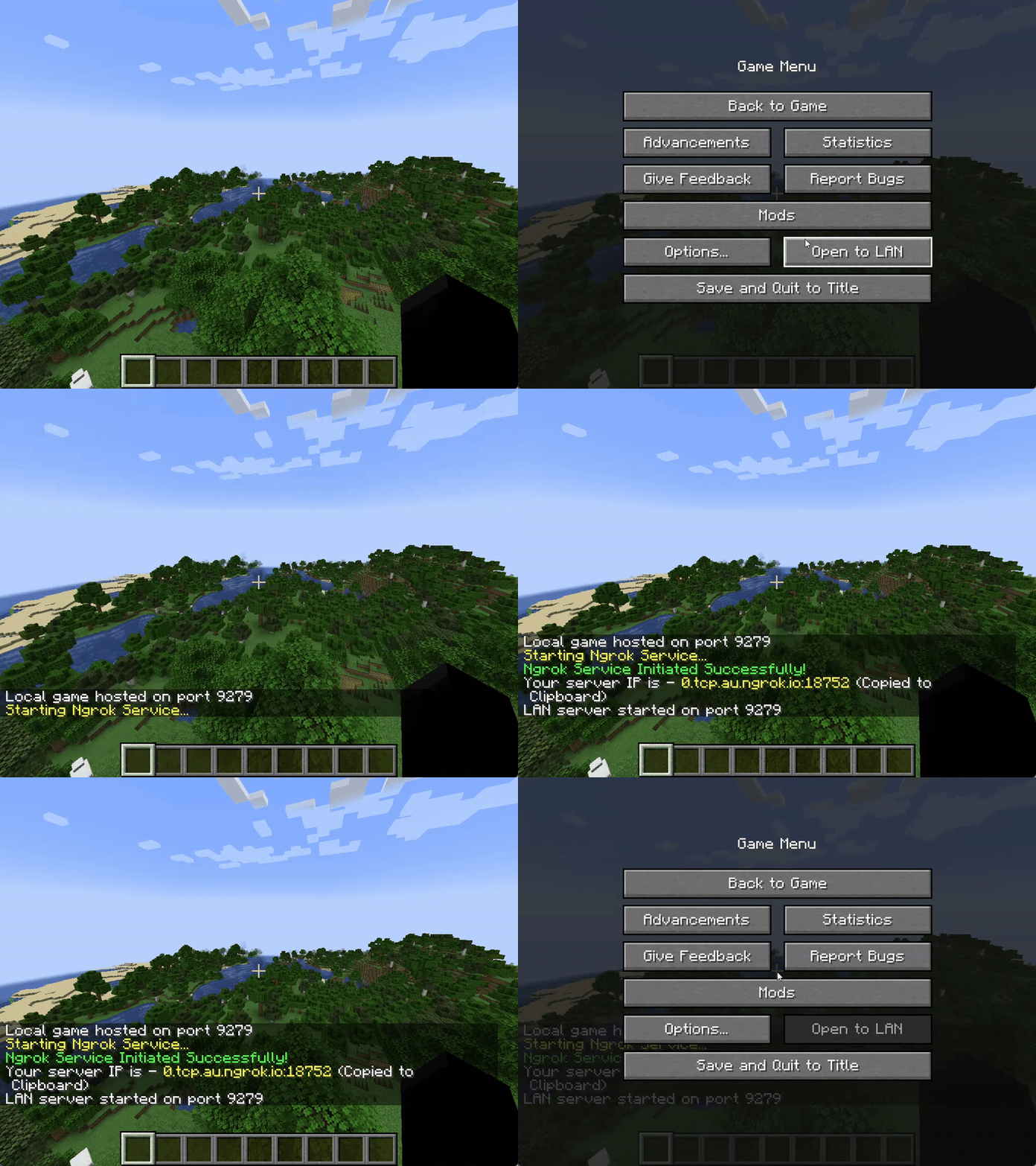
- Open a new singleplayer world, and click on Open to LAN
- Configure the game mode and whether to allow cheats
- Press on "Open Public Server"
- The game may freeze for a moment (especially on your first time using the mod), but if all goes well, the message "Ngrok service initiated successfully" should appear in chat, with a link highlighted in yellow
- If not, check common issues below
- The link is automatically copied to your clipboard, and can now be shared with your friends
- Other people just need to put this as a server IP into their multiplayer list, and join the world
Getting your Ngrok Auth Token
- Go to https://ngrok.com/, and sign up for a new free account
- On the dashboard, on your left-hand side menu, click on Getting Started > Your Auth Token
- Copy the auth token, and put this into Ngrok LAN (don't share this token with other people)
Commands
| Command | Description |
|---|---|
/op <username> |
Gives the specified player server operator status. |
/deop <username> |
Removes server operator status from specified player. |
/whitelist add <username> |
Adds the player profile(s) to the whitelist. The player does not need to be online. |
/whitelist on |
Enables the server's use of a whitelist. |
/whitelist off |
Disables the server's use of a whitelist. |
/whitelist remove |
Removes the player profile(s) from the whitelist. The player does not need to be online. |
/whitelist list |
Displays all player profiles in the whitelist. |
/whitelist reload <username> |
Reloads the list of player profiles in whitelist.json from disk (used when whitelist.json has been modified outside of Minecraft). |
Common Issues
| Error Message | Resolution |
|---|---|
| An attempt was made to access a socket in a way forbidden by its access permissions. | Restart "Host Network Service" under the "Services" program |
| The authtoken you specified does not look like a proper ngrok tunnel (ERR_NGROK_105) | Check that your auth token is valid, and is correctly inputted into the mod config |
| Your account is limited to simultaneous ngrok agent session... |
Check that you are not running any other tunnels with this auth token, or that you are not hitting the limit for the max number of tunnels on your account |
- For more errors, error codes and their resolution, check the Ngrok docs
Other Issues
Please open a new issue in Issues
What is Ngrok?
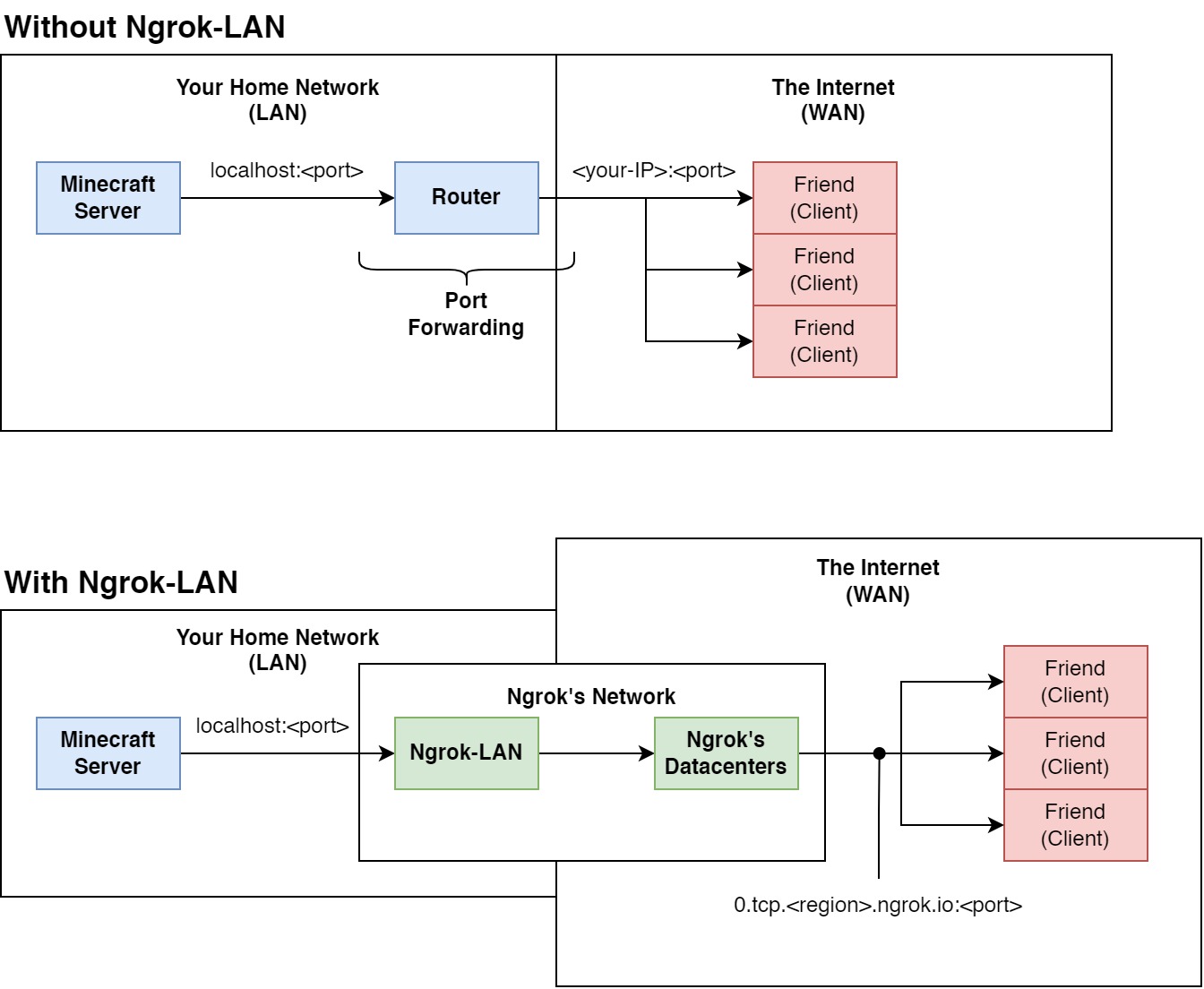
Ngrok is a free service that exposes your applications running locally to the internet, without port forwarding. Usually, when setting up a Minecraft server, you would have to open the server, and "forward" your port through your router. Port forwarding "publishes" your server to the internet, so anyone with you IP can join. Think of this as your router "forwarding" the network packets from your server (part of your local network) to your friends (part of the wider internet).
Using Ngrok, however, we don't need to forward the port. All the internet traffic is routed through an application (Ngrok-LAN in this case), then their datacentres. Ngrok provides us with a link in return, that we can give to our friends to connect to our server. This doesn't require any other configuration on your side - as long as you have internet, and an Ngrok account, you can host your singleplayer world to your friends across the globe.
Ngrok Account Requirements
The mod only requires a free Ngrok account. The free tier for Ngrok allows you to have 1 free online tunnel simultaenously, which means that, with one Ngrok free account, you can only host 1 Ngrok-LAN server at the same time. The paid tiers allows you to have custom domains and more simultaenous online tunnels, but custom domains are not yet supported in this mod.
More pricing info please refer to Ngrok's website
Known Incompatibilities
Please refer to Incompatibilities to find a list of incompatible mods.
Currently, only Proximity Voice Chat mods are incompatible. This is unlikely to be fixed.
TODO
- Port to QuiltMC (Please reach out and help us!)
- 1.17.1 Build
License
This mod is available under the MIT license.
DEPRECATION NOTICE
This project is no longer actively maintained.
Due to a lack of bandwidth in the development team, we've unfortunately had to halt progress on this project, we appreciate your understanding.
We recommend alternatives such as e4mc for a similar featureset.
Thanks you for your support :)
Kind regards, Alujjdnd/Flooflez
Ngrok LAN





Help Needed!
We are trying to port this mod to QuiltMC, many thanks to those who have contributed already! However, we are hope that a Quilt specific config library will become available to use soon, since our mod requires editing a config file we want the process to be as easy as possible for our users.
Introduction
Ngrok LAN is a Fabric mod that enables you to share your singleplayer world with your friends across the globe, all via clicking on the new "Open Public Server" button! This mod uses Ngrok, a free service to ease the creation of servers, as the main service to "tunnel" your connection to the internet, and will generate a link for your friends to connect to after you click on "Open Public Server".
For more on how Ngrok-LAN works, check out What is Ngrok.
Installation/Quick Start
Dependencies
The mod requires the following mods:
Install Fabric Loader and Ngrok-LAN
- Go to the FabricMC website and download the latest installer
- Run the JAR, a window will pop up. Choose the correct version of Minecraft and loader (this mod currently requires Minecraft v1.18.2 and loader v0.13.3), and click on "Install".
- A new game version and profile will be created in the launcher's menu, which you can now use to launch Fabric.
- Put the mod JAR (available under Releases) into your "mods" folder, along with the ClothConfig API and ModMenu JARs. (The Fabric API JAR should already be in your mods folder from the previous section)
- Run the newly installed profile from step 3, and Ngrok LAN should load
Configuring Ngrok-LAN
| Field | Description |
|---|---|
| "Enabled?" | This will enable/disable the mod, so you can configure whether the world is shared with Ngrok |
| "Ngrok Auth Token" | This is the field to input your Ngrok auth token, see getting your auth token |
| "Region" | This is where you can select the region of the Ngrok datacenter that you wish to use, use ones that are closest to you to minimise latency |
| "Require Authentication" | Ticking this box will start the server in online mode. If this box is unchecked, the server will be started in offline mode. This is mainly for when the other players are using cracked Minecraft accounts. |
| "Spawn Protection Radius" | Prevents non-opped players from breaking and placing blocks within X blocks of spawn |
Ngrok Regions
| Code | Region |
|---|---|
| US | United States |
| EU | Europe |
| AP | Asia/Pacific |
| AU | Australia |
| SA | South America |
| JP | Japan |
| IN | India |
Starting Ngrok LAN
- Make sure that Ngrok LAN is enabled, the auth token is valid, and the correct region is selected
- Open a new singleplayer world, and click on Open to LAN
- Configure the game mode and whether to allow cheats
- Press on "Open Public Server"
- The message "Ngrok service initiated successfully" should appear in chat, with a link highlighted in yellow
- If not, check common issues below
- The link is automatically copied to your clipboard, and can now be shared with your friends
- Other people just need to put this as a server IP into their multiplayer list, and join the world
Getting your Ngrok Auth Token
- Go to https://ngrok.com/, and sign up for a new free account
- On the dashboard, on your left-hand side menu, click on Getting Started > Your Auth Token
- Copy the auth token, and put this into Ngrok LAN (don't share this token with other people)
Commands
| Command | Description |
|---|---|
/op <username> |
Gives the specified player server operator status. |
/deop <username> |
Removes server operator status from specified player. |
/whitelist add <username> |
Adds the player profile(s) to the whitelist. The player does not need to be online. |
/whitelist on |
Enables the server's use of a whitelist. |
/whitelist off |
Disables the server's use of a whitelist. |
/whitelist remove |
Removes the player profile(s) from the whitelist. The player does not need to be online. |
/whitelist list |
Displays all player profiles in the whitelist. |
/whitelist reload <username> |
Reloads the list of player profiles in whitelist.json from disk (used when whitelist.json has been modified outside of Minecraft). |
Common Issues
| Error Message | Resolution |
|---|---|
| An attempt was made to access a socket in a way forbidden by its access permissions. | Restart "Host Network Service" under the "Services" program |
| The authtoken you specified does not look like a proper ngrok tunnel (ERR_NGROK_105) | Check that your auth token is valid, and is correctly inputted into the mod config |
| Your account is limited to simultaneous ngrok agent session... | Check that you are not running any other tunnels with this auth token, try change to regions if you are still getting this error |
- For more errors, error codes and their resolution, check the Ngrok docs
Other Issues
Please open a new issue in Issues
What is Ngrok?
Ngrok is a free service that exposes your applications running locally to the internet, without port forwarding. Usually, when setting up a Minecraft server, you would have to open the server, and "forward" your port through your router. Port forwarding "publishes" your server to the internet, so anyone with you IP can join. Think of this as your router "forwarding" the network packets from your server (part of your local network) to your friends (part of the wider internet).
Using Ngrok, however, we don't need to forward the port. All the internet traffic is routed through an application ( Ngrok-LAN in this case), then their datacentres. Ngrok provides us with a link in return, that we can give to our friends to connect to our server. This doesn't require any other configuration on your side - as long as you have internet, and an Ngrok account, you can host your singleplayer world to your friends across the globe.
Ngrok Account Requirements
The mod only requires a free Ngrok account. The free tier for Ngrok allows you to have 1 free online tunnel simultaenously, which means that, with one Ngrok free account, you can only host 1 Ngrok-LAN server at the same time. The paid tiers allows you to have custom domains and more simultaenous online tunnels, but custom domains are not yet supported in this mod.
More pricing info please refer to Ngrok's website
Known Incompatibilities
Please refer to Incompatibilities to find a list of incompatible mods. Currently, only Proximity Voice Chat mods are incompatible. This is unlikely to be fixed.
TODO
- Port to QuiltMC (Please reach out and help us!)
- 1.17.1 Build
- 1.19 Build
License
This mod is available under the MIT license.
Screenshots
Gallery
Versions
Files
Relations
Project Relations
More like this
Similar Mods
Suggestions use data such as tags, dependencies, dependents, descriptions, titles, and more to rank how much they overlap with this mod.
On ModDex
Community snapshot
By the numbers
Statistics
 (opens in a new tab)
Get it on
Available Platforms
On ModDex
Community snapshot
By the numbers