
Community listing page, reviews here may not be monitored by the author.
Nilcord

No reviews yet
Yet another Discord bridge for Minecraft
Community voices
Reviews
No reviews yet. Be the first to review this project!
Get it on
Available Platforms
Compatibility
Supported Environments
Runs entirely on the server. Also works in singleplayer.
About
Project Details
For authors
Embed Badge
If you're the author of this project, you can embed a live badge anywhere that supports HTML or Markdown. It updates automatically whenever ratings change.
Use HTML for any page that supports it, or Markdown for README files and Markdown-based descriptions.
Identifiers
Platform IDs
Resources
External Links
About
Description
What started as a niche project for a niche modloader for a niche Minecraft version has now been extended to all Minecraft versions (that I personally care about)!
Nilcord | Yet another Discord bridge for Minecraft
Nilcord connects the chat of your Minecraft server to a specified Discord text channel, using a Discord bot and (optionally) webhook.
Installation
To get the mod set up, simply place the mod file in the mods directory (or nilmods with NilLoader), start your Minecraft server, and wait for it to generate the config file (and crash because it's not yet populated).
The config file, named nilcord.toml, is found in the config folder, and is pretty self-explanatory.
(default configuration)
# Settings pertaining to Discord itself
[discord]
	# The Discord bot token to use
	# default:
	token = ""
	# The default Discord channel ID for the bot to send messages to / receive messages from. Used ALONGSIDE send_to and receive_from. Can be blank!
	# default:
	channel_id = ""
	# Other Discord channel ID(s) for the bot to send messages to
	send_to = []
	# Other Discord channel ID(s) for the bot to receive messages from
	receive_from = []

	# Settings pertaining to the Discord webhook
	[discord.webhook]
		# Whether to use a webhook for sending players' chat messages to Discord
		# default: false
		enabled = false
		# The webhook URL to use
		# default:
		url = ""

# Settings pertaining to Minecraft itself
[minecraft]
	# Whether to allow mentioning Discord users from Minecraft
	# default: false
	enable_mentions = false
	# Whether to allow mentioning @everyone and @here from Minecraft
	# default: false
	enable_everyone_and_here = false
	# Whether to show Discord message attachments in-game
	# default: true
	show_attachments = true
	# Whether to show messages from other Discord bots in-game
	# default: false
	show_bot_messages = false
	# Whether to show messages from Discord webhooks in-game
	# default: true
	show_webhook_messages = true
	# Application / User IDs to ignore messages from
	ignored_ids = ["000000000000000000"]

# Settings pertaining to message formatting
[formatting]

	# Settings pertaining to messages visible in Discord
	# Available placeholders: <displayname> <username>
	[formatting.discord]
		# Server starting message
		# Available placeholders: N/A
		# default: **Server starting...**
		server_starting_message = "**Server starting...**"
		# Server started message
		# Available placeholders: N/A
		# default: **Server started!**
		server_started_message = "**Server started!**"
		# Server stopping message
		# Available placeholders: N/A
		# default: **Server stopping...**
		server_stopping_message = "**Server stopping...**"
		# Server stopped message
		# Available placeholders: N/A
		# default: **Server stopped!**
		server_stopped_message = "**Server stopped!**"
		# Server crash message
		# Available placeholders: N/A
		# default: **Server crashed :(**
		server_crash_message = "**Server crashed :(**"
		# Player chat messages
		# Additional placeholders: <message>
		# default: **<<username>>** <message>
		chat_message = "**<<username>>** <message>"
		# Player join messages
		# Additional placeholders: N/A
		# default: > **<username> joined the game**
		join_message = "> **<username> joined the game**"
		# Player leave messages
		# Additional placeholders: N/A
		# default: > **<username> left the game**
		leave_message = "> **<username> left the game**"
		# Player advancement messages
		# Additional placeholders: <advancement_description> <advancement_title>
		# default: > **<username>** has just earned the achievement **[<advancement_title>]**
		#> \> _<advancement_description>_
		advancement_fallback_message = "> **<username>** has just earned the achievement **[<advancement_title>]**\n> \\> _<advancement_description>_"
		# default: > **<username>** has completed the challenge **[<advancement_title>]**
		#> \> _<advancement_description>_
		advancement_challenge_message = "> **<username>** has completed the challenge **[<advancement_title>]**\n> \\> _<advancement_description>_"
		# default: > **<username>** has reached the goal **[<advancement_title>]**
		#> \> _<advancement_description>_
		advancement_goal_message = "> **<username>** has reached the goal **[<advancement_title>]**\n> \\> _<advancement_description>_"
		# default: > **<username>** has made the advancement **[<advancement_title>]**
		#> \> _<advancement_description>_
		advancement_task_message = "> **<username>** has made the advancement **[<advancement_title>]**\n> \\> _<advancement_description>_"
		# Player death messages
		# Additional placeholders: <death_message>
		# default: **<username> died:** _<death_message>_
		death_message = "**<username> died:** _<death_message>_"

		# Settings pertaining to messages sent from the webhook, if enabled
		[formatting.discord.webhook]
			# The URL to use for the webhook's avatar
			# Additional placeholders: <skin_id> <skin_model> <uuid>
			# default: https://visage.surgeplay.com/bust/128/<skin_id>?<skin_model>
			avatar_url = "https://visage.surgeplay.com/bust/128/<skin_id>?<skin_model>"
			# Default skin ID for the webhook's avatar, if the player's cannot be loaded
			# default: 31f477eb1a7beee631c2ca64d06f8f68fa93a3386d04452ab27f43acdf1b60cb
			default_skin_id = "31f477eb1a7beee631c2ca64d06f8f68fa93a3386d04452ab27f43acdf1b60cb"
			# Default skin model for the webhook's avatar, if the player's cannot be loaded
			# default: wide
			default_skin_model = "wide"
			# The webhook's username
			# Additional placeholders: N/A
			# default: <username>
			username = "<username>"
			# Player chat messages
			# Additional placeholders: <message>
			# default: <message>
			chat_message = "<message>"

	# Settings pertaining to messages visible in Minecraft
	# Available placeholders: <message> <message_url> <nickname> <role_color> <username>
	[formatting.minecraft]
		# Discord messages
		# Additional placeholders: <attachment_format> <discord_format> <reply_format> <username_format>
		# default: [Discord] <reply_format><click type:open_url value:'<message_url>'><<username_format>></click> <message><attachment_format>
		discord_message = "[Discord] <reply_format><click type:open_url value:'<message_url>'><<username_format>></click> <message><attachment_format>"
		# Username format
		# Additional placeholders: N/A
		# default: <hover type:show_text value:'@<username>'><color value:'<role_color>'><nickname></color></hover>
		username_format = "<hover type:show_text value:'@<username>'><color value:'<role_color>'><nickname></color></hover>"
		# Mention format
		# Additional placeholders: N/A
		# default: <underline><hover type:show_text value:'@<username>'>@<nickname></hover></underline>
		mention_format = "<underline><hover type:show_text value:'@<username>'>@<nickname></hover></underline>"
		# Reply format
		# Additional placeholders: <reply_message> <reply_nickname> <reply_role_color> <reply_url> <reply_username>
		# default: <click type:open_url value:'<reply_url>'><hover type:show_text value:'@<reply_username>: <reply_message>'>[<aqua>←</aqua><color value:'<reply_role_color>'><reply_nickname></color>]</hover></click>
		reply_format = "<click type:open_url value:'<reply_url>'><hover type:show_text value:'@<reply_username>: <reply_message>'>[<aqua>←</aqua><color value:'<reply_role_color>'><reply_nickname></color>]</hover></click> "
		# Attachment format
		# Additional placeholders: <attachment_url>
		# default: <click type:open_url value:'<attachment_url>'>[<aqua>Attachment</aqua>]</click>
		attachment_format = "<click type:open_url value:'<attachment_url>'>[<aqua>Attachment</aqua>]</click>"
(Note that this is the config file for Nilcord 4.2+26.2+fabric. It may look different on other versions.)
Only the token and channel_id fields (under the discord category) are strictly required to be filled out; the mod falls back to sensible defaults for everything else. But feel free to change it to your liking!
Notes
For setting up a Discord application (to get a bot token), follow discord.js' guide: Setting up a bot application | discord.js Guide
For finding a Discord channel's "Channel ID", follow Discord's guide: Where can I find my User/Server/Message ID? - Discord
With 1.21.1 and below, the Fabric versions can also make use of the Simplified Text Format, as well as placeholders supplied by Text Placeholder API and the various mods that support it.
With 1.21.2 and above, the Fabric versions allow using QuickText as well.
With 1.20.4, as well as 26.1 and above, the NeoForge versions also allow using Simplified Text Format and QuickText.
The Forge 1.7.10 version has additional support for ChromatiCraft's progression messages, as well as ServerUtilities' AFK messages.
Comments? Questions? Suggestions? Demands? Open an issue on the issue tracker!
Screenshots
Gallery
-
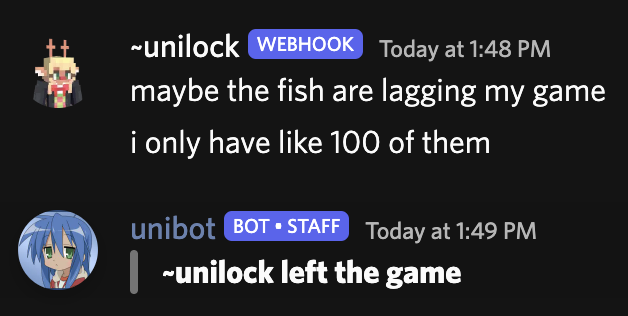 Example
Versions
Files
Relations
Project Relations
More like this
Similar Mods
Suggestions use data such as tags, dependencies, dependents, descriptions, titles, and more to rank how much they overlap with this mod.
On ModDex
Community snapshot
By the numbers
Statistics

Want to reach Minecraft players?
We're looking for a server hosting partner to feature here and other parts of the site. Interested? Send us a message!
Get in touchGet it on
Available Platforms
On ModDex
Community snapshot
By the numbers
Statistics
Resources