Community listing page, reviews here may not be monitored by the author.
Norths Schematics

No reviews yet
A modification that can save and load structures for general gameplay.
Community voices
Reviews
No reviews yet. Be the first to review this project!
Get it on
Available Platforms
About
Project Details
For authors
Embed Badge
If you're the author of this project, you can embed a live badge anywhere that supports HTML or Markdown. It updates automatically whenever ratings change.
Use HTML for any page that supports it, or Markdown for README files and Markdown-based descriptions.
Identifiers
Platform IDs
Resources
External Links
About
Description
North's Schematics
A modification that is designed with survival mode in mind. Similar to how Structure blocks work but using JSON files, it is possible to save structures in both creative and survival or adventure mode. Once saved the player can place down their structure anywhere else in the world.
Modes
Survival Mode
When the player is in survival the structure will be removed when saved. Some items might drop that can't be saved, things like Shulker boxes, item frames, armour stands, paintings things like that. Beds are also one of the few blocks that can't be saved due to it being a multi-structure but I have made sure they drop instead for being fully removed.
Creative Mode
When the player is in creative mode the save block will act more like cloning the structure, the structure can also be placed more than once unlike survival mode, the same idea as survival inventories are not saved but blocks and block rotation are saved as much as possible.
Game Rules
nsMaximumSchematicSize
There is a game rule for setting the maximum size players can save structures. It is recommended to not go over 32 as this is the maximum size Minecraft generally uses for block updates and may cause severe lag when placing larger structures, for this reason, I have made sure there is an option for players to limit the structure save size though it can be changed any time by an operator when they like.
nsUseSchematicBackups
You can enable structure backups, an optional system to ensure that every time a structure is saved (even with the same name) that a new file will save to a backups folder for that player. Servers might not want this enabled as it could add up file size on a well-used server but it might be useful for people that want a copy of their structures just in case something happens to them. To roll back a structure all you need to do is place the structure JSON file into the folder and change the name of the file to something more usable like "structure_backup_1" and then use that file name when loading the structure.
Tags
- norths_schematics:dye | Item tag | Used for the crafting recipes.
- norths_schematics:placement/display | Block tag | Used for structure placement and generation.
- Signs, banners, etc.
- norths_schematics:placement/fire | Block tag | Used for structure placement and generation.
- Fire blocks.
- norths_schematics:placement/lights | Block tag | Used for structure placement and generation.
- Torches, lanterns, and candles.
- norths_schematics:placement/plants | Block tag | Used for structure placement and generation.
- For all plants that have placement conditions.
- norths_schematics:placement/redstone | Block tag | Used for structure placement and generation.
- For all Redstone blocks that have placement conditions.
- norths_schematics:placement/objects | Block tag | Used for structure placement and generation.
- All blocks that don't fit under the categories above.
Recipes
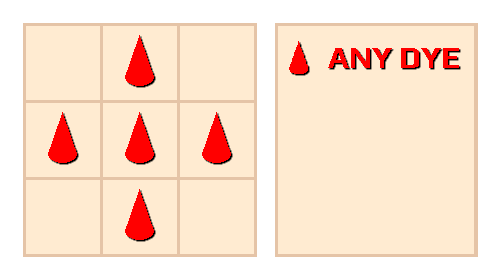
Target Block Crafting Recipe
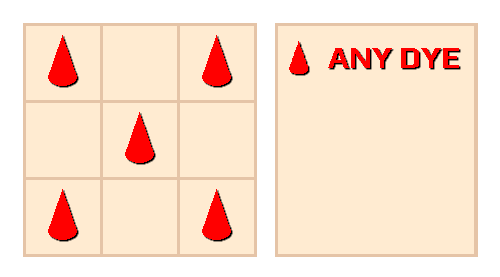
Structure Block Crafting Recipe
Features
- Can save most blocks and their rotations.
- Structure generation places one block at a time that looks like the structure is being 3D printed.
- Tag support for custom mod blocks with placement conditions.
- Designed for general gameplay and creativity, unlike structure blocks.
- Uses JSON files to save and load structures.
- Not overpowered in survival mode due to one-time use structures when not in creative.
- Possible to set the structure size to any size you like as long as it's in the range for the game rule cap.
- Support for structure backups allows players to keep structures safe even in survival mode.
- Support for both Fabric and Forge
Planned Features
- Structure trading system
- Structure selling system
- Possibly more features later on.
Known Issues
Fixed in 1.1.0 - Large structures lagged when being placed in version 1.0.0.
Screenshots
Gallery
Versions
Files
Relations
Project Relations
More like this
Similar Mods
Suggestions use data such as tags, dependencies, dependents, descriptions, titles, and more to rank how much they overlap with this mod.
On ModDex
Community snapshot
By the numbers
Statistics
Want to reach Minecraft players?
We're looking for a server hosting partner to feature here and other parts of the site. Interested? Send us a message!
Get in touchGet it on
Available Platforms
On ModDex
Community snapshot
By the numbers
Statistics
Resources