
Community listing page, reviews here may not be monitored by the author.
音符盒调教师NoteBlockTweaker

No reviews yet
原版大型红石音乐的建造需要一次次地右击音符盒、一个方块一个方块地摆放延音电路,此模组专为解决这两个痛点而生。 Building large-scale redstone music in vanilla Minecraft requires right-clicking note blocks one by one and placing delay circuits block by block — this mod is designed to solve those two pain points.
Community voices
Reviews
No reviews yet. Be the first to review this project!
Get it on
Available Platforms
Compatibility
Supported Environments
Must be installed on both the client and the server.
About
Project Details
For authors
Embed Badge
If you're the author of this project, you can embed a live badge anywhere that supports HTML or Markdown. It updates automatically whenever ratings change.
Use HTML for any page that supports it, or Markdown for README files and Markdown-based descriptions.
Identifiers
Platform IDs
Resources
External Links
About
Description
一键调音 + 一键生成延音电路 + 批量调音 One-Click Tuning + One-Click Delay Circuit Generation + Batch Tuning
功能/Function
1、音高注入棒:右键音符盒打开调音界面,黑白键调音、切换垫块音色; 2、延音生成器:一键生成延音红石电路(音符盒+红石线+垫块),支持直线、贝塞尔、弦乐三段包络与三视图预览; 3、批量联动:同组(identicalTag)音符盒同步调音/换垫块,开关控制; 4、同组高亮:手持注入棒对准音符盒,同组显示浅蓝边框; 5、多语言:简繁英日 + 文言文。 1.Pitch Injector Rod: Right-click a note block to open the tuning screen; tune with white/black keys and switch supporting-block timbres. 2.Delay Generator: One-click generation of a delay redstone circuit (note block + redstone dust + supporting block); supports straight-line, Bézier, and string-style three-segment envelopes, with a three-view preview. 3.Batch Linkage: Note blocks in the same group (identicalTag) sync tuning and block swapping, controlled by a toggle. 4.Group Highlight: Hold the injector rod and aim at a note block to highlight all same-group note blocks with a light blue outline. 5.Multi-language: Simplified/Traditional Chinese, English, Japanese + Classical Chinese.
使用/Usage
1、手持音高注入棒右键音符盒 → 调音 → 换垫块、开延音开关批量联动 2、手持延音生成器右键音符盒 → 设参数 → 预览 → 放置 1.Hold the Pitch Injector Rod and right-click a note block → tune → swap supporting block / enable batch linkage via the delay toggle. 2.Hold the Delay Generator and right-click a note block → set parameters → preview → place.
Screenshots
Gallery
-
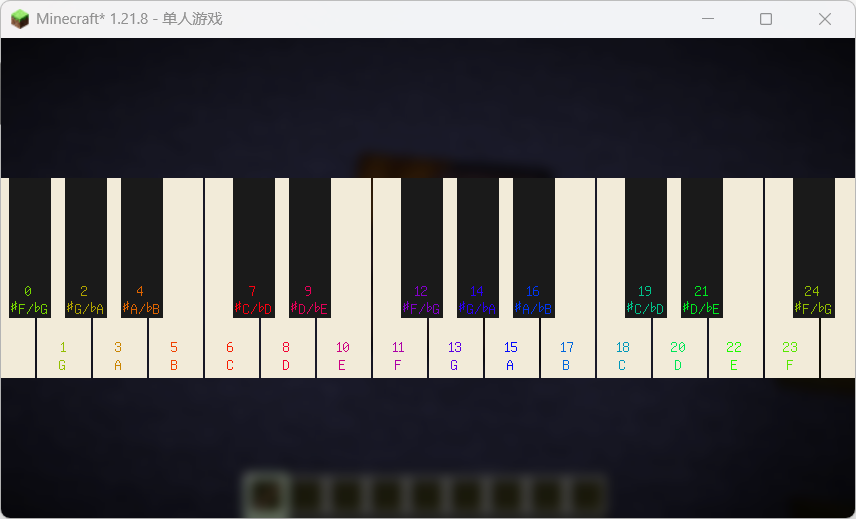 在版本1.1-SNAPSHOT重绘了交互界面、使调音成功时能播放正确的声音事件、静默了点击按钮时的默认声音事件。 In version 1.1-SNAPSHOT, the interaction GUI has been redrawn, the correct sound event now plays when tuning succeeds, and the default button click sound has been silenced.
 -
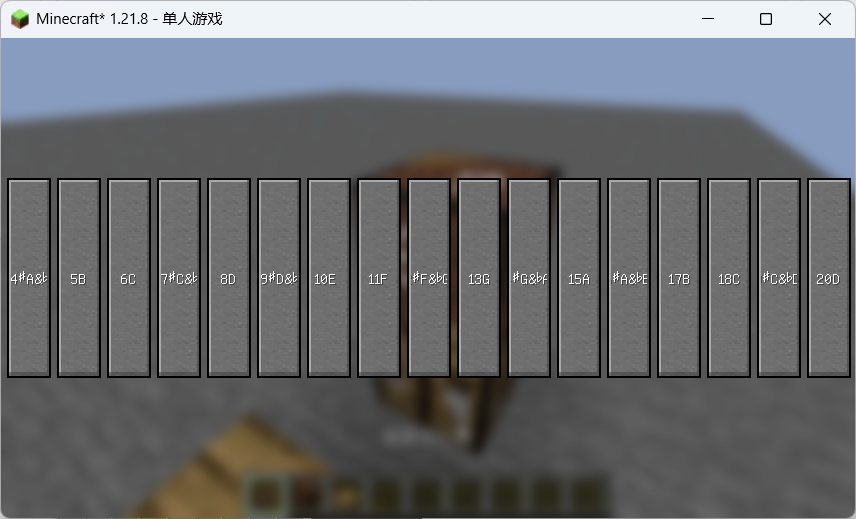 点击按钮即可调至对应音高 Click the button to tune to the corresponding pitch.
 -
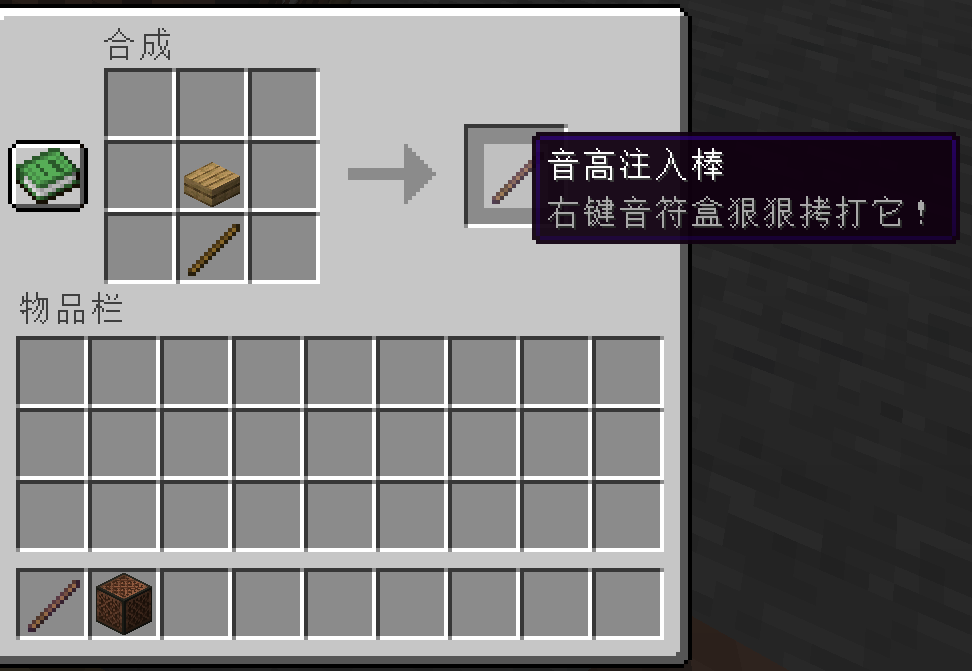 音高注入棒的配方 the recipe of pitch_injector
Versions
Files
Relations
Project Relations
More like this
Similar Mods
Suggestions use data such as tags, dependencies, dependents, descriptions, titles, and more to rank how much they overlap with this mod.
On ModDex
Community snapshot
By the numbers
Statistics

Want to reach Minecraft players?
We're looking for a server hosting partner to feature here and other parts of the site. Interested? Send us a message!
Get in touchGet it on
Available Platforms
On ModDex
Community snapshot
By the numbers
Statistics
Resources