
NoteBot
No reviews yet
Play using the surrounding sound blocks.
Forge is a popular mod loader for versions 1.1+ of Minecraft.
Neoforge is a fork of the Minecraft Forge available for versions 1.20.1+ of Minecraft. Many Forge mods are compatible with Neoforge and vice versa.
Fabric is a mod loader for versions 1.14+ of Minecraft, particularly popular for client side and optimization mods.
Community voices
Reviews
Click once to include, again to exclude, again to clear
No reviews yet. Be the first to review this project!
Get it on
Available Platforms
 Modrinth
Compatibility
Supported Environments
About
Project Details
For authors
Embed Badge
If you're the author of this project, you can embed a live badge anywhere that supports HTML or Markdown. It updates automatically whenever ratings change.
Use HTML for any page that supports it, or Markdown for README files and Markdown-based descriptions.
Identifiers
Platform IDs
About
Description
NoteBot Mod Feature Overview
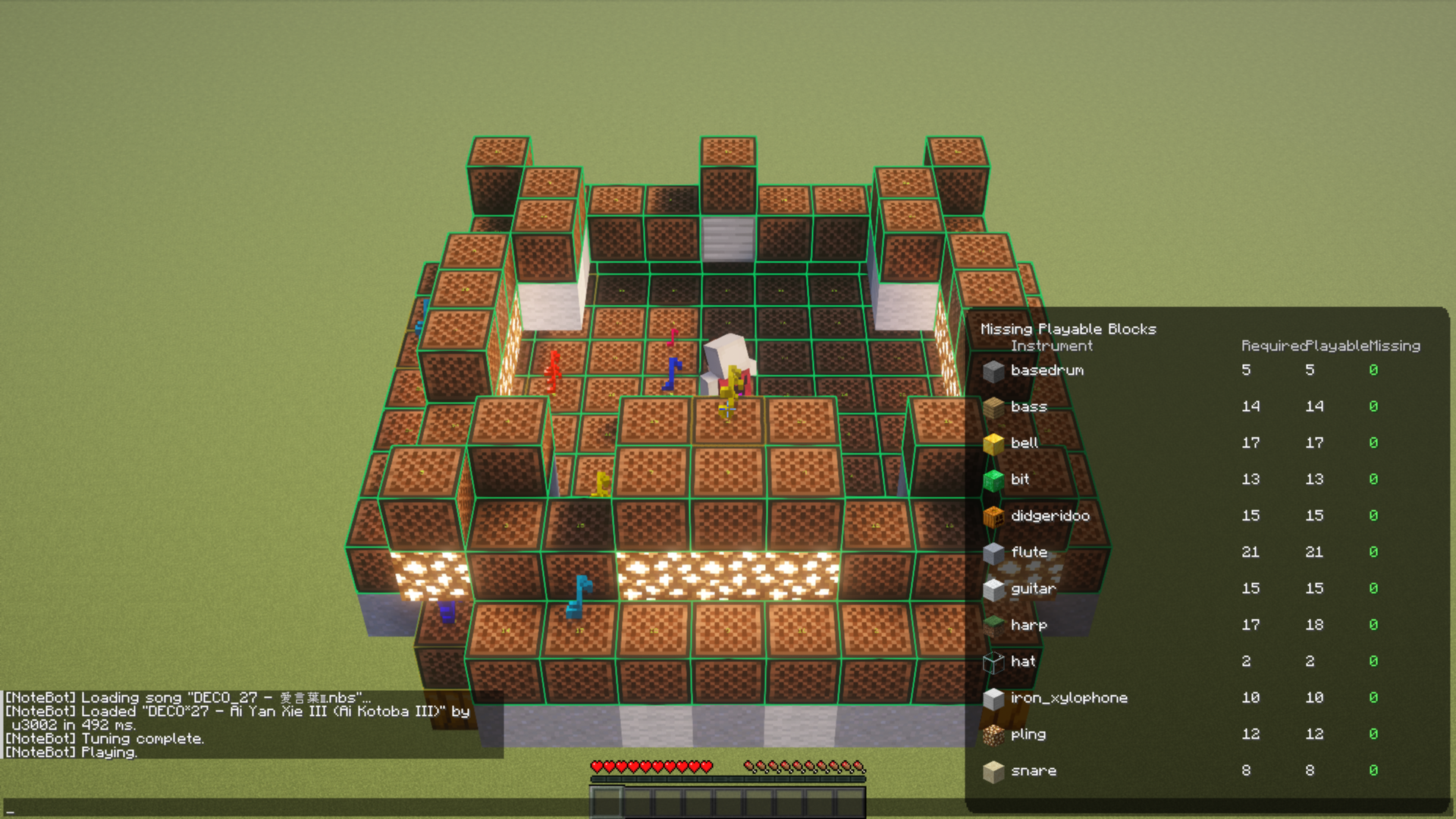
NoteBot is a client-side mod for Fabric designed to automate Note Block operations and play music within Minecraft. It loads external song files and automatically tunes and plays surrounding Note Blocks.
1. Song Playback Features
Load and play music data within the game from external files.
- Supported File Formats:
- .nbs: Direct support for Minecraft Note Block Studio files.
- .txt: Proprietary text-based song data.
- Playback Control: Select, play, pause, and stop songs via a dedicated GUI.
- Playback Modes:
- Tick-based Synchronization: Plays with precise timing synchronized to Minecraft's in-game ticks.
- Preview Function: Play sounds only on the client side to check the song without interacting with actual Note Blocks.
.nbs files are available on noteblock.world.
2. Note Block Management
Automatically finds and manages the Note Blocks required for performance.
- Area Scanning: Automatically searches for Note Blocks around the player and lists them as available instruments.
- Auto-Instrument Detection: Identifies the type of instrument (Harp, Bass Drum, Snare, etc.) based on the block positioned underneath the Note Block.
- Auto-Tuning: Automatically tunes surrounding Note Blocks to the required pitch by simulating right-click operations.
3. Visual Feedback
Provides visual cues for the performance status and block conditions.
- World Rendering: Highlights blocks in the world that require tuning or are currently being played.
- HUD Display: Shows real-time playback status, elapsed time, and any missing instruments directly on the screen.
- Debug View: Detailed technical status and scan results for troubleshooting.
4. Configuration Options
Customize the behavior to suit your preferences.
- Playing Mode: Configure movements during performance, such as facing the block or showing the arm-swing animation.
- Playback Speed Adjustment: Adjust the tempo of the song.
- Volume Settings: Balance the audio levels specifically for sounds played through the mod.
5. Technical Highlights
- Mixin Integration: Hooks into ChatScreen, InGameHud, Network Handlers, and Debug Renderers to extend vanilla behavior.
- Localization Support: Supports six languages: Japanese (JA), English (EN), German (DE), French (FR), Russian (RU), and Chinese (ZH).
- ModMenu Compatibility: Allows direct access to the configuration screen if ModMenu is installed.
How to Use (Estimated)
- Open the Notebot GUI using the designated key.
- Select a music file from the song list.
- Use "Scan" or "Setup" to register surrounding Note Blocks as instruments.
- Press "Play." The mod will automatically perform necessary tuning before starting the performance.
Screenshots
Gallery
Versions
Files
Relations
Project Relations
More like this
Similar Mods
Suggestions use data such as tags, dependencies, dependents, descriptions, titles, and more to rank how much they overlap with this mod.
On ModDex
Community snapshot
By the numbers
Statistics

Want to reach Minecraft players?
We're looking for a server hosting partner to feature here and other parts of the site. Interested? Send us a message!
Get in touchGet it on
Available Platforms
On ModDex
Community snapshot
By the numbers