
Nova Reimagined Snow
No reviews yet
A companion mod for Nova Reimagined that provides accurate per-block biome snow detection and snow texture variant support.
Fabric is a mod loader for versions 1.14+ of Minecraft, particularly popular for client side and optimization mods.
Community voices
Reviews
Click once to include, again to exclude, again to clear
No reviews yet. Be the first to review this project!
Get it on
Available Platforms
 Modrinth
Compatibility
Supported Environments
About
Project Details
For authors
Embed Badge
If you're the author of this project, you can embed a live badge anywhere that supports HTML or Markdown. It updates automatically whenever ratings change.
Use HTML for any page that supports it, or Markdown for README files and Markdown-based descriptions.
Identifiers
Platform IDs
Resources
External Links
About
Description
Nova Reimagined Snow
A companion mod for Nova Reimagined that provides accurate snow-biome detection, snow texture variants, and shader-published DH material textures for texture-led distant terrain.
What it does
Nova Reimagined includes a shader-driven snow system that applies a snow appearance to
surfaces in snowy biomes. Without this mod, the shader uses inSnowy - a player-position-based smoothed value - which causes snow tinting to visibly bleed across biome borders into adjacent warm biomes.
Nova Reimagined Snow solves that by building a biome snow eligibility texture that the shader samples in exact world space. It also resolves resource-pack textures and publishes them under stable IDs for the shader to use.
When used alongside Distant Horizons, the mod can also publish resource-pack textures for supported DH terrain materials so the shader can drive texture-led distant terrain.
Features
- Per-block-column biome snow eligibility - exact biome boundaries, no bleed
- Automatically sizes the eligibility texture to match your render distance
- Handles render distance changes mid-session with automatic reallocation
- Correctly suppresses snow tinting in the Nether and End
- Resolves snow surface textures from active resource packs
- Resolves DH LOD material textures from active resource packs
- Stable shader-facing texture IDs for snow and DH LOD materials
- Graceful fallback - shader still works without the mod using
inSnowy - Client-side only - works on multiplayer servers with no server-side mod required
Requirements
- Minecraft 1.21.x (Java Edition)
- Fabric Loader 0.16.5+
- Fabric API
- Iris Shaders 1.6+
- The companion Nova Reimagined shader pack
Optional integrations
- Distant Horizons - enables DH LOD material texturing
- Season Cache - when present, its server-authoritative per-chunk snow coverage drives the eligibility texture instead of the client-side biome sampler
- Serene Seasons X Distant Horizons - optional for per-season grass tinting when your shader setup uses SSDH season metadata
Installation
- Install Fabric Loader and Fabric API
- Install Iris Shaders
- Place
compsnow-<version>.jarin yourmods/folder - Install the companion Nova Reimagined shader pack
- Enable the shader pack in Iris settings
- Enable the relevant snow / DH material features in shader settings
Snow Biome Map
The mod publishes two textures for exact snow-biome eligibility:
compsnow:snow_biome_mapcompsnow:snow_biome_meta
The shader samples these in world space to determine whether a surface should receive snow treatment.
Configuring Texture Paths
The config file is created automatically at config/compsnow_snow_variants.json on
first launch. Changes take effect after reloading resource packs (F3+T) - a full
restart is not required.
Paths follow the standard Minecraft resource identifier format:
namespace:textures/path/to/texture.png
The namespace is usually minecraft for vanilla-replacing resource packs, or a
pack-specific namespace. The path is relative to the assets/ root of the pack.
Snow Variant Textures
The mod resolves up to four snow surface textures and publishes them to the shader as:
compsnow:snow_variant_0compsnow:snow_variant_1compsnow:snow_variant_2compsnow:snow_variant_3
The shader hashes world position to assign one of the four variants across terrain.
Modes
Auto (default)
Scans your active resource pack stack for snow textures and fills the four slots
automatically. Any unfilled slots fall back to vanilla minecraft:textures/block/snow.png.
Manual_Override
You specify exactly which texture fills each of the four slots. Any slot left as ""
falls back to vanilla snow.
What to put in the config
Set "mode": "Manual_Override" and fill "manualVariants" with four paths — one per
slot. The shader uses whichever texture is in each slot for that position's hash bucket,
so slot order matters.
If your resource pack has fewer than four snow textures, repeat the textures you do have to fill all four slots. The mod does not auto-propagate snow variants — any slot with an empty string or a path that fails to resolve falls back to vanilla snow instead.
| Textures you have | How to fill the four slots |
|---|---|
| 1 | Repeat it in all four slots |
| 2 | Alternate: [A, B, A, B] |
| 3 | Repeat one: [A, B, C, A] |
| 4 | Fill normally: [A, B, C, D] |
Example with two snow textures:
{
  "mode": "Manual_Override",
  "manualVariants": [
    "minecraft:textures/block/nature/snow/snow_1.png",
    "minecraft:textures/block/nature/snow/snow_2.png",
    "minecraft:textures/block/nature/snow/snow_2.png",
    "minecraft:textures/block/nature/snow/snow_1.png"
  ]
}
Distant Horizons LOD Material Textures
When used with Distant Horizons, the mod publishes resource-pack textures for supported DH terrain materials.
Published DH LOD texture IDs
Grass variants (8 slots):
compsnow:dh_lod_grass_0throughcompsnow:dh_lod_grass_7
Single material textures:
compsnow:dh_lod_snowcompsnow:dh_lod_dirtcompsnow:dh_lod_stonecompsnow:dh_lod_deepslatecompsnow:dh_lod_sand
What the shader does with them
The shader uses these textures on the DH terrain path only. Because DH LOD terrain does not provide normal block-face UVs, the shader uses projected / world-space sampling rather than exact vanilla block mapping.
Grass uses projected texturing with up to 8 variants; selection is driven by a stable world-space noise field. Snow, dirt, stone, deepslate, and sand use their corresponding resolved textures. The shader remains texture-led but still supports optional seasonal grass tinting if paired with SSDH season metadata.
Configuring DH LOD textures
The dhLodTextures section of config/compsnow_snow_variants.json controls these slots.
Single-slot materials (snow, dirt, stone, deepslate, sand) each take one
path. If a path is empty or fails to resolve, a neutral white 1×1 pixel is used instead
(the shader effectively ignores the slot).
Grass variants take up to eight paths. Unlike snow variants, the mod automatically propagates whichever grass paths successfully resolve across all eight shader slots. You only need to list the textures you actually have — the mod wraps them via modulo to fill the remaining slots.
| Textures you have | What to put in grassVariants |
Result |
|---|---|---|
| 1 | ["path_to_A.png"] |
A fills all 8 slots |
| 2 | ["path_to_A.png", "path_to_B.png"] |
A, B, A, B, A, B, A, B |
| 4 | Four paths | Each repeated twice |
| 8 | Eight paths | Used as configured |
If none of the configured grass paths resolve successfully, all eight slots fall back to a neutral 1×1 white texture.
Example with four grass textures:
{
  "dhLodTextures": {
    "enabled": true,
    "grassVariants": [
      "minecraft:textures/block/nature/grass/gt_1.png",
      "minecraft:textures/block/nature/grass/gt_2.png",
      "minecraft:textures/block/nature/grass/gt_3.png",
      "minecraft:textures/block/nature/grass/gt_4.png"
    ],
    "snow":      "minecraft:textures/block/nature/snow/snow_1.png",
    "dirt":      "minecraft:textures/block/soils/dirt/dirt.png",
    "stone":     "minecraft:textures/block/stone/stone_top_1.png",
    "deepslate": "minecraft:textures/block/stone/deepslate/top.png",
    "sand":      "minecraft:textures/block/soils/sand/sand.png"
  }
}
Compatibility
| Environment | Status |
|---|---|
| Singleplayer | Yes |
| Multiplayer (no server mod) | Yes - client-side only |
| Distant Horizons | Yes - DH terrain texturing supported |
| Season Cache | Yes - server-authoritative snow coverage when present |
| Serene Seasons + SSDH | Yes - optional seasonal grass tinting |
| Shader pack without mod | Yes - falls back to inSnowy for snow logic |
| Forge / NeoForge | No - Fabric only |
| OptiFine | No - Iris only |
Notes
- DH material texturing improves visual parity, not exact vanilla block UV mapping on LOD terrain.
- Seasonal grass tinting is handled by the shader when paired with SSDH's optional
ssdh:season_metatexture. - This mod is entirely client-side.
License
MIT - see LICENSE
Credits
- ItsThatNova - mod author and shader modifications
GitHub: https://github.com/ItsThatNova - EminGT - Complementary Reimagined shader pack, the base on which Nova Reimagined is built
Screenshots
Gallery
-
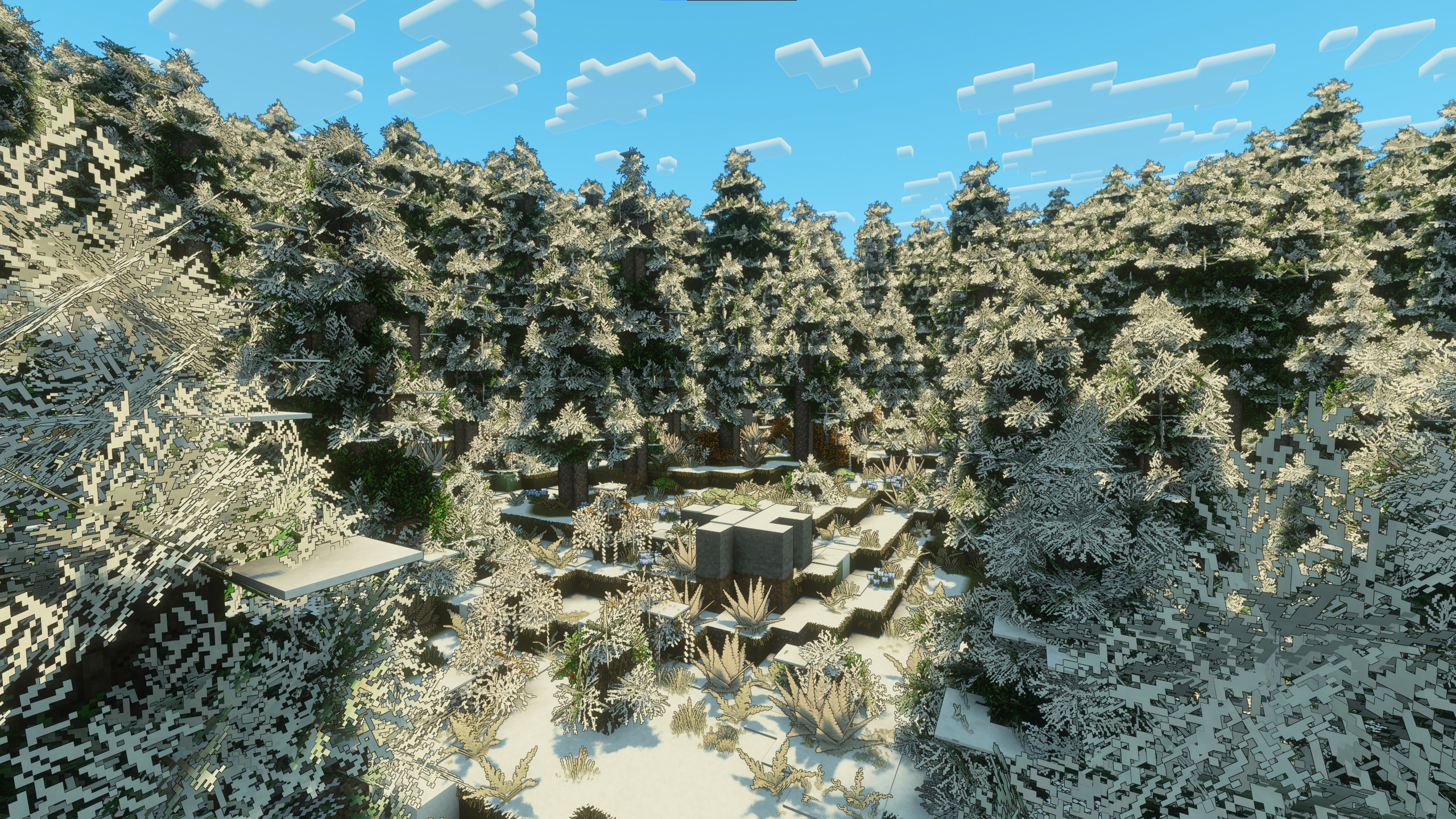 Nova Reimagined Snow Feature Image
Versions
Files
Relations
Project Relations
More like this
Similar Mods
Suggestions use data such as tags, dependencies, dependents, descriptions, titles, and more to rank how much they overlap with this mod.
On ModDex
Community snapshot
By the numbers
Statistics

Want to reach Minecraft players?
We're looking for a server hosting partner to feature here and other parts of the site. Interested? Send us a message!
Get in touchGet it on
Available Platforms
On ModDex
Community snapshot
By the numbers
Statistics
Resources