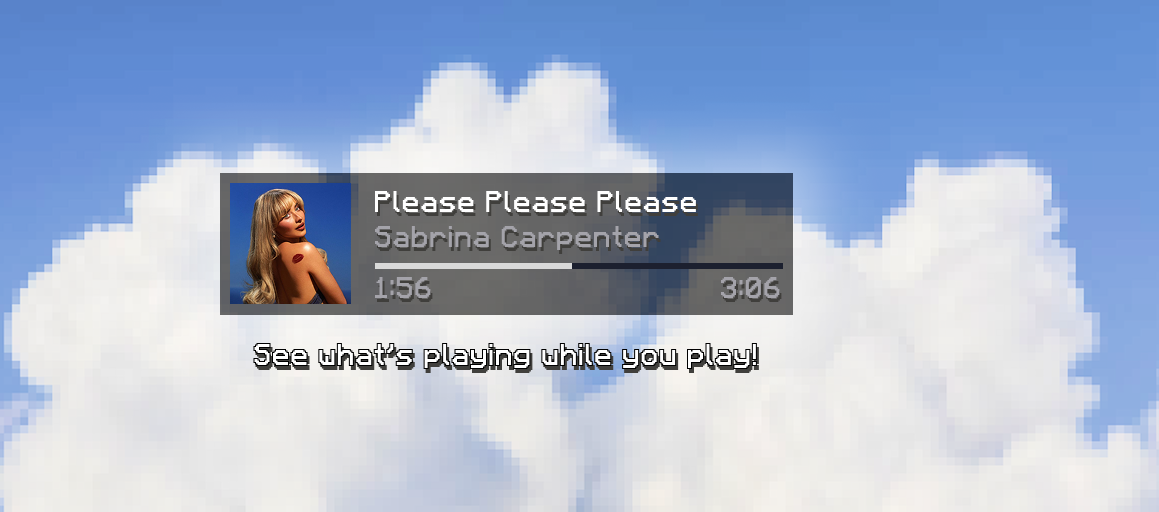

Now Playing
No reviews yet
See what's playing on your device while your game is maximized. No need to Alt-Tab anymore!
Fabric is a mod loader for versions 1.14+ of Minecraft, particularly popular for client side and optimization mods.
Community voices
Reviews
Click once to include, again to exclude, again to clear
No reviews yet. Be the first to review this project!
Get it on
Available Platforms
 Modrinth
Compatibility
Supported Environments
About
Project Details
For authors
Embed Badge
If you're the author of this project, you can embed a live badge anywhere that supports HTML or Markdown. It updates automatically whenever ratings change.
Use HTML for any page that supports it, or Markdown for README files and Markdown-based descriptions.
Identifiers
Platform IDs
About
Description

This mod lets you view what song is currently playing on your PC without the need for you to Alt-Tab all the time to check. It displays a clear overlay in-game to allow you to keep the shuffle going on and not have to interrupt your mining to check who, what, where, when is playing in your headphones!
🖥️ Completely local
No weird sign-ins to any music service, no authorization needed; This mod runs completely local on your computer.
📡 How is that possible?
The mod utilizes a C# console application that runs in the background to fetch what is currently playing on your PC via WinRT. It hosts this data locally in a Web server, which the mod can then fetch easily via HTTP.
When the game is running, you can even access these URLs yourself to see it in action:
/media_info 🎵This URL will show you what is currently playing on your computer and includes info such as the title, the artist's name, the app that's currently playing the media (ex.: "Spotify.exe"), the playing status (ex.: "Playing", "Paused"), the current timeline position, the start time and the end time (duration/length) of the media.
/media_image.jpg 🖼️This URL will show you what is currently playing on your computer and includes info such as the title, the artist's name, the app that's currently playing the media (ex.: "Spotify.exe"), the playing status (ex.: "Playing", "Paused"), the current timeline position, the start time and the end time (duration/length) of the media.
 |
 |
 |
| When watching a movie in an app like Netflix, or directly from the Web browser, the service often displays the current media's poster art. | The same happens when watching a YouTube video in your browser of choice. | Some apps like Spotify embed their branding directly in the image they provide, which is why we can see the Spotify logo under the cover art for this song. |
GET /play_pause ⏯️🚨 Don't be alarmed, but when opening this one, if anything was playing on your computer, it will paused, and if you open it again, well it should play again. This is completely normal and is how the mod can provide play/pause controls.
GET /skip-next ⏭️🚨 This URL should skip the currently playing media and go the next one, so don't be alarmed if it skips your favorite song when opening it up.
GET /skip-previous ⏮️🚨 Uno reverses the URL above it.
⚙️ Easily customizable
With its implementation into Mod Menu, this mod allows you to customize a bunch of settings to make this the best experience for your playthrough.
🔨 Customization options
| Setting | Description | Options |
|---|---|---|
| Horizontal position | Controls the mod widget's position on the X axis (horizontally). | Slider (from 0 to your screen's width). Default is maximum. |
| Vertical position | Controls the mod widget's position on the Y axis (vertically). | Slider (from 0 to your screen's height). Default is 10. |
| Font size | Controls the size of the text on screen. | Slider (from 5 to 25). Default is 10. |
| Background opacity | How transparent should the background of the widget be? | Slider (from 0 to 100). Default is 90 |
| Show cover art | Should the cover art for what you're listening to be displayed? See the section above for more info. | Checkbox, default is true. |
| Show timeline | Display the track length aswell as the current position? | Checkbox, default is true. |
| Show artist name | Show the artist name for the media that's currently playing? | Checkbox, default is true. |
| Show media title | Show the title for the media that's currently playing? | Checkbox, default is true. |
| Show play status icon | Display an icon next to the timeline that shows if the media is playing or paused? | Checkbox, default is true. |
Screenshots
Gallery
Versions
Files
Relations
Project Relations
More like this
Similar Mods
Suggestions use data such as tags, dependencies, dependents, descriptions, titles, and more to rank how much they overlap with this mod.
On ModDex
Community snapshot
By the numbers
Statistics

Want to reach Minecraft players?
We're looking for a server hosting partner to feature here and other parts of the site. Interested? Send us a message!
Get in touchGet it on
Available Platforms
On ModDex
Community snapshot
By the numbers