
OBSCraft
No reviews yet
Control OBS using command blocks/datapacks!
Neoforge is a fork of the Minecraft Forge available for versions 1.20.1+ of Minecraft. Many Forge mods are compatible with Neoforge and vice versa.
Fabric is a mod loader for versions 1.14+ of Minecraft, particularly popular for client side and optimization mods.
Community voices
Reviews
Click once to include, again to exclude, again to clear
No reviews yet. Be the first to review this project!
Get it on
Available Platforms
 Modrinth
Compatibility
Supported Environments
About
Project Details
For authors
Embed Badge
If you're the author of this project, you can embed a live badge anywhere that supports HTML or Markdown. It updates automatically whenever ratings change.
Use HTML for any page that supports it, or Markdown for README files and Markdown-based descriptions.
Identifiers
Platform IDs
About
Description
Right now this is in active development and still in alpha, please report any bugs you find!
Connect Minecraft directly to OBS Studio using the OBS WebSocket plugin. Allows using command blocks, datapacks, and plugins to trigger various actions in OBS Studio.
This works by listening for a specially formatted translatable chat message, which is decoded then acted upon. You can generate a tellraw command using the /obscraft command.
Demo Video
Features
- Set the active scene from in-game!
- Update a Text source's text.
- Set a source's visibility in a given scene.
- Set the visible status of a filter on a source. (Also works with plugin filters such as the Move plugin)
Each of these options support both typing literal names as well as looking up names from a scoreboard objective. You can either search for the first player with a specific score or search for the score of a specific player. (Works with both dummy objectives and "real" scoreboards)
NOTE: To have the client "see" a scoreboard objective for use in this mod, the scoreboard must be attached to a display. It can be any display, even if it's not visible to the player, like a different teams's sidebar.
Commands
/obscraft listConnections- List all OBS connections by ID. Gives connection status for each one./obscraft reconnect <id>- Reconnect to an OBS connection by ID.- There are more commands to generate tellraw commands and save actions, but the in-game documentation is setup to show them all as you type.
Setup
OBS Studio
First, we need to make sure the websocket server is enabled.
In OBS go to Tools -> WebSocket Server Settings.
Make sure of the following:
Enable WebSocket Serveris checked.Enable Authentificationis checked.- Note down the
Server PortandServer PasswordPressShow Connect Infoto see it.
Minecraft
Note: The mod required the Architectury API installed to load.
Launch the game once to generate the config file, it should be with other configuration files for you mods.
It should look like this:
{
  "connections": [
    {
      "ID": "default",
      "host": "127.0.0.1",
      "port": 4455,
      "password": "password"
    }
  ],
  "savedActions": {},
  "savedActionKeys": {}
}
IDis a unique identifier for the connection. You can have multiple connections to different OBS instances.hostis the IP address of the computer running OBS. If it's on the same computer, use127.0.0.1portis the port number from the OBS WebSocket settings.passwordis the password from the OBS WebSocket settings.
For a simple setup just make sure port and password match the OBS settings.
After that restart the game and you should be good to go! Make sure everything is connected by running /obscraft listConnections and default should show up under Available Connections.
Screenshots
Gallery
-
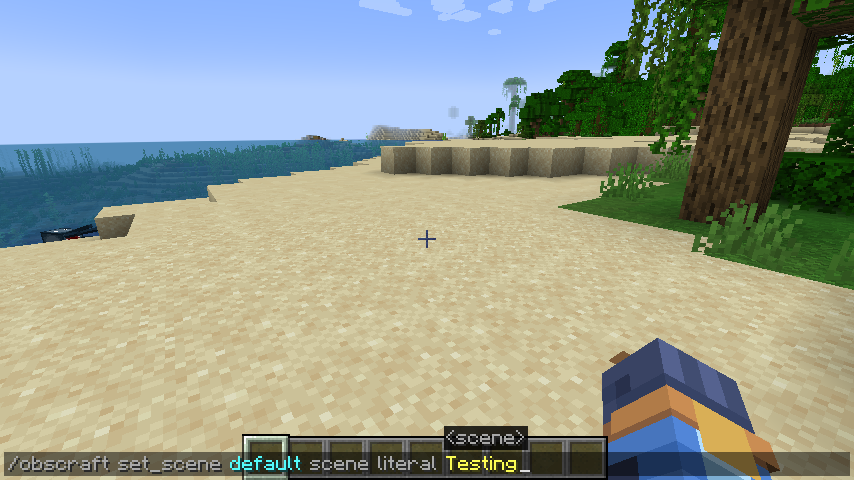 Example Command Example of a command to generate a /tellraw message to set the active scene to Testing
 -
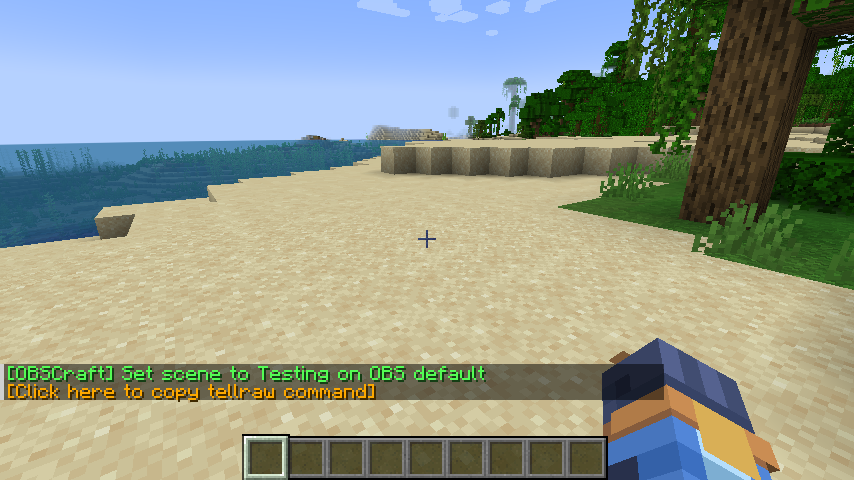 Successful Output Once the command is run, OBS will execute the action. If OBS is successful, you will receive this output with a clickable text area to copy the /tellraw command.
 -
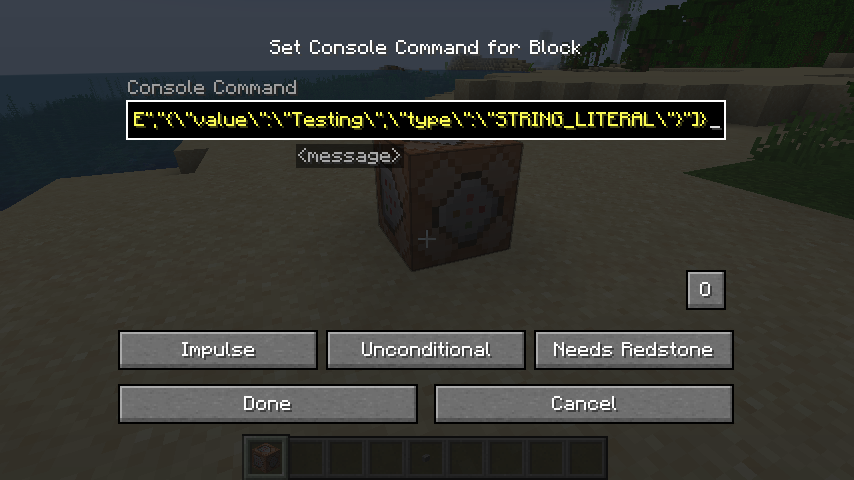 Paste into Command Block This is the last part of the command generated, showing how it looks in a Command Block.
Versions
Files
Relations
Project Relations
More like this
Similar Mods
Suggestions use data such as tags, dependencies, dependents, descriptions, titles, and more to rank how much they overlap with this mod.
On ModDex
Community snapshot
By the numbers
Statistics

Want to reach Minecraft players?
We're looking for a server hosting partner to feature here and other parts of the site. Interested? Send us a message!
Get in touchGet it on
Available Platforms
On ModDex
Community snapshot
By the numbers