
Community listing page, reviews here may not be monitored by the author.
Off Da Grid Blocks

No reviews yet
This project adds a wand that can be used to places blocks on rotation.
Community voices
Reviews
No reviews yet. Be the first to review this project!
Get it on
Available Platforms
Compatibility
Supported Environments
Must be installed on both the client and the server.
About
Project Details
For authors
Embed Badge
If you're the author of this project, you can embed a live badge anywhere that supports HTML or Markdown. It updates automatically whenever ratings change.
Use HTML for any page that supports it, or Markdown for README files and Markdown-based descriptions.
Identifiers
Platform IDs
Resources
External Links
About
Description
Break free from the grid. Off Grid Blocks lets you place every block at sub-block positions and at the angle you're looking — freeform, tilted, offset structures that normal Minecraft never allows. And it isn't just decoration: chests, redstone, pistons, rails, and even nether portals keep working off the grid.
No tools or special items to learn — pull a block from your inventory and place it like normal. It lands exactly where your cursor points, rotated to match your view.
Features
| Feature | What you get |
|---|---|
| Free placement & rotation | Blocks sit at fractional positions and tilt to your look direction — diagonal walls, leaning pillars, natural clutter |
| Real hitboxes | Collision matches each block's true shape (half slabs, thin fences, flat carpets), so you can stand on what you build |
| Working utility blocks | Crafting tables, anvils, chests, furnaces, hoppers, droppers and more open and function; contents persist |
| Doors, beds, cake, switches | Doors open, beds skip the night, cake is edible, levers/buttons toggle — visuals update to match |
| Redstone | Dust, repeaters, comparators, observers, levers, buttons and lamps wire up and pass signals |
| Pistons | Push & pull off-grid blocks at any angle, with full slime/honey adhesion and redstone power |
| Observers | Detect off-grid blocks placed or broken in front of them |
| Minecarts on rails | Lay off-grid rails, drop a minecart, and ride it through straights and curves |
| Nether portals | Build an off-grid obsidian frame, light it, and travel to the Nether and back |
| Light & gravity | Glowing blocks light the area; sand/gravel/concrete place off-grid without falling |
Controls
| Action | Result |
|---|---|
| Right-click with a block | Place it off-grid, rotated to your view |
| Right-click an off-grid block | Stack another off-grid block on it |
| Left-click an off-grid block | Break it (drops as normal) |
| Flint & steel on off-grid obsidian | Light a nether portal in the frame |
| Minecart on an off-grid rail | Spawn a cart — right-click it to ride |
| Redstone block / powered lever on a piston | Fire the piston (any side except the head) |
Before you download — please read
[!IMPORTANT]
- Requires Fabric Loader and Fabric API for Minecraft 1.21.1.
- Must be installed on both the client and the server, on the same version. A vanilla client cannot join a server running this mod and have it work.
- This mod changes how all block placement works. It's built for creative and freeform building — it is not a vanilla-compatible drop-in.
Known limitations
These are honest trade-offs, not bugs:
- Collision is axis-aligned. A tilted block still has an upright, straight hitbox — the engine can't give entities rotated collision boxes (the same reason boats and shulkers don't).
- Redstone is best-effort. It works well for flat, roughly grid-spaced layouts. Very tight sub-block spacing, tall vertical stacks, and very large contraptions aren't fully supported.
- Pistons move off-grid blocks only, not normal world blocks or entities.
How does it work under the hood? (optional reading)
Each off-grid block is a pair of entities: a vanilla Block Display for the visual (which is what carries the rotation) and an invisible collision entity for the hitbox. Blocks that need real function — containers, redstone, interactions — are mirrored to a hidden region of the world so the vanilla logic still runs, and the result is synced back to what you see.
This is why the mod must be on both sides: the custom collision entity has to exist on the client for you to actually bump into it.
Compatibility
| Minecraft | 1.21.1 |
| Loader | Fabric |
| Dependencies | Fabric API |
| Environment | Required on client and server |
If you hit an issue, please report it with a clear description of what you placed and what happened — it really helps.
Screenshots
Gallery
-
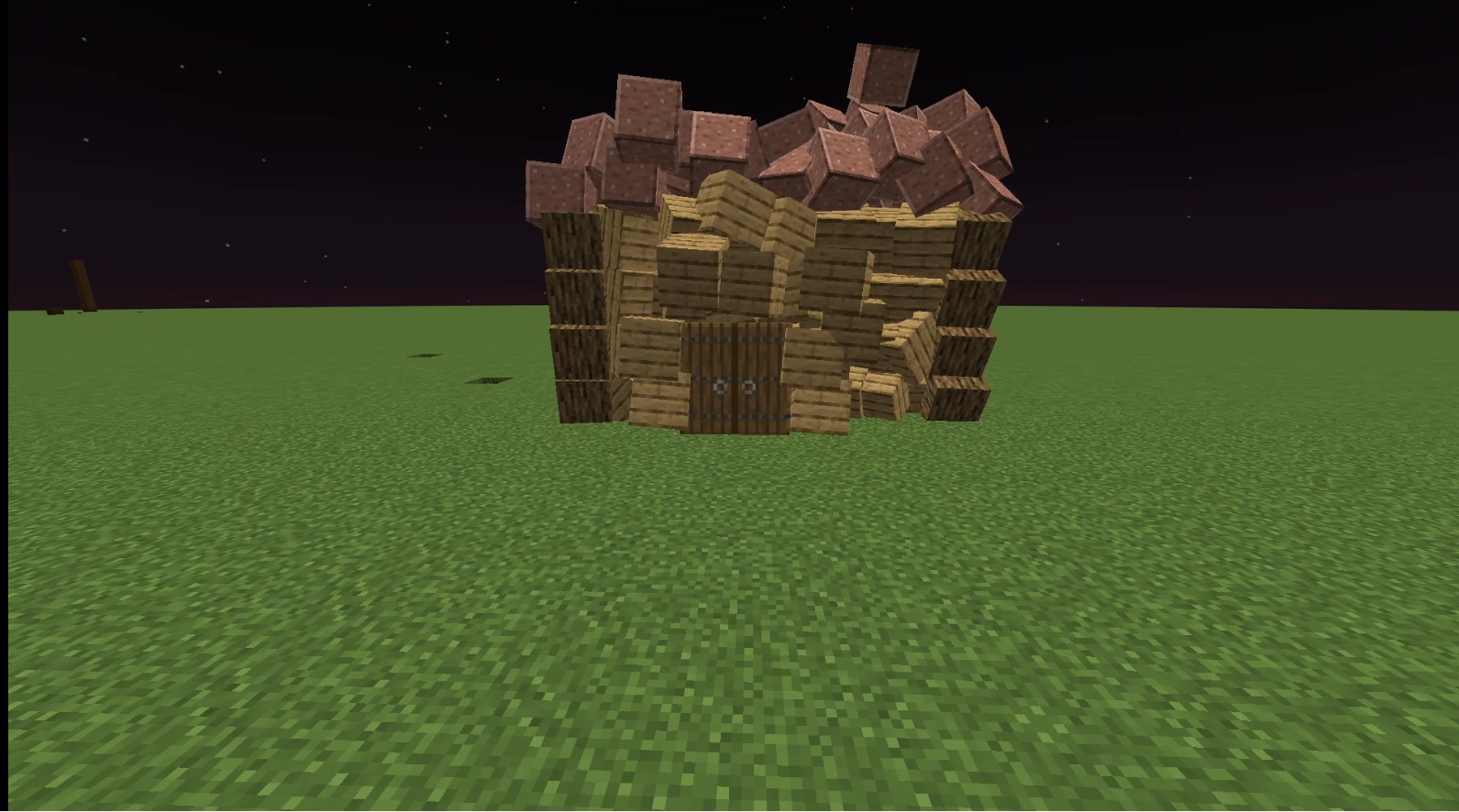 House
House
Versions
Files
Relations
Project Relations
More like this
Similar Mods
Suggestions use data such as tags, dependencies, dependents, descriptions, titles, and more to rank how much they overlap with this mod.
On ModDex
Community snapshot
By the numbers
Statistics

Want to reach Minecraft players?
We're looking for a server hosting partner to feature here and other parts of the site. Interested? Send us a message!
Get in touchGet it on
Available Platforms
On ModDex
Community snapshot
By the numbers
Statistics
Resources