
Community listing page, reviews here may not be monitored by the author.
Offline Whitelist — Nickname-Based Whitelist


No reviews yet
Simple mod that secures offline-mode servers by allowing access strictly based on player usernames.
Community voices
Reviews
No reviews yet. Be the first to review this project!
Get it on
Available Platforms
Compatibility
Supported Environments
Runs on a dedicated server only; does not work in singleplayer.
About
Project Details
For authors
Embed Badge
If you're the author of this project, you can embed a live badge anywhere that supports HTML or Markdown. It updates automatically whenever ratings change.
Use HTML for any page that supports it, or Markdown for README files and Markdown-based descriptions.
Identifiers
Platform IDs
Resources
External Links
About
Description

Offline Whitelist is a server-side mod designed specifically for servers running with online-mode=false. It validates players by nickname, ensuring that only approved users can access your server. Because it operates entirely server-side, it requires no client installation and works seamlessly with vanilla clients. The mod intercepts connections early, preventing undesirable players from entering the server.
Supported Languages


Features
- Offline-Mode Support: Validates players purely by their username, making it perfect for cracked/offline servers.
- Seamless Connection Blocking: Disconnects players during the connection phase before they spawn, leaving no trace in the server chat.
- Localized Kick Messages: Automatically detects the player's client language and displays the kick reason accordingly (e.g., English clients get English text, Russian clients get Russian). You can add unlimited custom languages in the config file
config/offlinewhitelist.json. - Operator Bypass: An optional setting (enabled by default) that allows server operators to join the server even if they are not explicitly added to the whitelist.
- Clean File Structure: All player lists and configuration files are neatly organized in the
config/directory as simple, editable JSON files.
Commands
All commands require Operator permission. You can use either /offwhitelist or the shorter alias /owh.
/owh add— Adds a player to the whitelist./owh remove— Removes a player from the whitelist./owh getall— Lists all players currently in the whitelist./owh on— Enables the whitelist./owh off— Disables the whitelist./owh opbypass on— Allows operators to bypass the whitelist./owh opbypass off— Requires operators to be in the whitelist to join./owh status— Shows the current whitelist status./owh reload— Reloads the whitelist players and configuration messages.
Offline Whitelist is a server-side mod designed specifically for servers running with online-mode=false. It validates players by nickname, ensuring that only approved users can access your server. Because it operates entirely server-side, it requires no client installation and works seamlessly with vanilla clients. The mod intercepts connections early, preventing undesirable players from entering the server.
Supported Languages


Features
- Offline-Mode Support: Validates players purely by their username, making it perfect for cracked/offline servers.
- Seamless Connection Blocking: Disconnects players during the connection phase before they spawn, leaving no trace in the server chat.
- Localized Kick Messages: Automatically detects the player's client language and displays the kick reason accordingly (e.g., English clients get English text, Russian clients get Russian). You can add unlimited custom languages in the config file
config/offlinewhitelist.json. - Operator Bypass: An optional setting (enabled by default) that allows server operators to join the server even if they are not explicitly added to the whitelist.
- Clean File Structure: All player lists and configuration files are neatly organized in the
config/directory as simple, editable JSON files.
Commands
All commands require Operator permission. You can use either /offwhitelist or the shorter alias /owh.
/owh add— Adds a player to the whitelist./owh remove— Removes a player from the whitelist./owh getall— Lists all players currently in the whitelist./owh on— Enables the whitelist./owh off— Disables the whitelist./owh opbypass on— Allows operators to bypass the whitelist./owh opbypass off— Requires operators to be in the whitelist to join./owh status— Shows the current whitelist status./owh reload— Reloads the whitelist players and configuration messages.
Screenshots
Gallery
-
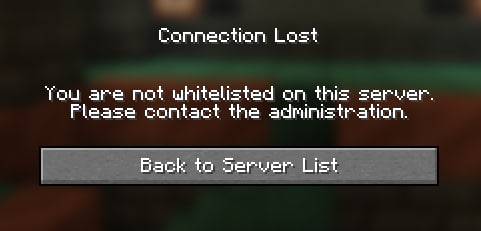 You are not whitelisted!
-
 You are not whitelisted!
Versions
Files
Relations
Project Relations
More like this
Similar Mods
Suggestions use data such as tags, dependencies, dependents, descriptions, titles, and more to rank how much they overlap with this mod.
On ModDex
Community snapshot
By the numbers
Statistics
Want to reach Minecraft players?
We're looking for a server hosting partner to feature here and other parts of the site. Interested? Send us a message!
Get in touchGet it on
Available Platforms
On ModDex
Community snapshot
By the numbers
Statistics
Resources