
OnlyKeys
No reviews yet
Allows you to play Minecraft only using your keyboard!
Fabric is a mod loader for versions 1.14+ of Minecraft, particularly popular for client side and optimization mods.
Community voices
Reviews
Click once to include, again to exclude, again to clear
No reviews yet. Be the first to review this project!
Get it on
Available Platforms
 Modrinth
Compatibility
Supported Environments
About
Project Details
For authors
Embed Badge
If you're the author of this project, you can embed a live badge anywhere that supports HTML or Markdown. It updates automatically whenever ratings change.
Use HTML for any page that supports it, or Markdown for README files and Markdown-based descriptions.
Identifiers
Platform IDs
About
Description
OnlyKeys
OnlyKeys is a Minecraft Fabric Mod that allows you to play minecraft using only your keyboard.
The mod is still very early in development and will very likely have some bugs. If you encounter any please let me know.
It is important to note that the Fabric API is required for this mod to work.
It does so by moving the cameara via u h j k, left clicking via z and right clicking via i.
The inventory is controlled via a selected slot that is marked and can be moved with the camera key bindings.
Additionally for faster slot movement there is a quick slot selection that can be opened using l. It allows you to enter
the id of the slot and instantly select it.
Here is a short demo of the mod where you can see the game is controlled using the keyboard only. Also the goal of crafting a wodden hoe is completed successfully. The Keyboard Visualizer used can be found here is Open Source and very basic.
Default Controlls
By default the following are the key bindings. Feel free to change them. You can also have Camera and Slot movement on different keys if you like. If you want to get rid of the warning for the overlap in key bindings with no conflict I recommend this mod that allows you to turn them off. To change the sensitivy just change the regular mouse sensitivity in the vanilla minecraft settings
F4Enable/Disable OnlyKeysuCamera Up & Slot UpjCamera Down & Slot DownhCamera Left & Slot LeftkCamera Right & Slot RightzLeft ClickiRight ClicklOpen Quick Slot SelectionTABChange Creative Inventory TabPage UpScroll Up in Creative InventoryPage DownScroll Down in Creative Inventory
Screenshots
Gallery
-
 Key Bindings Shows all possible Key Binding Settings
 -
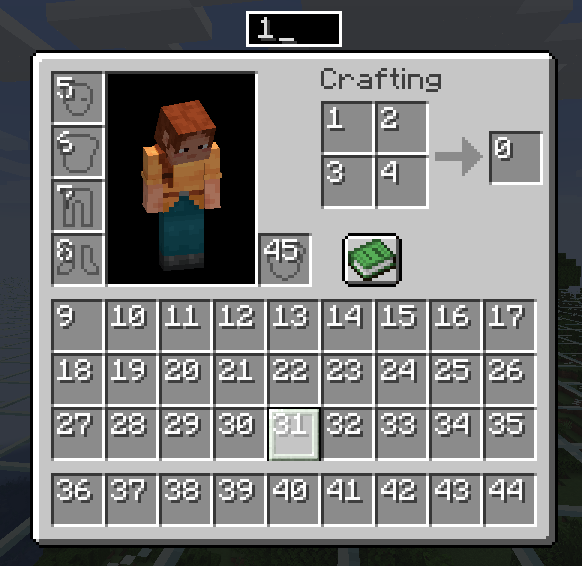 Quick Slot Selection The Quick Slot Selection shows all Slot IDs and a Textfield select a Slot
 -
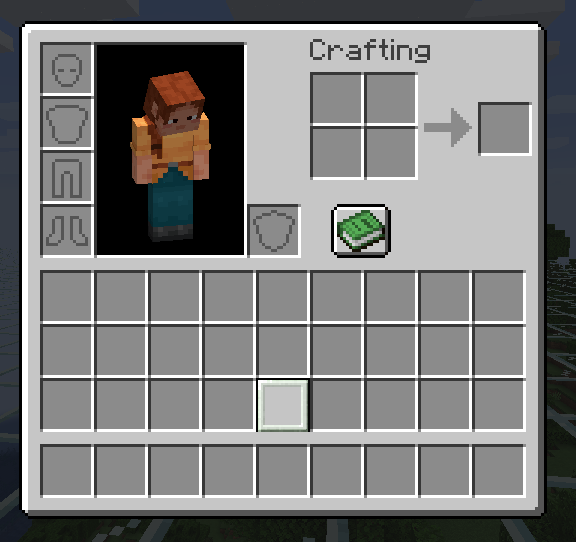 Move Selected Slot The Selected Slot in the Inventory is Highlighted and Bordered
Versions
Files
Relations
Project Relations
More like this
Similar Mods
Suggestions use data such as tags, dependencies, dependents, descriptions, titles, and more to rank how much they overlap with this mod.
On ModDex
Community snapshot
By the numbers
Statistics

Want to reach Minecraft players?
We're looking for a server hosting partner to feature here and other parts of the site. Interested? Send us a message!
Get in touchGet it on
Available Platforms
On ModDex
Community snapshot
By the numbers