
Community listing page, reviews here may not be monitored by the author.
OPack2Reload


No reviews yet
Prevent Minecraft from reloading the resource packs if the player doesn't really change the selected packs. Also add a "Cancel" button to PackSelectionScreen.

Community voices
Reviews
No reviews yet. Be the first to review this project!
Get it on
Available Platforms
Compatibility
Supported Environments
Runs entirely on the client. Works on vanilla servers.
About
Project Details
For authors
Embed Badge
If you're the author of this project, you can embed a live badge anywhere that supports HTML or Markdown. It updates automatically whenever ratings change.
Use HTML for any page that supports it, or Markdown for README files and Markdown-based descriptions.
Identifiers
Platform IDs
Resources
External Links
About
Description
📖 Introduction
Minecraft always loads some base resource packs such as:
vanilla(the game's default resources)mod_resources(resources added by mods)
However, before the player opens the resource pack screen for the first time, the game's options.txt still records resourcepacks=[] as empty.
So when opening the resource pack selection screen before creating or joining a world, even if the player does nothing (no adding, removing, or reordering), clicking "Done" or pressing Esc will still cause Minecraft to incorrectly think new resource packs were added, and it will forcibly reload them.
This reload process can be very slow, especially when many modded resource packs are involved.
✅ What This Mod Does
This mod introduces two features to avoid this unnecessary waste of time:
-
If the user hasn’t made any actual changes to the resource pack list, pressing Esc or clicking “Done” will no longer trigger a reload.
-
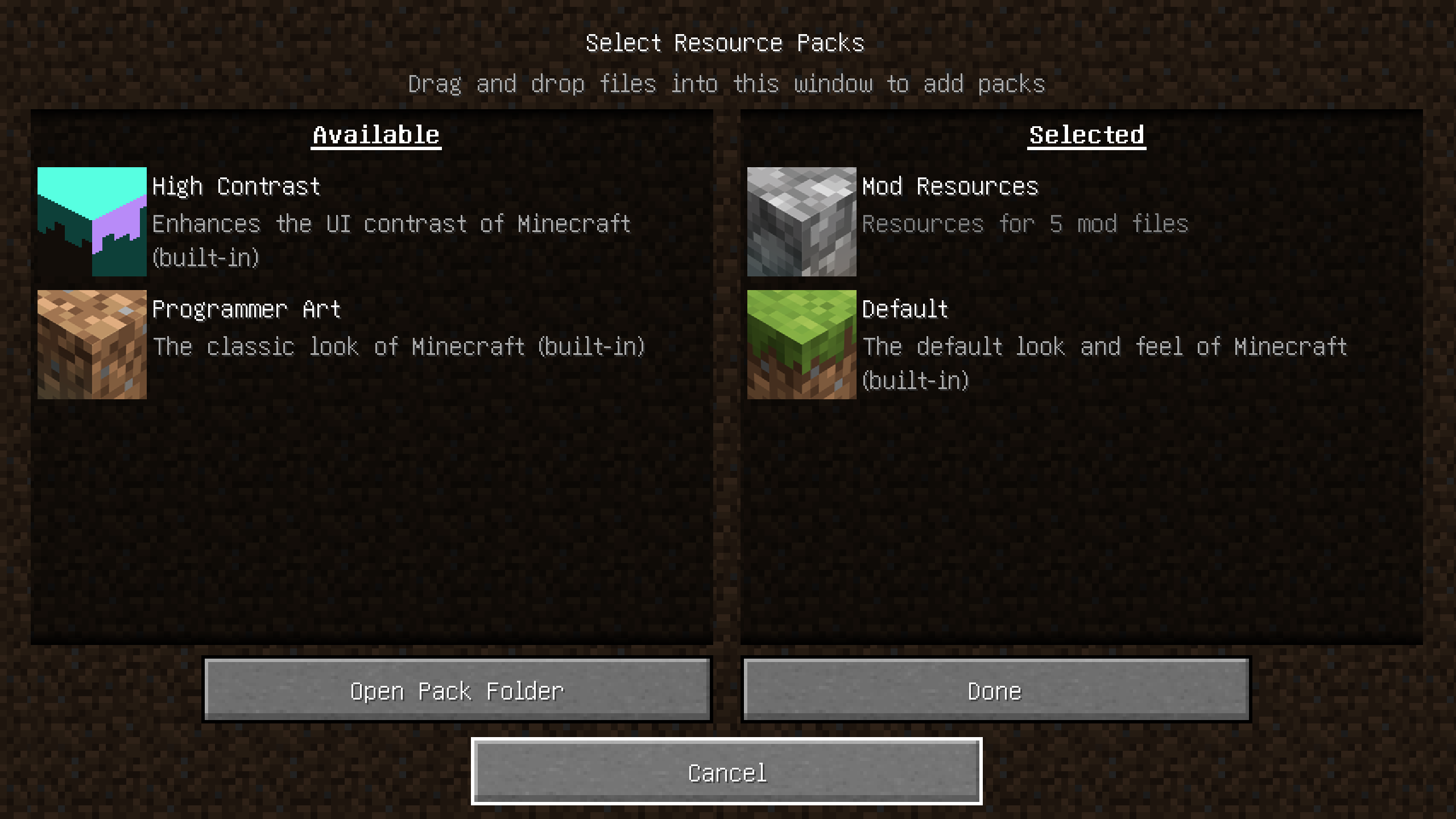
An extra "Cancel" button was added to the resource pack screen, intended to exit without triggering any logic at all.
(However, after 1.20, due to technical limitations in Minecraft, resource pack validation always runs when the screen closes, making the Cancel button behave nearly the same as Done in most cases.
As a result, the Cancel button was removed in the 1.21.1 NeoForge version.)
The additional "Cancel" button:
ATTENTION
- You DEFINITELY CAN add the mod to your modpack;
- The project adheres to Nova Relay License 1.0.
📖 Introduction
Minecraft always loads some base resource packs such as:
- vanilla (the game's default resources)
- mod_resources (resources added by mods)
However, before the player opens the resource pack screen for the first time, the game's options.txt still records resourcepacks=[] as empty.
So when opening the resource pack selection screen before creating or joining a world, even if the player does nothing (no adding, removing, or reordering), clicking "Done" or pressing Esc will still cause Minecraft to incorrectly think new resource packs were added, and it will forcibly reload them.
This reload process can be very slow, especially when many modded resource packs are involved.
✅ What This Mod Does
This mod introduces two features to avoid this unnecessary waste of time:
-
If the user hasn’t made any actual changes to the resource pack list, pressing Esc or clicking “Done” will no longer trigger a reload.
-
An extra "Cancel" button was added to the resource pack screen, intended to exit without triggering any logic at all. (However, after 1.20, due to technical limitations in Minecraft, resource pack validation always runs when the screen closes, making the Cancel button behave nearly the same as Done in most cases. As a result, the Cancel button was removed in the 1.21.1 NeoForge version.)
The additional "Cancel" button:

ATTENTION
You DEFINITELY CAN add the mod to your modpack.
Screenshots
Gallery
-
Cancel
Versions
Files
Relations
Project Relations
More like this
Similar Mods
Suggestions use data such as tags, dependencies, dependents, descriptions, titles, and more to rank how much they overlap with this mod.
On ModDex
Community snapshot
By the numbers
Statistics
 (opens in a new tab)
Get it on
Available Platforms
On ModDex
Community snapshot
By the numbers
Statistics
Resources