
Community listing page, reviews here may not be monitored by the author.
Open Inventory

No reviews yet
OpenInv is a powerful Minecraft admin plugin that lets staff view and edit player inventories and ender chests using /inv commands, featuring a modern GUI, database-backed inventory snapshots, rollback support, and multiple Minecraft version support.
Community voices
Reviews
No reviews yet. Be the first to review this project!
Get it on
Available Platforms
About
Project Details
For authors
Embed Badge
If you're the author of this project, you can embed a live badge anywhere that supports HTML or Markdown. It updates automatically whenever ratings change.
Use HTML for any page that supports it, or Markdown for README files and Markdown-based descriptions.
Identifiers
Platform IDs
Resources
External Links
About
Description
OpenInv – Ultimate Multi-World Inventory Suite
OpenInv is a professional-grade administration plugin designed for Paper, Spigot, and Bukkit servers. It provides staff members with absolute control over player data through a sleek, interactive GUI system. Whether a player is online in another world or completely offline, OpenInv ensures you can always manage their items with precision and security.
What’s New in v1.4.2
This update brings major features for history, logging, private vaults, and autosaves.
- New
/openinv dropcommand allows admins to force-drop items from a player's inventory, Ender Chest, or both. - New
/openinv clearcommand allows admins to clear inventories, armor, or Ender Chests with confirmable execution. - Rewritten
/openinv historycommand now uses a redesigned GUI that supports multiple snapshots in a single interface. - Private Vault support for the PriVault plugin — OpenInv can now manage private vault contents when PriVault is installed.
- Config rewrite:
config.ymlhas been redesigned for better clarity and easier customization. - Offline snapshot preview support lets staff view saved history even when the target player is offline.
- Autosave enhancements now save player inventory snapshots on both join and quit.
Key Features
- GUI-based inventory and Ender Chest management for online and offline players.
- Snapshot history with preview, restore, and multi-snapshot browsing.
- Admin commands for
drop,clear,freeze,search, and vault management. - PriVault integration for private vault inspection and snapshots.
- Permission-driven view/modify/exempt system with flexible role control.
- Async database support for SQLite/MySQL and full localization.
Core Features
Advanced GUI Management
- Live Interactive Editing: Modify player inventories in real time with a responsive GUI.
- Native Multi-World Support: Inspect player data across worlds without bridges or external tools.
- Shulker Box Peeking: Right-click any Shulker Box in the GUI to preview its contents instantly.
- Private Vault Management: When PriVault is installed, OpenInv can open and manage player private vaults as a first-class data source.
Snapshot Time Machine
- Automatic Backups: OpenInv automatically saves inventory snapshots in the background.
- Join/Quit Autosave: The plugin saves snapshots when players join and when they quit.
- Optimized History GUI: The history interface now displays multiple snapshots in one window, making recovery faster.
- Offline Preview: Preview saved snapshots even if the player is currently offline.
Security & Permissions
- Master Modify Key: Only users with
openinv.modifycan move items in GUIs. - Role-Based Exemptions:
openinv.exemptprotects staff and VIP inventories from being opened by lower-ranked staff. - Override Support:
openinv.overrideallows trusted admins to bypass exemption protection in emergencies. - Command Logging: Every OpenInv command can be recorded for staff accountability.
Investigation & Admin Tools
- Freeze Inventories: Lock a player's inventory using
/openinv freeze <player>. - Global Item Search: Search a player's inventory for illegal or hidden items with
/openinv search <item> <player>. - Snapshot Preview: Preview saved inventory states directly from IDs.
- Vault Inspection: Manage player vaults and view vault backups when PriVault is available.
Commands Cheat Sheet
Base Commands & Aliases
| Command | Description |
|---|---|
/openinv |
Main OpenInv command with access to all subcommands. |
/invsee |
Alias for /openinv. |
/inv <player> |
Shortcut for /openinv check to open an online player's inventory. |
/invec <player> |
Shortcut for /openinv echeck to open an online player's Ender Chest. |
/offlineinv <player> [world] |
Open an offline player's inventory. |
/offlineec <player> [world] |
Open an offline player's Ender Chest. |
Subcommands (/openinv <subcommand>)
| Subcommand | Description |
|---|---|
help |
Displays the help menu with hover descriptions. |
info |
Shows plugin information, version status, and quick links. |
check <player> |
Open the inventory of an online player. |
echeck <player> |
Open the Ender Chest of an online player. |
offlineinv <player> [world] |
Open an offline player's inventory. |
offlineec <player> [world] |
Open an offline player's Ender Chest. |
history <player> |
Open a player's unified snapshot history. |
search <item> <player> |
Search a player's inventory for a specific item. |
freeze <player> |
Freeze a player's inventory so it cannot be used or moved. |
unfreeze <player> |
Unfreeze a player's inventory. |
preview <player> <id> |
Preview a saved snapshot by ID. |
vault |
Open the player's private vault via PriVault integration. |
drop |
Force drop items from a player. |
clear |
Clear a target's inventory, armor, or Ender Chest. |
reload |
Reloads config.yml, messages.yml, and reconnects the database if needed. |
Permissions Breakdown
Global Access
openinv.*— Grants access to every OpenInv command and feature.openinv.admin— Grants access to all admin-focused commands and actions.
Usage Permissions
openinv.use— Required to use the root command and/openinv help.openinv.usen— Used by the/invseealias to access OpenInv features.openinv.check— Allows/invand/openinv check.openinv.enderchest— Allows/invecand/openinv echeck.openinv.offlinecheck— Allows/offlineinv.openinv.offlineecheck— Allows/offlineec.openinv.history— Allows/openinv history.openinv.search— Allows/openinv search.openinv.container— Allows opening Shulker Boxes inside GUIs.openinv.preview— Allows/openinv preview <player> <id>.openinv.clear— Allows/openinv clear.openinv.clear.all— Allows/openinv clear all.openinv.drop— Allows/openinv drop.openinv.drop.all— Allows/openinv drop all.openinv.vault— Allows opening the vault selection menu.openinv.vault.edit— Allows editing a player's private vault.openinv.vault.snapshot— Allows viewing vault snapshots.openinv.vault.restore— Allows restoring vault snapshots.openinv.silent— Allows silent inventory operations.openinv.freeze— Allows/openinv freeze.openinv.unfreeze— Allows/openinv unfreeze.openinv.self— Allows viewing your own inventory/Ender Chest via GUI.
Modification Permissions
openinv.modify— Master permission for moving items in GUIs.openinv.modify.*— Grants both inventory and Ender Chest modification.openinv.modify.inv— Grants normal inventory modification.openinv.modify.ec— Grants Ender Chest modification.
Protection & Exemptions
openinv.exempt— Prevents others from opening your inventory.openinv.override— Bypassesopeninv.exemptprotection.openinv.exempt.modify— Prevents others from modifying your inventory.openinv.override.modify— Bypassesopeninv.exempt.modifyprotection.
Technical Details
- Asynchronous Processing: Background tasks such as database saves and offline loads run off the main server thread.
- Database Support: Local SQLite and networked MySQL are both supported.
- Snapshot Cleanup: Old snapshots can be auto-purged based on configuration settings.
- Localization: Includes support for over 20 language files and fully configurable messages.
- Compatibility: Works with Minecraft 1.16.x through 1.21.x and requires Java 17+.
Developed with ❤️ by INFIE03. Ensuring staff integrity and inventory security since 2025.
Screenshots
Gallery
-
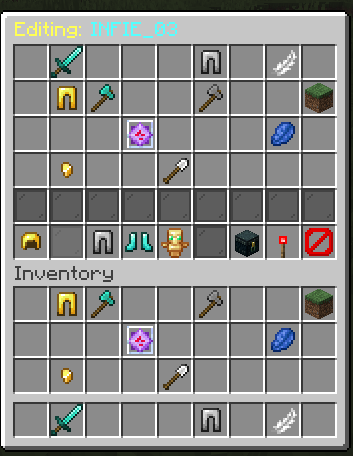 Main Inventory Player main inventory
 -
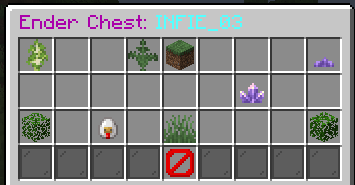 Ender chest Inventory Player ender chest inventory
 -
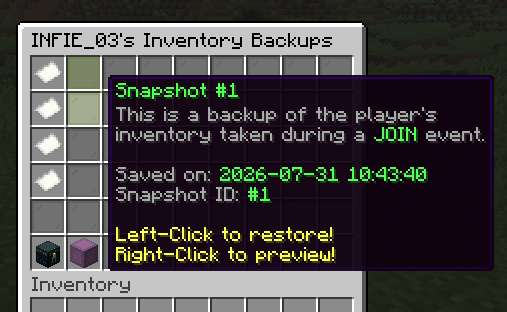 Player History Can recover Time / Death based player inventory
 -
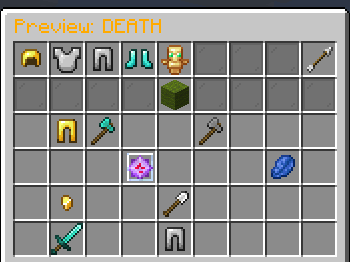 Inventory preview Display the player's stored inventory from the database
 -
 Search command Working Finds the item in the selected player's inventory and Ender Chest, and displays a detailed list.
 -
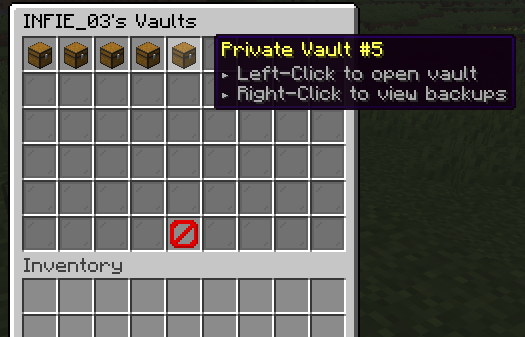 PriVault Integration – Manage Private Vaults with Backup History OpenInv integrates seamlessly with PriVault so that administrators can access players' private vaults directly through an intuitive graphical user interface.
 -
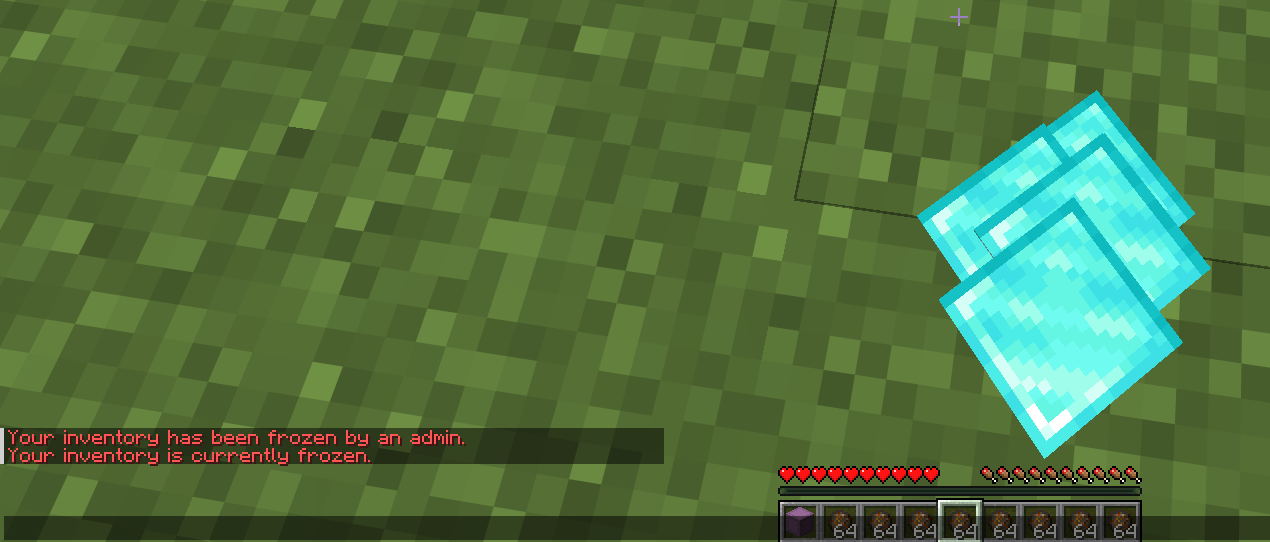 Inventory Freeze Lock down a player's inventory temporarily, and prevent them from moving, dropping, crafting or otherwise interacting with items. Ideal for staff investigations, events or administrative actions, with the player’s items kept totally safe.
 -
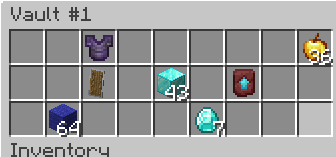 View Player Vaults Open any player’s PriVault to view its contents exactly as stored. Inventory checks, item browsing, and player vault edits can be done without the player being online.
Versions
Files
Relations
Project Relations
More like this
Similar Mods
Suggestions use data such as tags, dependencies, dependents, descriptions, titles, and more to rank how much they overlap with this mod.
On ModDex
Community snapshot
By the numbers
Statistics

Want to reach Minecraft players?
We're looking for a server hosting partner to feature here and other parts of the site. Interested? Send us a message!
Get in touchGet it on
Available Platforms
On ModDex
Community snapshot
By the numbers
Statistics
Resources