Community listing page, reviews here may not be monitored by the author.
OpenToPublic


No reviews yet
Allows you to open LAN world to WAN and set server settings
Community voices
Reviews
No reviews yet. Be the first to review this project!
Get it on
Available Platforms
Compatibility
Supported Environments
Required on the server. Installing it on the client adds functionality.
About
Project Details
For authors
Embed Badge
If you're the author of this project, you can embed a live badge anywhere that supports HTML or Markdown. It updates automatically whenever ratings change.
Use HTML for any page that supports it, or Markdown for README files and Markdown-based descriptions.
Identifiers
Platform IDs
About
Description
With this mod, you can make "Open to LAN" button open your world to outer network
Note: only host need mod to work
Features:
- Enable/Disable online mode
- Enable/Disable PVP
- You can set custom port
- Set server MOTD (Support colors)
- Set max player value
- Open to WAN button to open world to outer network (Requires opened port on router if set to Manual)
- Add additional ports to set when Open to WAN button set to UPnP using config file
- Option to hide IP addresses when opening to WAN (Streamer mode)
Menu showcase
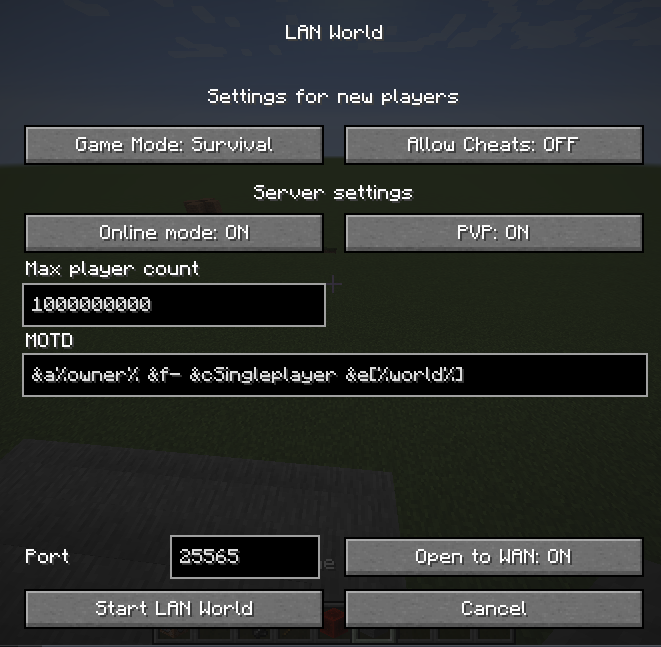
MOTD placeholders
- %owner% - server owner
- %world% - world name
Online Mode
If ON, then Minecraft will be check players for license, else players with cracked launchers can join
config.json explanation
See at end of README.md
With this mod, you can make "Open to LAN" button open your world to outer network
Note: only host need mod to work
Features
- Enable/Disable online mode
- Enable/Disable PVP
- Set custom port
- Set server MOTD (Support colors)
- Set max player value
- Open to WAN button to open world to outer network (Requires opened port on router if set to Manual)
- Add additional ports to set when Open to WAN button set to UPnP using config file
- Option to hide IP addresses when opening to WAN (Streamer mode)
Menu showcase
MOTD placeholders
%owner%- server owner%world%- world name
Online Mode
If ON, then Minecraft will be check players for license, else players with cracked launchers can join
config.json explanation
See at end of README.md
Screenshots
Gallery
-
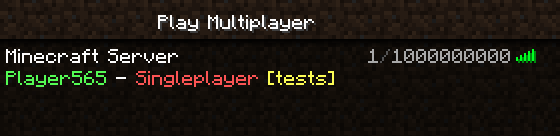 Singleplayer world that opened to LAN/WAN Custom MOTD and custom max player value set
 -
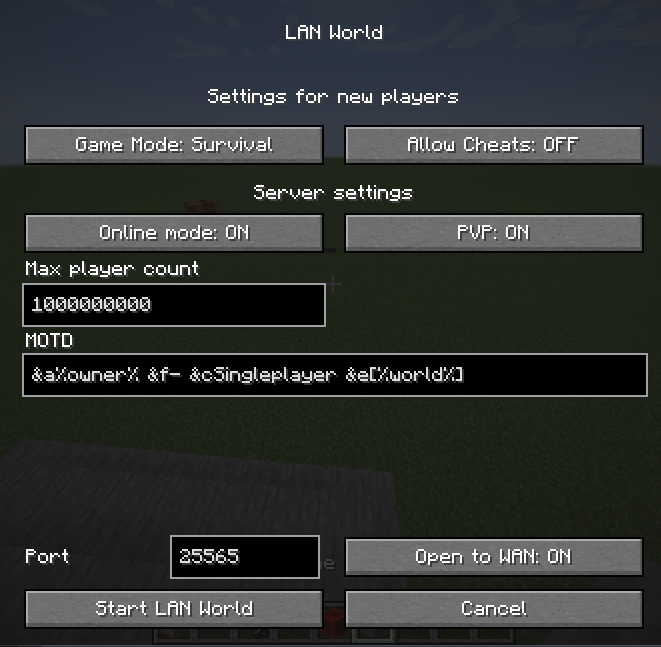 New Menu
-
New "Open to LAN" menu
-
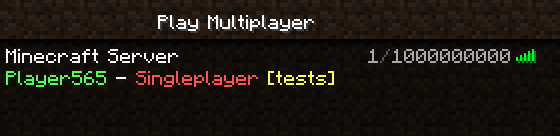 Singleplayer world that opened to LAN/WAN Custom MOTD, custom max player value set
Versions
Files
Relations
Project Relations
More like this
Similar Mods
Suggestions use data such as tags, dependencies, dependents, descriptions, titles, and more to rank how much they overlap with this mod.
On ModDex
Community snapshot
By the numbers
Statistics
Want to reach Minecraft players?
We're looking for a server hosting partner to feature here and other parts of the site. Interested? Send us a message!
Get in touchGet it on
Available Platforms
On ModDex
Community snapshot
By the numbers